


- Posts: 59
- Thank you received: 4
3 Post Moderation Rule for New Boarders (25 Jan 2021)
New boarders will have their posts moderated - Don't worry if you cannot see your post immediately.
Are FCP links to media really Aliases?
30 Jun 2012 12:27 #10675
by MattDavis
Are FCP links to media really Aliases? was created by MattDavis
Let's say you have an Event, and you import footage from a folder on a separate volume - unchecking the box 'Copy Files to Final Cut Events folder'.
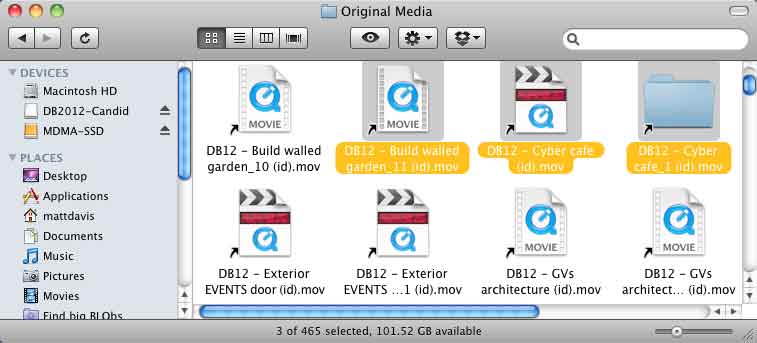
Your Original Media folder is now full of 'Alias' files - double-clicking them actually opens the original files. We know they aren't the REAL files because 1) they are mere bytes in size and 2) they have little bent arrows on them, the Mac convention for denoting these icons as Aliases.
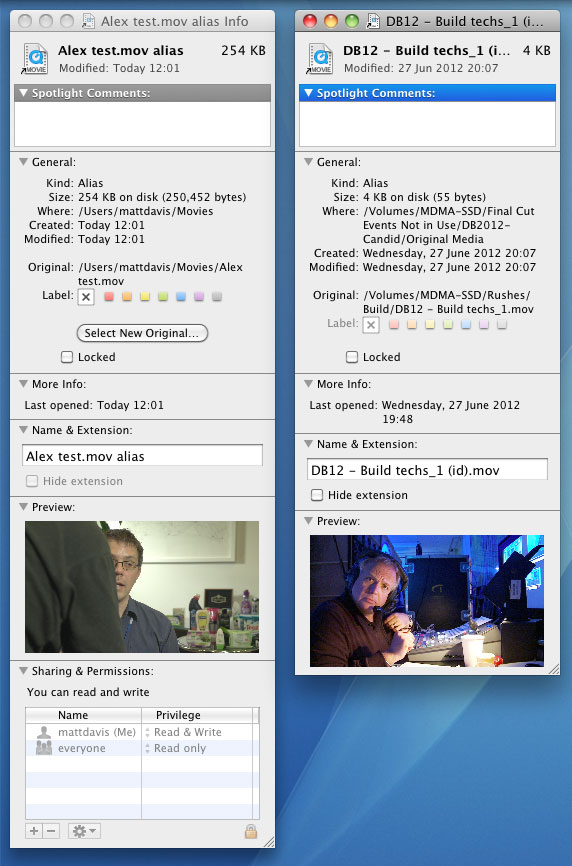
But ARE they traditional aliases? If I make an alias using the Finder's Cmd-L, then get info on it with Cmd-I, I have the option to click a button to 'Select New Orignal...' - but the alias made by FCP does NOT have this button, nor does it have the option to select a Finder colour.
My issue is that a project I was working on suddenly 'stopped working' because about 10-15% of the referenced files' links (these pesky faux aliases FCPX uses) decided that they would point to the folder they were enclosed in, rather than to the file they should be referencing. Painstakingly making 47 new aliases didn't work because they weren't real aliases. Other aliases looked fine (appearing to use FCP7 QT icons), but if opened would either need their Alias fixed (at which point they looked like ordinary QT aliases) or more often wouldn't open at all, resulting in a Mac OS error -43.
This meant that the project in its current (and backed up) state would not open.
So...
- Have you had this problem?
- Do you know what these files really are if they're not Aliases?
- Anyone know any fixes?
It's really put me off linking to external files, but it makes regular backups take so much longer. Any general concensus as to which method is 'canonical'?
Your Original Media folder is now full of 'Alias' files - double-clicking them actually opens the original files. We know they aren't the REAL files because 1) they are mere bytes in size and 2) they have little bent arrows on them, the Mac convention for denoting these icons as Aliases.
But ARE they traditional aliases? If I make an alias using the Finder's Cmd-L, then get info on it with Cmd-I, I have the option to click a button to 'Select New Orignal...' - but the alias made by FCP does NOT have this button, nor does it have the option to select a Finder colour.
My issue is that a project I was working on suddenly 'stopped working' because about 10-15% of the referenced files' links (these pesky faux aliases FCPX uses) decided that they would point to the folder they were enclosed in, rather than to the file they should be referencing. Painstakingly making 47 new aliases didn't work because they weren't real aliases. Other aliases looked fine (appearing to use FCP7 QT icons), but if opened would either need their Alias fixed (at which point they looked like ordinary QT aliases) or more often wouldn't open at all, resulting in a Mac OS error -43.
This meant that the project in its current (and backed up) state would not open.
So...
- Have you had this problem?
- Do you know what these files really are if they're not Aliases?
- Anyone know any fixes?
It's really put me off linking to external files, but it makes regular backups take so much longer. Any general concensus as to which method is 'canonical'?
Please Log in to join the conversation.

30 Jun 2012 15:45 #10683
by BenB
Replied by BenB on topic Re: Are FCP links to media really Aliases?
- No
- Apple calls them "Sims", they are "aliases" but handled differently. UNIX has built in the ability to do all sorts of alias links.
- Have you tried the Relink Media option in the Event Browser?
- Apple calls them "Sims", they are "aliases" but handled differently. UNIX has built in the ability to do all sorts of alias links.
- Have you tried the Relink Media option in the Event Browser?
Please Log in to join the conversation.
30 Jun 2012 16:24 #10686
by MattDavis
Replied by MattDavis on topic Re: Are FCP links to media really Aliases?
One can't use Re-link within FCP, as the event won't open - it won't open because it's trying to resolve all the Unix style Symbolic Links, and because they either point nowhere or to the folder that the Symbolic Links are pointing to, it gets into a loop.
Please Log in to join the conversation.
03 Jul 2012 14:45 #10841
by MattDavis
Replied by MattDavis on topic Re: Are FCP links to media really Aliases?
Hmmm. Just had another project go tits up - different disk, different drive technology, different project, but of course relying on Symbolic Links to the movie files.
Common thread:
- Events/Projects living on a SparseImage virtual disk with rushes stored on the same drive as the SparseImage.
I really don't think there's anything fundamentally wrong with that as it's been a great platform to work on - but in the last week, have had two major meltdowns. Time to do a complete teardown of the system folder and move onto Lion?
Common thread:
- Events/Projects living on a SparseImage virtual disk with rushes stored on the same drive as the SparseImage.
I really don't think there's anything fundamentally wrong with that as it's been a great platform to work on - but in the last week, have had two major meltdowns. Time to do a complete teardown of the system folder and move onto Lion?
Please Log in to join the conversation.
03 Jul 2012 15:17 #10845
by BenB
Replied by BenB on topic Re: Are FCP links to media really Aliases?
No need to tear down anything. Just upgrade to OS X 7.
Why don't you just import your originals into the FCPX Events? Then you can use FCPX's metadata platform as a cataloging system, also.
Why don't you just import your originals into the FCPX Events? Then you can use FCPX's metadata platform as a cataloging system, also.
Please Log in to join the conversation.
03 Jul 2012 15:26 #10847
by MattDavis
Replied by MattDavis on topic Re: Are FCP links to media really Aliases?
I like to back up the entire project every so often, and if the media is stored 'outside' the process is very quick and efficient - I'm only backing up the changed data, not ALL the rushes, and in this way I don't have to pull off drives. If I didn't use SparseImages, FCPX gets confused with having a duplicate of a project on the system and won't play until one of the duplicates is actually physically removed.
So, to do a quick backup, quit FCPX, drag the SparseImage image to another drive, and within seconds it's done. Relaunch FCPX and you're away.
Also, when sharing projects out, handy to have one central Rushes folder that's common to all editors.
But if the SymLink is futzy, and there's a better way of backing up...
So, to do a quick backup, quit FCPX, drag the SparseImage image to another drive, and within seconds it's done. Relaunch FCPX and you're away.
Also, when sharing projects out, handy to have one central Rushes folder that's common to all editors.
But if the SymLink is futzy, and there's a better way of backing up...
Please Log in to join the conversation.
03 Jul 2012 15:40 #10848
by BenB
Replied by BenB on topic Re: Are FCP links to media really Aliases?
Or use Carbon Copy Cloner to backup to a "Backup Folder" on your other drive. Set it to backup only changed files. If the FCP Event and FCP Project folders are not at the root level of a drive, FCP won't see it.
When sharing a Project with another user, you need to put it on a portable drive. Just use the Duplicate function for your Projects.
You say one central folders for all editors to access. Does that mean you're moving things over a network? I'm not really clear as to what is where.
But if DMG's work, that's fine.
When sharing a Project with another user, you need to put it on a portable drive. Just use the Duplicate function for your Projects.
You say one central folders for all editors to access. Does that mean you're moving things over a network? I'm not really clear as to what is where.
But if DMG's work, that's fine.
Please Log in to join the conversation.
