


- Posts: 379
- Thank you received: 6
3 Post Moderation Rule for New Boarders (25 Jan 2021)
New boarders will have their posts moderated - Don't worry if you cannot see your post immediately.
Compound clip frame rate
- Marc Lucas
-
 Topic Author
- Offline
- Platinum Member
-

Less
More
20 Jun 2012 03:34 #10030
by Marc Lucas
Compound clip frame rate was created by Marc Lucas
1280 x 720 Timeline, all footage 25 fps. The last Compound Clip I have made has 60 fps I have checked the other Compound Clips in the project they are all showing 25 fps. The first clip in the Compound Clip was 25 fps. All I have done different in this CC was to using the speed functions a little on some slow mo shots etc would that trick FCPX into thinking that the frame rate should be different. BTW when playing the timeline all seems fine.
Please Log in to join the conversation.


20 Jun 2012 03:56 - 20 Jun 2012 03:56 #10032
by BenB
Replied by BenB on topic Re: Compound clip frame rate
You do know that you can change that, right? In the Inspector, in the Properties tab for a Project, the wrench menu at the bottom right (whatever that menu button is called, I've no idea).
But no, I don't see any way retiming a clip in a timeline would have any effect on it's settings. Never heard of that before.
But no, I don't see any way retiming a clip in a timeline would have any effect on it's settings. Never heard of that before.
Last edit: 20 Jun 2012 03:56 by BenB.
Please Log in to join the conversation.
- Marc Lucas
-
Topic Author
- Offline
- Platinum Member
-
Less
More
- Posts: 379
- Thank you received: 6
20 Jun 2012 04:47 #10033
by Marc Lucas
Replied by Marc Lucas on topic Re: Compound clip frame rate
Just looked and the only option is 60p I had a look in the other CC and their only option was 25p which was correct for them.
Please Log in to join the conversation.
- Tom Wolsky
-

- Offline
- Moderator
-

20 Jun 2012 04:51 #10034
by Tom Wolsky
Replied by Tom Wolsky on topic Re: Compound clip frame rate
What's the last compound clip made up off, still images, a Photoshop layered document?
Please Log in to join the conversation.
- Marc Lucas
-
Topic Author
- Offline
- Platinum Member
-
Less
More
- Posts: 379
- Thank you received: 6
20 Jun 2012 04:59 #10035
by Marc Lucas
Replied by Marc Lucas on topic Re: Compound clip frame rate
Same as the other CC's 720p footage and an audio file 48kHz
The only thing that I did different with this one was to create it in the Event (after a previous post a couple of days ago) but that shouldn't have an affect because the Event settings are 720p 25 fps
The only thing that I did different with this one was to create it in the Event (after a previous post a couple of days ago) but that shouldn't have an affect because the Event settings are 720p 25 fps
Please Log in to join the conversation.
20 Jun 2012 05:03 - 20 Jun 2012 05:06 #10036
by BenB
Replied by BenB on topic Re: Compound clip frame rate
"Events" don't have those settings. You mean the clips in the Event?
I'm trying to duplicate this, and I can't. My CC's are whatever I make them originally, or whatever the first clip is I drop in.
If the first thing I drop in is not a video clip, it prompts me to select a format manually.
I'm trying to duplicate this, and I can't. My CC's are whatever I make them originally, or whatever the first clip is I drop in.
If the first thing I drop in is not a video clip, it prompts me to select a format manually.
Last edit: 20 Jun 2012 05:06 by BenB.
Please Log in to join the conversation.
- Marc Lucas
-
Topic Author
- Offline
- Platinum Member
-
Less
More
- Posts: 379
- Thank you received: 6
20 Jun 2012 06:31 #10037
by Marc Lucas
Replied by Marc Lucas on topic Re: Compound clip frame rate
I meant the Project settings were at 720p
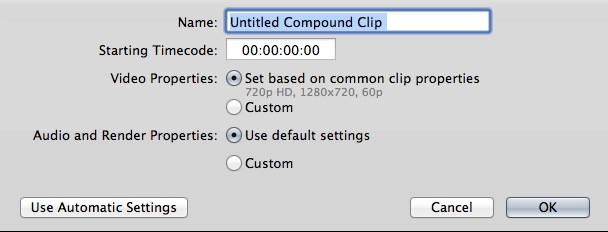
So I'm on a different Mac now and just opened FCPX and the only project I have on this is another 720p project. The Project settings are 1280x720 25 fps, however I imported a fresh .wav file just to test things because I haven't got any other audio in the project yet. I imported into the Browser and selected it. Then I went to the file menu and selected new CC and this came up (see attached file)
The video properties are 1280x720 60p which is not correct.
So I'm on a different Mac now and just opened FCPX and the only project I have on this is another 720p project. The Project settings are 1280x720 25 fps, however I imported a fresh .wav file just to test things because I haven't got any other audio in the project yet. I imported into the Browser and selected it. Then I went to the file menu and selected new CC and this came up (see attached file)
The video properties are 1280x720 60p which is not correct.
Please Log in to join the conversation.
20 Jun 2012 06:49 #10038
by BenB
Replied by BenB on topic Re: Compound clip frame rate
If the first thing you drop into a CC or Project is not a "video" clip, it prompts you to select a format manually.
Please Log in to join the conversation.
- Tom Wolsky
-
- Offline
- Moderator
-
20 Jun 2012 06:55 #10039
by Tom Wolsky
Replied by Tom Wolsky on topic Re: Compound clip frame rate
If you have set properties on first clip and put in a audio, which has no frame rate, the project will be set to 60fps. If you have set properties on first clip you MUST put in a video clip first to set the parameters. Even if you're not going to use the clip. Or you set specific project parameters when you create the project.
Please Log in to join the conversation.
20 Jun 2012 10:10 #10043
by BenB
Replied by BenB on topic Re: Compound clip frame rate
I just tested this on both a CC and Project. If I create a new one, and set it to adjust to the first clip, then the first clip is audio, photo, graphic, anything that's not a "video" clip, FCP X will prompt me to manually select a setting. It does NOT automatically set to 60fps, on my system.
Please Log in to join the conversation.
- Marc Lucas
-
Topic Author
- Offline
- Platinum Member
-
Less
More
- Posts: 379
- Thank you received: 6
20 Jun 2012 14:33 #10048
by Marc Lucas
Replied by Marc Lucas on topic Re: Compound clip frame rate
So why would it default to 60 fps even though your project is 25p or something different. I only noticed this after I created the CC but after going through the process even after putting in an audio file you can still choose 25p from the custom settings. I think this 60p default is a little strange.
Please Log in to join the conversation.
- Tom Wolsky
-
- Offline
- Moderator
-
20 Jun 2012 15:07 #10049
by Tom Wolsky
Replied by Tom Wolsky on topic Re: Compound clip frame rate
The only things that produce 60fps frame rates are still images, JPEGs, PNGs, layered Photoshop files are all 60fps by default.
Please Log in to join the conversation.
- Marc Lucas
-
Topic Author
- Offline
- Platinum Member
-
Less
More
- Posts: 379
- Thank you received: 6
20 Jun 2012 15:16 #10051
by Marc Lucas
Replied by Marc Lucas on topic Re: Compound clip frame rate
My audio file did:-)
I haven't got any stills or graphics in the whole Event
I haven't got any stills or graphics in the whole Event
Please Log in to join the conversation.

21 Jun 2012 07:13 #10105
by marchyman
Because you're working in an event. Events are in not tied to a specific project*. The fact that you happen to have a particular project open is irrelevant. The media in the event nay be used in multiple projects and different media in the event can have different formats. I don't know why FCPX picked 720p60 for the compound clip. It's an arbitrary selection and is no more or less correct than any other value it could have picked. As you noted you can override the selection if you don't like it.
*A project has a default event so when you drag something from the finder to the project timeline FCPX knows which event to add the media. That doesn't in any way tie the event to the project.
Replied by marchyman on topic Re: Compound clip frame rate
Marc Lucas wrote: So why would it default to 60 fps even though your project is 25p or something different.
Because you're working in an event. Events are in not tied to a specific project*. The fact that you happen to have a particular project open is irrelevant. The media in the event nay be used in multiple projects and different media in the event can have different formats. I don't know why FCPX picked 720p60 for the compound clip. It's an arbitrary selection and is no more or less correct than any other value it could have picked. As you noted you can override the selection if you don't like it.
*A project has a default event so when you drag something from the finder to the project timeline FCPX knows which event to add the media. That doesn't in any way tie the event to the project.
Please Log in to join the conversation.
21 Jun 2012 07:42 - 21 Jun 2012 07:43 #10107
by BenB
Replied by BenB on topic Re: Compound clip frame rate
OK guys, something isn't right here.
I just created a new, empty Event.
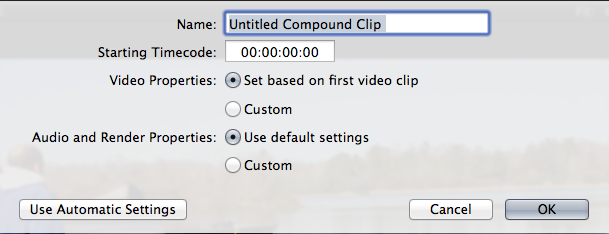
Then I created in it a new, empty Compound Clip in it's Browser, left it set to adjust to the first clip automatically, and it defaulted to NTSC 1080p before I did anything.
I dropped in a photograph, and it PROMPTS me to manually set it's specifics. And it's defaulting to 1920x1080 23.98p in that settings window.
So I'm not sure where this 720p60 automatic stuff is coming from. Where do you guys see that at?
I just created a new, empty Event.
Then I created in it a new, empty Compound Clip in it's Browser, left it set to adjust to the first clip automatically, and it defaulted to NTSC 1080p before I did anything.
I dropped in a photograph, and it PROMPTS me to manually set it's specifics. And it's defaulting to 1920x1080 23.98p in that settings window.
So I'm not sure where this 720p60 automatic stuff is coming from. Where do you guys see that at?
Last edit: 21 Jun 2012 07:43 by BenB.
Please Log in to join the conversation.
- Marc Lucas
-
Topic Author
- Offline
- Platinum Member
-
Less
More
- Posts: 379
- Thank you received: 6
21 Jun 2012 14:31 #10126
by Marc Lucas
See attached image Ben
Replied by Marc Lucas on topic Re: Compound clip frame rate
BenB wrote: OK guys, something isn't right here.
I just created a new, empty Event.
Then I created in it a new, empty Compound Clip in it's Browser, left it set to adjust to the first clip automatically, and it defaulted to NTSC 1080p before I did anything.
I dropped in a photograph, and it PROMPTS me to manually set it's specifics. And it's defaulting to 1920x1080 23.98p in that settings window.
So I'm not sure where this 720p60 automatic stuff is coming from. Where do you guys see that at?
See attached image Ben
Please Log in to join the conversation.
21 Jun 2012 15:08 - 21 Jun 2012 15:14 #10128
by BenB
Replied by BenB on topic Re: Compound clip frame rate
AAAhhh...
You're creating a Compound Clip from an asset in the Browser!
Create a CC in the Browser that is empty. Highlight the Event in the Library and create a CC, or deselect everything in the Browser (Shift-Cmd-A), THEN make a CC.
Try that and see what happens.
OR select "Custom" and specify what you want to start with.
Don't know if that would help or not.
You're creating a Compound Clip from an asset in the Browser!
Create a CC in the Browser that is empty. Highlight the Event in the Library and create a CC, or deselect everything in the Browser (Shift-Cmd-A), THEN make a CC.
Try that and see what happens.
OR select "Custom" and specify what you want to start with.
Don't know if that would help or not.
Last edit: 21 Jun 2012 15:14 by BenB.
Please Log in to join the conversation.
