


- Posts: 407
- Thank you received: 16
3 Post Moderation Rule for New Boarders (25 Jan 2021)
New boarders will have their posts moderated - Don't worry if you cannot see your post immediately.
USB-C Hub
09 Nov 2020 18:24 #110760
by Albo
Hi,
Will a USB-C Hub (wih only the USB-C to supply power will slow down much. Laptop will be on external power.
Won't be used for editing but mosthy viewing two monitors and using ethernet for the web.
Input USB 2 or 3
HDMI
VGA
Ethernet
Any Hub suggestions?
Thanks
Will a USB-C Hub (wih only the USB-C to supply power will slow down much. Laptop will be on external power.
Won't be used for editing but mosthy viewing two monitors and using ethernet for the web.
Input USB 2 or 3
HDMI
VGA
Ethernet
Any Hub suggestions?
Thanks
Please Log in to join the conversation.


10 Nov 2020 12:09 #110773
by joema
FCPX.guru is correct, normally it won't affect speed. However some USB-C SSD drives are *extremely* sensitive to cable type and if using a 3rd-party cable will often degrade to USB 2.0 rates. The OEM cables are typically short and thick. This same issue might happen on certain hubs. Always check the transfer rate of a USB-C or even a USB 3.0 SSD drive plugged directly into the Mac with Blackmagic, remember that number, then test it again if using a hub or another cable.
USB hubs (inc'l USB-C) can be power limited, an in some cases multiple SSDs plugged in will exceed the power limit and the drive will shut down or behave unpredictably. This is more common with spinning drives but can even happen with some SSD drives. There are various "power delivery" protocols whereby the device can request additional power from the port, but there is no single standard and Apple has their own proprietary power deliver protocols.
It's more reliable to use ports on the Mac, but with a laptop that may not be possible. That is why the iMac Pro is so nice -- it has four USB-C/Thunderbolt 3 ports plus 4 USB-A ports.
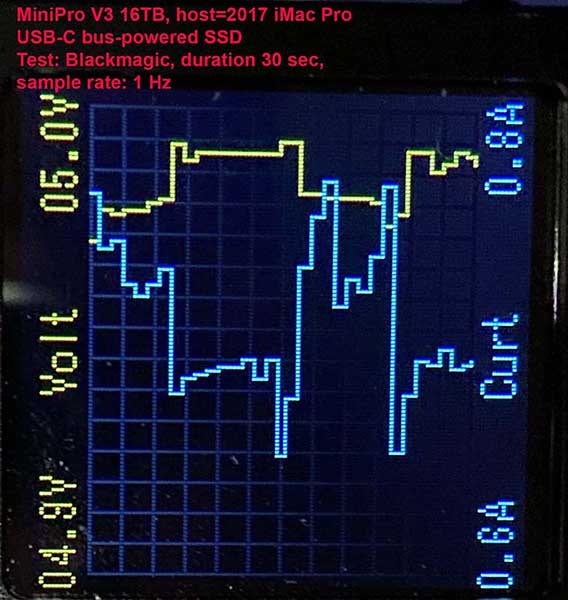
Attached is some instrumented testing I did of a USB-C enclosure with two 8TB SATA SSDs. It worked OK when under load and all adjacent ports were also loaded by other SSD devices. I tested this on a 2017 iMac Pro, 2017 i7 iMac 27 and 2019 MacBook Pro 16. This is the enclosure under test: oyendigital.com/hard-drives/store/CB3R3.html
Albo wrote: ...Will a USB-C Hub (wih only the USB-C to supply power will slow down much. Laptop will be on external power....Won't be used for editing but mosthy viewing two monitors and using ethernet for the web...
FCPX.guru is correct, normally it won't affect speed. However some USB-C SSD drives are *extremely* sensitive to cable type and if using a 3rd-party cable will often degrade to USB 2.0 rates. The OEM cables are typically short and thick. This same issue might happen on certain hubs. Always check the transfer rate of a USB-C or even a USB 3.0 SSD drive plugged directly into the Mac with Blackmagic, remember that number, then test it again if using a hub or another cable.
USB hubs (inc'l USB-C) can be power limited, an in some cases multiple SSDs plugged in will exceed the power limit and the drive will shut down or behave unpredictably. This is more common with spinning drives but can even happen with some SSD drives. There are various "power delivery" protocols whereby the device can request additional power from the port, but there is no single standard and Apple has their own proprietary power deliver protocols.
It's more reliable to use ports on the Mac, but with a laptop that may not be possible. That is why the iMac Pro is so nice -- it has four USB-C/Thunderbolt 3 ports plus 4 USB-A ports.
Attached is some instrumented testing I did of a USB-C enclosure with two 8TB SATA SSDs. It worked OK when under load and all adjacent ports were also loaded by other SSD devices. I tested this on a 2017 iMac Pro, 2017 i7 iMac 27 and 2019 MacBook Pro 16. This is the enclosure under test: oyendigital.com/hard-drives/store/CB3R3.html
Please Log in to join the conversation.

11 Nov 2020 02:20 #110782
by dgwvideo
Creating history....one edit at a time !
@Joema .... I don't mean to steal Albo's thread, but looks like you answered his question. On a somewhat similar note can you recommend a USB-C to E-Sata cable that works reliably? We have many OWC spinning raid drives we want to connect to latest iMac Pro via sata. I see that StarTek makes one but wondering if it's reliable.
Secondly, there seem to be many adapters that can connect USB-C to the older 27" LED Cinema Displays (the ones with the hardwired 3 wire cables - mini display port, usb and mag safe.) Do you have a recommendation on the best USB-C to female mini display port that would connect these monitors.
Much appreciated for any help.
Secondly, there seem to be many adapters that can connect USB-C to the older 27" LED Cinema Displays (the ones with the hardwired 3 wire cables - mini display port, usb and mag safe.) Do you have a recommendation on the best USB-C to female mini display port that would connect these monitors.
Much appreciated for any help.
Creating history....one edit at a time !
Please Log in to join the conversation.
11 Nov 2020 13:04 #110787
by joema
I have a couple of the StarTek USB-C to SATA cables and they seem to work OK, however most of my experience is using SATA SSDs not spinning SATA drives: www.amazon.com/dp/B0133F30R8/
We also have several of these Atomos USB-C/SATA "docking stations", which are really just like the StarTek but with a flat guide. We use them for AtomX SATA SSDs, but those SSDs also work with the StarTek cable: www.amazon.com/dp/B07J34K4G6/
AtomX SSDs: www.amazon.com/dp/B07JHVTS4Z/
For various "bare" rotating SATA hard drives, I have a couple of OWC Thunderbolt 2-bay docks. The only problem is some hard drives get hot under sustained use and require cooling, so I have a USB fan I blow on them. It is a messy solution and I only use that for infrequently-needed archival material.
www.owcdigital.com/products/drive-dock-thunderbolt-2
OWC makes a USB-C version of that dock: www.owcdigital.com/products/drive-dock-usb-c
Sorry, I'm not familiar with USB-C to 27" LED Cinema Display cables.
dgwvideo wrote: ...can you recommend a USB-C to E-Sata cable that works reliably? We have many OWC spinning raid drives we want to connect to latest iMac Pro via sata. I see that StarTek makes one but wondering if it's reliable...
I have a couple of the StarTek USB-C to SATA cables and they seem to work OK, however most of my experience is using SATA SSDs not spinning SATA drives: www.amazon.com/dp/B0133F30R8/
We also have several of these Atomos USB-C/SATA "docking stations", which are really just like the StarTek but with a flat guide. We use them for AtomX SATA SSDs, but those SSDs also work with the StarTek cable: www.amazon.com/dp/B07J34K4G6/
AtomX SSDs: www.amazon.com/dp/B07JHVTS4Z/
For various "bare" rotating SATA hard drives, I have a couple of OWC Thunderbolt 2-bay docks. The only problem is some hard drives get hot under sustained use and require cooling, so I have a USB fan I blow on them. It is a messy solution and I only use that for infrequently-needed archival material.
www.owcdigital.com/products/drive-dock-thunderbolt-2
OWC makes a USB-C version of that dock: www.owcdigital.com/products/drive-dock-usb-c
Sorry, I'm not familiar with USB-C to 27" LED Cinema Display cables.
Please Log in to join the conversation.
11 Nov 2020 14:51 #110792
by dgwvideo
Creating history....one edit at a time !
Thanks so much for the reply. I was actually referring to these types of e-sata cables:
www.amazon.com/StarTech-com-USB-eSATA-Ca...d=1605105855&sr=8-16
As for the mini displayport, I've found a few of this style:
www.amazon.com/Displayport-Adapter-Answi...id=1605106078&sr=8-3
I guess I'll try a few to see which ones work without any display issues. I have heard certain adapters cause the top few lines of the display to be cut off.
Thanks again.
As for the mini displayport, I've found a few of this style:
www.amazon.com/Displayport-Adapter-Answi...id=1605106078&sr=8-3
I guess I'll try a few to see which ones work without any display issues. I have heard certain adapters cause the top few lines of the display to be cut off.
Thanks again.
Creating history....one edit at a time !
Please Log in to join the conversation.
11 Nov 2020 15:28 #110793
by joema
That was my misunderstanding, of course eSATA means that cable type. It's funny you mention that because I actually have several old eSATA external drives, some of which have eSATA + USB 2.0, and some eSATA + USB 3.0. The material on those is very old and unlikely to be needed. However once or twice I just did an overnight USB 2.0 transfer to a newer USB 3 or Thunderbolt drive, then discarded the old 5.25" drive. I think in one case I removed the bare 5.25" drive and used it in my Thunderbolt SATA dock.
There is archival risk just having that material sitting on such old drives in a cabinet. If it was valuable enough and I had time I'd transfer it all to newer storage. In my case the value+potential utility of that material is just barely above "discard with no backup" threshold, thus the current situation.
dgwvideo wrote: Thanks so much for the reply. I was actually referring to these types of e-sata cables: www.amazon.com/StarTech-com-USB-eSATA-Ca...d=1605105855&sr=8-16 ...
That was my misunderstanding, of course eSATA means that cable type. It's funny you mention that because I actually have several old eSATA external drives, some of which have eSATA + USB 2.0, and some eSATA + USB 3.0. The material on those is very old and unlikely to be needed. However once or twice I just did an overnight USB 2.0 transfer to a newer USB 3 or Thunderbolt drive, then discarded the old 5.25" drive. I think in one case I removed the bare 5.25" drive and used it in my Thunderbolt SATA dock.
There is archival risk just having that material sitting on such old drives in a cabinet. If it was valuable enough and I had time I'd transfer it all to newer storage. In my case the value+potential utility of that material is just barely above "discard with no backup" threshold, thus the current situation.
Please Log in to join the conversation.
11 Nov 2020 15:45 #110795
by dgwvideo
Creating history....one edit at a time !
After researching this a bit more, that cable will only connect to a single individual drive. It does not have multiplier support for a raid enclosure. BUT...it appears that the OWC Thunderbolt 3 Pro Dock does have an e-sata port with multiplier support to connect directly to OWC raid enclosures such as Mercury Elite Pro (which we have 5 or 6 of). The mini display port adapters should work to go directly from the iMac Pro TB3 ports to the older displays (at least many reviews indicate they are working - so we'll see).
And I agree, most of the footage on the raids is older stuff we seldom access, but at least the dock gives us an opportunity to access and move/store any footage we might need.
And I agree, most of the footage on the raids is older stuff we seldom access, but at least the dock gives us an opportunity to access and move/store any footage we might need.
Creating history....one edit at a time !
Please Log in to join the conversation.
