


- Posts: 6
- Thank you received: 0
3 Post Moderation Rule for New Boarders (25 Jan 2021)
New boarders will have their posts moderated - Don't worry if you cannot see your post immediately.
What app or plugin are they using?
- HeyChristian
-
 Topic Author
- Offline
- New Member
-

Less
More
26 Feb 2017 22:23 #86137
by HeyChristian
What app or plugin are they using? was created by HeyChristian
i'm trying to recreate something similar to this but I can't find the app they use. I noticed the synched mouth movement and eyes - is this done through an app?
here's a few examples:
Thanks.
here's a few examples:
Thanks.
Please Log in to join the conversation.
- Karsten Schlüter
-

- Offline
- Moderator
-

Less
More
- Posts: 3790
- Thank you received: 718
27 Feb 2017 06:34 #86141
by Karsten Schlüter
Replied by Karsten Schlüter on topic What app or plugin are they using?
you can accomplish that quiet easy in Motion:
you need two layers, one for the head, one for the mouth (demands some cut&draw prep in Photoshop, Pixelmator etc)
then apply an Audio-Behaviour to the Y-axis of the Mouth-piece, have a look:
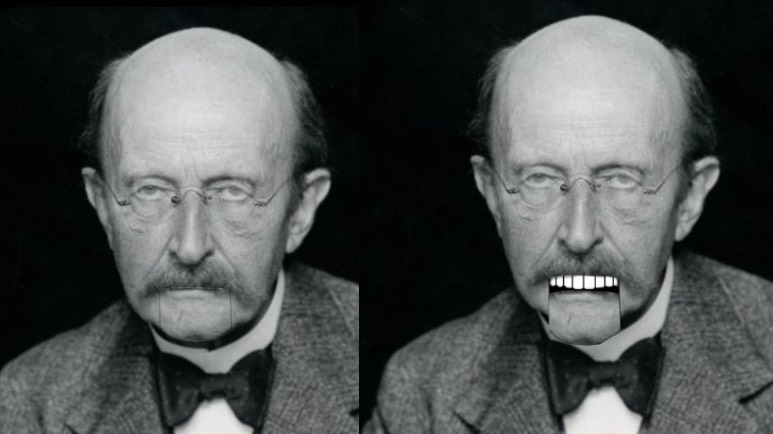
… that charming fellow is our schools name-patron, Max Planck.
see the Mouth-piece? And, more obvious the teeth and the black... I call that Python-izing, cause Terry Gilliam from Monty Pythons used this in extenso)
… unfortunately, I can not make it a universal-plugin, cause Audio-parameters can not been published (Top3 on my Wishlist, are you listening, Cupertino??!)
Discussed that with another unpublished plugin of mine
www.fcp.co/fcp-forum/6-motion-5/25786-yo...ublish-an-audio-well
you need two layers, one for the head, one for the mouth (demands some cut&draw prep in Photoshop, Pixelmator etc)
then apply an Audio-Behaviour to the Y-axis of the Mouth-piece, have a look:
… that charming fellow is our schools name-patron, Max Planck.
see the Mouth-piece? And, more obvious the teeth and the black... I call that Python-izing, cause Terry Gilliam from Monty Pythons used this in extenso)
… unfortunately, I can not make it a universal-plugin, cause Audio-parameters can not been published (Top3 on my Wishlist, are you listening, Cupertino??!)
Discussed that with another unpublished plugin of mine
www.fcp.co/fcp-forum/6-motion-5/25786-yo...ublish-an-audio-well
Please Log in to join the conversation.

27 Feb 2017 19:17 #86163
by VidGreg
Replied by VidGreg on topic What app or plugin are they using?
Hey Hey
I would recommend you go check out apps by Reallusion like Crazy Talk. Simple and fast; creates files that can be imported into FCPX or stand alone.
www.reallusion.com
Hope this helps, Greg
I would recommend you go check out apps by Reallusion like Crazy Talk. Simple and fast; creates files that can be imported into FCPX or stand alone.
www.reallusion.com
Hope this helps, Greg
Please Log in to join the conversation.
