


- Posts: 3790
- Thank you received: 718
3 Post Moderation Rule for New Boarders (25 Jan 2021)
New boarders will have their posts moderated - Don't worry if you cannot see your post immediately.
How to connect Android with iOS? Looking for prompter rsoftware ecommendations
- Karsten Schlüter
-
 Topic Author
- Offline
- Moderator
-

Less
More
09 Aug 2015 07:26 - 09 Aug 2015 07:29 #67217
by Karsten Schlüter
How to connect Android with iOS? Looking for prompter rsoftware ecommendations was created by Karsten Schlüter
'Cause my Lumix fz1000 allows remote-control via iPad, I bought one of these ...
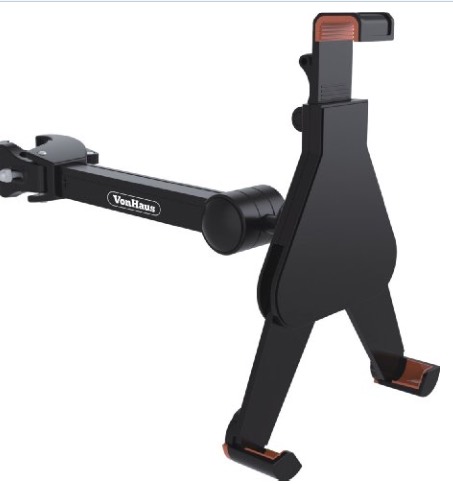
.... to attach my iPad to the tripod.
Now, for some school project, we thought of utilizing a prompter, to assist our actor-wannabees thru larger amounts of text.
So, I turned my iPad on the tripod to point to actor, like this:
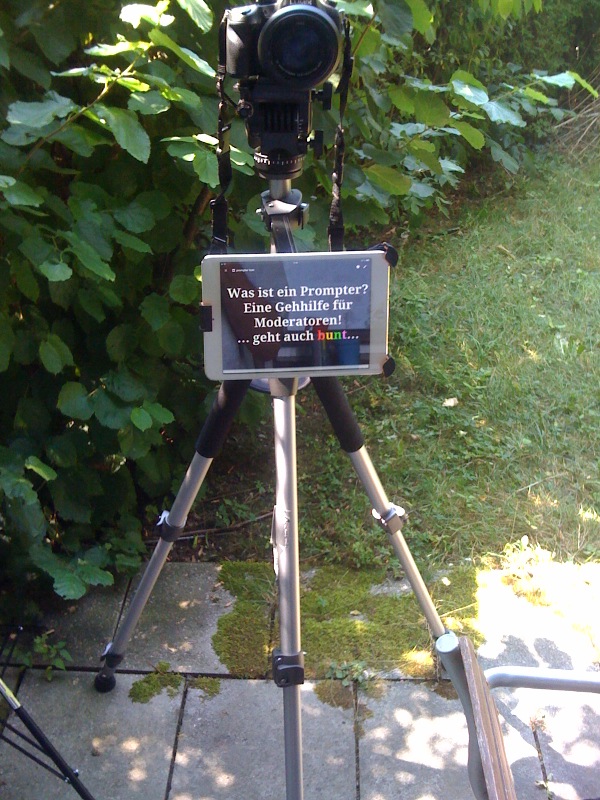
To 'scroll' thru longer texts, I'm using some BluTooth keyboard (<10$) .... flipping thru Keynote charts.
BUT...!
Now the inspired lil' authors/directtors ask for the option 'beaming live' copy to iPod from their Android devices.
Asde the option to take a detour via eMail - are there any software to jump the OS' gap via BluTooth, WLAN?
As usual with all my school-projects, budget is zero :lol: OK, close to zero ....
Or any other solutions for a DIY prompter? yep, I've seen some YTvids "for under 45$", using iPods, Liliputs, picture frames etc ... Looks all a bit too wobbly, I'm still preferring my hardware ... And, yes, we should invest 5$ into some anti-glare foil ... :lol:
... recommendations? Suggestions?
// on second read, has little to do with FCPX... push it where it belongs, sorry! //
.... to attach my iPad to the tripod.
Now, for some school project, we thought of utilizing a prompter, to assist our actor-wannabees thru larger amounts of text.
So, I turned my iPad on the tripod to point to actor, like this:
To 'scroll' thru longer texts, I'm using some BluTooth keyboard (<10$) .... flipping thru Keynote charts.
BUT...!
Now the inspired lil' authors/directtors ask for the option 'beaming live' copy to iPod from their Android devices.
Asde the option to take a detour via eMail - are there any software to jump the OS' gap via BluTooth, WLAN?
As usual with all my school-projects, budget is zero :lol: OK, close to zero ....
Or any other solutions for a DIY prompter? yep, I've seen some YTvids "for under 45$", using iPods, Liliputs, picture frames etc ... Looks all a bit too wobbly, I'm still preferring my hardware ... And, yes, we should invest 5$ into some anti-glare foil ... :lol:
... recommendations? Suggestions?
// on second read, has little to do with FCPX... push it where it belongs, sorry! //
Last edit: 09 Aug 2015 07:29 by Karsten Schlüter.
Please Log in to join the conversation.


09 Aug 2015 15:59 #67218
by BenB
Replied by BenB on topic How to connect Android with iOS? Looking for prompter rsoftware ecommendations
Look at "Pro Prompter" which is what we've used for years now, and love it. As for Android, well, no clue there...
Please Log in to join the conversation.


09 Aug 2015 19:48 #67222
by dgwvideo
Creating history....one edit at a time !
Replied by dgwvideo on topic How to connect Android with iOS? Looking for prompter rsoftware ecommendations
Karsten,
A quick google search for "prompter for android" reveals a few choices, free and paid versions. A point to make with the setup shown in your picture - if you can position your iPad up higher, (top of iPad just beneath the lens) you will get better results from talent appearance on screen. At the large distance currently shown, it will be quite obvious a speaker is looking away from the camera lens down to the prompter. You may not be able to raise the iPad higher if the camera has any front end sensors that may be blocked by doing so, but if it doesn't, closer to the lens is better. Just a suggestion. Also, even with a prompter close to the lens I would recommend keeping talent at least 10 feet from camera when reading text. This will help make the eye contact on the iPad a bit less obvious. Final point - the setup you have there makes a great off camera prompter (where you are filming someone at a 20 or 30 degree angle as they speak to someone else).
A quick google search for "prompter for android" reveals a few choices, free and paid versions. A point to make with the setup shown in your picture - if you can position your iPad up higher, (top of iPad just beneath the lens) you will get better results from talent appearance on screen. At the large distance currently shown, it will be quite obvious a speaker is looking away from the camera lens down to the prompter. You may not be able to raise the iPad higher if the camera has any front end sensors that may be blocked by doing so, but if it doesn't, closer to the lens is better. Just a suggestion. Also, even with a prompter close to the lens I would recommend keeping talent at least 10 feet from camera when reading text. This will help make the eye contact on the iPad a bit less obvious. Final point - the setup you have there makes a great off camera prompter (where you are filming someone at a 20 or 30 degree angle as they speak to someone else).
Creating history....one edit at a time !
Please Log in to join the conversation.
- Karsten Schlüter
-
Topic Author
- Offline
- Moderator
-
Less
More
- Posts: 3790
- Thank you received: 718
10 Aug 2015 08:34 #67231
by Karsten Schlüter
Replied by Karsten Schlüter on topic How to connect Android with iOS? Looking for prompter rsoftware ecommendations
Thanks Ben for recommendation ... have been on their website before, ... promising! Afaiu, you use one iPad to 'feed' the other? Unfortunatly, the kids in my project are on Android - that's why I'm looking for some sort of 'trans platform' solution... and I have no idea about Android apps, too :woohoo:
Thanks dwg for sharing your knowledge & experience.
yeah that naughty 'gazing' prob.
a) the/my subjects totally lose their spontanity, sticking to text on display ... we consider to show just keywords ...
b) eye direction .. we have to perform a few more tests
No, our hosts should look straight into camera - maybe I should pickup saw and screwdriver to
tinker a 'real' prompter (glas 45°, black hood etc) ... I'm afraid, could get shakey, with all the additional, heavy wood-work ... plastic? foam board??
anyhow: no solution for 'live texting' yet, and the actual iPod thingie needs adjustment ... will test it, before wie get 'hot' ...
got an idea from a friend, using iCloud/Keynote: afaik, you can use iCloud Apps (as Keynote) via Windows! (is it so?) So, perhaps we can use some schools laptop to feed my iPad ...
Yepp, very low budget, very amateurish, but, hey: it's fun!! :silly:
And doing that with kids is even more fun ... mostly. :blink:
<humming music themes of 'Home improvement' and 'Macgyver'> back to the drawing board!!
Thanks dwg for sharing your knowledge & experience.
yeah that naughty 'gazing' prob.
a) the/my subjects totally lose their spontanity, sticking to text on display ... we consider to show just keywords ...
b) eye direction .. we have to perform a few more tests
No, our hosts should look straight into camera - maybe I should pickup saw and screwdriver to
tinker a 'real' prompter (glas 45°, black hood etc) ... I'm afraid, could get shakey, with all the additional, heavy wood-work ... plastic? foam board??
anyhow: no solution for 'live texting' yet, and the actual iPod thingie needs adjustment ... will test it, before wie get 'hot' ...
got an idea from a friend, using iCloud/Keynote: afaik, you can use iCloud Apps (as Keynote) via Windows! (is it so?) So, perhaps we can use some schools laptop to feed my iPad ...
Yepp, very low budget, very amateurish, but, hey: it's fun!! :silly:
And doing that with kids is even more fun ... mostly. :blink:
<humming music themes of 'Home improvement' and 'Macgyver'> back to the drawing board!!
Please Log in to join the conversation.
10 Aug 2015 11:24 #67242
by BenB
Replied by BenB on topic How to connect Android with iOS? Looking for prompter rsoftware ecommendations
Pro Prompter is a stand-alone app, you can adjust text appearance, scroll speed, etc. You don't need a second iPhone or iPad to use it. But if you have more than one, you can optionally control one from another one during playback of scrolling text.
Android, yeah, well...
As for talent looking directly into camera, you can place the iPad or Android device directly below camera lens, and as long as talent is minimum 10 feet away, they appear to be looking directly into the lens. I did a series of news caster demos for a bunch of actors a couple of years ago. We did this and it worked like a charm.
Android, yeah, well...
As for talent looking directly into camera, you can place the iPad or Android device directly below camera lens, and as long as talent is minimum 10 feet away, they appear to be looking directly into the lens. I did a series of news caster demos for a bunch of actors a couple of years ago. We did this and it worked like a charm.
Please Log in to join the conversation.
- Karsten Schlüter
-
Topic Author
- Offline
- Moderator
-
Less
More
- Posts: 3790
- Thank you received: 718
10 Aug 2015 12:14 #67252
by Karsten Schlüter
Lucky us, we produce/play in a large room/hall; we need a few meters 'cause we do green-screen, but we still have room for the camera.... then, I fear, my iPad is too small .... LOL
Needs some real-life tests.
Thanks for sharing your insights!
Replied by Karsten Schlüter on topic How to connect Android with iOS? Looking for prompter rsoftware ecommendations
BenB wrote: .... you can place the iPad or Android device directly below camera lens, and as long as talent is minimum 10 feet away, they appear to be looking directly into the lens. ...
Lucky us, we produce/play in a large room/hall; we need a few meters 'cause we do green-screen, but we still have room for the camera.... then, I fear, my iPad is too small .... LOL
Needs some real-life tests.
Thanks for sharing your insights!
Please Log in to join the conversation.
10 Aug 2015 17:40 #67276
by BenB
Replied by BenB on topic How to connect Android with iOS? Looking for prompter rsoftware ecommendations
I use an iPhone and iPad all the time, not too small, font sizes and such can be changes, as with colors. iPad is perfect for a teleprompter. Run some tests, you'll be surprised what you can get away with.
Please Log in to join the conversation.
- Karsten Schlüter
-
Topic Author
- Offline
- Moderator
-
Less
More
- Posts: 3790
- Thank you received: 718
11 Aug 2015 10:39 #67311
by Karsten Schlüter
Replied by Karsten Schlüter on topic How to connect Android with iOS? Looking for prompter rsoftware ecommendations
Thanks again,Ben...
Next recording is end of August… I'll post pics of final set-up.
Next recording is end of August… I'll post pics of final set-up.
Please Log in to join the conversation.
