


- Posts: 582
- Thank you received: 5
3 Post Moderation Rule for New Boarders (25 Jan 2021)
New boarders will have their posts moderated - Don't worry if you cannot see your post immediately.
How to record sound when filming?
23 Jan 2015 23:43 #58823
by Neguah
How to record sound when filming? was created by Neguah
I have Zoom H1n, and it good, better than built in mic on 5D, but it has to stay quite close to the subject to avoid recording background sound. It does a fine job minimize the background sound, but there is still to much.
But, how do I get does fine and seamless cuts in a dialogue? How is sound recording done in the professional world? How can I, as an amateur get the best result soundwise?
When filming a dialogue there is always change in sound when switching between the actors in a dialogue.
Zoom H1 might not be the best mic, so I'm perhaps better of with a better mic?
But, how do I get does fine and seamless cuts in a dialogue? How is sound recording done in the professional world? How can I, as an amateur get the best result soundwise?
When filming a dialogue there is always change in sound when switching between the actors in a dialogue.
Zoom H1 might not be the best mic, so I'm perhaps better of with a better mic?
Please Log in to join the conversation.
- Karsten Schlüter
-

- Offline
- Moderator
-

Less
More
- Posts: 3790
- Thank you received: 718
24 Jan 2015 08:18 - 24 Jan 2015 08:19 #58827
by Karsten Schlüter
1) respect rule#1 for audio recoding:
"There never a 'too close' for a mic!"
2) keeping that in mind:
an assistant operating a boom-arm to get the mic close as possible; use a directional mic; point to the chest of speaker
or,
use Lavs - even my 5$ (yep, that's a five!) Lav delivers a much better sound than the built-in mic of any cam, 3m away from subject ....
In our school projects, I'm telling the sound-guy
"When the camera man doesn't banish you/your mic 'Get out of the frame!', you're not close enough!!"
Replied by Karsten Schlüter on topic How to record sound when filming?
Neguah wrote: …How can I, as an amateur get the best result sound wise?…
1) respect rule#1 for audio recoding:
"There never a 'too close' for a mic!"
2) keeping that in mind:
an assistant operating a boom-arm to get the mic close as possible; use a directional mic; point to the chest of speaker
or,
use Lavs - even my 5$ (yep, that's a five!) Lav delivers a much better sound than the built-in mic of any cam, 3m away from subject ....
In our school projects, I'm telling the sound-guy
"When the camera man doesn't banish you/your mic 'Get out of the frame!', you're not close enough!!"
Last edit: 24 Jan 2015 08:19 by Karsten Schlüter.
Please Log in to join the conversation.
24 Jan 2015 08:42 #58828
by Neguah
Replied by Neguah on topic How to record sound when filming?
Karsten wrote:
an assistant operating a boom-arm to get the mic close as possible; use a directional mic; point to the chest of speaker
or,
What I'm doing is practically a one man job, so a sound guy is for the moment not possible. I could always ask one of the actors(which often is my friends).
But I'll look into lavs!
How about syncing sound to video? Do you keep the lav running all the time?
For my recent project I started each clip with shouting, "sound 1, sound 2, sound 3, etc". It was easy to find the matching clips. But it was time consuming. Wish I could sync them all at once...
an assistant operating a boom-arm to get the mic close as possible; use a directional mic; point to the chest of speaker
or,
What I'm doing is practically a one man job, so a sound guy is for the moment not possible. I could always ask one of the actors(which often is my friends).
But I'll look into lavs!
How about syncing sound to video? Do you keep the lav running all the time?
For my recent project I started each clip with shouting, "sound 1, sound 2, sound 3, etc". It was easy to find the matching clips. But it was time consuming. Wish I could sync them all at once...
Please Log in to join the conversation.
- Karsten Schlüter
-
- Offline
- Moderator
-
Less
More
- Posts: 3790
- Thank you received: 718
24 Jan 2015 11:24 #58829
by Karsten Schlüter
Depends on your workflow on set and in edit:
When I do interviews, I prefer to keep the subject as short as possible in front of the camera, and 'disturb' it as less as possible - so, well prepped, it's a single take, never ever tinker with cams, mics, lights, etc while subject is 'at work'. No 'yelling' on set, verboten!!
When we record a school play or some music performance, audio-rec runs continuously, and FCPX' marvel MultiCam cares for syncing, video hasn't to be done as a single take.... automatically, I don't care.
To 'split' the solid master, just tag each take/sequence in the MC - a Multicam clip is a clip as any other ...; to hide jump-cuts, don't forget to record 'noddy shots' << I LOVE this phrase!! :woohoo: : those shots of the interviewer on the scene, nodding head "hmmmm, hmm!" Excellent for cut-aways, to 'cover' when you edit the audio...
synch-points? clap hands once in front cam - ...
keep in mind: FCPX has superb audio-synching features! On 'lengthy' records, you can 'help' FCPX by setting manually a marker to some synch-point.
Replied by Karsten Schlüter on topic How to record sound when filming?
Neguah wrote: …How about syncing sound to video? Do you keep the lav running all the time? ...
Depends on your workflow on set and in edit:
When I do interviews, I prefer to keep the subject as short as possible in front of the camera, and 'disturb' it as less as possible - so, well prepped, it's a single take, never ever tinker with cams, mics, lights, etc while subject is 'at work'. No 'yelling' on set, verboten!!
When we record a school play or some music performance, audio-rec runs continuously, and FCPX' marvel MultiCam cares for syncing, video hasn't to be done as a single take.... automatically, I don't care.
To 'split' the solid master, just tag each take/sequence in the MC - a Multicam clip is a clip as any other ...; to hide jump-cuts, don't forget to record 'noddy shots' << I LOVE this phrase!! :woohoo: : those shots of the interviewer on the scene, nodding head "hmmmm, hmm!" Excellent for cut-aways, to 'cover' when you edit the audio...
synch-points? clap hands once in front cam - ...
keep in mind: FCPX has superb audio-synching features! On 'lengthy' records, you can 'help' FCPX by setting manually a marker to some synch-point.
Please Log in to join the conversation.
25 Jan 2015 09:32 #58850
by Neguah
Replied by Neguah on topic How to record sound when filming?
Karsten Schlüter wrote:
When we record a school play or some music performance, audio-rec runs continuously, and FCPX' marvel MultiCam cares for syncing, video hasn't to be done as a single take.... automatically, I don't care.
My last project took aprox. 10 hours. I need many memory cards, or one big with 256GB.
The reason why I say "sound 1, 2, 3 etc" before each take is because it's easier to find the audio clip that belongs to the video clip. If I just clap, I don't know which clap belongs to which clip.
But if I have 5 audio clips and 300 video clip. Can I sync all of them at once? Then I will get one big clip?
To 'split' the solid master, just tag each take/sequence in the MC - a Multicam clip is a clip as any other
What do you mean by this?
I need to learn more about the multicam feature...
Thanks, Karsten for your help!
When we record a school play or some music performance, audio-rec runs continuously, and FCPX' marvel MultiCam cares for syncing, video hasn't to be done as a single take.... automatically, I don't care.
My last project took aprox. 10 hours. I need many memory cards, or one big with 256GB.
The reason why I say "sound 1, 2, 3 etc" before each take is because it's easier to find the audio clip that belongs to the video clip. If I just clap, I don't know which clap belongs to which clip.
But if I have 5 audio clips and 300 video clip. Can I sync all of them at once? Then I will get one big clip?
To 'split' the solid master, just tag each take/sequence in the MC - a Multicam clip is a clip as any other
What do you mean by this?
I need to learn more about the multicam feature...
Thanks, Karsten for your help!
Please Log in to join the conversation.
- Karsten Schlüter
-
- Offline
- Moderator
-
Less
More
- Posts: 3790
- Thank you received: 718
25 Jan 2015 10:43 #58851
by Karsten Schlüter
perhaps I answered a question you haven't asked! :lol:
What I mean is easier to explain with an example:
I lately recorded a concert in a church: 1 audio-recorder, 2.5 cameras (the half one is some video done by a parent, recording only performances of his kid, not the whole concert...)
1 camera run continuously, with another one I run; for diff. perspectives, close-ups, pick ups....
=> one Multicam, 1 'good' audio, 1 'wide' shot from a static cam, one track for just 3 titles, dozens of single clips for all titles, BUT in synch with audio! (which, btw, did FCPX in seconds! Whole concert 80-90min)
Now, those parents asked me for an edited version:
in the EventBrowser, I selected the MC, J/K/L to the right place, and tagged each title, plus 3 titles "Simon" (kids name).
So, later, I clicked the smart list "Simon"; set in/out markers, applied selection to a new project.
Then, in the project, while playing the project, I pushed the buttons 1/2/3 (=cam angles, audio was #4).
When I 'missed' a good cue-point, I just trimmed the edit point.
Finally, from same Multicam!, I selected some pans and close-ups of audience - from a totally different title, hit cmd-2/apply only video, Q=connected clips, nice cut-aways
Done.
___________
I'm noticing, when MCs get discussed, people desperately look for 'tracks', and tend to 'edit' in the Angle Viewer timeline - which is, imho, nonsense.
The MC is just for synching.
And first of all a clip as any other too; you can cut it, trim it, select it, tag it.
... aaaand, when applied to a project, you can switch cam angles, without losing synch.
Maybe, my 'evangelization' "An MC is just another clip!" gets a lil' clearer, when watching this tutorial
about Multi-Screen Multi-cam:
Replied by Karsten Schlüter on topic How to record sound when filming?
Neguah wrote: … What do you mean by this? …
perhaps I answered a question you haven't asked! :lol:
What I mean is easier to explain with an example:
I lately recorded a concert in a church: 1 audio-recorder, 2.5 cameras (the half one is some video done by a parent, recording only performances of his kid, not the whole concert...)
1 camera run continuously, with another one I run; for diff. perspectives, close-ups, pick ups....
=> one Multicam, 1 'good' audio, 1 'wide' shot from a static cam, one track for just 3 titles, dozens of single clips for all titles, BUT in synch with audio! (which, btw, did FCPX in seconds! Whole concert 80-90min)
Now, those parents asked me for an edited version:
in the EventBrowser, I selected the MC, J/K/L to the right place, and tagged each title, plus 3 titles "Simon" (kids name).
So, later, I clicked the smart list "Simon"; set in/out markers, applied selection to a new project.
Then, in the project, while playing the project, I pushed the buttons 1/2/3 (=cam angles, audio was #4).
When I 'missed' a good cue-point, I just trimmed the edit point.
Finally, from same Multicam!, I selected some pans and close-ups of audience - from a totally different title, hit cmd-2/apply only video, Q=connected clips, nice cut-aways
Done.
___________
I'm noticing, when MCs get discussed, people desperately look for 'tracks', and tend to 'edit' in the Angle Viewer timeline - which is, imho, nonsense.
The MC is just for synching.
And first of all a clip as any other too; you can cut it, trim it, select it, tag it.
... aaaand, when applied to a project, you can switch cam angles, without losing synch.
Maybe, my 'evangelization' "An MC is just another clip!" gets a lil' clearer, when watching this tutorial
about Multi-Screen Multi-cam:
Please Log in to join the conversation.

25 Jan 2015 14:38 #58852
by BenB
Replied by BenB on topic How to record sound when filming?
When working on fims, you'll use a slate. It has scene & take number, and other misc information. The slate person will hold the slate in front of the camera, and to help sync audio, speak in a loud voice the info on the slate. Then clap it. Some productions will do the same thing, but with the slate upside down at the end of the take. This can go a long way in helping you match up audio and video takes. If you have an iPhone or iPad, I strongly recommend the app "Slate" from PureBlend Software, which can log info that can XML into FCPX.
itunes.apple.com/us/app/movieslate-clapp...hot/id320315888?mt=8
I'd add that you should ALWAYS have someone monitoring the audio at it is recorded, on both the camera and audio recorder. And set, if possible, to monitor the post audio, the audio recorded, not a live feed from the mic. Some devices let you switch between the two.
Watch audio meters, never let them peak.
Always turn off automatic attenuation or automatic gain, ALWAYS.
Mic quality can make or break you audio. My Canon 7D picks up amazing quality audio when actors are close enough, and the audio recorded we used on that shoot was hooked to a $5 lavaliere mic, which gave us totally useless audio quality.
iPod Touch, iPhone, iPad make great live audio recorders and mixers if you have them available.
Have actors project their voice. It should be the first thing any actor is taught in a legitimate acting class. Even if they whisper, there are techniques to get that voice OUT THERE! This will help you pick them up much better.
Interviews are great, cause you can use lav's, and avoid tons of issues. But in dramatic and doc settings, folks are moving around, lavs can rub against clothing too much, you have to plan our the boom mic movement, like a choreographing a dance or fight scene.
As for multicam, be sure your voices are WELL ABOVE any background/room noise, or you could have sync issues.
And everything previously mentioned.
itunes.apple.com/us/app/movieslate-clapp...hot/id320315888?mt=8
I'd add that you should ALWAYS have someone monitoring the audio at it is recorded, on both the camera and audio recorder. And set, if possible, to monitor the post audio, the audio recorded, not a live feed from the mic. Some devices let you switch between the two.
Watch audio meters, never let them peak.
Always turn off automatic attenuation or automatic gain, ALWAYS.
Mic quality can make or break you audio. My Canon 7D picks up amazing quality audio when actors are close enough, and the audio recorded we used on that shoot was hooked to a $5 lavaliere mic, which gave us totally useless audio quality.
iPod Touch, iPhone, iPad make great live audio recorders and mixers if you have them available.
Have actors project their voice. It should be the first thing any actor is taught in a legitimate acting class. Even if they whisper, there are techniques to get that voice OUT THERE! This will help you pick them up much better.
Interviews are great, cause you can use lav's, and avoid tons of issues. But in dramatic and doc settings, folks are moving around, lavs can rub against clothing too much, you have to plan our the boom mic movement, like a choreographing a dance or fight scene.
As for multicam, be sure your voices are WELL ABOVE any background/room noise, or you could have sync issues.
And everything previously mentioned.
Please Log in to join the conversation.
31 Jan 2015 09:59 - 31 Jan 2015 09:59 #59093
by Neguah
Replied by Neguah on topic How to record sound when filming?
Much more clearer now, Karsten and Ben! I actually think I had my questions answered. Thank you very much!
But I have some new ones. How do I get the vocal audio appear in my center speaker? Is this something I do in editing? Setting on mic? Or do I need a mono mic?
Ben, you said that I must turn of automatic attenuation or automatic gain. On my Zoom H1 I did, but when I did no sound was recorded(wav). Didn't try mp3. So I manually had to reduce audio when mic automatically reduced or gained audio.
For interview, what kind of mics do you recommend? My Zoom H1 is good, but I think I need something better. It's not working as a boom mic. I tried and it's picking up to much noise from around. Perhaps because of the automatic gain...
What kind of mic for movie? You said the lav won't do good in all situation. And I agree. Rubbing and they might be visible.
So, when doing a movie I just let the audio recording all the time? It's much easier to sync in post?
For my latest project I had 250 audio and video clips. And I manually sync all of them. They where easy to find because of my shouting at the beginning of each clip. But the synching was tedious.
But I have some new ones. How do I get the vocal audio appear in my center speaker? Is this something I do in editing? Setting on mic? Or do I need a mono mic?
Ben, you said that I must turn of automatic attenuation or automatic gain. On my Zoom H1 I did, but when I did no sound was recorded(wav). Didn't try mp3. So I manually had to reduce audio when mic automatically reduced or gained audio.
For interview, what kind of mics do you recommend? My Zoom H1 is good, but I think I need something better. It's not working as a boom mic. I tried and it's picking up to much noise from around. Perhaps because of the automatic gain...
What kind of mic for movie? You said the lav won't do good in all situation. And I agree. Rubbing and they might be visible.
So, when doing a movie I just let the audio recording all the time? It's much easier to sync in post?
For my latest project I had 250 audio and video clips. And I manually sync all of them. They where easy to find because of my shouting at the beginning of each clip. But the synching was tedious.
Last edit: 31 Jan 2015 09:59 by Neguah.
Please Log in to join the conversation.
- Karsten Schlüter
-
- Offline
- Moderator
-
Less
More
- Posts: 3790
- Thank you received: 718
31 Jan 2015 11:29 #59095
by Karsten Schlüter
When your recordings are not centered, it looks like you do use a 'mono mic' already
'center' in stereo-audio means: same content in both channels.
You can accomplish that in diff.ways, depending on your set-up:
For your one-man-show, I'm stubborn to recommend lav-mics - there's ton of advice on the net how to fix it in some elegant manner to your subject; it gives you a max of flexibility, and superb audio due to closeness.
Depending on your recording situation, some shot-gun-mic on its own tripod could be a solution.
And, speaking of no-budget:
screw your H1 onto some mono-pod, and ask the person next to you to hold it close to your subject, as mentioned before, advice for audio-assistent-novice "if the camera-man doesn't start yelling at you OUTTAWAY, you're not close enough!" :whistle:
concerning "set to Dual-Mono":
The Timeline Index is an often overseen and superb tool, to select in an existing project just the audio-clips which needs to be mono-ized.
Replied by Karsten Schlüter on topic How to record sound when filming?
Neguah wrote: …How do I get the vocal audio appear in my center speaker? Is this something I do in editing? Setting on mic? Or do I need a mono mic?….
When your recordings are not centered, it looks like you do use a 'mono mic' already
'center' in stereo-audio means: same content in both channels.
You can accomplish that in diff.ways, depending on your set-up:
- when your mic is 'mono', e.g. has a 3-points XLR connector, you can tell some recorders to assign the input of that mic to both channels
- you can purchase a cable adapter (cheap toy, 5$), which splits the one cable to two, to assign L/R inputs the same source
- finally, in FCPX just simply set in the Inspector/Audio, the Chanel Configuration to 'double mono', read the Manual: help.apple.com/finalcutpro/mac/10.1/?lang=en#verc1fab5f6
For your one-man-show, I'm stubborn to recommend lav-mics - there's ton of advice on the net how to fix it in some elegant manner to your subject; it gives you a max of flexibility, and superb audio due to closeness.
Depending on your recording situation, some shot-gun-mic on its own tripod could be a solution.
And, speaking of no-budget:
screw your H1 onto some mono-pod, and ask the person next to you to hold it close to your subject, as mentioned before, advice for audio-assistent-novice "if the camera-man doesn't start yelling at you OUTTAWAY, you're not close enough!" :whistle:
concerning "set to Dual-Mono":
The Timeline Index is an often overseen and superb tool, to select in an existing project just the audio-clips which needs to be mono-ized.
Please Log in to join the conversation.
31 Jan 2015 12:43 #59096
by Neguah
Replied by Neguah on topic How to record sound when filming?
H1 is stereo, so no mono here
When watching the video the dialogue comes out of my front speakers, not from me center speaker as it does in real movies. But I'm changing to dual mono and I'll see what happens
I will definitely read up on lavs. And I will find a way to attach H1 on a monopod. But it requires a sound guy/gal. I like to do everything on my own. At least for now. But I realize I can't be doing this one man show all the time.
When watching the video the dialogue comes out of my front speakers, not from me center speaker as it does in real movies. But I'm changing to dual mono and I'll see what happens
I will definitely read up on lavs. And I will find a way to attach H1 on a monopod. But it requires a sound guy/gal. I like to do everything on my own. At least for now. But I realize I can't be doing this one man show all the time.
Please Log in to join the conversation.
- Karsten Schlüter
-
- Offline
- Moderator
-
Less
More
- Posts: 3790
- Thank you received: 718
31 Jan 2015 12:59 #59097
by Karsten Schlüter
so, you speak of 5.1 stereo here ... with a designated center-speaker.
I was under the impression, you keep it simple and we talk about goo' ol' stereo, so-to-speak 2.0
For utilizing 5.1., you have to set-up your project to that audio-format.
And you have to designate your 'voice' to Center.
... no further advice from here: Surround-sound is way above my needs&skills :silly:
5.1. asks for some really professional set-up, incl. architecture - and tons of skills in audio-mixing.
'cause for example, a 5.1.-mix has to sound good in plain stereo either…
Plus, I confused your ZoomH1 with another device - no XLR on your tiny recorder..... but a 'powered' 3.5mm stereo jack for some external mics ...
... for a One-Man-Band you make things really complex ........................
get for a test a 5$ Lav, I mentioned before, stick mic at subject and recorder in his pockets, and just give things a try! That's a 10min thing, which gives you more valuable info than any mile-long academic thread..........
Nobody knows your recording situation - outside, inside? Noisy? Hectic, crowded, wet, cold, windy ...?
A documentarists for Kiting will ask for a different mic than the a journalists, interviewing an overtone singer ... :pinch:
Replied by Karsten Schlüter on topic How to record sound when filming?
Neguah wrote: …When watching the video the dialogue comes out of my front speakers, not from me center speaker as it does in real movies. …
so, you speak of 5.1 stereo here ... with a designated center-speaker.
I was under the impression, you keep it simple and we talk about goo' ol' stereo, so-to-speak 2.0
For utilizing 5.1., you have to set-up your project to that audio-format.
And you have to designate your 'voice' to Center.
... no further advice from here: Surround-sound is way above my needs&skills :silly:
5.1. asks for some really professional set-up, incl. architecture - and tons of skills in audio-mixing.
'cause for example, a 5.1.-mix has to sound good in plain stereo either…
Plus, I confused your ZoomH1 with another device - no XLR on your tiny recorder..... but a 'powered' 3.5mm stereo jack for some external mics ...
... for a One-Man-Band you make things really complex ........................
get for a test a 5$ Lav, I mentioned before, stick mic at subject and recorder in his pockets, and just give things a try! That's a 10min thing, which gives you more valuable info than any mile-long academic thread..........
Nobody knows your recording situation - outside, inside? Noisy? Hectic, crowded, wet, cold, windy ...?
A documentarists for Kiting will ask for a different mic than the a journalists, interviewing an overtone singer ... :pinch:
Please Log in to join the conversation.
01 Feb 2015 09:50 #59130
by Neguah
Replied by Neguah on topic How to record sound when filming?
No, not necessarily a 5.1. But a 3.1. Front and center. I don't need audio in my surround speakers. At least not yet
But I would love to have the vocal come out of my center speaker, and the center speaker at work.
I'll search for lavs. And I'll try that for my next project. But I guess lavs only work when doing head shots. Or are you creative and hide them?
Yes, I know. I'm a bit complex. That's why it so hard making a movie. I always want perfection, but I either don't have knowledge or equipment
But I would love to have the vocal come out of my center speaker, and the center speaker at work.
I'll search for lavs. And I'll try that for my next project. But I guess lavs only work when doing head shots. Or are you creative and hide them?
Yes, I know. I'm a bit complex. That's why it so hard making a movie. I always want perfection, but I either don't have knowledge or equipment
Please Log in to join the conversation.
- Karsten Schlüter
-
- Offline
- Moderator
-
Less
More
- Posts: 3790
- Thank you received: 718
01 Feb 2015 10:31 - 01 Feb 2015 10:33 #59131
by Karsten Schlüter
NO!
Not on a 'project' - why does everybody makes his life hard by testing stuff under 'hot' conditions???
Test it! is my advice, in terms of trying, playing, doing this, doing that … yep, play!
A test allows to try the crazy stuff (in TV shows for example, the girls in their super 'light' dresses often get the mics glued into the hair, right above the forehead); a test would allow to set up diff. situations (put a radio close to subject, try diff. 'noise volumes'); a test would allow to try diff. positions of the Lav - I've seen Lavs taped behind the subjects jackets lapel; what about using two lavs on one subject, L/R, if the person often turns head by 180°? (again: nobody knows your rec situation... you have to TRY…)
Why hide them? People are used to see Lavs; plus you get 'em on many colors, … or use your kids finger-paint... LOL!
Did anybody get distracted with my 5€ Lav in this shot?
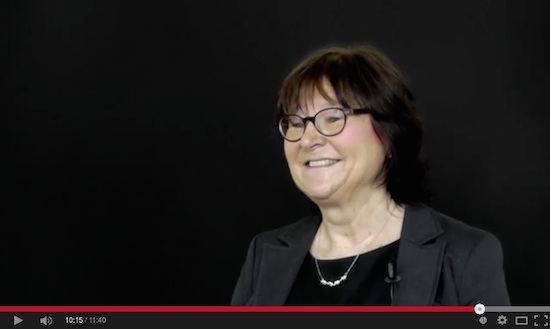
No! Everybody just listened to what this charming woman had to tell about her struggling life.-
In the time you try to get it intellectually, others have done & published successfully half a dozen projects...
JUST DO IT! ... :pinch:
Replied by Karsten Schlüter on topic How to record sound when filming?
Neguah wrote: …'ll search for lavs. And I'll try that for my next project. …
NO!
Not on a 'project' - why does everybody makes his life hard by testing stuff under 'hot' conditions???
Test it! is my advice, in terms of trying, playing, doing this, doing that … yep, play!
A test allows to try the crazy stuff (in TV shows for example, the girls in their super 'light' dresses often get the mics glued into the hair, right above the forehead); a test would allow to set up diff. situations (put a radio close to subject, try diff. 'noise volumes'); a test would allow to try diff. positions of the Lav - I've seen Lavs taped behind the subjects jackets lapel; what about using two lavs on one subject, L/R, if the person often turns head by 180°? (again: nobody knows your rec situation... you have to TRY…)
Neguah wrote: … Or are you creative and hide them?…
Why hide them? People are used to see Lavs; plus you get 'em on many colors, … or use your kids finger-paint... LOL!
Did anybody get distracted with my 5€ Lav in this shot?
No! Everybody just listened to what this charming woman had to tell about her struggling life.-
…I always want perfection, but I either don't have knowledge or equipment…
In the time you try to get it intellectually, others have done & published successfully half a dozen projects...
JUST DO IT! ... :pinch:
Last edit: 01 Feb 2015 10:33 by Karsten Schlüter.
Please Log in to join the conversation.
01 Feb 2015 10:37 #59132
by Neguah
Replied by Neguah on topic How to record sound when filming?
Karsten wrote:
...NO!
Not on a 'project' - why does everybody makes his life hard by testing stuff under 'hot' conditions???
Test it! is my advice, in terms of trying, playing, doing this, doing that … yep, play!...
Hehehe, of course I will test it first. But I'm guessing it'll work in a project since you speak so highly about it.
Karsten wrote:
...Why hide them?...
In a interview or a documentary I don't mind the mic showing, but in a thriller, comedy - in a movie it's not so cool showing the lavs on the subject, is it?
...NO!
Not on a 'project' - why does everybody makes his life hard by testing stuff under 'hot' conditions???
Test it! is my advice, in terms of trying, playing, doing this, doing that … yep, play!...
Hehehe, of course I will test it first. But I'm guessing it'll work in a project since you speak so highly about it.
Karsten wrote:
...Why hide them?...
In a interview or a documentary I don't mind the mic showing, but in a thriller, comedy - in a movie it's not so cool showing the lavs on the subject, is it?
Please Log in to join the conversation.
- Karsten Schlüter
-
- Offline
- Moderator
-
Less
More
- Posts: 3790
- Thank you received: 718
01 Feb 2015 13:04 #59135
by Karsten Schlüter
Don't get me wrong, Haugen, but our chat comes reaches a point, I'm losing having fun with it.... :huh:
This is all stabbin' in the foggy dark, because nobody can know what your needs are...
How can I know, that you dare to produce a thriller - as a one man show!?
You're author, producer, DoP and director of your own comedy show, I assume. And only actor ... I fear....
(you mention your quest for 'perfection' - by working alone? That is plain nonsense.- )
....
And believe it or not:
For Les Miserablé they HAD indeed 'lavaliers' - much bigger ones than in use we talked until now! And they spend some millions for CGI to get'em off the screen...
If 'scenic' is your main realm - how many actors populate your set, max?
You probably have to consider usage of a 'mixer' - and again: not as a [strike]unicorn[/strike] one man team.
Anyhow .. I need a rest ...............
Replied by Karsten Schlüter on topic How to record sound when filming?
Neguah wrote: … In a interview or a documentary I don't mind the mic showing, but in a thriller, comedy - in a movie it's not so cool showing the lavs on the subject, is it?
Don't get me wrong, Haugen, but our chat comes reaches a point, I'm losing having fun with it.... :huh:
This is all stabbin' in the foggy dark, because nobody can know what your needs are...
How can I know, that you dare to produce a thriller - as a one man show!?
You're author, producer, DoP and director of your own comedy show, I assume. And only actor ... I fear....
(you mention your quest for 'perfection' - by working alone? That is plain nonsense.- )
....
And believe it or not:
For Les Miserablé they HAD indeed 'lavaliers' - much bigger ones than in use we talked until now! And they spend some millions for CGI to get'em off the screen...
If 'scenic' is your main realm - how many actors populate your set, max?
You probably have to consider usage of a 'mixer' - and again: not as a [strike]unicorn[/strike] one man team.
Anyhow .. I need a rest ...............
Please Log in to join the conversation.
01 Feb 2015 13:32 #59137
by Neguah
Replied by Neguah on topic How to record sound when filming?
Karsten wrote:
...because nobody can know what your needs are...
How can I know, that you dare to produce a thriller - as a one man show!?...
What? This has nothing to do with my needs. I simply asked how a movie, like a thriller, comedy, horror etc would be with visible lavs. I know that visible mics in a documentary or interview is ok.
And like you said, they used millions for CGI to make the lavs invisible.
I have never said that my one-man-show is perfect. Far from it. But I eager for perfection. So I don't know why you mention nonsens. I like doing things on my own. I have done it since I was five years old. Perhaps that needs to change...
At work, I do all on my own. I'm the only one interesting in making movies, so I'm handling 20 kids on my own. But I usually spit them, having 1-6 alone. They can't function as sound guys...
Have done one move with friends, 4 friends. And I could of course have one of them to help me with the audio(boom mic).
I just need learn more about audio...
Your honest, and I like it. Thanks a lot for your help I have learned a lot these days! Buying lavs and perhaps a better mic for testing.
...because nobody can know what your needs are...
How can I know, that you dare to produce a thriller - as a one man show!?...
What? This has nothing to do with my needs. I simply asked how a movie, like a thriller, comedy, horror etc would be with visible lavs. I know that visible mics in a documentary or interview is ok.
And like you said, they used millions for CGI to make the lavs invisible.
I have never said that my one-man-show is perfect. Far from it. But I eager for perfection. So I don't know why you mention nonsens. I like doing things on my own. I have done it since I was five years old. Perhaps that needs to change...
At work, I do all on my own. I'm the only one interesting in making movies, so I'm handling 20 kids on my own. But I usually spit them, having 1-6 alone. They can't function as sound guys...
Have done one move with friends, 4 friends. And I could of course have one of them to help me with the audio(boom mic).
I just need learn more about audio...
Your honest, and I like it. Thanks a lot for your help
I have learned a lot these days! Buying lavs and perhaps a better mic for testing. Please Log in to join the conversation.
