


- Posts: 9
- Thank you received: 0
3 Post Moderation Rule for New Boarders (25 Jan 2021)
New boarders will have their posts moderated - Don't worry if you cannot see your post immediately.
Images in time to music
22 Jan 2014 23:32 - 22 Jan 2014 23:34 #39559
by federasta
Images in time to music was created by federasta
Hello guys,
i wanted to know if there is a quick way to do the effect you see in the video link, where the images are to the rhythm of music and accelerate at the end.
thanks
vimeo.com/48425421
ps: sorry for my bad English and I hope not to have the wrong session
i wanted to know if there is a quick way to do the effect you see in the video link, where the images are to the rhythm of music and accelerate at the end.
thanks
vimeo.com/48425421
ps: sorry for my bad English and I hope not to have the wrong session
Last edit: 22 Jan 2014 23:34 by federasta. Reason: addition
Please Log in to join the conversation.

23 Jan 2014 16:06 #39624
by BenB
Replied by BenB on topic Images in time to music
Place the music track in the Primary Storyline, use the "M" key to create markers on it, in time to the music, while playing it back. Then edit to those markers.
Please Log in to join the conversation.
23 Jan 2014 22:27 #39656
by federasta
Replied by federasta on topic Images in time to music
sorry, but I've never used markers: once placed, what should I do?
I do not understand how to use them, I can put pictures right at those points?
I do not understand how to use them, I can put pictures right at those points?
Please Log in to join the conversation.
24 Jan 2014 00:08 #39668
by BenB
Replied by BenB on topic Images in time to music
Use them to line up clips you're editing, nothing magical about them. There is no "auto edit to the beat" button anywhere.
Please Log in to join the conversation.
25 Jan 2014 10:31 #39752
by federasta
Replied by federasta on topic Images in time to music
Thank you very much 
it is just that I use FCP and there are still many things I need to learn
since the project seems very heavy x my iMac to 16Gb of RAM, there are tricks to "lighten" the project?
thanks
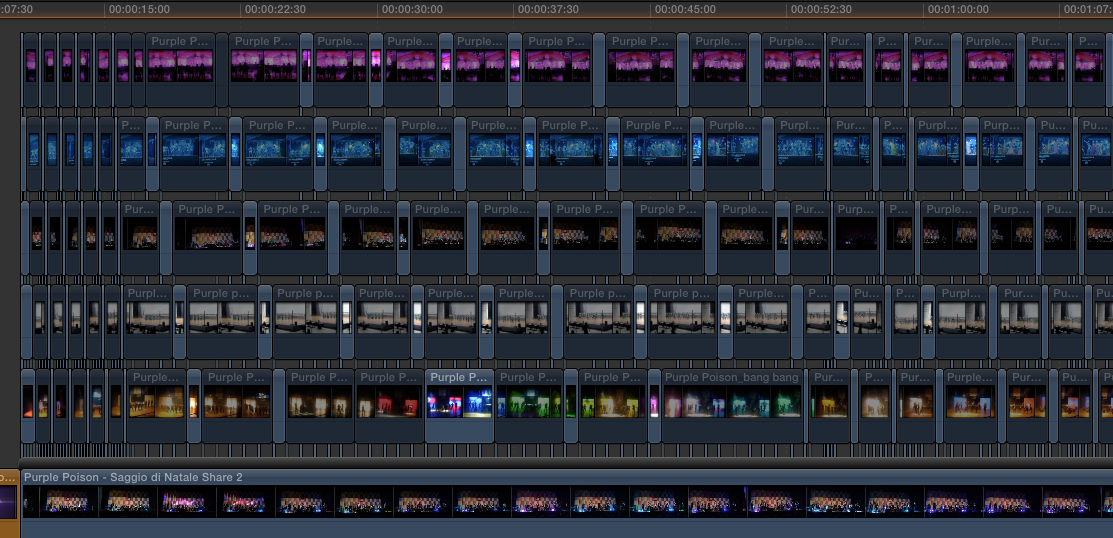
it is just that I use FCP and there are still many things I need to learn
since the project seems very heavy x my iMac to 16Gb of RAM, there are tricks to "lighten" the project?
thanks
Please Log in to join the conversation.
- Karsten Schlüter
-

- Offline
- Moderator
-

Less
More
- Posts: 3790
- Thank you received: 718
25 Jan 2014 11:42 - 25 Jan 2014 11:43 #39754
by Karsten Schlüter
ehm...? What do we see here? :S
6 staples of videos ... why for god's sake that?!
is this a sort-of "Brady Bunch" intro .........??
heatherandmike.files.wordpress.com/2011/...unch-grid-j-6721.jpg
can you apply to your screen-shot the Preview window?
Replied by Karsten Schlüter on topic Images in time to music
federasta wrote: … since the project seems very heavy x my iMac to 16Gb of RAM, there are tricks to "lighten" the project? …
ehm...? What do we see here? :S
6 staples of videos ... why for god's sake that?!
is this a sort-of "Brady Bunch" intro .........??
heatherandmike.files.wordpress.com/2011/...unch-grid-j-6721.jpg
can you apply to your screen-shot the Preview window?
Last edit: 25 Jan 2014 11:43 by Karsten Schlüter.
Please Log in to join the conversation.
25 Jan 2014 14:47 #39768
by federasta
Replied by federasta on topic Images in time to music
I'll explain: the parts obscured by V, should be to influence the work of the Mac while playing?
Please Log in to join the conversation.
- Karsten Schlüter
-
- Offline
- Moderator
-
Less
More
- Posts: 3790
- Thank you received: 718
25 Jan 2014 17:02 #39779
by Karsten Schlüter
6 'tracks' of video in simultaneous playback (with or without v) plus effects (dissolves) DO influence any Mac (ok, not the new MacPro+ssd) and esp. your hard drives ... hopefully, all those videos are on different drives, not on a single one, nor - god beware - on the system drive.. !!
sorry for seeing me flabbergasted - but WHY do you 'synch' by stacking videos???
< taking a deep breath > This is your way of emulating tracks, right? ... :sick:
This is a very ... unintended way using FCPX ...
... and I'm no expert, ...
Replied by Karsten Schlüter on topic Images in time to music
federasta wrote: I'll explain: the parts obscured by V, should be to influence the work of the Mac while playing?
6 'tracks' of video in simultaneous playback (with or without v) plus effects (dissolves) DO influence any Mac (ok, not the new MacPro+ssd) and esp. your hard drives ... hopefully, all those videos are on different drives, not on a single one, nor - god beware - on the system drive.. !!
sorry for seeing me flabbergasted - but WHY do you 'synch' by stacking videos???
< taking a deep breath > This is your way of emulating tracks, right? ... :sick:
This is a very ... unintended way using FCPX ...
... and I'm no expert, ...
Please Log in to join the conversation.
25 Jan 2014 17:44 #39787
by federasta
Replied by federasta on topic Images in time to music
I have worked in this way because I needed several pieces of each track with different times, seemed uncomfortable every time a copy of the video that I was interested and then move it to the project.
Unfortunately, I do not know the possible tricks to speed this bit of work you and others
Unfortunately, I do not know the possible tricks to speed this bit of work you and others
Please Log in to join the conversation.
