


- Posts: 479
- Thank you received: 5
3 Post Moderation Rule for New Boarders (25 Jan 2021)
New boarders will have their posts moderated - Don't worry if you cannot see your post immediately.
sharing to Vimeo
09 Mar 2012 20:49 #5562
by parkerhqj
sharing to Vimeo was created by parkerhqj
Has anyone else had troubles doing this? Every time I've tried - big or small files, I've been told it's too big - when they are all well under 1gb. I then just export as a QT file and then send to Compressor, etc. I'd love to do it their way and save steps, but I don't seem to be able to do it. thx
Please Log in to join the conversation.
10 Mar 2012 00:38 #5565
by RonPriest
Replied by RonPriest on topic Re: sharing to Vimeo
Hey Parker
Yep, you don't have to feel like the Lone Ranger, I'm having the same problem. At first, I thought it was just the fact that I was encoding a full 1080p video so I tried 720 and that worked once or twice (probably depending upon the size of the original ProRes file) but even with the 720p I still get this error.
Instead of re-exporting it, I just go in and grab the shared file it encoded for the vimeo upload (found in the Final Cut Projects/Shared Items folder) and upload it via Vimeo's web site upload link, and it works fine. So it doesn't appear to be the actual video that's being encoded for upload that's causing the actual problem, although I'm not sure what is causing the problem.
BTW, do you know what happen to the self contained Vimeo uploader application? It doesn't seem to work anymore. Anytime I open it up, I get an Error #401 invalid consumer key, with a button that's labeled "Try Again" that doesn't do anything when I click on it. So I've resorted to just uploading in via their website upload link. I've looked all over on Vimeo's site and can't fine the Vimeo uploader app to re-download. Did they stop supporting this uploader for the Plus account holders do you know?
Yep, you don't have to feel like the Lone Ranger, I'm having the same problem. At first, I thought it was just the fact that I was encoding a full 1080p video so I tried 720 and that worked once or twice (probably depending upon the size of the original ProRes file) but even with the 720p I still get this error.
Instead of re-exporting it, I just go in and grab the shared file it encoded for the vimeo upload (found in the Final Cut Projects/Shared Items folder) and upload it via Vimeo's web site upload link, and it works fine. So it doesn't appear to be the actual video that's being encoded for upload that's causing the actual problem, although I'm not sure what is causing the problem.
BTW, do you know what happen to the self contained Vimeo uploader application? It doesn't seem to work anymore. Anytime I open it up, I get an Error #401 invalid consumer key, with a button that's labeled "Try Again" that doesn't do anything when I click on it. So I've resorted to just uploading in via their website upload link. I've looked all over on Vimeo's site and can't fine the Vimeo uploader app to re-download. Did they stop supporting this uploader for the Plus account holders do you know?
Please Log in to join the conversation.
10 Mar 2012 00:43 #5566
by parkerhqj
Replied by parkerhqj on topic Re: sharing to Vimeo
Thanks. I'll try that.
I don't know what happened o the Uploader App. It never seemed to work for me so I blew it off and didn't return to it.
I don't know what happened o the Uploader App. It never seemed to work for me so I blew it off and didn't return to it.
Please Log in to join the conversation.
10 Mar 2012 00:45 #5567
by RonPriest
Replied by RonPriest on topic Re: sharing to Vimeo
Im not sure what the actual file size limit is when uploading a video, do you? I know I've been able to upload files between 1.5 and 2 GB at time.
Please Log in to join the conversation.
10 Mar 2012 00:59 #5569
by parkerhqj
Replied by parkerhqj on topic Re: sharing to Vimeo
Al I know if my weekly limit (with Vimeo Plus) is 5gb/ week. I assume they don't care about the file size as long as you don't exceed that number. I could be wrong.
Please Log in to join the conversation.
- Mikeybouchereau
-

- Offline
- Elite Member
-

Less
More
- Posts: 201
- Thank you received: 81
10 Mar 2012 09:56 #5588
by Mikeybouchereau
Replied by Mikeybouchereau on topic Re: sharing to Vimeo
Compressor has a limit of 500MB to be uploaded to vimeo. That was the original size limitation for someone who does not have a Plus or Pro account. I do alot of video uploads to vimeo. So I purchased Courier from the app store for 10 bucks it lets me upload to youtube, vimeo, facebook, ftp all at once with preset templates so I can just drop my video on a stamp and it goes. It's really handy. And since compressor lets you run a script after a video is done encoding, you can create an automator action to have it move the clip to courier to upload for you.
Please Log in to join the conversation.
11 Mar 2012 03:38 - 11 Mar 2012 03:40 #5610
by parkerhqj
Replied by parkerhqj on topic Re: sharing to Vimeo
I do have a Plus account - does Compressor still have that size limitation if you have Plus? Why would Compressor have a file size limit if Vimeo doesn't (for Plus)?
I bought Courier, but it won't allow me to add a password in the settings, unless I'm missing something. I guess I'll have to do my privacy settings at the Vimeo site. I'm uploading a test file now and as it is uploading, it's telling me that my file is being delivered but they can't find my location. I would hate to hear that from the pizza guy!
I don't know about running scripts. Is there somewhere I can learn that? Thanks.
I bought Courier, but it won't allow me to add a password in the settings, unless I'm missing something. I guess I'll have to do my privacy settings at the Vimeo site. I'm uploading a test file now and as it is uploading, it's telling me that my file is being delivered but they can't find my location. I would hate to hear that from the pizza guy!
I don't know about running scripts. Is there somewhere I can learn that? Thanks.
Last edit: 11 Mar 2012 03:40 by parkerhqj.
Please Log in to join the conversation.
- Mikeybouchereau
-
- Offline
- Elite Member
-
Less
More
- Posts: 201
- Thank you received: 81
12 Mar 2012 08:44 #5666
by Mikeybouchereau
Replied by Mikeybouchereau on topic Re: sharing to Vimeo
Yes compressor still have the 500mb limit even if you have a Plus or Pro account. I have both types of accounts for both personal and business.
If you google automator actions, its pretty easy to learn how to build custom actions to speed up your workflow.
You only need to set up your account and password once with Courier, and once you do, it will deliver the video to which ever account you set up for it.
In Courier you "add" stamps to the envelope. Each stamp is your username and password for a service.
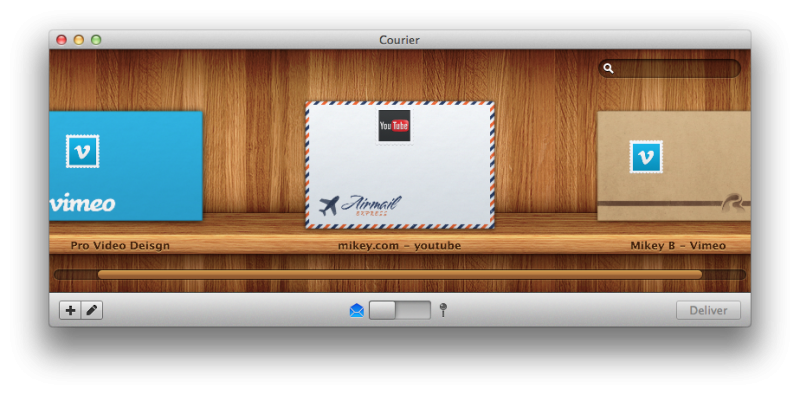
If you google automator actions, its pretty easy to learn how to build custom actions to speed up your workflow.
You only need to set up your account and password once with Courier, and once you do, it will deliver the video to which ever account you set up for it.
In Courier you "add" stamps to the envelope. Each stamp is your username and password for a service.
Please Log in to join the conversation.

13 Mar 2012 08:20 #5694
by dgwvideo
Creating history....one edit at a time !
Replied by dgwvideo on topic Re: sharing to Vimeo
Wow, that looks like a cool app. I'll have to check it out. Seems like a great way to eliminate all the various account logins I have scattered around and centralize them in one app.
Creating history....one edit at a time !
Please Log in to join the conversation.
- Mikeybouchereau
-
- Offline
- Elite Member
-
Less
More
- Posts: 201
- Thank you received: 81
14 Mar 2012 08:21 #5739
by Mikeybouchereau
Replied by Mikeybouchereau on topic Re: sharing to Vimeo
Yeah I dig it, I also like that you can batch uploads. I can add like 5 videos to one account, hit send. Then set another video to go to a different account/service and send it and they all just queue up to be uploaded.
Please Log in to join the conversation.
25 Mar 2012 09:16 #6148
by dgwvideo
Creating history....one edit at a time !
Replied by dgwvideo on topic Re: sharing to Vimeo
Regarding the Vimeo desktop uploader, it is now no longer a valid app from Vimeo. I received an email from Vimeo basically saying their new improvements to the web site upload no longer justified the separate desktop uploader.
Creating history....one edit at a time !
Please Log in to join the conversation.
25 Mar 2012 09:17 #6149
by RonPriest
Replied by RonPriest on topic Re: sharing to Vimeo
Yep, I got that email too.
Please Log in to join the conversation.
- simonpwood
-
- Offline
- Platinum Member
-

Less
More
- Posts: 654
- Thank you received: 42
27 Mar 2012 13:05 - 27 Mar 2012 13:10 #6235
by simonpwood
I say balls to that.
I like Vimeo enough to have got a plus account, but the service really annoys me. There are just too many weird bugs that keep happening. Youtube seems so efficient these days (and unlike Vimeo Plus its free).
With the desktop uploader you were able to pause and resume uploads. This was extremely important for people with slow connections (and we're talking about a large % of the global population have slow internet). Right now I'm uploading a 5 minute clip at 720p. The connection has slowed down to 0.01mbs, but I'm already 3 hours in to the upload, so its too late to stop (another 3 hours to go to finish). This is the 3rd attempt on the same clip, both other uploads failed due to a break in connection.
Whats the point of adding features (such as pause and resume), to only take them away?
The new design doesn't resolve this!
Balls vimeo! Balls!
Replied by simonpwood on topic Re: sharing to Vimeo
dgwvideo wrote: Regarding the Vimeo desktop uploader, it is now no longer a valid app from Vimeo. I received an email from Vimeo basically saying their new improvements to the web site upload no longer justified the separate desktop uploader.
I say balls to that.
I like Vimeo enough to have got a plus account, but the service really annoys me. There are just too many weird bugs that keep happening. Youtube seems so efficient these days (and unlike Vimeo Plus its free).
With the desktop uploader you were able to pause and resume uploads. This was extremely important for people with slow connections (and we're talking about a large % of the global population have slow internet). Right now I'm uploading a 5 minute clip at 720p. The connection has slowed down to 0.01mbs, but I'm already 3 hours in to the upload, so its too late to stop (another 3 hours to go to finish). This is the 3rd attempt on the same clip, both other uploads failed due to a break in connection.
Whats the point of adding features (such as pause and resume), to only take them away?
The new design doesn't resolve this!
Balls vimeo! Balls!
Last edit: 27 Mar 2012 13:10 by simonpwood.
Please Log in to join the conversation.
29 Mar 2012 08:55 - 29 Mar 2012 08:59 #6269
by dgwvideo
Creating history....one edit at a time !
Replied by dgwvideo on topic Re: sharing to Vimeo
Well, I'm guessing that's roughly 40 to 50 MB and if that's taking 3 to 6 hours you are not kidding about a sloooow internet connection. How did you ever download FCPX and/or Motion at that speed? It must have taken weeks. 
EDIT: I should add that I use Vimeo Plus and have none of the problems that you're describing. It seems like the issues might all be related to that very slow internet speed you are getting. Any file, regardless of size will experience erratic upload behavior if the connection starts and stops and intermittently screeches to a slow halt.
EDIT: I should add that I use Vimeo Plus and have none of the problems that you're describing. It seems like the issues might all be related to that very slow internet speed you are getting. Any file, regardless of size will experience erratic upload behavior if the connection starts and stops and intermittently screeches to a slow halt.
Creating history....one edit at a time !
Last edit: 29 Mar 2012 08:59 by dgwvideo.
Please Log in to join the conversation.
- simonpwood
-
- Offline
- Platinum Member
-
Less
More
- Posts: 654
- Thank you received: 42
29 Mar 2012 12:57 #6275
by simonpwood
Replied by simonpwood on topic Re: sharing to Vimeo
The file was actually just under 400mbs.
I eventually cancelled the upload, and restarted' it took nearly 3 hours to upload.
Uploading FCPX (and its updates) is essentially impossible here. I bought the computer in Ireland, and purchased it there on a fast connection.
I just came back from a holiday in Finland (where they have incredible 4G internet); so I managed to update FCPX (and everything else), and finally download all the Garageband loops, etc.
But this is something to consider; the most of the developing world still does not have fast internet. Apples move to deliver everything online means that they are excluding themselves from emerging markets around the globe.
I eventually cancelled the upload, and restarted' it took nearly 3 hours to upload.
Uploading FCPX (and its updates) is essentially impossible here. I bought the computer in Ireland, and purchased it there on a fast connection.
I just came back from a holiday in Finland (where they have incredible 4G internet); so I managed to update FCPX (and everything else), and finally download all the Garageband loops, etc.
But this is something to consider; the most of the developing world still does not have fast internet. Apples move to deliver everything online means that they are excluding themselves from emerging markets around the globe.
Please Log in to join the conversation.
30 Mar 2012 07:36 #6301
by dgwvideo
Creating history....one edit at a time !
Replied by dgwvideo on topic Re: sharing to Vimeo
I hear you, simonpwood, I don't like the fact that Apple has all these large apps and updates only available online either. Adobe is going the same route as are other vendors. We'll keep our fingers crossed for you that hi-speed internet arrives soon.
Out of curiosity, why is your 5 minute clip so large? I was assuming you were trying to upload a 720p H.264 or other compressed format which could easily have been around 40 or 50 mb. Is this a full uncompressed file, and if so, what is the reason you need to do that, especially with your internet connection?
Out of curiosity, why is your 5 minute clip so large? I was assuming you were trying to upload a 720p H.264 or other compressed format which could easily have been around 40 or 50 mb. Is this a full uncompressed file, and if so, what is the reason you need to do that, especially with your internet connection?
Creating history....one edit at a time !
Please Log in to join the conversation.
- simonpwood
-
- Offline
- Platinum Member
-
Less
More
- Posts: 654
- Thank you received: 42
30 Mar 2012 10:38 #6303
by simonpwood
Replied by simonpwood on topic Re: sharing to Vimeo
Errrr....thats a good question. I'm not sure why its so big actually.
The project was shot on a Canon DSLR at 1080p, converted to ProRes. A lot of effects were added (mainly Magic Bullet Looks, Lens Flares, Overlays, Titles). Then I exported from FCPX using Compressor Settings (using a preset - 720p for Web Export).
Result is a 5 minute clip, at 396.7mb.
Anything along the way that I could do to improve the efficiency?
The project was shot on a Canon DSLR at 1080p, converted to ProRes. A lot of effects were added (mainly Magic Bullet Looks, Lens Flares, Overlays, Titles). Then I exported from FCPX using Compressor Settings (using a preset - 720p for Web Export).
Result is a 5 minute clip, at 396.7mb.
Anything along the way that I could do to improve the efficiency?
Please Log in to join the conversation.
30 Mar 2012 19:15 #6308
by dgwvideo
Creating history....one edit at a time !
Replied by dgwvideo on topic Re: sharing to Vimeo
Well, possibly that is a normal file size if you encoded at high quality at the full frame size of 1280 x 720. I suspected that if your intention was for the web, you would be using a smaller video file. I never use anything larger than 640 x 360 for an encoded 720p file and usually use something even smaller like 400 x 270, etc.
Try this method (again only if you want a smaller frame size):
Use Quicktime 7 for this.
Open your full res file in QT7. Resize the file visually using the handles to a size you think will be appropriate. Immediately select "export" and then "using current settings".
Select h.264 for the video and leave all settings at automatic. On the quality slider, try leaving it at center position for medium. If your video has a lot of movement, transitions, effects, etc. you may need to move the slider a bit towards high quality.
At medium you will get a bitrate roughly around 500 to 700 mbps. At high setting it could be 1000 to 1300 or more depending on the motion in the video. I try to avoid going much beyond 700 to 1000.
This should dramatically reduce your file size (assuming your frame size as you drag the handles produces a width of 400 to 600).
If you need the full 1280 x 720 size, then the file will be much larger, but I can't see that being very practical for web use. The bit rate of that video would be prohibitive for anyone but those with pretty fast internet connections.
Hope this helps.
Try this method (again only if you want a smaller frame size):
Use Quicktime 7 for this.
Open your full res file in QT7. Resize the file visually using the handles to a size you think will be appropriate. Immediately select "export" and then "using current settings".
Select h.264 for the video and leave all settings at automatic. On the quality slider, try leaving it at center position for medium. If your video has a lot of movement, transitions, effects, etc. you may need to move the slider a bit towards high quality.
At medium you will get a bitrate roughly around 500 to 700 mbps. At high setting it could be 1000 to 1300 or more depending on the motion in the video. I try to avoid going much beyond 700 to 1000.
This should dramatically reduce your file size (assuming your frame size as you drag the handles produces a width of 400 to 600).
If you need the full 1280 x 720 size, then the file will be much larger, but I can't see that being very practical for web use. The bit rate of that video would be prohibitive for anyone but those with pretty fast internet connections.
Hope this helps.
Creating history....one edit at a time !
Please Log in to join the conversation.
