


- Posts: 1
- Thank you received: 0
3 Post Moderation Rule for New Boarders (25 Jan 2021)
New boarders will have their posts moderated - Don't worry if you cannot see your post immediately.
Canon c100 and Compressor
- M.Kulakovskij
-
 Topic Author
- Offline
- New Member
-

Less
More
15 Sep 2015 15:48 #68535
by M.Kulakovskij
Canon c100 and Compressor was created by M.Kulakovskij
Hi Guys, im mikel.
My English isn't quite well but i hope its enough
So my problem is actually that i can't really get the image quality of my c100 out of compressor...
The main difference is that the new generated file is not as sharp as the original one.
And when i upload it into youtube the sharpness goes much more down.
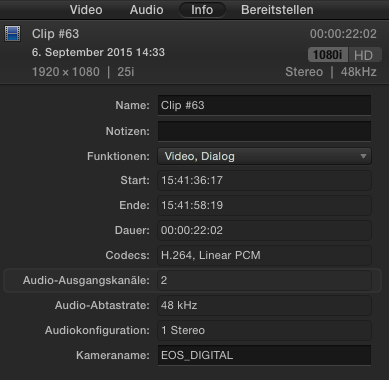
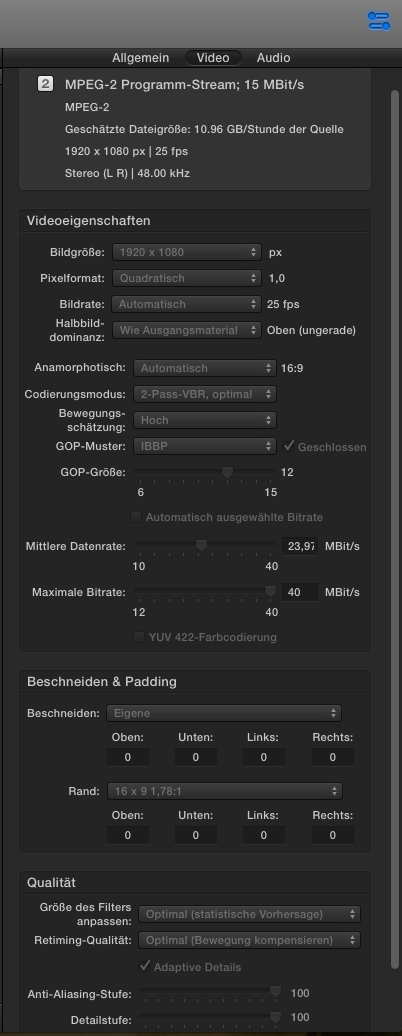
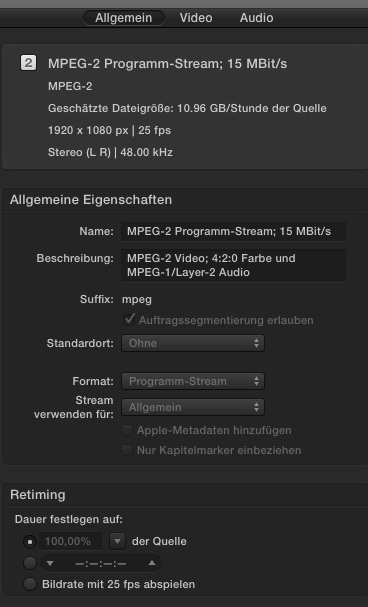
I brought for you some screenshots of the original Video Data Information in FCP ( it can't be manipulated by FCP ) and the finished Compressor Video Data Information.
Do somebody also work with the c100 and Compressor? And if yes, how do u compress the Video Files?
I want to study this but the internet simply empty about this topic..I work now for 2 1/2 Years autodidact with Videos and Photos and had never such problems to export something..
Thank u for every Reply in forward!
PS: The Video Information is a bit german, but i think the most of u will see the data clear. sorry for that.. i can send u more if u need something.
My English isn't quite well but i hope its enough
So my problem is actually that i can't really get the image quality of my c100 out of compressor...
The main difference is that the new generated file is not as sharp as the original one.
And when i upload it into youtube the sharpness goes much more down.
I brought for you some screenshots of the original Video Data Information in FCP ( it can't be manipulated by FCP ) and the finished Compressor Video Data Information.
Do somebody also work with the c100 and Compressor? And if yes, how do u compress the Video Files?
I want to study this but the internet simply empty about this topic..I work now for 2 1/2 Years autodidact with Videos and Photos and had never such problems to export something..
Thank u for every Reply in forward!
PS: The Video Information is a bit german, but i think the most of u will see the data clear. sorry for that.. i can send u more if u need something.
Please Log in to join the conversation.
- Russ Haskell
-
- Offline
- Elite Member
-

Less
More
- Posts: 176
- Thank you received: 24
17 Sep 2015 15:03 - 17 Sep 2015 15:09 #68635
by Russ Haskell
Replied by Russ Haskell on topic Canon c100 and Compressor
What format are you shooting…is it interlaced? If so, that may explain why your images aren't holding their quality when uploaded (and are recompressed) to You Tube.
Russ.
Russ.
Last edit: 17 Sep 2015 15:09 by Russ Haskell. Reason: grammar!
Please Log in to join the conversation.


17 Sep 2015 19:31 #68654
by Emmanuel
Replied by Emmanuel on topic Canon c100 and Compressor
Mikel
As Russ said, there is something suspicious in the screenshot you sent: it shows 25i
i stands for interlaced. It should be p for progressive. Several options here:
- You shot interlaced with the C100 (and you should not)
- You set some interlacing in the settings of the timeline (and you should not)
- Maybe you do all correct as there is a small bug within FCPX that sometimes displays 25i instead of 25p for footage that has been syncronized. In that case, you do not have to change anything.
HOWEVER, you are attempting to compress in MPEG2. This is a really old, inefficient compressor Codec that was mainly used for making DVDs.
In Compressor, go to Video Sharing Services, and choose HD1080. By defaut it will compress in H264 and you will get much, much better compressed videos.
As Russ said, there is something suspicious in the screenshot you sent: it shows 25i
i stands for interlaced. It should be p for progressive. Several options here:
- You shot interlaced with the C100 (and you should not)
- You set some interlacing in the settings of the timeline (and you should not)
- Maybe you do all correct as there is a small bug within FCPX that sometimes displays 25i instead of 25p for footage that has been syncronized. In that case, you do not have to change anything.
HOWEVER, you are attempting to compress in MPEG2. This is a really old, inefficient compressor Codec that was mainly used for making DVDs.
In Compressor, go to Video Sharing Services, and choose HD1080. By defaut it will compress in H264 and you will get much, much better compressed videos.
Please Log in to join the conversation.
