


- Posts: 20
- Thank you received: 1
3 Post Moderation Rule for New Boarders (25 Jan 2021)
New boarders will have their posts moderated - Don't worry if you cannot see your post immediately.
Compressor Error
03 May 2015 20:57 #63987
by sergeson
Compressor Error was created by sergeson
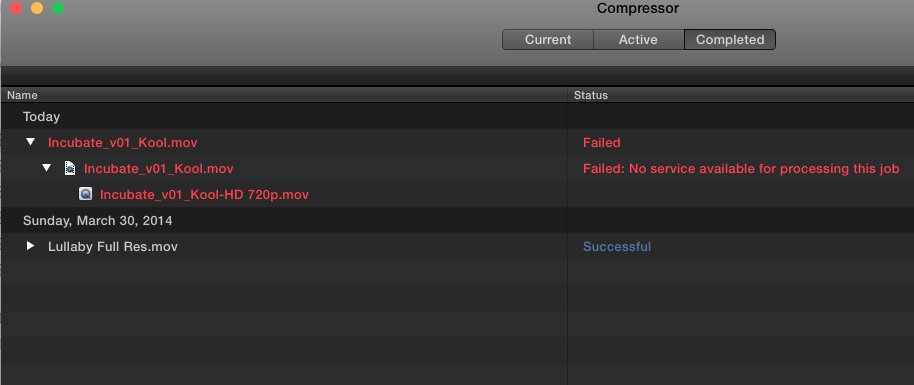
Hello! It's been a while since I used compressor. I started a file today and I'm now getting this error message.
"Failed: No Service Available for processing this job."
Can someone point me in the right direction on how to fix this?
Thanks!
"Failed: No Service Available for processing this job."
Can someone point me in the right direction on how to fix this?
Thanks!
Please Log in to join the conversation.

05 Jun 2015 01:22 #65234
by BenB
Replied by BenB on topic Compressor Error
What Compressor version are you running?
Please Log in to join the conversation.
11 Jun 2015 14:36 #65433
by sergeson
Replied by sergeson on topic Compressor Error
I'm running 4.2.
I temporarily solved the problem by loading compressor on my wife's MBP. But that certainly isn't a long term solution.
I temporarily solved the problem by loading compressor on my wife's MBP. But that certainly isn't a long term solution.
Please Log in to join the conversation.
12 Jun 2015 22:53 #65476
by BenB
Replied by BenB on topic Compressor Error
Go to Preferences, to the Advanced section. Use the "Reset Queue" function to first cancel all jobs, second repair compressor. See if that helps.
Please Log in to join the conversation.
- Russ Haskell
-

- Offline
- Elite Member
-

Less
More
- Posts: 176
- Thank you received: 24
12 Jul 2015 22:52 #66414
by Russ Haskell
Replied by Russ Haskell on topic Compressor Error
A couple of things:
If you used an earlier version of Compressor, you may have a Qmaster folder in Applications Support in your hime folder library. Drag that to the trash,
If that doesn't work, trash the Compressor folder –also in your Home library, (Burt before you do, drag the settings folder to your Desktop if you have custom settings you want to preserve.
Russ
If you used an earlier version of Compressor, you may have a Qmaster folder in Applications Support in your hime folder library. Drag that to the trash,
If that doesn't work, trash the Compressor folder –also in your Home library, (Burt before you do, drag the settings folder to your Desktop if you have custom settings you want to preserve.
Russ
Please Log in to join the conversation.
