


- Posts: 4
- Thank you received: 2
3 Post Moderation Rule for New Boarders (25 Jan 2021)
New boarders will have their posts moderated - Don't worry if you cannot see your post immediately.
Compressor will not output a 500MB file without filling up the 12GB that is left on my MBP.
07 Jul 2014 14:44 #49345
by Arctistic
Compressor will not output a 500MB file without filling up the 12GB that is left on my MBP. was created by Arctistic
so, I have a genuine production problem. I am in Beirut, and need to deliver a file to a client in sweden. Because of dodgy internet, I can´t direct upload to vimeo. Need to make a file and use a file transfer service.
I have my 3 minute film in FCPX. I hit send to compressor.
In compressor I choose output to file. 1080p for videosharing.
And to be clear, it's H264, it's AAC, it's nothing in the settings that are awkward. They are fair, and not at all way to high. And compressor admit's this by estimating the filesize to only 523 mb.
So far Im all happy.
No I hit GO and I see my blue bar slowly go right. And 25 minutes later with 10% done I get the system message my computer is full. 1GB left on my MBP. I hit cancel. Restart and my MBP get's its 11GB back.
Repeat. Fail. Repeat. Fail.
C'mon. whats wrong? Any takes?
I have my 3 minute film in FCPX. I hit send to compressor.
In compressor I choose output to file. 1080p for videosharing.
And to be clear, it's H264, it's AAC, it's nothing in the settings that are awkward. They are fair, and not at all way to high. And compressor admit's this by estimating the filesize to only 523 mb.
So far Im all happy.
No I hit GO and I see my blue bar slowly go right. And 25 minutes later with 10% done I get the system message my computer is full. 1GB left on my MBP. I hit cancel. Restart and my MBP get's its 11GB back.
Repeat. Fail. Repeat. Fail.
C'mon. whats wrong? Any takes?
Please Log in to join the conversation.

07 Jul 2014 15:49 #49350
by tpayton
Replied by tpayton on topic Compressor will not output a 500MB file without filling up the 12GB that is left on my MBP.
Have you tried to export 1080p h264 directly from FCPX rather than compressor? (using either Apple devices 1080p, or Master File with h264).
Regarding out of memory, 12GB is not alot of free space. I could see cache files taking up that much space, but I have had FCPX export just fine from a machine with that little free HD space on a startup drive. If direct export from FCPX doesn't work, I would say you would have to export to an external drive.
I hope this helps.
Regarding out of memory, 12GB is not alot of free space. I could see cache files taking up that much space, but I have had FCPX export just fine from a machine with that little free HD space on a startup drive. If direct export from FCPX doesn't work, I would say you would have to export to an external drive.
I hope this helps.
Please Log in to join the conversation.
- Russ Haskell
-

- Offline
- Elite Member
-

Less
More
- Posts: 176
- Thank you received: 24
08 Jul 2014 15:47 #49445
by Russ Haskell
Replied by Russ Haskell on topic Compressor will not output a 500MB file without filling up the 12GB that is left on my MBP.
Definitely try T. Payton's suggestion to export directly from FCP X.
But I have to say that it sounds like something is amiss with your system to deplete 12 GBs. If I take a 3 minute project and send to Compressor using that standard 1080 video sharing setting , I get an output file similar to the estimate you got, about 470 MB. However, if I track the available space on my system drive (which is where I saved it) to most it uses is a little over 800 MB. Then as soon as the process is complete, it bounces back to 470 MB less than what I had before the test.
So I agree that 12 GB is not a lot of head room, but still…perhaps a RAM problem with a lot of swaps?
When you make a your next attempt, I'd open up Activity Monitor to see what's going on during the prowess.
Russ
But I have to say that it sounds like something is amiss with your system to deplete 12 GBs. If I take a 3 minute project and send to Compressor using that standard 1080 video sharing setting , I get an output file similar to the estimate you got, about 470 MB. However, if I track the available space on my system drive (which is where I saved it) to most it uses is a little over 800 MB. Then as soon as the process is complete, it bounces back to 470 MB less than what I had before the test.
So I agree that 12 GB is not a lot of head room, but still…perhaps a RAM problem with a lot of swaps?
When you make a your next attempt, I'd open up Activity Monitor to see what's going on during the prowess.
Russ
Please Log in to join the conversation.
13 Jul 2014 10:42 - 13 Jul 2014 11:24 #49772
by Arctistic
Replied by Arctistic on topic Compressor will not output a 500MB file without filling up the 12GB that is left on my MBP.
so just so sum it up. I did export directly from FCPX, and that was flawless. It would still be interesting to know what causes the compressor issue. Exporting from FCPX do not give the same control over all settings, but for this gig that was not a problem. so all is good.
Will prob do a complete reinstall of system and apps. It's not only Compressor that is messing with me.
anyway, thnks!
Will prob do a complete reinstall of system and apps. It's not only Compressor that is messing with me.
anyway, thnks!
Last edit: 13 Jul 2014 11:24 by Arctistic.
Please Log in to join the conversation.
14 Jul 2014 15:25 #49888
by tpayton
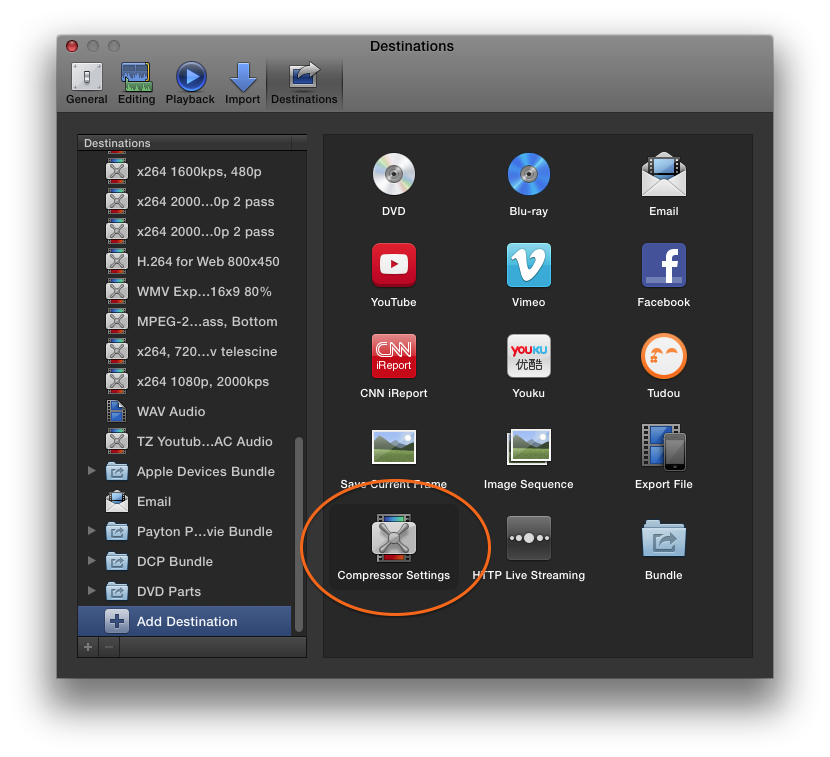
Glad to hear things are working. You can actually create a compressor preset and then use that as a destination preset in FCPX so you can have all the control you had in compressor (with the exception of a job action after export).
Replied by tpayton on topic Compressor will not output a 500MB file without filling up the 12GB that is left on my MBP.
Arctistic wrote: Exporting from FCPX do not give the same control over all settings, but for this gig that was not a problem. so all is good.
Glad to hear things are working. You can actually create a compressor preset and then use that as a destination preset in FCPX so you can have all the control you had in compressor (with the exception of a job action after export).
Please Log in to join the conversation.
