


- Posts: 1
- Thank you received: 0
3 Post Moderation Rule for New Boarders (25 Jan 2021)
New boarders will have their posts moderated - Don't worry if you cannot see your post immediately.
Very long export times, any way around this?
- beavsFFstudent
-
 Topic Author
- Offline
- New Member
-

Less
More
07 Jun 2014 00:06 #47427
by beavsFFstudent
Very long export times, any way around this? was created by beavsFFstudent
Hi all,
I filmed a recital in 1080i on DV tape and brought it into FCPX using a Sony tape deck. I'm currently trying to export it but I keep running into obnoxious export times. I sent it to compressor and applied the HD 1080p setting under Apple's Video Sharing Services folder; the codec is H.264. I've been exporting for nearly an hour now and I've watched the export time steadily climb from one hour to four hours where it is now.
This is problematic for me because I'm using the computers at my university and this weekend the computer lab won't be open long enough for me to finish the export.
Would it be quicker to export straight from Final Cut? The video will ultimately end up on youtube and I'm not sure what codec will be best. Is there anything glaringly wrong with what I'm doing that's causing this problem? Or is it going to take a very long time regardless of what I do?
Any and all information will be greatly appreciated as I'm in somewhat of a time crunch!
Thanks much,
Sean
I filmed a recital in 1080i on DV tape and brought it into FCPX using a Sony tape deck. I'm currently trying to export it but I keep running into obnoxious export times. I sent it to compressor and applied the HD 1080p setting under Apple's Video Sharing Services folder; the codec is H.264. I've been exporting for nearly an hour now and I've watched the export time steadily climb from one hour to four hours where it is now.
This is problematic for me because I'm using the computers at my university and this weekend the computer lab won't be open long enough for me to finish the export.
Would it be quicker to export straight from Final Cut? The video will ultimately end up on youtube and I'm not sure what codec will be best. Is there anything glaringly wrong with what I'm doing that's causing this problem? Or is it going to take a very long time regardless of what I do?
Any and all information will be greatly appreciated as I'm in somewhat of a time crunch!
Thanks much,
Sean
Please Log in to join the conversation.

07 Jun 2014 00:54 - 07 Jun 2014 00:55 #47435
by tpayton
Replied by tpayton on topic Very long export times, any way around this?
Well, depending on the length of your timeline and the computer you are on, it could take half of real time to export, or even double real time.
In Compressor try duplicating the YouTube setting, for HD 720p. Then on the duplicate change the setting on the video tab for Quicktime settings and turn off Multi-Pass. So make sure it is on Faster-Encode.
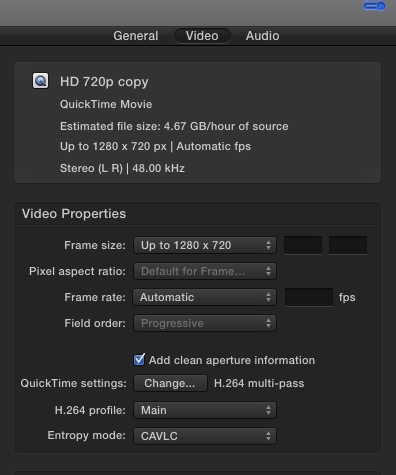
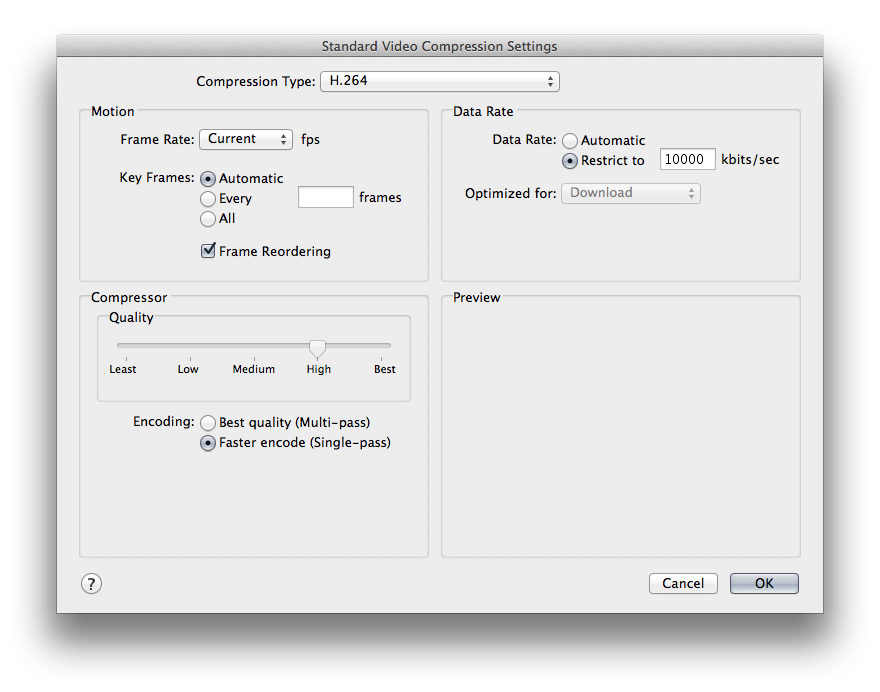
Next time there is no need at all to use Compressor. If you are going to YouTube, just create a destination for your youtube channel, then start the share and FCPX will take care of exporting and uploading it and you can just leave it running there in the lab.
In FCPX, to make a new YouTube destination, goto File > Share > Add Destination. I would recommend that you upload 720p, using faster encode.
I hope it goes well.
In Compressor try duplicating the YouTube setting, for HD 720p. Then on the duplicate change the setting on the video tab for Quicktime settings and turn off Multi-Pass. So make sure it is on Faster-Encode.
Next time there is no need at all to use Compressor. If you are going to YouTube, just create a destination for your youtube channel, then start the share and FCPX will take care of exporting and uploading it and you can just leave it running there in the lab.
In FCPX, to make a new YouTube destination, goto File > Share > Add Destination. I would recommend that you upload 720p, using faster encode.
I hope it goes well.
Last edit: 07 Jun 2014 00:55 by tpayton.
Please Log in to join the conversation.

07 Jun 2014 06:31 #47445
by Seamusvfx
Replied by Seamusvfx on topic Very long export times, any way around this?
The problem is Apples h264 encoder is extremely slow. This apples to compressor as well as final cut. To get round it export prores lt from the timeline, and then encode that using handbrake, a free piece of software with a really good h264 encoder. It'll take a fraction of the time. Just google handbrake to find the download.
Please Log in to join the conversation.
09 Jun 2014 19:00 #47548
by tpayton
Replied by tpayton on topic Very long export times, any way around this?
Handbrake uses x264 encoder which is very efficient. You can easily create a compressor preset for it and use it in FCPX also. Larry Jordan did a writeup for it here:
www.larryjordan.biz/compressor-x264-improve-video/
- T.
www.larryjordan.biz/compressor-x264-improve-video/
- T.
Please Log in to join the conversation.
09 Jun 2014 19:10 #47550
by Seamusvfx
Replied by Seamusvfx on topic Very long export times, any way around this?
Can you install it fcpx as well? That would be fantastic.
Please Log in to join the conversation.
09 Jun 2014 19:17 #47551
by tpayton
Replied by tpayton on topic Very long export times, any way around this?
Yes, you can make any export present or FCPX using compressor.
Please Log in to join the conversation.
- Russ Haskell
-
- Offline
- Elite Member
-

Less
More
- Posts: 176
- Thank you received: 24
10 Jun 2014 16:30 #47592
by Russ Haskell
Replied by Russ Haskell on topic Very long export times, any way around this?
Recently, having some time on my hands, I ran some H.264 compression tests with FCP X and Compressor. I was curious whether hardware acceleration in Compressor would trump FCP X 's leveraging the GPU. On my system, at least, it did – but with caveats.
On my long-in-the-tooth (late 2009) iMac, a Pro Res export typically exports in about 40% of real time. But a single pass H.264 export jumps to nearly 2X (190%)real time. (No scaling involved.)
Send to Compressor – using the same settings – was slightly faster at 180% of real time. (However, that slim advantage was more than lost by several annoying episodes of heath balls – something I've found common with this workflow .
Bringing the Pro Res file into Compressor and applying the Main Profile single pass settings apparently did leverage hardware acceleration and the job completed in a little less than 150% real time. However, when I add the time it took to export the Pro Res source file, the two stage process actually takes a bit longer.
BTW, I learned that CABAC High Profile setting does not seem to engage hardware acceleration and the job took almost exactly 200% real time.
Switching to the X.264 encoder, the processing time increased to 215% real time, but as noted, produced a much smaller, high image quality file.
Finally, a ran the file through MPEG Streamclip, which took 225% real time for the H.264 setting. (I don't believe the X,264 version I have is optimized for MPEG Streamclip and that encode was very slow.)
In my experience, Streamclip was typically faster than Compressor – but no longer – at least with these settings.
So for me the takeaway of these tests was if speed is the main priority, have FCP X do the heavy lifting at export.
Russ
On my long-in-the-tooth (late 2009) iMac, a Pro Res export typically exports in about 40% of real time. But a single pass H.264 export jumps to nearly 2X (190%)real time. (No scaling involved.)
Send to Compressor – using the same settings – was slightly faster at 180% of real time. (However, that slim advantage was more than lost by several annoying episodes of heath balls – something I've found common with this workflow .
Bringing the Pro Res file into Compressor and applying the Main Profile single pass settings apparently did leverage hardware acceleration and the job completed in a little less than 150% real time. However, when I add the time it took to export the Pro Res source file, the two stage process actually takes a bit longer.
BTW, I learned that CABAC High Profile setting does not seem to engage hardware acceleration and the job took almost exactly 200% real time.
Switching to the X.264 encoder, the processing time increased to 215% real time, but as noted, produced a much smaller, high image quality file.
Finally, a ran the file through MPEG Streamclip, which took 225% real time for the H.264 setting. (I don't believe the X,264 version I have is optimized for MPEG Streamclip and that encode was very slow.)
In my experience, Streamclip was typically faster than Compressor – but no longer – at least with these settings.
So for me the takeaway of these tests was if speed is the main priority, have FCP X do the heavy lifting at export.
Russ
Please Log in to join the conversation.

10 Jun 2014 17:06 - 10 Jun 2014 17:08 #47596
by BenB
Replied by BenB on topic Very long export times, any way around this?
I helped run some encoding tests not long ago for Iain Anderson. Very interesting results from several different Mac models.
www.macprovideo.com/hub/final-cut/final-...o-x-performance-test
P.S. My Mac "tube" is stated in the article as 6 core, it really is 8 core.
www.macprovideo.com/hub/final-cut/final-...o-x-performance-test
P.S. My Mac "tube" is stated in the article as 6 core, it really is 8 core.
Last edit: 10 Jun 2014 17:08 by BenB.
Please Log in to join the conversation.
