


- Posts: 7
- Thank you received: 0
3 Post Moderation Rule for New Boarders (25 Jan 2021)
New boarders will have their posts moderated - Don't worry if you cannot see your post immediately.
COMPRESSOR FAILED!!
- INNOVAVIDEOPD
-
 Topic Author
- Offline
- New Member
-

Less
More
03 Mar 2014 05:43 #41965
by INNOVAVIDEOPD
COMPRESSOR FAILED!! was created by INNOVAVIDEOPD
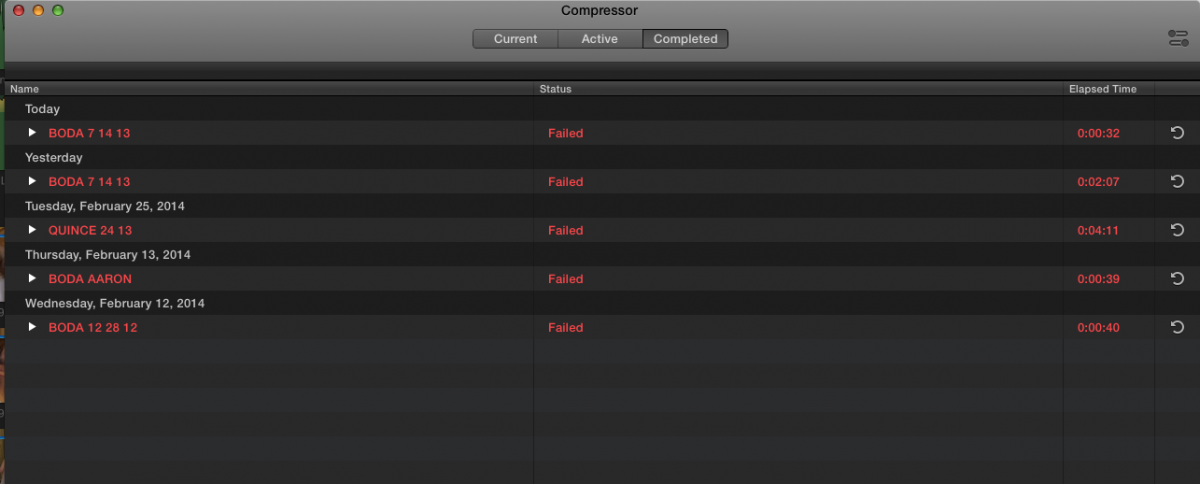
Hi! I installed the latest version of compressor 4.1.1 and i am still having trouble exporting. It tries for like a minute and then all of a sudden FAILED! can anyone help me?
thanks
Luis
thanks
Luis
Please Log in to join the conversation.
- Russ Haskell
-
- Offline
- Elite Member
-

Less
More
- Posts: 176
- Thank you received: 24
08 Mar 2014 18:51 #42289
by Russ Haskell
Replied by Russ Haskell on topic COMPRESSOR FAILED!!
Please supply a little more detail.
Have you had any jobs that completed satisfactorily? What are your source files? What settings are you applying and is there a job action appended to the encoding?
Russ
Have you had any jobs that completed satisfactorily? What are your source files? What settings are you applying and is there a job action appended to the encoding?
Russ
Please Log in to join the conversation.
- INNOVAVIDEOPD
-
Topic Author
- Offline
- New Member
-
Less
More
- Posts: 7
- Thank you received: 0
08 Mar 2014 19:40 #42297
by INNOVAVIDEOPD
Replied by INNOVAVIDEOPD on topic COMPRESSOR FAILED!!
Hi! no jobs have completed satisfactory. My source files are a external hard disk i have which has 4TB enough space. My settings that i am applying are for standard DVD, no jobs are appended and encoding. thank you truly for helping.
Luis
Luis
Please Log in to join the conversation.

08 Mar 2014 21:09 #42306
by BenB
Replied by BenB on topic COMPRESSOR FAILED!!
What format/codec are the originals?
Please Log in to join the conversation.
- INNOVAVIDEOPD
-
Topic Author
- Offline
- New Member
-
Less
More
- Posts: 7
- Thank you received: 0
09 Mar 2014 02:13 #42314
by INNOVAVIDEOPD
Replied by INNOVAVIDEOPD on topic COMPRESSOR FAILED!!
I film with DSLR cameras so its a .MOV format.
Please Log in to join the conversation.
09 Mar 2014 04:47 - 09 Mar 2014 04:47 #42316
by BenB
Replied by BenB on topic COMPRESSOR FAILED!!
What camera make/model specifically? That could be H.264, AVCHD, etc.
I'd get the free "Preference Manager" from Digital Rebellion dot com and use it to quickly and safely delete the Compressor preference files.
If that doesn't work, I'd move the Compressor app from the Applications folder into the Trash. Launch the App Store, go to the Purchases sections, re-install it.
Are you getting any specific error messages when it fails?
I'd get the free "Preference Manager" from Digital Rebellion dot com and use it to quickly and safely delete the Compressor preference files.
If that doesn't work, I'd move the Compressor app from the Applications folder into the Trash. Launch the App Store, go to the Purchases sections, re-install it.
Are you getting any specific error messages when it fails?
Last edit: 09 Mar 2014 04:47 by BenB.
Please Log in to join the conversation.
- INNOVAVIDEOPD
-
Topic Author
- Offline
- New Member
-
Less
More
- Posts: 7
- Thank you received: 0
09 Mar 2014 15:29 #42348
by INNOVAVIDEOPD
Replied by INNOVAVIDEOPD on topic COMPRESSOR FAILED!!
The camera i am using is a Canon 60D dslr. Maybe H.264 it think. I did erase compressor and re-install it but same things happens. All i get is "FAILED" where do i go to verify more details?
thanks!
thanks!
Please Log in to join the conversation.
- Russ Haskell
-
- Offline
- Elite Member
-
Less
More
- Posts: 176
- Thank you received: 24
10 Mar 2014 02:05 #42381
by Russ Haskell
Replied by Russ Haskell on topic COMPRESSOR FAILED!!
Yes. 60D shoots H.264 mov files and they are normally quite easy for Compressor to do whatever with. So it sounds like something is messed up.
Suggest closing Compressor; going to Home library (not root library) >Applications Support>Compressor. Drag the Settings folder to the Desktop and then trash the Compressor folder (which Compressor will rebuild when you launch).
Try your job again. If it works, with Compressor closed, replace the Settings folder with the one on the Desktop.
Russ
Suggest closing Compressor; going to Home library (not root library) >Applications Support>Compressor. Drag the Settings folder to the Desktop and then trash the Compressor folder (which Compressor will rebuild when you launch).
Try your job again. If it works, with Compressor closed, replace the Settings folder with the one on the Desktop.
Russ
Please Log in to join the conversation.
10 Mar 2014 03:14 #42382
by marchyman
Replied by marchyman on topic COMPRESSOR FAILED!!
The input to compressor is his output from FCPX (assuming X) and need not be the same format his camera shot. Maybe it's ProRes as many (most?) output master files in ProRes, not H.264.
Please Log in to join the conversation.
- INNOVAVIDEOPD
-
Topic Author
- Offline
- New Member
-
Less
More
- Posts: 7
- Thank you received: 0
10 Mar 2014 03:56 #42384
by INNOVAVIDEOPD
Replied by INNOVAVIDEOPD on topic COMPRESSOR FAILED!!
I tried what you said Russ and this is what i got.
Thanks
Luis
Thanks
Luis

Please Log in to join the conversation.
- Russ Haskell
-
- Offline
- Elite Member
-
Less
More
- Posts: 176
- Thank you received: 24
11 Mar 2014 00:30 #42422
by Russ Haskell
Replied by Russ Haskell on topic COMPRESSOR FAILED!!
EditCodes suggests 3x possibly is a plug-in conflict. If you can disable whatever you have, it would be a good test.
It also makes me wonder whether there is something amiss with your user account. If plug-ins aren't the answer, try a test user account and see whether it will complete the encode (or any encode) from that account.
Russ
It also makes me wonder whether there is something amiss with your user account. If plug-ins aren't the answer, try a test user account and see whether it will complete the encode (or any encode) from that account.
Russ
Please Log in to join the conversation.
18 Apr 2014 15:43 #44706
by yann
Replied by yann on topic COMPRESSOR FAILED!!
Hi Sorry for m'y english
I have a MacBook pro 15' FCP X and Compressor 4.1.1
With OS X lion all was ok
But WIth mavericks Compressor 4.0.1 didn't run
So i installed compressor 4.1.1 and i can use it for .avi or other little videos
But when i want to send my FCP projects to Compress them
I have the message 'cantpreviewmovie'
And When i run to compress i have this message : error of the render : 60
Each attempt fail at 2 minutes and 3 seconds
Can you help me?
I have a MacBook pro 15' FCP X and Compressor 4.1.1
With OS X lion all was ok
But WIth mavericks Compressor 4.0.1 didn't run
So i installed compressor 4.1.1 and i can use it for .avi or other little videos
But when i want to send my FCP projects to Compress them
I have the message 'cantpreviewmovie'
And When i run to compress i have this message : error of the render : 60
Each attempt fail at 2 minutes and 3 seconds
Can you help me?
Please Log in to join the conversation.
