


- Posts: 3790
- Thank you received: 718
3 Post Moderation Rule for New Boarders (25 Jan 2021)
New boarders will have their posts moderated - Don't worry if you cannot see your post immediately.
Sharing Compressor4 presets to FCPX-users not owning Compressor?
- Karsten Schlüter
-
 Topic Author
- Offline
- Moderator
-

Less
More
21 Feb 2014 16:54 #41535
by Karsten Schlüter
Question came up here just the minute:
The 'share'-options in FCPX are for some users limited; but not everyone owns nor can handle Compressor.
So: can you share C4-presets as you can share Motion-templates/plugins?
If so, how?
(I'm sure, those presets are buried some place I would never thinking of diggin' there)?
The 'share'-options in FCPX are for some users limited; but not everyone owns nor can handle Compressor.
So: can you share C4-presets as you can share Motion-templates/plugins?
If so, how?
(I'm sure, those presets are buried some place I would never thinking of diggin' there)?
Please Log in to join the conversation.

21 Feb 2014 22:15 - 21 Feb 2014 22:19 #41552
by BenB
Replied by BenB on topic Sharing Compressor4 presets to FCPX-users not owning Compressor?
They are stored in this path-
[Home Folder] > Application Support > Compressor > Settings
Copy from there to a jump drive, or to the desktop to zip up and email to someone. Then on the other computer, place it in the same location.

[Home Folder] > Application Support > Compressor > Settings
Copy from there to a jump drive, or to the desktop to zip up and email to someone. Then on the other computer, place it in the same location.
Last edit: 21 Feb 2014 22:19 by BenB.
Please Log in to join the conversation.
- Karsten Schlüter
-
Topic Author
- Offline
- Moderator
-
Less
More
- Posts: 3790
- Thank you received: 718
22 Feb 2014 07:16 #41572
by Karsten Schlüter
Excellent, thanks for your reply, Ben!
we give this a try - 'we'= some hobbyists, shy spending 40$ each for a tool we wouldn't/couldn't handle. :lol:
But, for example, we'd like to create a customized share-destination in FCPX, which offers e.g. a 720p/h264/low bitrate//mp4 .. would be more ... convenient, if our FCPXs offer such a 'preset'...
So, one will buy it, 2 will wrestle with it, and all 4 will participate from the result ... nice!
Replied by Karsten Schlüter on topic Sharing Compressor4 presets to FCPX-users not owning Compressor?
BenB wrote: They are stored in this path-…
Excellent, thanks for your reply, Ben!
we give this a try - 'we'= some hobbyists, shy spending 40$ each for a tool we wouldn't/couldn't handle. :lol:
But, for example, we'd like to create a customized share-destination in FCPX, which offers e.g. a 720p/h264/low bitrate//mp4 .. would be more ... convenient, if our FCPXs offer such a 'preset'...
So, one will buy it, 2 will wrestle with it, and all 4 will participate from the result ... nice!
Please Log in to join the conversation.
22 Feb 2014 13:21 #41576
by BenB
Replied by BenB on topic Sharing Compressor4 presets to FCPX-users not owning Compressor?
Compressor 4.1 actually is very easy to use, much more so than previous versions. I'm actually in production of a video course for macProVideo.com for Compressor 4.1. Remember to refer to the help docs (accessible via the Help menu) often. Or online here.
help.apple.com/compressor/mac/4.1/
help.apple.com/compressor/mac/4.1/
Please Log in to join the conversation.
- Karsten Schlüter
-
Topic Author
- Offline
- Moderator
-
Less
More
- Posts: 3790
- Thank you received: 718
22 Feb 2014 21:57 - 22 Feb 2014 22:01 #41593
by Karsten Schlüter
Replied by Karsten Schlüter on topic Sharing Compressor4 presets to FCPX-users not owning Compressor?
... ok, for the brave-hearted:
anybody WITHOUT Compressor would like to dare to test my first own Export Settings? :blink:
Un-zip it and follow advice Ben has given and add it to your Compressor Settings.
in FCPX add it it to your Share Options ..
Does it work?
Should export from FCPX straight to a 1080/25fps/h264/5mbps/mp4 ....
hey hey, mp4 export! :ohmy:
and, sorry all 30fps-lers, Europe here ....
anybody WITHOUT Compressor would like to dare to test my first own Export Settings? :blink:
Un-zip it and follow advice Ben has given and add it to your Compressor Settings.
in FCPX add it it to your Share Options ..
Does it work?
Should export from FCPX straight to a 1080/25fps/h264/5mbps/mp4 ....
hey hey, mp4 export! :ohmy:
and, sorry all 30fps-lers, Europe here ....
Last edit: 22 Feb 2014 22:01 by Karsten Schlüter.
Please Log in to join the conversation.
- Russ Haskell
-

- Offline
- Elite Member
-

Less
More
- Posts: 176
- Thank you received: 24
26 Feb 2014 14:14 #41777
by Russ Haskell
Replied by Russ Haskell on topic Sharing Compressor4 presets to FCPX-users not owning Compressor?
I'm very curious about this and hope that someone who doesn't have Compressor installed will post their experience. I'd try i but I have two very stable systems (with various versions of Compressor) and I don't want to change anything unless I have to.
What about your hobbyist friends?
Russ
What about your hobbyist friends?
Russ
Please Log in to join the conversation.
26 Feb 2014 16:12 #41780
by BenB
Replied by BenB on topic Sharing Compressor4 presets to FCPX-users not owning Compressor?
It would be super easy to remove Compressor, test, reinstall Compressor. It installs pretty quickly. I may give it a shot this afternoon.
Please Log in to join the conversation.
- Karsten Schlüter
-
Topic Author
- Offline
- Moderator
-
Less
More
- Posts: 3790
- Thank you received: 718
26 Feb 2014 17:05 #41782
by Karsten Schlüter
you won't believe how lazy those are, 'testing' stuff, they don't know!
.. esp. this 'FCPX to mp4'-thingie should make them curious, they don't like the work-around I showed them by rewrapping their exports with Streamclip..
Next Meeting: Friday!! I'll be back.. Äh, give feedback, I mean ... :silly:
Replied by Karsten Schlüter on topic Sharing Compressor4 presets to FCPX-users not owning Compressor?
Russ Haskell wrote: .. What about your hobbyist friends?..
you won't believe how lazy those are, 'testing' stuff, they don't know!
.. esp. this 'FCPX to mp4'-thingie should make them curious, they don't like the work-around I showed them by rewrapping their exports with Streamclip..
Next Meeting: Friday!! I'll be back.. Äh, give feedback, I mean ... :silly:
Please Log in to join the conversation.
26 Feb 2014 21:21 - 26 Feb 2014 21:25 #41796
by BenB
Replied by BenB on topic Sharing Compressor4 presets to FCPX-users not owning Compressor?
OK, I'm staging Macs, so I have a '13 MP I can test on that hasn't gone through Migration Assistant yet.
- I ran Digital Rebellion's "FCS Remover" and deleted Compressor.
- Went in to Application Support and deleted the Compressor folder.
- Rebooted.
- Manually recreated the Compressor folder in Application Support, and the Settings folder inside of that.
- I put the supplied compressor setting file in it.
Here is what fortunatly happens:
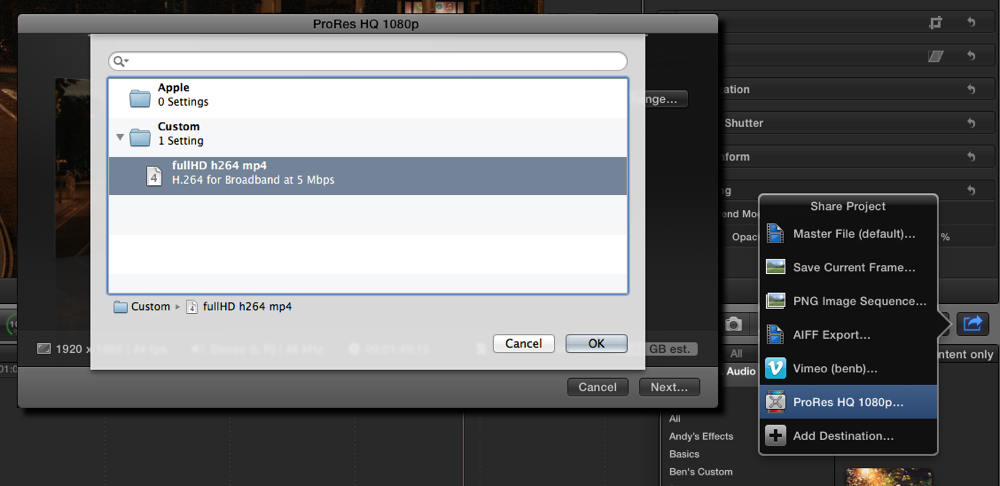
So my question is, if you install FCPX and not install Compressor, will you have a Compressor folder in your Applications Support folder?
At least we known if you don't, you can manually add it.
But if anyone does NOT have Compressor installed, would love to verify if that Compressor folder is there or not.
- I ran Digital Rebellion's "FCS Remover" and deleted Compressor.
- Went in to Application Support and deleted the Compressor folder.
- Rebooted.
- Manually recreated the Compressor folder in Application Support, and the Settings folder inside of that.
- I put the supplied compressor setting file in it.
Here is what fortunatly happens:
So my question is, if you install FCPX and not install Compressor, will you have a Compressor folder in your Applications Support folder?
At least we known if you don't, you can manually add it.
But if anyone does NOT have Compressor installed, would love to verify if that Compressor folder is there or not.
Last edit: 26 Feb 2014 21:25 by BenB.
Please Log in to join the conversation.
- Karsten Schlüter
-
Topic Author
- Offline
- Moderator
-
Less
More
- Posts: 3790
- Thank you received: 718
01 Mar 2014 07:29 - 01 Mar 2014 07:36 #41905
by Karsten Schlüter
Replied by Karsten Schlüter on topic Sharing Compressor4 presets to FCPX-users not owning Compressor?
so, results from the German laboratory, Probe #1
NO luck here!
see, we have an iMac here, never had any Compressor on it:
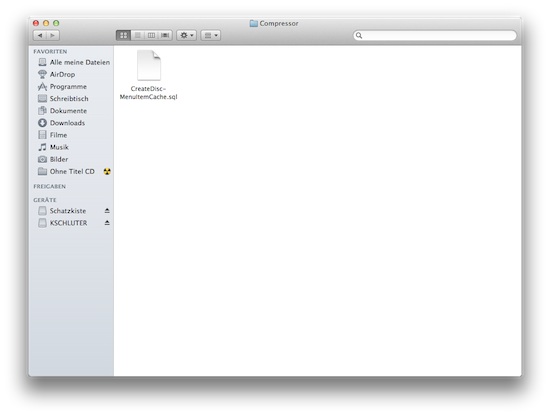
as you can see, in its Library/Application Support/Compressor, no 'settings' folder
then, we dragged my folder from my Mac (WITH Compressor) into it:
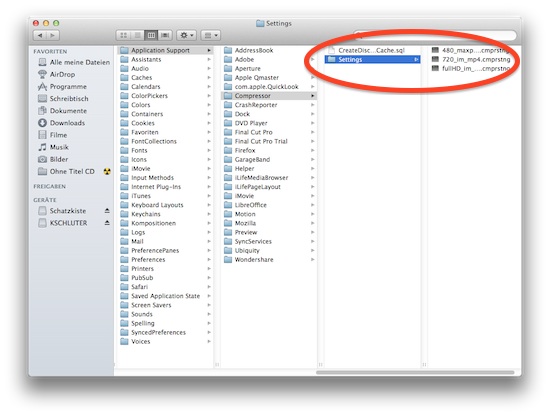
then, after launching FCPX and choosing a project, we tried to add the new/own (German "Eigene") settings to our list of Share-options -this error message appeared:
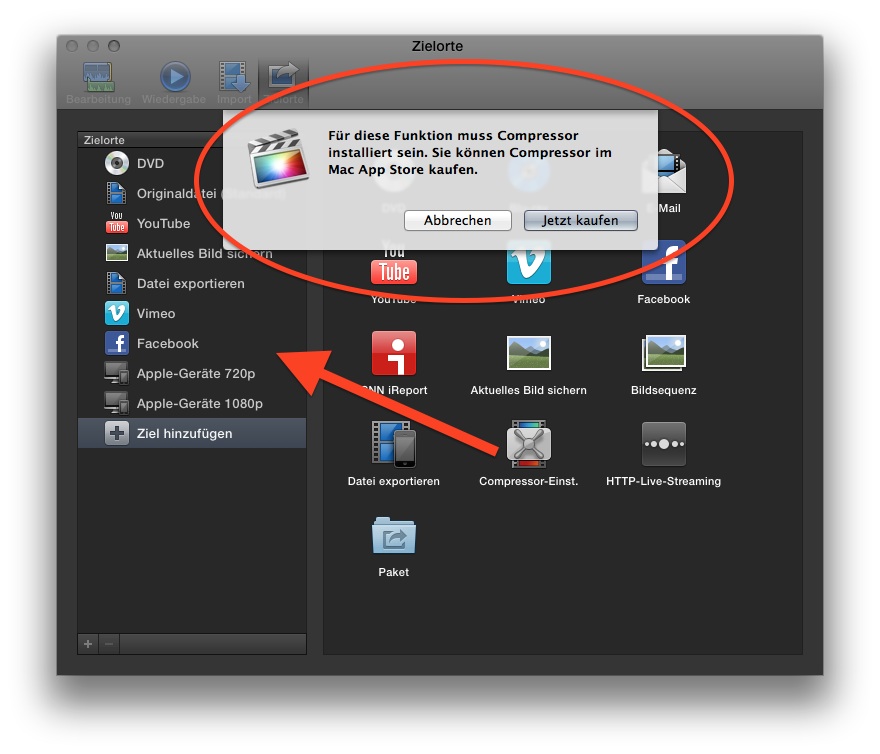
Translated: "For this feature, you have to have Compressor installed. Purchase it at Appstore."
... :oops:
_________
later, I noticed, my Mac has FCPX10.1, that iMacs was still running v0.9 .... "ski-vacation-week' here in Bavaria, so, we have to wait for a while for next tests ....
NO luck here!
see, we have an iMac here, never had any Compressor on it:
as you can see, in its Library/Application Support/Compressor, no 'settings' folder
then, we dragged my folder from my Mac (WITH Compressor) into it:
then, after launching FCPX and choosing a project, we tried to add the new/own (German "Eigene") settings to our list of Share-options -this error message appeared:
Translated: "For this feature, you have to have Compressor installed. Purchase it at Appstore."
... :oops:
_________
later, I noticed, my Mac has FCPX10.1, that iMacs was still running v0.9 .... "ski-vacation-week' here in Bavaria, so, we have to wait for a while for next tests ....
Last edit: 01 Mar 2014 07:36 by Karsten Schlüter.
Please Log in to join the conversation.
01 Mar 2014 13:13 - 01 Mar 2014 13:14 #41908
by BenB
Replied by BenB on topic Sharing Compressor4 presets to FCPX-users not owning Compressor?
Make the folders manually from scratch. Delete that "createdisk...cache...whatever" file, not needed, may interfere. But yes, you need compatible versions.
Last edit: 01 Mar 2014 13:14 by BenB.
Please Log in to join the conversation.
