


- Posts: 8
- Thank you received: 0
3 Post Moderation Rule for New Boarders (25 Jan 2021)
New boarders will have their posts moderated - Don't worry if you cannot see your post immediately.
Change video size with Compresor 4?
- marvinberry
-
 Topic Author
- Offline
- New Member
-

Less
More
18 Apr 2013 14:25 #24651
by marvinberry
Change video size with Compresor 4? was created by marvinberry
Hi all,
I admit, I am brand new to Compressor 4 so please excuse the possibility of this being a stupid question. I have scoured the web but can't find the answer I'm looking for - so I've signed up here!
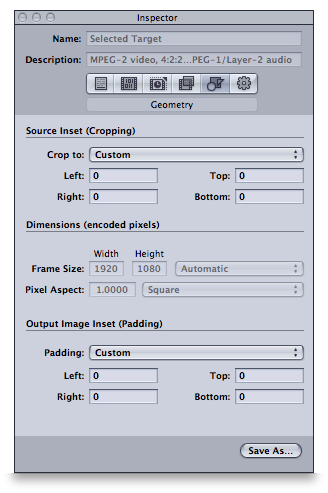
I've been asked to provide my 1920x1080 .MOV videos in MPG format at 1280x960. I understand how to convert to MPEG-2 but in the Geometry tab (after dragging the necessary MPEG-2 setting to the top box) the area named 'Dimensions (encoded pixels)' is greyed out. I presume this is the section where I need to enter the 1280x960? But the software won't allow it because it's 'greyed out'.
Can anyone help me by explaining why this is the case? Or alternatively, if I'm approaching this re-sizing job in the wrong way, I would really appreciate another suggested method. I've read that Compressor is a best option for re-sizing over FCPX itself. It would be ideal for me as well as I have many master .MOV files which I could conveniently run through Compressor quickly and hopefully easily.
Thank you in advance!
James
I admit, I am brand new to Compressor 4 so please excuse the possibility of this being a stupid question. I have scoured the web but can't find the answer I'm looking for - so I've signed up here!
I've been asked to provide my 1920x1080 .MOV videos in MPG format at 1280x960. I understand how to convert to MPEG-2 but in the Geometry tab (after dragging the necessary MPEG-2 setting to the top box) the area named 'Dimensions (encoded pixels)' is greyed out. I presume this is the section where I need to enter the 1280x960? But the software won't allow it because it's 'greyed out'.
Can anyone help me by explaining why this is the case? Or alternatively, if I'm approaching this re-sizing job in the wrong way, I would really appreciate another suggested method. I've read that Compressor is a best option for re-sizing over FCPX itself. It would be ideal for me as well as I have many master .MOV files which I could conveniently run through Compressor quickly and hopefully easily.
Thank you in advance!
James
Please Log in to join the conversation.

18 Apr 2013 15:29 #24661
by BenB
Replied by BenB on topic Change video size with Compresor 4?
1280x960? For playback on what?
Please Log in to join the conversation.
- marvinberry
-
Topic Author
- Offline
- New Member
-
Less
More
- Posts: 8
- Thank you received: 0
18 Apr 2013 16:08 #24665
by marvinberry
Replied by marvinberry on topic Change video size with Compresor 4?
It's a playback system that hooks up to all the TV's in a resort. Each room gets the same channel for in-house advertising etc.
Please Log in to join the conversation.
18 Apr 2013 16:12 #24666
by BenB
Replied by BenB on topic Change video size with Compresor 4?
So they want DVD MPEG-2, streaming MPEG-2, program MPEG-2?
I still don't get the unconventional frame size. That doesn't match broadcast standards. I think something is out of whack there. But, who knows what they have in mind.
The MPEG-2 encoder in Compressor only does standard broadcast frame sizes.
I still don't get the unconventional frame size. That doesn't match broadcast standards. I think something is out of whack there. But, who knows what they have in mind.
The MPEG-2 encoder in Compressor only does standard broadcast frame sizes.
Please Log in to join the conversation.
