


3 Post Moderation Rule for New Boarders (25 Jan 2021)
New boarders will have their posts moderated - Don't worry if you cannot see your post immediately.
encoding QT file FROM .m2v file
- stkirkland
-
 Topic Author
- Offline
- Senior Member
-

- Haven't I already written something (LOTS) about myself on my "Info" page??
I found an old DVD with data files. For this project, I didn't save a QT file of the final product. All I have are the .m2v and .aif files.
I was able to watch the video using MPEG Streamclip. Even tried (took alllll day) to encode from the file and make a QT file, encoding to Vimeo's specs.
The file is jumpy and pixelated.
Any other suggestions? Maybe I need to have different settings, since I'm using the .m2v as my source.
Thanks for any insight!
SK
Please Log in to join the conversation.
- Karsten Schlüter
-

- Offline
- Moderator
-

- Posts: 3790
- Thank you received: 718
stkirkland wrote: … old DVD with data files. … All I have are the .m2v and .aif files. …
just to speed-up any encoding: copy all files onto one of your ext. hard-drives - encoding straight from disk is painstaking slow due to 'mechanics'.
.m2v should be mpeg2 encoded, and is most probably SDef, so don't expect wonders in quality be transcoding it into anything .......
I would transcode it into proRes/480, add the audio in a FCPX SDef project and export to h264 .....
Please Log in to join the conversation.
- stkirkland
-
Topic Author
- Offline
- Senior Member
-
- Haven't I already written something (LOTS) about myself on my "Info" page??
Thank you for replying. I'm assuming I'd use Compressor to encode the .m2v file (yes it's SDef...was made back in 2001). Will find a ProRes/480 setting.
Please Log in to join the conversation.
- stkirkland
-
Topic Author
- Offline
- Senior Member
-
- Haven't I already written something (LOTS) about myself on my "Info" page??
Please Log in to join the conversation.
- Karsten Schlüter
-
- Offline
- Moderator
-
- Posts: 3790
- Thank you received: 718
stkirkland wrote: … .. do you mean ProRes 422 and then have settings as 720x480?
exactly - a lossless intermediate codec, and in original res to avoid scaling losses.
Please Log in to join the conversation.

Please Log in to join the conversation.
- stkirkland
-
Topic Author
- Offline
- Senior Member
-
- Haven't I already written something (LOTS) about myself on my "Info" page??
Thanks for all this feedback!!
Please Log in to join the conversation.
stkirkland wrote: OK, so if ProRes 422 of any sort is overkill, what is the solution?
Not what I said. I said ProRes HQ was overkill. Use ProRes LT to save disk space, or ProRes 422 if desired. Just not ProRes HQ nor ProRes 4444.
Please Log in to join the conversation.
- stkirkland
-
Topic Author
- Offline
- Senior Member
-
- Haven't I already written something (LOTS) about myself on my "Info" page??
Once I have these 2 separate elements, how do I combine them into one final file? Do I import the ProRes422 video file into the FCPX SDef project along with the .aif and export it all out into the final .H264 file? This might be what you originally meant several posts back.
Thanks for your help and insight.
Please Log in to join the conversation.
Please Log in to join the conversation.
- Karsten Schlüter
-
- Offline
- Moderator
-
- Posts: 3790
- Thank you received: 718
stkirkland wrote: … This might be what you originally meant several posts back.
Thanks for your help and insight.
Ja

less insight, simple 'just do it'....... :woohoo:
■ karsten
Please Log in to join the conversation.
- stkirkland
-
Topic Author
- Offline
- Senior Member
-
- Haven't I already written something (LOTS) about myself on my "Info" page??
I think what's causing the jumpiness is the inconsistency between the frame rates (original footage doesn't look progressive / project settings in fcpx for frame rate are listed at progressive). However, I can't change the project property's frame rate; it's only option is 23.98.
If I go back and re-compress my original as 23.98 (if that's even possible) would that fix it?
Thanks.
Please Log in to join the conversation.
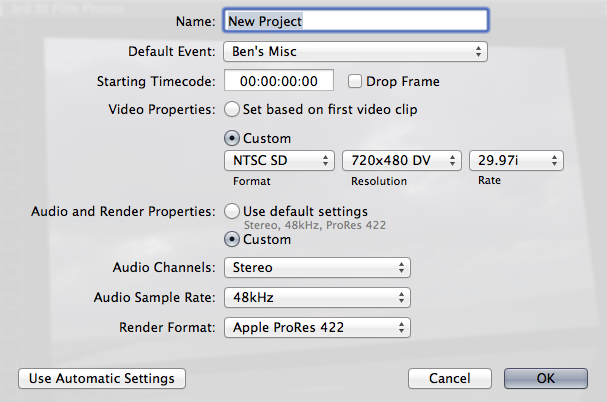
OK, create a brand new Project. Do NOT select the default "auto" settings. Manually force it into: NTSC-DV, 720x480 DV, 29.97i and you should be good.
Ripping from an SD DVD is not going to give you great quality. That MPEG-2 compression is hell on video. A second generation transcode from it won't be great. ProRes 422 will maintain the quality as much as you'll get. But I'd never expect great quality from video that highly compressed.
Please Log in to join the conversation.
- stkirkland
-
Topic Author
- Offline
- Senior Member
-
- Haven't I already written something (LOTS) about myself on my "Info" page??
Please Log in to join the conversation.
