


- Posts: 136
- Thank you received: 0
3 Post Moderation Rule for New Boarders (25 Jan 2021)
New boarders will have their posts moderated - Don't worry if you cannot see your post immediately.
Third Party Products for FCP
7toX not working properly
- youngeddie
-
 Topic Author
- Offline
- Premium Member
-

Less
More
15 Jun 2012 08:59 #9845
by youngeddie
7toX not working properly was created by youngeddie
I'm trying to send a couple of 1 minute projects from FCP 7 to FCPX using 7toX.
The movies are playing just fine in FCP 7, and I don't see any problems with unconnected clips.
When I try and export the XML file I get this message:
"There are 18 offline media files that will not be imported into Final Cut Pro X"
Does anyone know how I can work through this problem?
Thanks very much for your help. Eddie
The movies are playing just fine in FCP 7, and I don't see any problems with unconnected clips.
When I try and export the XML file I get this message:
"There are 18 offline media files that will not be imported into Final Cut Pro X"
Does anyone know how I can work through this problem?
Thanks very much for your help. Eddie
Please Log in to join the conversation.

20 Jun 2012 21:04 #10075
by robodean
Replied by robodean on topic Re: 7toX not working properly
I have just run into the exact same issue.
Did you ever find a solution?
Did you ever find a solution?
Please Log in to join the conversation.
20 Jun 2012 21:54 #10077
by robodean
Replied by robodean on topic Re: 7toX not working properly
all good.
turns out to have been a bug in 7toX 1.0.9 that was fixed with 1.0.10.
Thanks to swift support by the developer.
turns out to have been a bug in 7toX 1.0.9 that was fixed with 1.0.10.
Thanks to swift support by the developer.
Please Log in to join the conversation.
- rocknrollchef
-

- Offline
- Junior Member
-

Less
More
- Posts: 21
- Thank you received: 1
14 Jul 2012 16:20 #11542
by rocknrollchef
Replied by rocknrollchef on topic Re: 7toX not working properly
Anyone ever encounter this error message trying to import an XML file from FCP7 to FCP X with the "7 to X" app? VERY FRUSTRATING!!!!!
Value for attribute version of fcpxml is different from default "1.0"
Value for attribute version of fcpxml must be "1.0"
thanks guys,
chef
Value for attribute version of fcpxml is different from default "1.0"
Value for attribute version of fcpxml must be "1.0"
thanks guys,
chef
Please Log in to join the conversation.

14 Jul 2012 21:07 #11561
by marchyman
Replied by marchyman on topic Re: 7toX not working properly
What version of FCPX are you using? The current version of FCPX XML is 1.1 and REQUIRES FCPX 10.0.3 or later. I'm guessing that 7toX generates FCPX XML 1.1 as
assistedediting.intelligentassistance.com/7toX/
states FCPX 1.0.3 or later in its requirements section.
Please Log in to join the conversation.
18 Jul 2012 00:51 #11719
by Mickey G
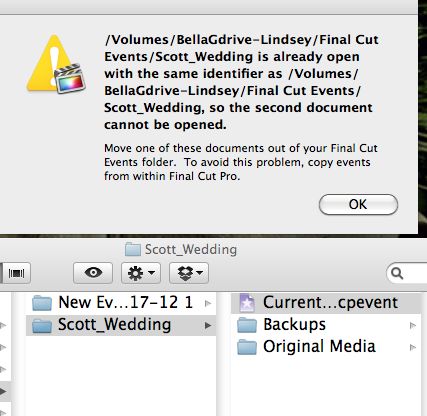
I recently purchased 7toX,
Attached is an error I’m getting while trying to translate an entire fcp7 project into fcpx 10.0.5.
I’m running the latest version of Snow Leopard on an I7 iMac.
Basically when I load the created fcp7 xml into fcpx, fcpx creates these 2 new events but will only load the “New Event” not the “Scott Wedding Event”
Any insight into this matter would be greatly appreciated.
PS: This is my 1st time using 7toX so it could be user error but I dont know what else to do..
Thanks
Replied by Mickey G on topic Re: 7toX not working properly
I recently purchased 7toX,
Attached is an error I’m getting while trying to translate an entire fcp7 project into fcpx 10.0.5.
I’m running the latest version of Snow Leopard on an I7 iMac.
Basically when I load the created fcp7 xml into fcpx, fcpx creates these 2 new events but will only load the “New Event” not the “Scott Wedding Event”
Any insight into this matter would be greatly appreciated.
PS: This is my 1st time using 7toX so it could be user error but I dont know what else to do..
Thanks
Please Log in to join the conversation.
18 Jul 2012 05:16 #11720
by Mickey G
Replied by Mickey G on topic Re: 7toX not working properly
Update: After a very quick response from Phillip Hodgets (like within 10mins) we were able to resolve my particular issue.
Thought I’d share part of the email he sent me that resolved the issue just in case anyone else has this issue.
Very simple fix that most of you probably already knew about but I couldn’t find any info regarding the matter.
From Philip:
"That seems to me to be the error message that happens when FCP X is not already open when you do the translation. It's an FCP X bug.
Try opening FCP X first and then do the translation and import the XML (or sending to FCP X from 7toX)”
after I tried this I opened a fairly large project from FCP7 inside FCPX, bins, markers, 40min edited sequence, completely intact!!
Hats off to these guys for doing what Apple couldn't and in so many words even said can’t be done...
Thought I’d share part of the email he sent me that resolved the issue just in case anyone else has this issue.
Very simple fix that most of you probably already knew about but I couldn’t find any info regarding the matter.
From Philip:
"That seems to me to be the error message that happens when FCP X is not already open when you do the translation. It's an FCP X bug.
Try opening FCP X first and then do the translation and import the XML (or sending to FCP X from 7toX)”
after I tried this I opened a fairly large project from FCP7 inside FCPX, bins, markers, 40min edited sequence, completely intact!!
Hats off to these guys for doing what Apple couldn't and in so many words even said can’t be done...
Please Log in to join the conversation.
