


3 Post Moderation Rule for New Boarders (25 Jan 2021)
New boarders will have their posts moderated - Don't worry if you cannot see your post immediately.
FCP X & Cyborg Rat : Anybody out there?
- finalbug.net
-
 Topic Author
- Offline
- Platinum Member
-

- Absence of Quality is the essence of squareness.
Am I the only person on this planet using a Cyborg Rat to edit in FCP X.
www.cyborggaming.com/de/prod/rat9.htm
Either I am stupid or the people who make this are twisted or both.
But I have that big red button where my thumb is screaming at me every morning "Append Edit"
Anybody out there? Anybody managed to program their rat?

Please Log in to join the conversation.
- cinemaloha
-

- Offline
- Elite Member
-

- Posts: 163
- Thank you received: 36
The main thing to note is that you have to force yourself to use Better Touch Tool. After a few days of using it exclusively, I can rough cut only with the Magic Trackpad without touching the keyboard.
Please Log in to join the conversation.

Please Log in to join the conversation.
- finalbug.net
-
Topic Author
- Offline
- Platinum Member
-
- Absence of Quality is the essence of squareness.
Yes a magic Track Pad is inevitable.
I am a short cut Junkie and I am very open to the idea of using gestures to operate FCP X.
It is a matter of weeks rather than months :whistle:
Please Log in to join the conversation.
paurray wrote: I am a short cut Junkie and I am very open to the idea of using gestures to operate FCP X.
You don't chose one or the other, like myself, I use both at the same time. MUCH faster and easier than keyboard with a "mouse".
Please Log in to join the conversation.
- finalbug.net
-
Topic Author
- Offline
- Platinum Member
-
- Absence of Quality is the essence of squareness.
But I usually manage to slap myself on the wrist at the very latest when I am doing keyboard acrobatics with 3 fingers.
As I say, I am very open to Gestures having pulled film material out of a flat bed film editor it is just seems natural, like the images move as well...

Please Log in to join the conversation.
But most importantly I use the second wheel to zoom in and out.
I would love to try the Magic Trackpad but my MacPro is so old it doesn't have Bluetooth.

Do you think it would work with a dongle Ben?
Sean Lander - Editing since 1982 - AVID 1991 - FCP 1999 - FCPX 2011
Please Log in to join the conversation.
- finalbug.net
-
Topic Author
- Offline
- Platinum Member
-
- Absence of Quality is the essence of squareness.
But most importantly I use the second wheel to zoom in and out.
You are talking about zooming in and out depending on what window is active, like Command +/- ?
I have to get my head around my mouse, once and for all. It is actually technically called a Rat. :whistle:
Your mouse looks cool. Looked at it online. Actually my mouse, emmmm I mean rat is not all that different.
www.conrad.com/medias/global/ce/9000_999...B_02_FB.EPS_1000.jpg
Like I have 5 buttons and a second scroll thingy that I never use. All just screaming at me.... :woohoo:
Would you mind telling me what you map to what?
Please Log in to join the conversation.
Has anyone any experience with the Wacom 5 on FCPX? I'm curious about what can be done with gestures, and maybe, hopefully, the touch ring. Could it perhaps allow me to clear desk space of my ShuttleXpress?
Please Log in to join the conversation.
- finalbug.net
-
Topic Author
- Offline
- Platinum Member
-
- Absence of Quality is the essence of squareness.
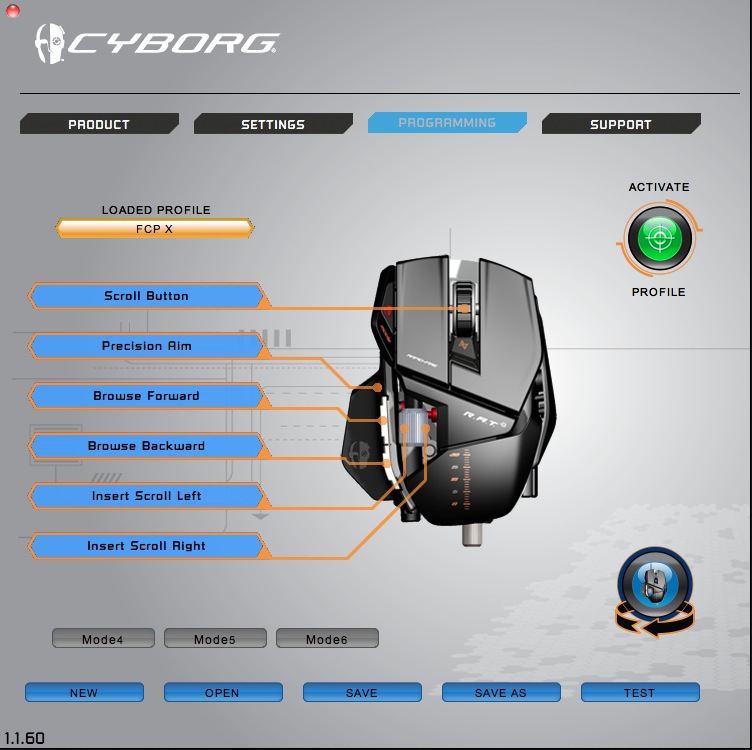
1 button : Precision Aim for Edit (Append/Insert/Overwrite/Connect)
The button is right where my thumb rests on the pinky! :ohmy:
2 buttons for previous/next Edit
And the second scroll thingy for zooming in/out (love the idea)
Maybe 2 buttons fro switching between the Event Browser & Timeline.
Guess that I actually need several sets of short cuts depending on what point I am at in the Edit.
thoughts anyone?
Please Log in to join the conversation.
I'm still trying to decide on what I'll use the buttons for. I'm thinking one could be a tilde key?
Yes the zoom workers everywhere. Zoom out canvas and reframe. Zoom in timeline and adjust clips. Etc.
When I was using Avid back in the day the Wacom was my preferred weapon but now wi right clicking, extra mouse (rat) buttons, scroll wheels and the like the tablet pen is just waaaay too limited. Worked fine on a monitor that was 800/600 anything more (for editing) and your really working with one hand tied behind your back IMHO.
Would much rather a trackpad with all the beautiful gestures.
Sean Lander - Editing since 1982 - AVID 1991 - FCP 1999 - FCPX 2011
Please Log in to join the conversation.
I have a MacPro 1.1 2006, (same as you, yes?) Easy to add bluetooth card. You can also change out the WiFi card to newer radios to support AirDrop. I also think a dongle will work with the MagicTrackpad, haven't tried it though.
As too upgrading the GPU, Lion and ML have native drivers for many additional cards that are not "APPLE blessed" and they work fine out of the box, or have a few quirks. Personally, I am running a XFX6870 in my MP1.1 without any hacks, works great just no "startup gray screen" with the radial counter. Opens to log in screen.
For programs that can utilize the GPU, you see better speed.
While the GTX680 is not officially supported on older computer models, it should work fine, you may not have the boot startup screen as above. That screen is a function of the 64bit EFI boot block that older MP lacks. Would need to check my Lion kext to see if 680 driver is included, otherwise it is possible to hack from ML and insert into Lion.The iMac has the mobile version of the 680 and now Apple is "officially" supporting the desktop GTX680. Barefeats has some speed comparisons here…
www.barefeats.com/gpu680v.html
www.barefeats.com/gpu680v2.html
You can also hack ML to run on older models, even though Apple does not support them officially. Currently, I run Lion on the MP and ML on my rMBP. I plan on setting up a drive with ML on it for the MP1.1 sometime soon. In the past this has required many hacks to extract and insert code to fool MacOS to install, now there is some great progress in getting ML installed with a 2 step process…see this discussion at MacRumors
forums.macrumors.com/showthread.php?t=1325709
Might be worth waiting for ver 3, sounds like they still have a couple of improvements coming.
Nice thing about the MP is that you can change the set up and just buy a new drive to try different OS's. I have hdd's with 10.4/10.5/10.6/10.7 on them, just insert hdd switch boot drive in preferences and restart.
Still waiting to see the new MP's though.
I use trackpads, and a Contour Shuttle 2 for video editing. I have found a bit of lag in using BTT so have quit using it.
Happy computing, keep the old girl running,
Greg
Please Log in to join the conversation.
NocoDave wrote: FCPX is the first NLE that I've felt comfortable using my Wacom tablet with (which a good thing as I use it for everything else). I'm about to upgrade to the intuos 5, this will be my first tablet with touch capabilities.
Has anyone any experience with the Wacom 5 on FCPX? I'm curious about what can be done with gestures, and maybe, hopefully, the touch ring. Could it perhaps allow me to clear desk space of my ShuttleXpress?
Did you end up getting a Wacom 5? I'm really thinking about getting one of these and I'm not sure what size, but I feel like this way of editing will be something I really enjoy, especially using SliceX where I have to draw around objects.
Any feedback on experiences with a wacom tablet would be great.
Please Log in to join the conversation.
especially using SliceX where I have to draw around objects.
I first got a tablet for the purpose of rotoscoping in After Effects, I remember at first it was pretty strange to get used to. But even then, working with masks was better/easier than a mouse straight away.
At first I only used the tablet for masking and switched to the mouse for anything else, then gradually used the mouse less and less until only using the mouse for video editing in Avid/Premiere. When FCPX came along I dumped the mouse completely.
For me the main things I was curious about were the touch and the ring capabilities. If you like a track pad perhaps a combination of fingers/pen may be good. But when the pen is close to the tablet the touch feature is disabled, it is possible to flick the pen up into the thumb crotch while lifting the hand to get it far enough away (a few inches) to switch to touch, when you start working with your fingers it overrides the pen so it can then stay close to the surface until again lifted far enough away and the pen can then automatically take priority again.
The ring is excellent and can be toggled between 4 different key combinations. I used a jog wheel for years and then found that with FCPX I'd use the skimmer to get rough position and the jog shuttle to find an exact frame from there.
At first it was a bit weird with the Intuos touch wheel, I wasn't sure about it as it doesn't click into position from frame to frame, but it never taken long to get used to it and I now love the combination.
Please Log in to join the conversation.

Interested that you have success with the Wacom as I find it tricky to use in FCPX
Been using tablets since my Quantel Editbox days and the Intuos 3 was great in FCP legacy. Just can't get it to work right in X. It seems really picky as to when it selects/deselects. If i open the project Library, it closes straight back up! Tweaking parameters in the Inspector is a right pain. Any tips??
Please Log in to join the conversation.
With the Intuos5 you can change the "Sensitivity", "Click Threshold" and "Max Pressure" independently. I recall it being a little different with Intuos3. I'm thinking that perhaps a threshold or max pressure adjustment might help.
Please Log in to join the conversation.
Please Log in to join the conversation.
Please Log in to join the conversation.
Did you ever get things working? It had a been a wee while since I had, so I just checked the Wacom drivers page. I updated and a minor issue with text staying selecting in C4D when I pulled the pen away from the tablet got sorted.
Please Log in to join the conversation.
