


- Posts: 1049
- Thank you received: 404
3 Post Moderation Rule for New Boarders (25 Jan 2021)
New boarders will have their posts moderated - Don't worry if you cannot see your post immediately.
FCPX, Motion 5, Compressor 4: Blu-ray folder (BDMV) on disc may appear as a QuickTime file
- peteramwiggins
-
 Topic Author
- Offline
- Administrator
-

- The Administrator :)
Less
More
28 Aug 2012 08:15 - 28 Aug 2012 08:19 #13512
by peteramwiggins
Administrator
FCPX, Motion 5, Compressor 4: Blu-ray folder (BDMV) on disc may appear as a QuickTime file was created by peteramwiggins
All,
Apple has released a Knowledge Base article on a problem with BDMV files (Blu-Ray) Seems that people were expecting to be able to open the file with QuickTime Player (You can't)
Symptoms
When sharing to Blu-ray from Final Cut Pro X, Motion 5, or Compressor 4, the Blu-ray (BDMV) folder on the resulting Blu-ray disc appears as a QuickTime file and it will not open. This occurs in OS X v10.8 Mountain Lion. Any Blu-ray disc (purchased, burned, or disc image) will appear this way.
Resolution
The BDMV folder is not intented to be opened in QuickTime Player. If you need to view the contents of the BDMV folder on a Blu-ray disc:
Control click the BDMV icon
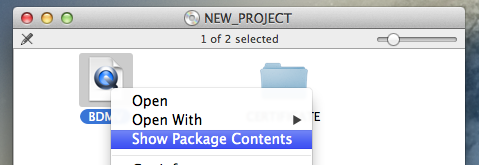
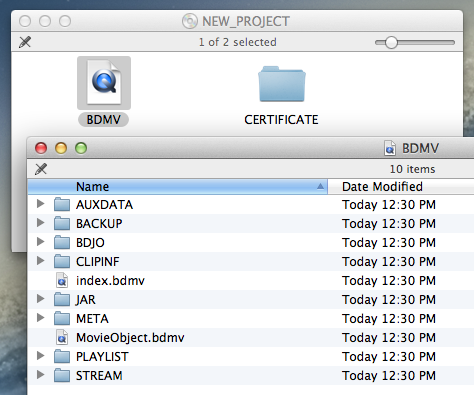
Choose Show Package Contents from the contextual menu. The contents of the BDMV folder will then be visible.
Apple has released a Knowledge Base article on a problem with BDMV files (Blu-Ray) Seems that people were expecting to be able to open the file with QuickTime Player (You can't)
Symptoms
When sharing to Blu-ray from Final Cut Pro X, Motion 5, or Compressor 4, the Blu-ray (BDMV) folder on the resulting Blu-ray disc appears as a QuickTime file and it will not open. This occurs in OS X v10.8 Mountain Lion. Any Blu-ray disc (purchased, burned, or disc image) will appear this way.
Resolution
The BDMV folder is not intented to be opened in QuickTime Player. If you need to view the contents of the BDMV folder on a Blu-ray disc:
Control click the BDMV icon
Choose Show Package Contents from the contextual menu. The contents of the BDMV folder will then be visible.
Administrator
Last edit: 28 Aug 2012 08:19 by peteramwiggins.
Please Log in to join the conversation.


24 Oct 2012 15:19 #15678
by BenB
Replied by BenB on topic FCPX, Motion 5, Compressor 4: Blu-ray folder (BDMV) on disc may appear as a QuickTime file
I also noticed, not a bug, but with SD DVDs, when writing to the hard drive, it creates a .IMG file. Very handy for burning right away in the Finder!
Please Log in to join the conversation.
