


- Posts: 1080
- Thank you received: 106
3 Post Moderation Rule for New Boarders (25 Jan 2021)
New boarders will have their posts moderated - Don't worry if you cannot see your post immediately.
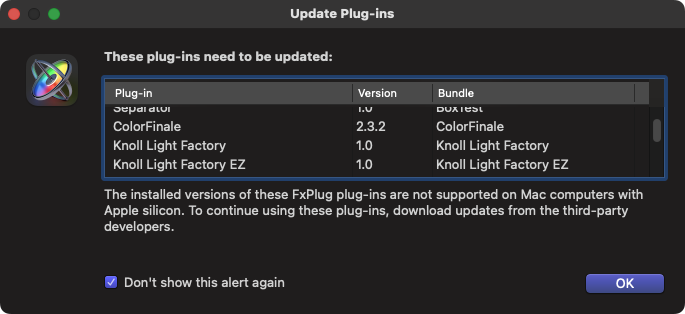
Motion keeps showing me this window despite clicking "Do Not Show Again"
18 Jul 2022 21:43 - 18 Jul 2022 21:44 #121486
by Redifer
Every time I open Motion 5.6.1 I get this alert. I click "Do not show this alert again" but the next time I open Motion, it does. Every. Single. Time. Without exception.
Lots of bugs this go-round with the Apple pro stuff. I hope they're OK.
Lots of bugs this go-round with the Apple pro stuff. I hope they're OK.
Last edit: 18 Jul 2022 21:44 by Redifer.
Please Log in to join the conversation.

18 Jul 2022 22:09 - 18 Jul 2022 22:11 #121487
by DaveM
Replied by DaveM on topic Motion keeps showing me this window despite clicking "Do Not Show Again"
From what's visible in that list, you have at least a few not-compatible-with-Apple-Silicon versions of plugins on your Mac.
A test you could do would be to remove the items listed in the "Update Plug-ins" dialog window. Then, start up Motion and see if it still appears.
Or, try deleting Motion's preferences.
More concerning, however, is that it seems that older, non-Silicon-supporting plugins can cause serious issues with FCP on M1 Macs. This also may apply to Motion. Another, recent poster had issues with an outdated plugin keeping his Project file from loading on an M1 MacBook Pro.
It might be a good idea for anyone running an M1 or M2 Mac to do some housekeeping with respect to older plugins.
A test you could do would be to remove the items listed in the "Update Plug-ins" dialog window. Then, start up Motion and see if it still appears.
Or, try deleting Motion's preferences.
More concerning, however, is that it seems that older, non-Silicon-supporting plugins can cause serious issues with FCP on M1 Macs. This also may apply to Motion. Another, recent poster had issues with an outdated plugin keeping his Project file from loading on an M1 MacBook Pro.
It might be a good idea for anyone running an M1 or M2 Mac to do some housekeeping with respect to older plugins.
Last edit: 18 Jul 2022 22:11 by DaveM.
Please Log in to join the conversation.
