


- Posts: 56
- Thank you received: 3
3 Post Moderation Rule for New Boarders (25 Jan 2021)
New boarders will have their posts moderated - Don't worry if you cannot see your post immediately.
Rigging presets without losing slider control?
09 Sep 2011 17:31 #1159
by goestas
Rigging presets without losing slider control? was created by goestas
I'd like to have a bunch of presets of a group of sliders as a drop-down menu, while still retaining the ability to adjust the individual sliders in FCP X. But when I rig groups of slider settings to the drop-down widget, the sliders themselves, although published separately, can no longer be moved individually within the FCP X effect. Here is a picture of the interface of the template I'm working on:
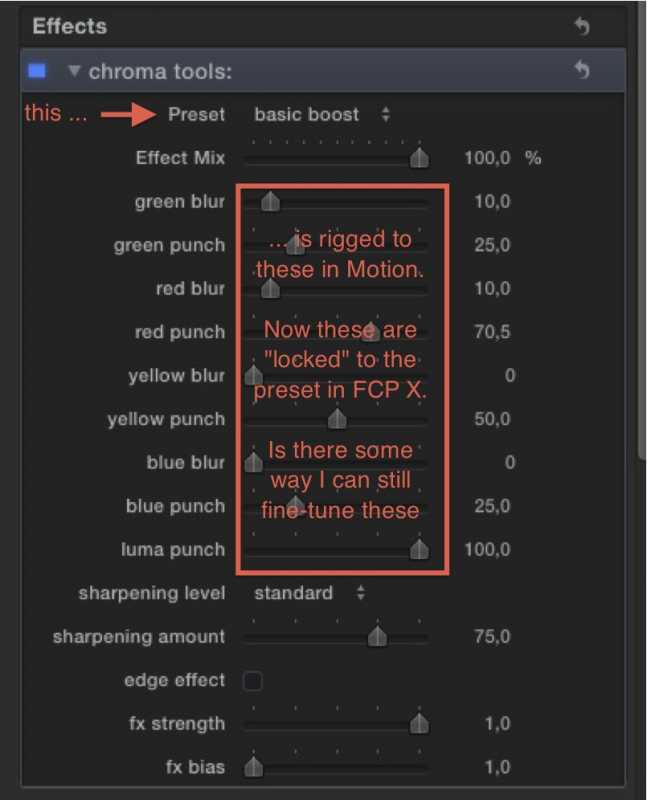
The individual sliders are rigged to input sliders in (in this case) the Conduit plug's interface. They work ... until the drop-down widget is rigged to those sliders. So the real and general question is, I guess: is there a way to temporarily disable a part of a rig, say with a check box, in order to "free" the subordinate controls, OR is there a way to nest widgets so that the "subordinate" ones can be both controlled individually and by the "higher" ones OR can I clone the image+effect layer and choose which layer (either the one rigged to individual sliders or the one rigged to the presets) is output by the template? (Ok, that already gives me an idea, but it's a klutzy workaround. There must be a more elegant way)
Thanks in advance for any suggestions!
The individual sliders are rigged to input sliders in (in this case) the Conduit plug's interface. They work ... until the drop-down widget is rigged to those sliders. So the real and general question is, I guess: is there a way to temporarily disable a part of a rig, say with a check box, in order to "free" the subordinate controls, OR is there a way to nest widgets so that the "subordinate" ones can be both controlled individually and by the "higher" ones OR can I clone the image+effect layer and choose which layer (either the one rigged to individual sliders or the one rigged to the presets) is output by the template? (Ok, that already gives me an idea, but it's a klutzy workaround. There must be a more elegant way)
Thanks in advance for any suggestions!
Please Log in to join the conversation.
11 Sep 2011 22:21 #1174
by goestas
Replied by goestas on topic Re: Rigging presets without losing slider control?
Well, I guess the short answer is "no", it's not designed that way. Hence "presets" -- you'd have to create a few of those that you could then drag & drop onto the clip.
The workaround is of course to create another instance -- with "preset menu" instead of sliders -- of the effect within the template and then rig a composite. Now the question becomes: if the instance I'm not currently using is at 0% opacity, will it still be processed anyway, resulting in a factor of 2 performance hit? I will test this at some point, but if anyone has the answer already, please do say!
Cheers, G.
The workaround is of course to create another instance -- with "preset menu" instead of sliders -- of the effect within the template and then rig a composite. Now the question becomes: if the instance I'm not currently using is at 0% opacity, will it still be processed anyway, resulting in a factor of 2 performance hit? I will test this at some point, but if anyone has the answer already, please do say!
Cheers, G.
Please Log in to join the conversation.

12 Sep 2011 01:34 #1177
by BenB
Replied by BenB on topic Re: Rigging presets without losing slider control?
Make each slider an independent Rig.
Please Log in to join the conversation.
12 Sep 2011 14:45 #1183
by goestas
Replied by goestas on topic Re: Rigging presets without losing slider control?
But if I then rig a drop-down menu item to the slider/rig, wouldn't it end up the same? 'Splain please, how this would change the nature of the connections? I wondered myself what the purpose (other than organizational) of being able to create more than one rig is. But so far I don't "get" it.
Please Log in to join the conversation.
12 Sep 2011 18:43 #1186
by BenB
Replied by BenB on topic Re: Rigging presets without losing slider control?
Well, I'm thinking, I don't know, but you won't know if it works until you try, that putting them all together in the same Rig may be associating them in some unwanted manner. We're not really sure how Motion is associating these things yet.
I've had some similar strange behaviors, and doing things like separating things out into rigs, or just Publishing a slider without making it a rig, often fixes stuff. It's a huge experiment, and I'd never "assume" anything I hadn't actually tried yet would or would not work.
And I'm not sure what you mean by converting sliders to drop-down menus. Why would you do that?
I've had some similar strange behaviors, and doing things like separating things out into rigs, or just Publishing a slider without making it a rig, often fixes stuff. It's a huge experiment, and I'd never "assume" anything I hadn't actually tried yet would or would not work.
And I'm not sure what you mean by converting sliders to drop-down menus. Why would you do that?
Please Log in to join the conversation.
12 Sep 2011 18:54 #1188
by goestas
Replied by goestas on topic Re: Rigging presets without losing slider control?
Well, if you look at the interface picture in the first post, I wanted to be able to access a few quick slider combinations via drop-down "preset", since there are a lot of sliders to adjust by hand, and then fine-tune that setting. But according to the manual and my tests so far, each slider can only be linked to one input, which means now that they're in a hierarchy, with the drop-down snapshots on top, the individual sliders, though I can publish them, are now "hard-wired" to the presets. So the workaround was to create an exact copy of the effect on another layer (with a clone of the input placeholder), and then rig the values of that layer's effect to the drop-down and the other layer to the sliders; and add an opacity setting to the presets - So if the presets/dropdown selection is anything but "off", the opacity of that layer is 100% and that of the "sliders" layer (for good measure, but unnecessary I guess) is 0%. Now if Motion is coded efficiently, any layer that is set at 0% opacity ought to be bypassed in processing. But I'm not sure that's the case. If yes, then great, I can do this. If no, then the performance hit isn't worth it, and I might as well just create separate template presets to drag & drop onto my clip as needed. Which I think is the way Motion is built, hence calling them templates or presets rather than "plug-ins". If I have time I'll try this on a very processing-intensive effect and measure the time it takes to render in both variations.
Have I managed to remove any remaining clarities?
Have I managed to remove any remaining clarities?
Please Log in to join the conversation.
12 Sep 2011 19:19 - 12 Sep 2011 19:24 #1192
by BenB
Replied by BenB on topic Re: Rigging presets without losing slider control?
OK, yeah, your preset drop-down menu would have to have an "off" for the sliders to work. That makes sense.
Just a thought, make this two templates (yes, Apple calls them templates, not plugins, plugins are written with FXPlug 2 scripting). See if you can get it to work that way. One with presets, one with manual slider adjustments. Just to try and isolate what is going on. Not having the template to work with myself, I'm making assumptions about what's being done.
The only thing that throws me, is that you're building this based on Conduit. And I've no clue how Conduit handles it's controls. I'd email Conduit support, and ask them if there was something in their plugin that could trip up Motion's Rig & Publish process. Because all of this works straight forward with Motion's built-in filters. Just a thought.
Setting a layer's opacity to 0% does not, and should not "bypass" the layer altogether. We need to have layers be invisible, yet still interact with other layers using physics based behaviors.
This looks like a very interesting template you're building. It'd be interesting to see what it's actually doing.
Just a thought, make this two templates (yes, Apple calls them templates, not plugins, plugins are written with FXPlug 2 scripting). See if you can get it to work that way. One with presets, one with manual slider adjustments. Just to try and isolate what is going on. Not having the template to work with myself, I'm making assumptions about what's being done.
The only thing that throws me, is that you're building this based on Conduit. And I've no clue how Conduit handles it's controls. I'd email Conduit support, and ask them if there was something in their plugin that could trip up Motion's Rig & Publish process. Because all of this works straight forward with Motion's built-in filters. Just a thought.
Setting a layer's opacity to 0% does not, and should not "bypass" the layer altogether. We need to have layers be invisible, yet still interact with other layers using physics based behaviors.
This looks like a very interesting template you're building. It'd be interesting to see what it's actually doing.
Last edit: 12 Sep 2011 19:24 by BenB.
Please Log in to join the conversation.
12 Sep 2011 20:26 - 12 Sep 2011 20:29 #1196
by goestas
Replied by goestas on topic Re: Rigging presets without losing slider control?
Though you're right that Conduit throws another factor into the equation, I don't think this affects how Motion deals with the sliders; now that I've read the help file I would expect it to do exactly what it does.
You're right that invisible layers should be processed when needed, but wouldn't it be equally useful to be able to turn them on or off, essentially being able to rig the layer checkboxes in Motion? Shouldn't be a difficult option for Apple to offer, no?
If you have the conduit engine for Motion or are interested in it (I think a demo is still available through dvgarage), a better version of that template is here . I've taken out the presets for now. Let me know if it does something the standard Motion effects can't (haven't tried them all out yet), and I'll continue to refine it, adding hue controls and maybe even selective color adjustment, which however won't be as good as what FCP X has on offer now, but what I can offer is a different set of controls.
SInce you're a color grading pro and I don't have the first clue about it but think Conduit offers some really nice tools for this, it would be great if you would post some specific desires that might complement what FCP X and Motion 5 has/hasn't got.
You're right that invisible layers should be processed when needed, but wouldn't it be equally useful to be able to turn them on or off, essentially being able to rig the layer checkboxes in Motion? Shouldn't be a difficult option for Apple to offer, no?
If you have the conduit engine for Motion or are interested in it (I think a demo is still available through dvgarage), a better version of that template is here . I've taken out the presets for now. Let me know if it does something the standard Motion effects can't (haven't tried them all out yet), and I'll continue to refine it, adding hue controls and maybe even selective color adjustment, which however won't be as good as what FCP X has on offer now, but what I can offer is a different set of controls.
SInce you're a color grading pro and I don't have the first clue about it but think Conduit offers some really nice tools for this, it would be great if you would post some specific desires that might complement what FCP X and Motion 5 has/hasn't got.
Last edit: 12 Sep 2011 20:29 by goestas.
Please Log in to join the conversation.
12 Sep 2011 21:12 #1197
by BenB
Replied by BenB on topic Re: Rigging presets without losing slider control?
You can, in fact, Rig the visibility check boxes for each layer. I'll download this and check it out later. Trying to make deadlines this week. "Deadlines are what stop editors from completing their work."
Please Log in to join the conversation.
12 Sep 2011 21:17 #1198
by goestas
Oh, great, I'll check that out (pun intended?). So easy to miss the many little features ...
:grin:
Replied by goestas on topic Re: Rigging presets without losing slider control?
You can, in fact, Rig the visibility check boxes for each layer.
Oh, great, I'll check that out (pun intended?). So easy to miss the many little features ...
"Deadlines are what stop editors from completing their work."
:grin:
Please Log in to join the conversation.
