



- Posts: 17
- Thank you received: 0
3 Post Moderation Rule for New Boarders (25 Jan 2021)
New boarders will have their posts moderated - Don't worry if you cannot see your post immediately.
Camera Audio doesn't play on iPhone devices???
23 Jul 2012 14:00 #11940
by erickp
Camera Audio doesn't play on iPhone devices??? was created by erickp
I'm having an issue with "audio" after exporting for YouTube and uploading. When viewed on iPhone the music intros play just fine but then when the video we shot kicks in, the sound is virtually non-existent. You hear very low garbling. I'm currently using Final Cut Pro 7 and Compressor 3. I'm creating very simple product demonstration videos.
I'm shooting the videos with a Canon Vixia HF S200 and an external Lavalier Mic plugged into the camera. I take the video shot and "log and transfer" into FCP7. Once the video is imported I edit everything down and just add the intro & outro. The intro and outro use the same music which is a ".aiff" file. When finished I adjust all the levels, then play everything back. Within FCP7 it plays back beautifully.
My next step is to export and then send that file to Compressor. Since I am posting this to YouTube, I just use the YouTube preset and call it a day. Once it's finished, I play it on my various computers and it plays just fine.
The issue comes when people try to play the video on an iPhone or iPad (out of the units speakers). The intro & outro ".aiff" music plays fine but when the actually camera audio kicks in, it completely drops off and you barely hear it and it's all distorted. This same issue does happen on some window PCs but that is hit or miss.
Am I doing something wrong? Is there specific procedure for making the video play smoothly on everything? I am at a TOTAL loss! Any help is GREATLY appreciated!
Thanks!
~Erick
I'm shooting the videos with a Canon Vixia HF S200 and an external Lavalier Mic plugged into the camera. I take the video shot and "log and transfer" into FCP7. Once the video is imported I edit everything down and just add the intro & outro. The intro and outro use the same music which is a ".aiff" file. When finished I adjust all the levels, then play everything back. Within FCP7 it plays back beautifully.
My next step is to export and then send that file to Compressor. Since I am posting this to YouTube, I just use the YouTube preset and call it a day. Once it's finished, I play it on my various computers and it plays just fine.
The issue comes when people try to play the video on an iPhone or iPad (out of the units speakers). The intro & outro ".aiff" music plays fine but when the actually camera audio kicks in, it completely drops off and you barely hear it and it's all distorted. This same issue does happen on some window PCs but that is hit or miss.
Am I doing something wrong? Is there specific procedure for making the video play smoothly on everything? I am at a TOTAL loss! Any help is GREATLY appreciated!
Thanks!
~Erick
Please Log in to join the conversation.


23 Jul 2012 15:39 #11947
by BenB
Replied by BenB on topic Re: Camera Audio doesn't play on iPhone devices???
Screen shot of your Sequence open in the timeline?
Very odd.
Very odd.
Please Log in to join the conversation.
23 Jul 2012 16:05 #11948
by erickp
Replied by erickp on topic Re: Camera Audio doesn't play on iPhone devices???
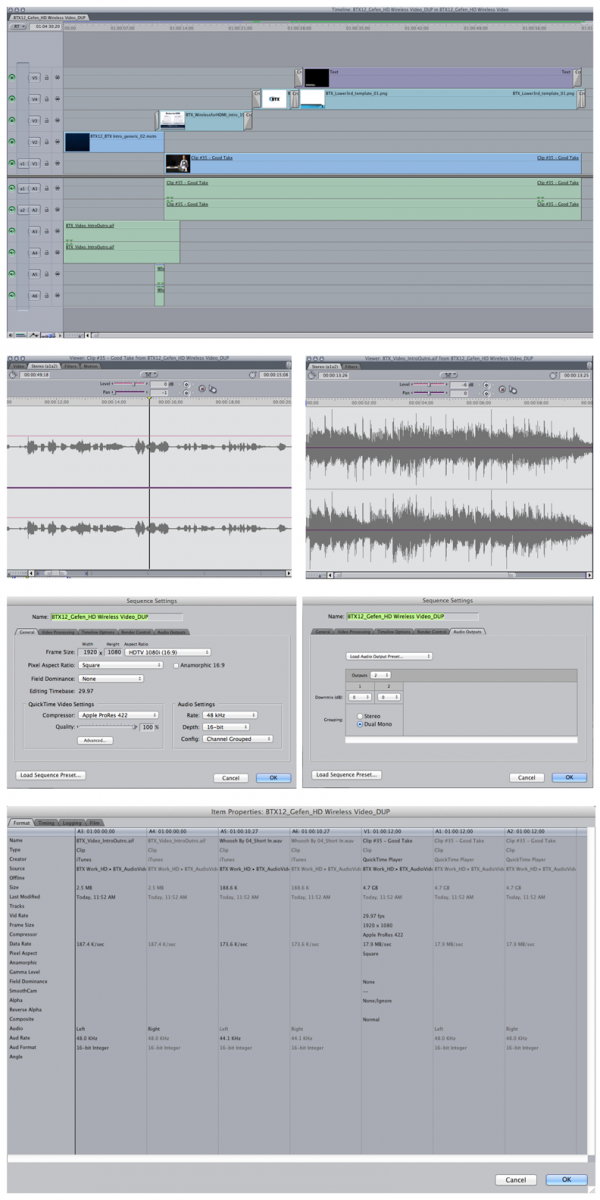
Sure.. no problem. Here's a DUP of the original sequence. Using this one for testing purposes but it's all the same. Attached is a screen shot of various windows.
Please Log in to join the conversation.
23 Jul 2012 16:08 #11949
by erickp
Replied by erickp on topic Re: Camera Audio doesn't play on iPhone devices???
Sure.. no problem. Here's a DUP of the original sequence. Using this one for testing purposes but it's all the same. Attached is a screen shot of various windows.
Please Log in to join the conversation.
23 Jul 2012 16:15 #11950
by BenB
Replied by BenB on topic Re: Camera Audio doesn't play on iPhone devices???
Screen shot is way too small for me to read anything on it. Are all audio files AIFF, 16-bit, 48kHz? I think I can see all audio tracks are enabled, and all clips are enabled individually. Wish I could see the text in that browser, and your audio channel configurations, and the timeline. Too small for me to see anything.
Please Log in to join the conversation.
23 Jul 2012 16:23 #11951
by erickp
Replied by erickp on topic Re: Camera Audio doesn't play on iPhone devices???
Check out this version. Let me know if you can read this one...
dl.dropbox.com/u/5658633/FCP_project%20screenshots.pdf
dl.dropbox.com/u/5658633/FCP_project%20screenshots.pdf
Please Log in to join the conversation.
23 Jul 2012 19:53 #11952
by BenB
Replied by BenB on topic Re: Camera Audio doesn't play on iPhone devices???
One question. Why are you outputting dual mono, and not Stereo?
Please Log in to join the conversation.
23 Jul 2012 20:25 #11954
by erickp
Replied by erickp on topic Re: Camera Audio doesn't play on iPhone devices???
I honestly haven't noticed that it was set to dual-mono.
So, I just switched it stereo and decided to export it again to see if it makes a difference. Now, the music intro plays but when the person starts to talk it sounds REALLY low and garbled. Almost static in nature. You can barely hear anything. Before, you would at least hear it via the computer playback but now it sounds the same as if I were playing via the iPhone speakers. So I just basically recreate the issue I was having but on both iPhone speakers and normal playback on the computer. LOL! Any ideas?
So, I just switched it stereo and decided to export it again to see if it makes a difference. Now, the music intro plays but when the person starts to talk it sounds REALLY low and garbled. Almost static in nature. You can barely hear anything. Before, you would at least hear it via the computer playback but now it sounds the same as if I were playing via the iPhone speakers. So I just basically recreate the issue I was having but on both iPhone speakers and normal playback on the computer. LOL! Any ideas?
Please Log in to join the conversation.
23 Jul 2012 20:34 #11955
by BenB
Replied by BenB on topic Re: Camera Audio doesn't play on iPhone devices???
What third party audio/video I/O devices are hooked up?
Are these ALL AIFF files?
1- Delete all render files, do NOT render before Export.
2- If that doesn't help use the free "Preference Manager" from Digital Rebellion to trash FCP 7 prefs. Delete renders. Launch FCP. Try again.
Are these ALL AIFF files?
1- Delete all render files, do NOT render before Export.
2- If that doesn't help use the free "Preference Manager" from Digital Rebellion to trash FCP 7 prefs. Delete renders. Launch FCP. Try again.
Please Log in to join the conversation.
23 Jul 2012 20:56 #11957
by erickp
Replied by erickp on topic Re: Camera Audio doesn't play on iPhone devices???
I figured it OUT!
Ok... so like before, I changed the setting from "dual-mono" to "stereo". Then, I un-linked the stereo pair from the camera audtio and deleted one of the tracks. Then panned that track to "0". Reexported the sequence back out and BooYah! It sounds GREAT!
I thank you SO MUCH for your help! Please reach out if you need anything.
~Erick
Ok... so like before, I changed the setting from "dual-mono" to "stereo". Then, I un-linked the stereo pair from the camera audtio and deleted one of the tracks. Then panned that track to "0". Reexported the sequence back out and BooYah! It sounds GREAT!
I thank you SO MUCH for your help! Please reach out if you need anything.
~Erick
Please Log in to join the conversation.
