


3 Post Moderation Rule for New Boarders (25 Jan 2021)
New boarders will have their posts moderated - Don't worry if you cannot see your post immediately.
Preview changes Viewer to Fit?
- Tom Wolsky
-
 Topic Author
- Offline
- Moderator
-

Thanks.
Please Log in to join the conversation.
- ronny courtens
-

- Offline
- Moderator
-
- Posts: 4455
- Thank you received: 962
I can confirm this.
If you have the Viewer set to a small size or are zoomed in on it, while you're skimming an effect in the Effects Browser, the Viewer always jumps to display 100%.
Same thing happens with skimming through a clip: when you skim through the timeline the Viewer displays the video the way it is set in the Viewer Zoom level. But when you skim through a specific clip in that timeline the Viewer jumps to display the video at 100%. Regardless of how the zoom level of the Viewer is set.
Please Log in to join the conversation.


I also tried it with using my second monitor for events, second monitor for viewer and single monitor for viewer and events. Am I misunderstanding something?
Creating history....one edit at a time !
Please Log in to join the conversation.
- Tom Wolsky
-
Topic Author
- Offline
- Moderator
-
Please Log in to join the conversation.
- ronny courtens
-
- Offline
- Moderator
-
- Posts: 4455
- Thank you received: 962
I have tried this on a test machine that runs multiple OSes and FCPX versions for troubleshooting purposes. When I first did the test the machine was running 10.0.4 on Snow Leopard, and clip skimming was enabled. As I said these were the results:
When the Viewer is set to any zoom level, previewing an effect or skimming over a clip (if clip skimming is enabled) makes the zoom level temporarily jump to 100%. That is not a correct behavior, and here is a little video showing this issue:
files.me.com/ronnycourtens/u6wftl.mov
I have switched the test machine to run 10.0.4 on Lion (7.3) for a new test and these are the results:
When the Viewer is set to any zoom level, previewing an effect or skimming over a clip (if clip skimming is enabled) makes the zoom level temporarily jump to Fit. That's the behavior we are used to see and which I like.
This also explains why if the Viewer zoom level is already set to Fit and you preview an effect (or you skim a clip with clip skimming enabled) you won't notice any difference.
Please Log in to join the conversation.
vimeo.com/42037986
Creating history....one edit at a time !
Please Log in to join the conversation.
- Tom Wolsky
-
Topic Author
- Offline
- Moderator
-
And here's what ronny and I see:
vimeo.com/42039616
Please Log in to join the conversation.


Please Log in to join the conversation.
- Tom Wolsky
-
Topic Author
- Offline
- Moderator
-
Please Log in to join the conversation.
Tom Wolsky wrote: Interesting. What computer is this? Wonder if it makes a difference if the browser is on the same screen. Maybe the size of the monitor is a factor.
Tom, this is tested on a MacPro 12 core mid 2010 model OSX Lion 10.7.4. 48GB ram, SSD drives and two 27 inch LED apple displays. It works the same for me whether I choose FCPX to run on one display, or whether I put the viewer on a second display or the events on a second display. By default I use both monitors with events on the second display, but I tested the viewer zoom in every possible configuration and it always works per my screencast.
Are you using the new 10.7.4 OSX Lion? I noticed Ronny was testing with Snow Leopard and then with Lion 10.7.3.
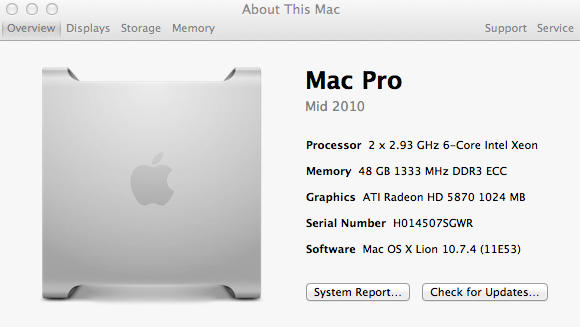
Creating history....one edit at a time !
Please Log in to join the conversation.
- ronny courtens
-
- Offline
- Moderator
-
- Posts: 4455
- Thank you received: 962
Please Log in to join the conversation.
Please Log in to join the conversation.
- ronny courtens
-
- Offline
- Moderator
-
- Posts: 4455
- Thank you received: 962
Snow Leopard
No matter how the Viewer is set, clip skimming and effect previews switch Viewer setting to 100%
Lion 10.7.3
No matter how the Viewer is set, clip skimming and effect previews switch Viewer setting to Fit. Exactly as in the video Tom has posted and what Ben sees.
Lion 10.7.4
Same result as 10.7.3
Please Log in to join the conversation.
- Tom Wolsky
-
Topic Author
- Offline
- Moderator
-
Please Log in to join the conversation.
- ronny courtens
-
- Offline
- Moderator
-
- Posts: 4455
- Thank you received: 962
Please Log in to join the conversation.
Creating history....one edit at a time !
Please Log in to join the conversation.
- Tom Wolsky
-
Topic Author
- Offline
- Moderator
-
Please Log in to join the conversation.
- ronny courtens
-
- Offline
- Moderator
-
- Posts: 4455
- Thank you received: 962
Please Log in to join the conversation.
Creating history....one edit at a time !
Please Log in to join the conversation.
- Tom Wolsky
-
Topic Author
- Offline
- Moderator
-
www.fcpxbook.com/005.png
Apparently if I add an image to the forum the message is blank.
Please Log in to join the conversation.
