


- Posts: 170
- Thank you received: 4
3 Post Moderation Rule for New Boarders (25 Jan 2021)
New boarders will have their posts moderated - Don't worry if you cannot see your post immediately.
What are the px values in the Transform and Crop windows, they don't seem to be pixels?
08 Apr 2012 23:44 #6684
by scotopia
What are the px values in the Transform and Crop windows, they don't seem to be pixels? was created by scotopia
Hello All,
I am having some trouble understanding what the Left/Right/Top/Bottom and position values in the transform and crop inspector panes are measured int. My video is 1920x1080 pixels, but if i transform drag a section of clip footage so that its upper left point is at the bottom right of the window, the inspector window shows position x= 178.8 px and position = 100 px (even though the overlay that appears above the footage as you drag it shows x= 1920 and y= 1080); what does this mean?
What I am basically looking to do is to take trim a 480x480 pixel section of of my footage (with origin at 300,400) and then transform up it to be at position 100,200 in relation to the main window (for picture in picture type of stuff). I was expecting to just be able to go into those inspector windows and type in the pixel values for trim and transform but then I saw this and got confused. Can anyone clear this up for me? Thanks.
I am having some trouble understanding what the Left/Right/Top/Bottom and position values in the transform and crop inspector panes are measured int. My video is 1920x1080 pixels, but if i transform drag a section of clip footage so that its upper left point is at the bottom right of the window, the inspector window shows position x= 178.8 px and position = 100 px (even though the overlay that appears above the footage as you drag it shows x= 1920 and y= 1080); what does this mean?
What I am basically looking to do is to take trim a 480x480 pixel section of of my footage (with origin at 300,400) and then transform up it to be at position 100,200 in relation to the main window (for picture in picture type of stuff). I was expecting to just be able to go into those inspector windows and type in the pixel values for trim and transform but then I saw this and got confused. Can anyone clear this up for me? Thanks.
Please Log in to join the conversation.
09 Apr 2012 08:52 #6687
by cgbier
Replied by cgbier on topic Re: What are the px values in the Transform and Crop windows, they don't seem to be pixels?
The screen origin (0, 0) is in the center of your image.
Please Log in to join the conversation.
09 Apr 2012 09:11 #6688
by scotopia
Replied by scotopia on topic Re: What are the px values in the Transform and Crop windows, they don't seem to be pixels?
Okay; I still don't see where 178.8 comes into play.
Please Log in to join the conversation.

09 Apr 2012 18:50 #6695
by BenB
Replied by BenB on topic Re: What are the px values in the Transform and Crop windows, they don't seem to be pixels?
Oh no, there's a system that the FCP X Team has not explained to anyone yet. Your frame size for these values, it seems, has no relationship to the size of the actual video frame. No matter what, from the center of the frame, it's 50 "px" to the top, 50 to the bottom. And it's 88.9 "px" to each side from the center, except for SD which is 68.2 to each side. That's just how it is. Many of us have been trying to figure this oddity out without success.
Please Log in to join the conversation.
- Tom Wolsky
-

- Offline
- Moderator
-

09 Apr 2012 19:12 #6700
by Tom Wolsky
Replied by Tom Wolsky on topic Re: What are the px values in the Transform and Crop windows, they don't seem to be pixels?
What a px? It's not a pixel, or these are the chunkiesr pixels ever. It's not percent, because the percentages don't make sense.
Please Log in to join the conversation.
- ronny courtens
-

- Offline
- Moderator
-
Less
More
- Posts: 4455
- Thank you received: 962
09 Apr 2012 19:15 - 09 Apr 2012 19:32 #6703
by ronny courtens
Replied by ronny courtens on topic Re: What are the px values in the Transform and Crop windows, they don't seem to be pixels?
First allow me to make one small correction: when you transform drag a section of clip footage in a 1920x1080 project so that its upper left point is at the bottom right of the window, the inspector window shows position x= 177.8 (and not 178.8 ). And it's quite logical as well. Let the math begin!
1920 x 1080 is a 16:9 square pixel format.
The relation between the width and the height is 1920:1080 = 1.77777778.
In FCP10 the centre of your image is shown as x=0 and y=0
The relative distance between the centre of the image and the top of the image is shown as x=100
This means that the relative distance between the centre of the image and the right side of the image will be y= (100 x 1.77777778) = 177.77778 or 177.8. Which is what you see.
So to answer your question: the Left/Right/Top/Bottom and position values in the transform and crop inspector panes are measured in units. One unit equals 1 percent of the frame height. So in a 1290x1080 frame 1 unit equals 10.8 square pixels. You have 100 units in the height (10.8 x 100 = 1080) and 177.8 units in the width (10.8 x 177.8 = 1920).
Now let's do a real life test to see if the math is correct.
Select Crop > Trim and in the Inspector enter a value of 10 for Left, Right, Top and Bottom.
Now click the image in the Viewer and watch the overlay information.
You will see that Left, Right, Top and Bottom have been trimmed by exactly 108 pixels.
Best wishes
Ronny
1920 x 1080 is a 16:9 square pixel format.
The relation between the width and the height is 1920:1080 = 1.77777778.
In FCP10 the centre of your image is shown as x=0 and y=0
The relative distance between the centre of the image and the top of the image is shown as x=100
This means that the relative distance between the centre of the image and the right side of the image will be y= (100 x 1.77777778) = 177.77778 or 177.8. Which is what you see.
So to answer your question: the Left/Right/Top/Bottom and position values in the transform and crop inspector panes are measured in units. One unit equals 1 percent of the frame height. So in a 1290x1080 frame 1 unit equals 10.8 square pixels. You have 100 units in the height (10.8 x 100 = 1080) and 177.8 units in the width (10.8 x 177.8 = 1920).
Now let's do a real life test to see if the math is correct.
Select Crop > Trim and in the Inspector enter a value of 10 for Left, Right, Top and Bottom.
Now click the image in the Viewer and watch the overlay information.
You will see that Left, Right, Top and Bottom have been trimmed by exactly 108 pixels.
Best wishes
Ronny
Last edit: 09 Apr 2012 19:32 by ronny courtens.
Please Log in to join the conversation.
- Tom Wolsky
-
- Offline
- Moderator
-
09 Apr 2012 19:25 #6706
by Tom Wolsky
Replied by Tom Wolsky on topic Re: What are the px values in the Transform and Crop windows, they don't seem to be pixels?
So what's a px? It's not a pixel, not by SMPTE or any other definition.
Your system sounds logical; it also sounds like the most fundamentally stupid piece of programming imaginable for a user interface.
Your system sounds logical; it also sounds like the most fundamentally stupid piece of programming imaginable for a user interface.
Please Log in to join the conversation.
- ronny courtens
-
- Offline
- Moderator
-
Less
More
- Posts: 4455
- Thank you received: 962
09 Apr 2012 20:17 - 09 Apr 2012 20:20 #6711
by ronny courtens
Replied by ronny courtens on topic Re: What are the px values in the Transform and Crop windows, they don't seem to be pixels?
Hi Tom,
As creative people we know that logical is not necessarily the same as practical
The information in the Viewer overlay is shown as absolute square pixel values.
As I explained above the information in the Inspector is shown as relative square pixel values.
Unfortunately these values are called "px" both in the Viewer overlay and in the Inspector, although they completely differ. This is absolutely confusing and I have sent many reports to Apple about this inconsistency.
Best wishes,
Ronny
As creative people we know that logical is not necessarily the same as practical
The information in the Viewer overlay is shown as absolute square pixel values.
As I explained above the information in the Inspector is shown as relative square pixel values.
Unfortunately these values are called "px" both in the Viewer overlay and in the Inspector, although they completely differ. This is absolutely confusing and I have sent many reports to Apple about this inconsistency.
Best wishes,
Ronny
Last edit: 09 Apr 2012 20:20 by ronny courtens.
Please Log in to join the conversation.
09 Apr 2012 20:23 #6712
by BenB
Replied by BenB on topic Re: What are the px values in the Transform and Crop windows, they don't seem to be pixels?
"The relative distance between the centre of the image and the top of the image is shown as x=100"
Not me, for 1920 x 1080 I get x=88.9 from center to the edge. And 50 from center to top. Thus I have 100 "px units" from top to bottom, and 177.8 top to bottom.
It still makes no sense at all. "PX" should mean pixels, period. These esoteric "units" are simply garbage.
This is one of only two things that super irritate me about X, as much as I love it. The other is the nonsensical color "board" with no white balance tool, and no way to adjust to skin tone.
Not me, for 1920 x 1080 I get x=88.9 from center to the edge. And 50 from center to top. Thus I have 100 "px units" from top to bottom, and 177.8 top to bottom.
It still makes no sense at all. "PX" should mean pixels, period. These esoteric "units" are simply garbage.
This is one of only two things that super irritate me about X, as much as I love it. The other is the nonsensical color "board" with no white balance tool, and no way to adjust to skin tone.
Please Log in to join the conversation.
- Andreas Kiel
-

- Offline
- Platinum Member
-

Less
More
- Posts: 1077
- Thank you received: 189
09 Apr 2012 20:24 #6713
by Andreas Kiel
Replied by Andreas Kiel on topic Re: What are the px values in the Transform and Crop windows, they don't seem to be pixels?
I've done the same as Ronny.
Totally confusing and has nothing to do with "px" which the majority of users would interpret as "pixel"
-Andreas
Totally confusing and has nothing to do with "px" which the majority of users would interpret as "pixel"
-Andreas
Please Log in to join the conversation.
09 Apr 2012 21:11 #6717
by BenB
Replied by BenB on topic Re: What are the px values in the Transform and Crop windows, they don't seem to be pixels?
I'm an editor, not a mathematician, dammit!
So the abbreviation "px" means absolutely nothing related to the letter pair "P" and "X" put together. Great...
So the abbreviation "px" means absolutely nothing related to the letter pair "P" and "X" put together. Great...
Please Log in to join the conversation.
10 Apr 2012 04:45 #6729
by scotopia
Replied by scotopia on topic Re: What are the px values in the Transform and Crop windows, they don't seem to be pixels?
Wow, I can't believe this is really in there by design; this will make my next step in my current workflow exceedingly annoying!
Please Log in to join the conversation.
10 Apr 2012 04:50 #6730
by scotopia
Replied by scotopia on topic Re: What are the px values in the Transform and Crop windows, they don't seem to be pixels?
Well if we want a conversion factor it apparently is 1 wacky "pixel" = 10.8 normal pixels. Maybe it's mystical in nature, a reference to the 108 names for god
Please Log in to join the conversation.
10 Apr 2012 05:35 #6731
by BenB
Replied by BenB on topic Re: What are the px values in the Transform and Crop windows, they don't seem to be pixels?
Hell, I always just eye it up, then tweak it, anyway. Won't matter one iota to me.
Please Log in to join the conversation.
- Andreas Kiel
-
- Offline
- Platinum Member
-
Less
More
- Posts: 1077
- Thank you received: 189
10 Apr 2012 19:31 #6739
by Andreas Kiel
Replied by Andreas Kiel on topic Re: What are the px values in the Transform and Crop windows, they don't seem to be pixels?
Here some post I did last year on LAFCPUG
www.lafcpug.org/phorum/read.php?19,274745,274745#msg-274745
www.lafcpug.org/phorum/read.php?19,274745,274745#msg-274745
Please Log in to join the conversation.
10 Apr 2012 20:06 #6742
by BenB
Replied by BenB on topic Re: What are the px values in the Transform and Crop windows, they don't seem to be pixels?
LMAO!!!!
Please Log in to join the conversation.
- Andreas Kiel
-
- Offline
- Platinum Member
-
Less
More
- Posts: 1077
- Thank you received: 189
10 Apr 2012 21:27 #6747
by Andreas Kiel
Replied by Andreas Kiel on topic Re: What are the px values in the Transform and Crop windows, they don't seem to be pixels?
Hi Ben,
As I'm not a native English speaker; what means "LMAO!!!!"
As I'm not a native English speaker; what means "LMAO!!!!"
Please Log in to join the conversation.
10 Apr 2012 21:40 #6748
by BenB
Replied by BenB on topic Re: What are the px values in the Transform and Crop windows, they don't seem to be pixels?
Laughing My Ass Off!
"Perxent" is hilarious!
"Perxent" is hilarious!
Please Log in to join the conversation.
- Tom Wolsky
-
- Offline
- Moderator
-
11 Apr 2012 01:04 #6763
by Tom Wolsky
Replied by Tom Wolsky on topic Re: What are the px values in the Transform and Crop windows, they don't seem to be pixels?
And lookie here 10.0.4:
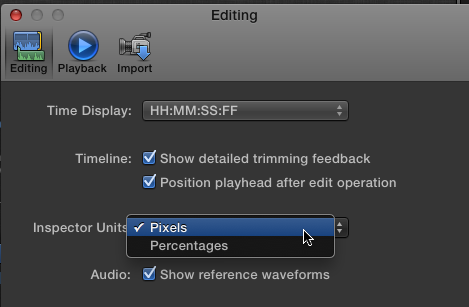
Please Log in to join the conversation.
- Tom Wolsky
-
- Offline
- Moderator
-
11 Apr 2012 01:09 #6764
by Tom Wolsky
Replied by Tom Wolsky on topic Re: What are the px values in the Transform and Crop windows, they don't seem to be pixels?
And the pixel values actually make sense.
Please Log in to join the conversation.
