


- Posts: 379
- Thank you received: 6
3 Post Moderation Rule for New Boarders (25 Jan 2021)
New boarders will have their posts moderated - Don't worry if you cannot see your post immediately.
Constantly crashing
- Marc Lucas
-
 Topic Author
- Offline
- Platinum Member
-

Less
More
19 Feb 2012 01:37 #4550
by Marc Lucas
Constantly crashing was created by Marc Lucas
Really not sure whats going on but getting crashes and beachball every 10 mins or so. Trashed prefs, repaired permissions, deleted render files, restarted MacPro everything!
I thought originally it was GoPro footage in Multicam mode, changed to proxy media. Finshed the short test edit with a few pieces of iPhone footage and GoPro footage so decided to get morte familiar with the interface changing colours and keyframing clip position etc. Getting really frustrated. I'm going to ingest some more footage tomorrow and see if the media is corrupt otherwise I'll have to look at a fresh install which I don't really want to do. FCPX at the minute is unusable and got a big multicam job coming up this Thursday.....doesn't fill me with confidence:-\
I thought originally it was GoPro footage in Multicam mode, changed to proxy media. Finshed the short test edit with a few pieces of iPhone footage and GoPro footage so decided to get morte familiar with the interface changing colours and keyframing clip position etc. Getting really frustrated. I'm going to ingest some more footage tomorrow and see if the media is corrupt otherwise I'll have to look at a fresh install which I don't really want to do. FCPX at the minute is unusable and got a big multicam job coming up this Thursday.....doesn't fill me with confidence:-\
Please Log in to join the conversation.
- bowlingotter
-

- Offline
- New Member
-

Less
More
- Posts: 2
- Thank you received: 0
19 Feb 2012 03:45 #4554
by bowlingotter
Replied by bowlingotter on topic Re: Constantly crashing
Same problem here. Granted, I'm running on a dated Mac Pro tower, so before I flip out about the software I'm going to make sure my hardware is up to snuff. There's a new iMac coming for me in the mail at the end of this week so hopefully that will improve things.
As it stands, I've gone through all of the same steps as you and it's hardly useable with a decent size project. This close to jumping ship to Adobe, as I've heard that even people with top-of-the-line Mac Pro systems are having identical problems.
As it stands, I've gone through all of the same steps as you and it's hardly useable with a decent size project. This close to jumping ship to Adobe, as I've heard that even people with top-of-the-line Mac Pro systems are having identical problems.
Please Log in to join the conversation.
- ronny courtens
-

- Offline
- Moderator
-

Less
More
- Posts: 4455
- Thank you received: 962
19 Feb 2012 04:14 #4555
by ronny courtens
Replied by ronny courtens on topic Re: Constantly crashing
Our company is running 3 FCP10 systems in daily broadcast production, one on a 17" iMac with a Promise 12TB Thunderbolt RAID and two on MacPro 8-core towers connected to our central media servers. In the past month we have been editing 10 long-form television projects using FCP10 in full 1080p25 without any hiccups at all. So I would suggest you check if your system is really up to working with a 64-bit NLE because the software surely works fine for us and for many others. Maybe if you post your system specs we can help you find where the real problem is.
Please Log in to join the conversation.

19 Feb 2012 09:09 #4556
by wdevn
LLAP,
James
Taipei, Taiwan
Replied by wdevn on topic Re: Constantly crashing
Hey Marc,
Can you post your system / hardware setup so we can see what you're working with? I just finished a crazy large video in muilt-role format on a MBP i7 and the project flew on it.
James
Can you post your system / hardware setup so we can see what you're working with? I just finished a crazy large video in muilt-role format on a MBP i7 and the project flew on it.
James
LLAP,
James
Taipei, Taiwan
Please Log in to join the conversation.
19 Feb 2012 17:29 - 19 Feb 2012 17:30 #4568
by cgbier
Replied by cgbier on topic Re: Constantly crashing
Is it possible that the GoPro footage is the culprit? I had the same problem once when I had to edit footage that was given to me (sorry, can't remember what format it was). That project was one crash fest.
Otherwise, FCP X has been pretty solid with my standard formats (DV, HDV, MXF) from day one. You only have to give it a bit time on start up before you do anything.
(2010 i7 MBP, 8GB RAM)
Otherwise, FCP X has been pretty solid with my standard formats (DV, HDV, MXF) from day one. You only have to give it a bit time on start up before you do anything.
(2010 i7 MBP, 8GB RAM)
Last edit: 19 Feb 2012 17:30 by cgbier.
Please Log in to join the conversation.
- Marc Lucas
-
Topic Author
- Offline
- Platinum Member
-
Less
More
- Posts: 379
- Thank you received: 6
19 Feb 2012 21:15 #4572
by Marc Lucas
Replied by Marc Lucas on topic Re: Constantly crashing
2x2.8 Quad Core 16GB ram ATI Radeon 4870 OSX 10.7.2 FCPX 10.0.3
I'm pretty sure its nothing to do with the system or configuration.
Deleted all media that I was working with and re-imported the iPhone footage I was working with but didn't include the GoPro footage. Setting up the Multicam edit was a breeze no problems at all. Used four tracks all proxy. Cycling through the camera angles was fluid and worked a treat.
I think the problem is something connected to the speed of editing or the system isn't as stable as it should be. I have had one crash since. My crashes have all occurred whilst fine tuning the edit points in the Multicam timeline. For speed reasons I like to click before an edit points and audition the edit point over a few times to see if its where I want it to be so there are a number of quick clicks and spacebar presses to play over the edit point. I think thats where the problem is FCPX can't keep up with it especially when audio skimming is active. I know there are key commands to play and cycle a selection etc but I find the previously mention technique quicker.
Can I really be working FCPX to hard even with the specs of the system and with only FCPX open??
I do feel that the Go Pro footage was partly to blame so I'll test more and include that after some more experimenting. I do also feel that yes in a perfect world all these different flavours of footage are advertised to seamlessly mix together but when you actually start adding up the tracks and codecs I don't think FCPX is mature enough yet, I may be wrong.
I'm pretty sure its nothing to do with the system or configuration.
Deleted all media that I was working with and re-imported the iPhone footage I was working with but didn't include the GoPro footage. Setting up the Multicam edit was a breeze no problems at all. Used four tracks all proxy. Cycling through the camera angles was fluid and worked a treat.
I think the problem is something connected to the speed of editing or the system isn't as stable as it should be. I have had one crash since. My crashes have all occurred whilst fine tuning the edit points in the Multicam timeline. For speed reasons I like to click before an edit points and audition the edit point over a few times to see if its where I want it to be so there are a number of quick clicks and spacebar presses to play over the edit point. I think thats where the problem is FCPX can't keep up with it especially when audio skimming is active. I know there are key commands to play and cycle a selection etc but I find the previously mention technique quicker.
Can I really be working FCPX to hard even with the specs of the system and with only FCPX open??
I do feel that the Go Pro footage was partly to blame so I'll test more and include that after some more experimenting. I do also feel that yes in a perfect world all these different flavours of footage are advertised to seamlessly mix together but when you actually start adding up the tracks and codecs I don't think FCPX is mature enough yet, I may be wrong.
Please Log in to join the conversation.
19 Feb 2012 22:07 #4574
by wdevn
LLAP,
James
Taipei, Taiwan
Replied by wdevn on topic Re: Constantly crashing
Marc,
I can confirm that at this point working too fast in FCPX with choke it! I can make FCPX choke even before it has fully loaded! I'm not kidding. I can repeat it.
Now, with that said, FCPX is getting to the point where most of us can rely on it for most of the work we do today. I will do some testing with some Go Pro video from my airsoft team and report what I find.
PS:
I came across a post in a local Chinese language site that someone was having issues with FCPX because of the graphic card being used. Hmm, I what can say?
James
I can confirm that at this point working too fast in FCPX with choke it! I can make FCPX choke even before it has fully loaded! I'm not kidding. I can repeat it.
Now, with that said, FCPX is getting to the point where most of us can rely on it for most of the work we do today. I will do some testing with some Go Pro video from my airsoft team and report what I find.
PS:
I came across a post in a local Chinese language site that someone was having issues with FCPX because of the graphic card being used. Hmm, I what can say?
James
LLAP,
James
Taipei, Taiwan
Please Log in to join the conversation.
- Marc Lucas
-
Topic Author
- Offline
- Platinum Member
-
Less
More
- Posts: 379
- Thank you received: 6
19 Feb 2012 22:30 #4576
by Marc Lucas
Replied by Marc Lucas on topic Re: Constantly crashing
Yes I think the choking thing applies partly to me. However I added 3 extra iphone tracks to the 4 I was using I added tracks manually & synced them manually in the Multicam arrange window. Apart from being out of sync which is not a real issue because I've seen that does happen. The real problem was that FCPX really slowed down signaficantly where it was 5 sec delays after zooming in & Out etc. I then thought I would see what the performance was like in the multicam edit window. That was quite smooth as usual because I think FCPX can handle the simple switching of angles. Then I double clicked the Multicam clip to take me back to the multicam arrange window and there was no clips or audio in the tracks they had disappeared from the multicam clip!
I set up an other one and starting testing again. There is definitely something wrong don't really want to do a re-install:-\
I set up an other one and starting testing again. There is definitely something wrong don't really want to do a re-install:-\
Please Log in to join the conversation.

19 Feb 2012 23:39 #4577
by BenB
Replied by BenB on topic Re: Constantly crashing
Reinstalling is not a problem, easier than ever before.
1- Get Digital Rebellion's free "FCS Remover" to be sure all files are removed.
2- App Store, Purchased tab, click Install for FCP X. Done.
But I'd trash prefs (Preference Manager), use Disk Utility to repair all drives, be sure you have at least 10-15% of every drive's capacity as free space minimum, not any third party plugins you've installed.
What is your hardware setup?
1- Get Digital Rebellion's free "FCS Remover" to be sure all files are removed.
2- App Store, Purchased tab, click Install for FCP X. Done.
But I'd trash prefs (Preference Manager), use Disk Utility to repair all drives, be sure you have at least 10-15% of every drive's capacity as free space minimum, not any third party plugins you've installed.
What is your hardware setup?
Please Log in to join the conversation.
- ronny courtens
-
- Offline
- Moderator
-
Less
More
- Posts: 4455
- Thank you received: 962
19 Feb 2012 23:48 #4580
by ronny courtens
Replied by ronny courtens on topic Re: Constantly crashing
Hi Marc,
Your system is perfectly fit for regular editing with FCP10. But woking on a multicam clip in the timeline puts a lot of strain on your resources. A Multicam clip holds all the clips (angles) you use in the multicam edit. This means that every time you play the timeline multiple streams of video have to be fed to your system and have to be processed at the same time.
Even on a maxed out computer the biggest bottleneck in working with multiple simultaneous HD streams is the media drive. When playing back multiple HD streams a fast eSATA or Thunderbolt RAID system will give you much more read speed than say a single FW 800 or SATA drive. Even when using HD Proxies a single FW 800 drive (average read speed 80 MB/s) will not be able to deliver more than 6 simultaneous streams until it chokes (spinning ball). And every time you click on the timeline the drive has to feed the streams. The faster you work on the timeline the quicker your drive will choke if it isn't up to the task.
With a decent yet affordable RAID like the new Promise Thunderbolt you can have 5 to 6 simultaneous full 1080 ProRes 422 (HQ) streams being fed to your system at the same time. When you use proxies (and you save the proxies to the RAID of course), you will be able to comfortably view up to 15 simultaneous streams without the drive choking up. We have thoroughly tested these different workflows.
There are of course other factors that will slow down your workflow, but my advice for multi cam work is: put your media on the fastest media drive you can afford (your boot drive being the worst possible place to store your media), convert all your multicam media to proxies and work with the proxies as far as the pure cutting is concerned, and turn off any background processes as well as skimming if you don't need it. This will put less strain on your system resources and your drive and it will make you user experience much better.
Your system is perfectly fit for regular editing with FCP10. But woking on a multicam clip in the timeline puts a lot of strain on your resources. A Multicam clip holds all the clips (angles) you use in the multicam edit. This means that every time you play the timeline multiple streams of video have to be fed to your system and have to be processed at the same time.
Even on a maxed out computer the biggest bottleneck in working with multiple simultaneous HD streams is the media drive. When playing back multiple HD streams a fast eSATA or Thunderbolt RAID system will give you much more read speed than say a single FW 800 or SATA drive. Even when using HD Proxies a single FW 800 drive (average read speed 80 MB/s) will not be able to deliver more than 6 simultaneous streams until it chokes (spinning ball). And every time you click on the timeline the drive has to feed the streams. The faster you work on the timeline the quicker your drive will choke if it isn't up to the task.
With a decent yet affordable RAID like the new Promise Thunderbolt you can have 5 to 6 simultaneous full 1080 ProRes 422 (HQ) streams being fed to your system at the same time. When you use proxies (and you save the proxies to the RAID of course), you will be able to comfortably view up to 15 simultaneous streams without the drive choking up. We have thoroughly tested these different workflows.
There are of course other factors that will slow down your workflow, but my advice for multi cam work is: put your media on the fastest media drive you can afford (your boot drive being the worst possible place to store your media), convert all your multicam media to proxies and work with the proxies as far as the pure cutting is concerned, and turn off any background processes as well as skimming if you don't need it. This will put less strain on your system resources and your drive and it will make you user experience much better.
Please Log in to join the conversation.
- Marc Lucas
-
Topic Author
- Offline
- Platinum Member
-
Less
More
- Posts: 379
- Thank you received: 6
20 Feb 2012 00:46 #4584
by Marc Lucas
Replied by Marc Lucas on topic Re: Constantly crashing
Media is on a separate internal drive bay. I have got background rendering turned off and have indeed noticed that turning skimming off does help the situation. I am using proxy files for all the streams too. I do think it is solely a hardrive issue or lack of HD speed that it the problem though because I haven't installed any third party plugins yet because I didn't want them to affect the system whilst getting used to the whole workflow. I Just might have to be a bit more patient in the timeline then but choking on 4 tracks originally and being unusable on 7 is the best situation to be in.
Thanks for the feedback!
Thanks for the feedback!
Please Log in to join the conversation.
20 Feb 2012 00:56 #4588
by BenB
Replied by BenB on topic Re: Constantly crashing
And that secondary media drive is a 7200rpm SATA drive, correct?
Please Log in to join the conversation.
- Marc Lucas
-
Topic Author
- Offline
- Platinum Member
-
Less
More
- Posts: 379
- Thank you received: 6
20 Feb 2012 01:16 #4590
by Marc Lucas
Replied by Marc Lucas on topic Re: Constantly crashing
yes
Please Log in to join the conversation.

20 Feb 2012 20:34 #4637
by waternyc
Replied by waternyc on topic Re: Constantly crashing
I guess I need a thunderbolt drive as well.:blink: :woohoo:
Please Log in to join the conversation.
20 Feb 2012 22:16 #4643
by BenB
Replied by BenB on topic Re: Constantly crashing
At this point I'd run Disk Warrior and rebuild the directories of all your drives.
Please Log in to join the conversation.
21 Feb 2012 00:03 #4645
by waternyc
Replied by waternyc on topic Re: Constantly crashing
Well there ya have it!
Please Log in to join the conversation.
- Marc Lucas
-
Topic Author
- Offline
- Platinum Member
-
Less
More
- Posts: 379
- Thank you received: 6
21 Feb 2012 00:22 #4646
by Marc Lucas
Replied by Marc Lucas on topic Re: Constantly crashing
Ben was the DW comment suggested at me, not sure who you meant. I have actually partition the FCPX drive and re-installed Lion and everything else and will give that a go now. Thought I would do this because I knew it wouldn't take that long.
Please Log in to join the conversation.
21 Feb 2012 00:38 #4647
by BenB
Replied by BenB on topic Re: Constantly crashing
When all else fails, run Disk Warrior.
Are you partitioning your drive to run two different OS versions?
Are you partitioning your drive to run two different OS versions?
Please Log in to join the conversation.
- Marc Lucas
-
Topic Author
- Offline
- Platinum Member
-
Less
More
- Posts: 379
- Thank you received: 6
21 Feb 2012 01:04 #4648
by Marc Lucas
Replied by Marc Lucas on topic Re: Constantly crashing
I did originally had SL on one and Lion on other but thought start again and just have the drive with Lion on. Opened up FCPX (after re-installing) and made a new project and named it the name I used on the last project I used with all the crashes and you will never guess a crash within 2 mins. I'll have to start another project and test more. If I can run 7 tracks of iPhone footage I find it very hard even with Thunderbolts etc that you would ever dream of 30 tracks plus!
Please Log in to join the conversation.
- ronny courtens
-
- Offline
- Moderator
-
Less
More
- Posts: 4455
- Thank you received: 962
21 Feb 2012 03:59 - 21 Feb 2012 04:02 #4651
by ronny courtens
Replied by ronny courtens on topic Re: Constantly crashing
Hi Marc,
Sorry to hear you are having so much trouble with this. I just did a small test with 13 1080p25 multicam angles on a Quad MacPro test machine with only 6 GB RAM and an nVidia card that is not optimized for FCP10. Media were coming from one single SATA drive. The multiclip could play at full resolution but some frames were dropped. Then I switched to Proxies and everything ran smoothly. I did the cutting, and after the cuts were done I messed around with the clips in the timeline. Even when quickly rolling back and forth between the clips and really putting the system to a test I did not experience any stalls or crashes. So IMO there definitely must be something wrong with either your drive or your workflow. I have attached a screenshot from this project.
If you have done everything Ben has suggested and you still get the crashes the only thing I can think of is a faulty media drive, or working with multicam while background processes are unfinished and still running. Please keep us updated so we can work out a solution together.
Best wishes,
Ronny
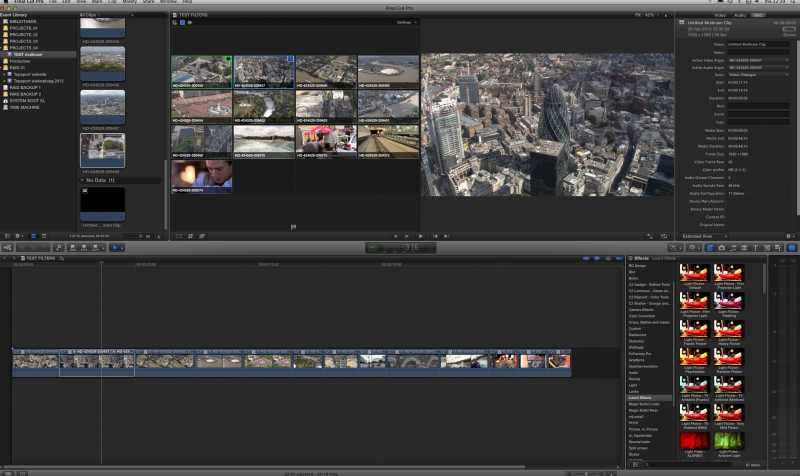
Sorry to hear you are having so much trouble with this. I just did a small test with 13 1080p25 multicam angles on a Quad MacPro test machine with only 6 GB RAM and an nVidia card that is not optimized for FCP10. Media were coming from one single SATA drive. The multiclip could play at full resolution but some frames were dropped. Then I switched to Proxies and everything ran smoothly. I did the cutting, and after the cuts were done I messed around with the clips in the timeline. Even when quickly rolling back and forth between the clips and really putting the system to a test I did not experience any stalls or crashes. So IMO there definitely must be something wrong with either your drive or your workflow. I have attached a screenshot from this project.
If you have done everything Ben has suggested and you still get the crashes the only thing I can think of is a faulty media drive, or working with multicam while background processes are unfinished and still running. Please keep us updated so we can work out a solution together.
Best wishes,
Ronny
Last edit: 21 Feb 2012 04:02 by ronny courtens.
Please Log in to join the conversation.
