


3 Post Moderation Rule for New Boarders (25 Jan 2021)
New boarders will have their posts moderated - Don't worry if you cannot see your post immediately.
Round tripping audio to GarageBand
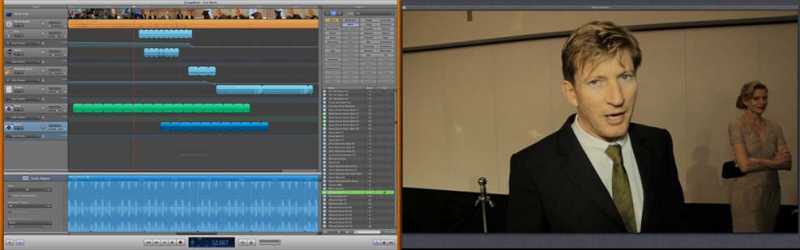
First you need to share your project to the Media Browser. Pick your res and then you're done.
Go to GarageBand and select Movie and your edit should be there waiting for you if you navigate the the project folder.
Drag the edit in the track editor and now you can lay up any track you like.
If you have two screens you can even pop out the video to a separate window and run it on the second monitor.
Add all your FX music and what ever else you like.
Then save the project and mix it down. If you still want to tinker with your projects main audio in FCP X then just pull the level of the movie track down to zero before you mix it down.
Now when you're back in FCP X go the Audio browser and under GarageBand you should find your mix.
Drag it into your timeline and your done! I was amazed at how well this works.
The other thing I tried was creating a new Audio Role and called it Final Mix.
Then turned off all the other audio roles so I could just listen to what came from GarageBand.
I'm really impressed at how well this works, and bodes well for when Logic X comes out.
Sean Lander - Editing since 1982 - AVID 1991 - FCP 1999 - FCPX 2011
Please Log in to join the conversation.
But, hey, if it works! Garageband seems to have gotten pretty powerful over the years (rarely ever used it... that's what I had STP for).
Please Log in to join the conversation.
This only occurred to me when watching a friend who's a musician using GarageBand.
Got to say I'm suitably impressed. I know have a use for GarageBand.
Sean Lander - Editing since 1982 - AVID 1991 - FCP 1999 - FCPX 2011
Please Log in to join the conversation.

Creating history....one edit at a time !
Please Log in to join the conversation.
- ronny courtens
-

- Offline
- Moderator
-

- Posts: 4455
- Thank you received: 962
Please Log in to join the conversation.
And if you want to work on all your tracks the timeline isn't big enough unless once again you compromise all the other screens.
Loops can't be extended indefinitely just by dragging
It doesn't have near the same search functionality as GarageBand or iTunes.
Anyway enough whinging.. It is nice to have it there it's just that I found this solution so much easier. I forgot to mention that your markers show up in GarageBand too.
Sean Lander - Editing since 1982 - AVID 1991 - FCP 1999 - FCPX 2011
Please Log in to join the conversation.
Please Log in to join the conversation.

Please Log in to join the conversation.
Sean Lander - Editing since 1982 - AVID 1991 - FCP 1999 - FCPX 2011
Please Log in to join the conversation.
Please Log in to join the conversation.
- michaschmidt
-

- Offline
- New Member
-

- Posts: 6
- Thank you received: 0

Please Log in to join the conversation.
- Marc Lucas
-

- Offline
- Platinum Member
-

- Posts: 379
- Thank you received: 6
Please Log in to join the conversation.
- michaschmidt
-
- Offline
- New Member
-
- Posts: 6
- Thank you received: 0
Marc Lucas wrote: Might try the Logic route then??
well its the petter app but as you can't export OMF in FCPX you don't get any more audio out of FCPX even if you use LogicPro
Please Log in to join the conversation.
- ronny courtens
-
- Offline
- Moderator
-
- Posts: 4455
- Thank you received: 962
Please Log in to join the conversation.
What I've been doing is (and I have an article being published on this soon) is export my audio as Stems (using Rolls). That way I have separate audio files that are all the same length (of the original Timeline) and in sync.
I'd much prefer to work in Logic than GarageBand because Logic has actual audio engineering tools GB lacks.
Fill out the feedback page, everyone, and request round trips from FCP X to Logic Pro.
We don't have tracks, but we have Compound Clips that helps a great deal, we can trim, we also have all of Logic's filters, then throw in Rolls & Stem export, and it's pretty nice. I don't miss having a mixer at all. And I cam to video from audio recording studios and composing. Mixers are over rated for basic work done inside of an NLE. That said, a round trip built-in to get to GB and/or Logic would be fantastic.
As for iDVD, remember, it's dead. You won't find it on any new Mac now, Apple has dropped it totally. Toast Pro 11 is what I see as it's proper replacement.
FYI, I have a blog post about doing voice work in FCP X, as it's something I work with professionally almost daily. FCP X does have way more audio mixing ability than folks give it credit for.
www.fcproxuniversity.com/FCPro_X_Univers...rding_tricks%29.html
Please Log in to join the conversation.
- Marc Lucas
-
- Offline
- Platinum Member
-
- Posts: 379
- Thank you received: 6
Please Log in to join the conversation.
- michaschmidt
-
- Offline
- New Member
-
- Posts: 6
- Thank you received: 0
Please Log in to join the conversation.
Please Log in to join the conversation.
michaschmidt wrote: but you can't actually really edit the audio from you edit from FCPX like you can with en OMF export form FCP7 to LogicPro, right? .... u don't get separate "tracks" or something ... u also could track that Quicktime Movie (with a mixed down FCPX audio) into LogicPro and do the (only) same as you did in Garage Band ... so i don't see the point of this "Roundtrip" .... just saying
The usefulness I found is that I can add loops, drag them to the right length and add ducking and goosing easily. The only way I can think to do this would be to edit the loop in multiple times, convert them into a compound clip and then apply the ducking.
The other advantage is the interface has more friendly to adio editing and if you're a musician you can score the movie while it's playing.
I'll do a test on roles and chapter markers to see what happens.
Sean Lander - Editing since 1982 - AVID 1991 - FCP 1999 - FCPX 2011
Please Log in to join the conversation.
-

- New Member
-
- Thank you received: 0
Please Log in to join the conversation.
