


- Posts: 54
- Thank you received: 0
3 Post Moderation Rule for New Boarders (25 Jan 2021)
New boarders will have their posts moderated - Don't worry if you cannot see your post immediately.
BLACK FRAMES COMING ON TIMELINE FCPX 10.6.8 BUT IN PREMIER PRO
- robinsaini
-
 Topic Author
- Offline
- Senior Member
-

Less
More
05 Sep 2023 13:17 #127031
by robinsaini
Hello,
I am facing this black frames issue with FCPX from 10.6.6 to 6.7 & now 10.6.8 where footage shows black frames when viewed in FCPX, same drop frames are not visible in Premier Pro.
can anyone help what can be concern.
I have done test on Canon R5 + Nikon Z8 on Prograde Cobalt series top of the line card + Angelbird Cf express Tybe cards and seems to face same issue no matter which camera I choose.
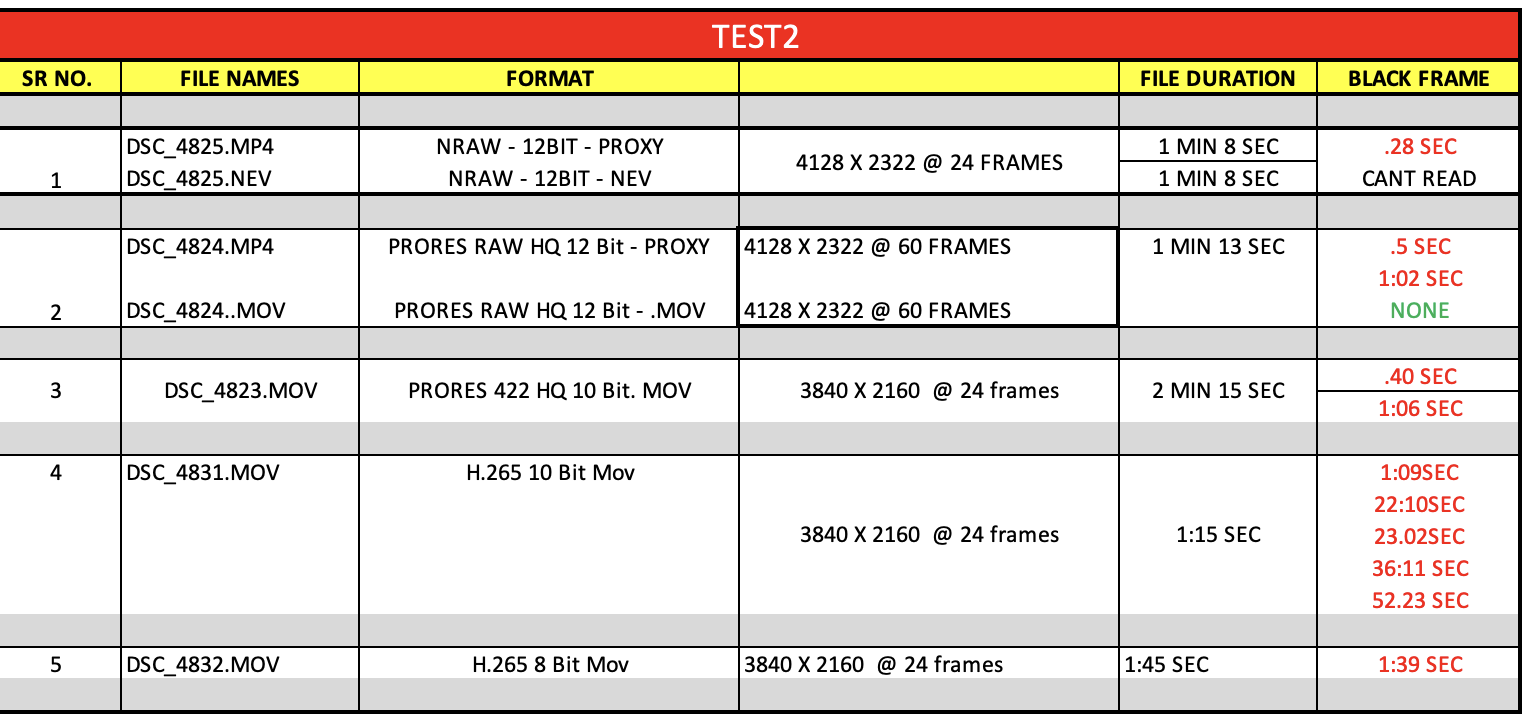
You can see the attached excel where I have mentioend where in video I get black frames.
I checked card & camera company both and , definately not a issue with them as no matter whch camera/card oe choose, these issued comes.
drive.google.com/drive/folders/1sVKGIz-b...UHE0OMoA?usp=sharing ( shot on Prograde Cobalt cards)
Shot on Angelbird CF ecpress cards
drive.google.com/drive/folders/1YuF7RNq5...sOoXqVLS?usp=sharing
looking forward to a solutiion
Rds
I am facing this black frames issue with FCPX from 10.6.6 to 6.7 & now 10.6.8 where footage shows black frames when viewed in FCPX, same drop frames are not visible in Premier Pro.
can anyone help what can be concern.
I have done test on Canon R5 + Nikon Z8 on Prograde Cobalt series top of the line card + Angelbird Cf express Tybe cards and seems to face same issue no matter which camera I choose.
You can see the attached excel where I have mentioend where in video I get black frames.
I checked card & camera company both and , definately not a issue with them as no matter whch camera/card oe choose, these issued comes.
drive.google.com/drive/folders/1sVKGIz-b...UHE0OMoA?usp=sharing ( shot on Prograde Cobalt cards)
Shot on Angelbird CF ecpress cards
drive.google.com/drive/folders/1YuF7RNq5...sOoXqVLS?usp=sharing
looking forward to a solutiion
Rds
Please Log in to join the conversation.


05 Sep 2023 20:01 #127038
by dmetz
Replied by dmetz on topic BLACK FRAMES COMING ON TIMELINE FCPX 10.6.8 BUT IN PREMIER PRO
I tested one file from each batch, and they are both corrupted. Yes, there are media players that will play them, but they are still missing data.
Could a format issue, a transfer issue, a CODEC issue... couldn't say as I don't have access to your gear. You'll need to elaborate on every step of your workflow, and include some hardware / software specs.
Could a format issue, a transfer issue, a CODEC issue... couldn't say as I don't have access to your gear. You'll need to elaborate on every step of your workflow, and include some hardware / software specs.
Please Log in to join the conversation.

05 Sep 2023 22:24 - 05 Sep 2023 22:27 #127039
by TerryB
Replied by TerryB on topic BLACK FRAMES COMING ON TIMELINE FCPX 10.6.8 BUT IN PREMIER PRO
I tested a few in FCP 10.6.5 on macOS 12.6.8 and see corrupted frames, not black frames.
Last edit: 05 Sep 2023 22:27 by TerryB.
Please Log in to join the conversation.

06 Sep 2023 00:44 - 06 Sep 2023 01:03 #127041
by DaveM
Replied by DaveM on topic BLACK FRAMES COMING ON TIMELINE FCPX 10.6.8 BUT IN PREMIER PRO
Like Doug and Terry, I can see glitches in the file I tested (no "black frames"). I looked at DSC_4827. I only found 3 glitches, at: 3:16 to 3:23, 23:01 to 23:11, and 50:18 to 51:00 (ss:ff).
I tested things on a 2019 Intel Mac Pro, FCP 10.6.5, and macOS Monterey 12.6.8. I also had the same results with Resolve Studio 18.5.1, as well as with Media Composer.
I made a screen movie of the first glitch in the file. It was recorded in Resolve.
www.dropbox.com/scl/fi/pgri80e8mq8r3f5jw...6vn7jgd93d87j8v&dl=0
Note: The screen movie was recorded at 60 fps and shows manual stepping through frames every second, or so. The actual timecode for the file is shown in the upper right.
Both Resolve and FCP show the same glitches, as noted above. Without more info, I can't suggest a possible cause. I know that Resolve and FCP both use macOS provided video libraries. Media Composer shows glitches at the same spots, but the distortion looks a bit different. I wonder if Media Composer is using its own codecs.
I tested things on a 2019 Intel Mac Pro, FCP 10.6.5, and macOS Monterey 12.6.8. I also had the same results with Resolve Studio 18.5.1, as well as with Media Composer.
I made a screen movie of the first glitch in the file. It was recorded in Resolve.
www.dropbox.com/scl/fi/pgri80e8mq8r3f5jw...6vn7jgd93d87j8v&dl=0
Note: The screen movie was recorded at 60 fps and shows manual stepping through frames every second, or so. The actual timecode for the file is shown in the upper right.
Both Resolve and FCP show the same glitches, as noted above. Without more info, I can't suggest a possible cause. I know that Resolve and FCP both use macOS provided video libraries. Media Composer shows glitches at the same spots, but the distortion looks a bit different. I wonder if Media Composer is using its own codecs.
Last edit: 06 Sep 2023 01:03 by DaveM.
Please Log in to join the conversation.
06 Sep 2023 02:18 #127042
by TerryB
Replied by TerryB on topic BLACK FRAMES COMING ON TIMELINE FCPX 10.6.8 BUT IN PREMIER PRO
How is the footage being transferred from the cards to working storage? ShotputPro or Hedge? Or something else?
Please Log in to join the conversation.
- robinsaini
-
Topic Author
- Offline
- Senior Member
-
Less
More
- Posts: 54
- Thank you received: 0
06 Sep 2023 07:22 #127045
by robinsaini
Replied by robinsaini on topic BLACK FRAMES COMING ON TIMELINE FCPX 10.6.8 BUT IN PREMIER PRO
Hello,
So here are all the answers
Camera used - CANON R5 OR NIKON Z8 (both with latest firmware)
CARDS USED - ANGELBIRD 512GB SE CARDS & PROGRADE COBALT 325 GB
EXTERNAL DATA RECORDED ON - ANGELBIRD ATOMX 1 TB SSD ( USED WHEN RECORDING ON NINJA V+)
( NO MATTER WHICH CARDS I USE, ERROR COMES V90 OR CF EXPRESS TYPE
HOW DATA IS COPIED ON SSD
- ANGELBIRD CF EXPRESS TYPEB MARK II CARD READER
- PROGRADE CF EXPRESS TYPEB CARD READER
- PROGRADE SD DUAL CARD READERS
DATA COPIED ON
- SAMSUNG 4TB RUGGED SSD
- SAMSUNG 2TB SSD RW(2000Mbps)
All footage once copied on SSD are directly imported into FCPX, As I use two machines to edit
Apple M1 Max 32 GB and Apple M1 Max 64 GB
and on both I am facing the issue.
As both LAPTOPS are fast so never used proxy to edit footage.
Do let me know if you need any more info.
Rds
So here are all the answers
Camera used - CANON R5 OR NIKON Z8 (both with latest firmware)
CARDS USED - ANGELBIRD 512GB SE CARDS & PROGRADE COBALT 325 GB
EXTERNAL DATA RECORDED ON - ANGELBIRD ATOMX 1 TB SSD ( USED WHEN RECORDING ON NINJA V+)
( NO MATTER WHICH CARDS I USE, ERROR COMES V90 OR CF EXPRESS TYPE
HOW DATA IS COPIED ON SSD
- ANGELBIRD CF EXPRESS TYPEB MARK II CARD READER
- PROGRADE CF EXPRESS TYPEB CARD READER
- PROGRADE SD DUAL CARD READERS
DATA COPIED ON
- SAMSUNG 4TB RUGGED SSD
- SAMSUNG 2TB SSD RW(2000Mbps)
All footage once copied on SSD are directly imported into FCPX, As I use two machines to edit
Apple M1 Max 32 GB and Apple M1 Max 64 GB
and on both I am facing the issue.
As both LAPTOPS are fast so never used proxy to edit footage.
Do let me know if you need any more info.
Rds
Please Log in to join the conversation.
- robinsaini
-
Topic Author
- Offline
- Senior Member
-
Less
More
- Posts: 54
- Thank you received: 0
06 Sep 2023 07:34 - 08 Sep 2023 06:15 #127046
by robinsaini
Replied by robinsaini on topic BLACK FRAMES COMING ON TIMELINE FCPX 10.6.8 BUT IN PREMIER PRO
replied with all details buddy 
Last edit: 08 Sep 2023 06:15 by robinsaini.
Please Log in to join the conversation.
- robinsaini
-
Topic Author
- Offline
- Senior Member
-
Less
More
- Posts: 54
- Thank you received: 0
06 Sep 2023 07:35 - 08 Sep 2023 06:16 #127047
by robinsaini
Replied by robinsaini on topic BLACK FRAMES COMING ON TIMELINE FCPX 10.6.8 BUT IN PREMIER PRO
thanks for sharing resolve footage as had not tested on it..rest all details shared above buddy
Last edit: 08 Sep 2023 06:16 by robinsaini.
Please Log in to join the conversation.
25 Sep 2023 18:10 - 26 Sep 2023 14:14 #127276
by DaveM
Replied by DaveM on topic BLACK FRAMES COMING ON TIMELINE FCPX 10.6.8 BUT IN PREMIER PRO
Robin, I saw your question repeated in Larry Jordan's newsletter. Sorry to hear you haven't figured out the issue yet.
There are probably more details that would be needed for someone to help you figure out things, if that's what you need. You might start with the simplest workflow from camera to computer. It does seem that the recordings are bad, or somewhere in the data transfer process some corruption is manifesting. It doesn't seem to be an issue related to FCP, Premiere Pro, etc.
If, after reading this post, and maybe re-reading the others in this thread, you are still a bit confused about how to proceed, it might be useful to find someone who can help troubleshoot the issue. There are some things that were mentioned about your issue, to which you haven't responded (a possible language issue???).
Since the issue occurs with multiple cameras, cards, etc., you need to create a simplified process that will make the troubleshooting easier. To that end, you should consider picking one camera, one type of card (SD, perhaps), and try to transfer the media from the card directly to a MacBook Pro (via the SD card slot). The shorter/simpler the processing chain, the better.
Some remaining questions, or things that need to be accounted for:
- How/where are the cards being formatted? You should probably re-format any card used for testing in the camera itself.- Though you may not use a SSD drive in testing, you should make sure they are formatted only as APFS (for compatibility with FCP).
- Did you copy media from cards to SSDs or to the MBP directly using the Finder, or did you use a specialized application, like EditReady, ShotPut Pro, or Hedge? Sometimes, it is better to create "camera card archives" or complete "backups" of camera cards, in order to preserve the card's file-folder hierarchy, which can help with preserving metadata on cards.
- When testing, does this issue manifest itself for various video codecs/settings on the camera (codec, frame size, frame rate, etc.) or for all recordings?
You should have enough guidance here, and provided by Terry's and Doug's posts, so that you can either determine what's causing the issue or eliminate things from consideration.
Good luck.
Addendum:
It may seem that the issue is due to some sort of incompatibility with the codecs used to record the video on the cameras, though that wouldn't likely apply to the Ninja, it is unlikely because the various NLEs probably don't use the same codecs for handling various media types. Resolve and FCP seem to use macOS-bundled codecs for some media types, but Premiere Pro and Media Composer often have their own custom codecs. But, with some further testing you'll have a better idea what's happening (hopefully)...
There are probably more details that would be needed for someone to help you figure out things, if that's what you need. You might start with the simplest workflow from camera to computer. It does seem that the recordings are bad, or somewhere in the data transfer process some corruption is manifesting. It doesn't seem to be an issue related to FCP, Premiere Pro, etc.
If, after reading this post, and maybe re-reading the others in this thread, you are still a bit confused about how to proceed, it might be useful to find someone who can help troubleshoot the issue. There are some things that were mentioned about your issue, to which you haven't responded (a possible language issue???).
Since the issue occurs with multiple cameras, cards, etc., you need to create a simplified process that will make the troubleshooting easier. To that end, you should consider picking one camera, one type of card (SD, perhaps), and try to transfer the media from the card directly to a MacBook Pro (via the SD card slot). The shorter/simpler the processing chain, the better.
Some remaining questions, or things that need to be accounted for:
- How/where are the cards being formatted? You should probably re-format any card used for testing in the camera itself.- Though you may not use a SSD drive in testing, you should make sure they are formatted only as APFS (for compatibility with FCP).
- Did you copy media from cards to SSDs or to the MBP directly using the Finder, or did you use a specialized application, like EditReady, ShotPut Pro, or Hedge? Sometimes, it is better to create "camera card archives" or complete "backups" of camera cards, in order to preserve the card's file-folder hierarchy, which can help with preserving metadata on cards.
- When testing, does this issue manifest itself for various video codecs/settings on the camera (codec, frame size, frame rate, etc.) or for all recordings?
You should have enough guidance here, and provided by Terry's and Doug's posts, so that you can either determine what's causing the issue or eliminate things from consideration.
Good luck.
Addendum:
It may seem that the issue is due to some sort of incompatibility with the codecs used to record the video on the cameras, though that wouldn't likely apply to the Ninja, it is unlikely because the various NLEs probably don't use the same codecs for handling various media types. Resolve and FCP seem to use macOS-bundled codecs for some media types, but Premiere Pro and Media Composer often have their own custom codecs. But, with some further testing you'll have a better idea what's happening (hopefully)...
Last edit: 26 Sep 2023 14:14 by DaveM. Reason: Cleaned up text for better clarity.
Please Log in to join the conversation.

26 Sep 2023 21:15 #127289
by joema
Replied by joema on topic BLACK FRAMES COMING ON TIMELINE FCPX 10.6.8 BUT IN PREMIER PRO
I tested all the non-RAW files from the Cobalt card on FCP 10.6.9, Resolve Studio 18.6, and Premiere Pro 23.6.0, all on an M1 Ultra Mac Studio running Ventura 13.6.
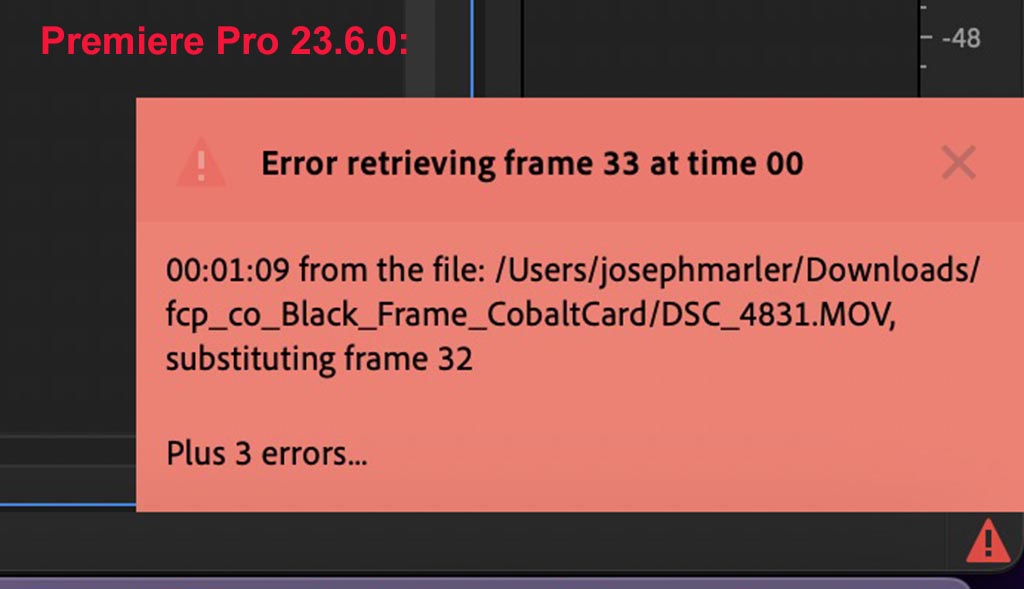
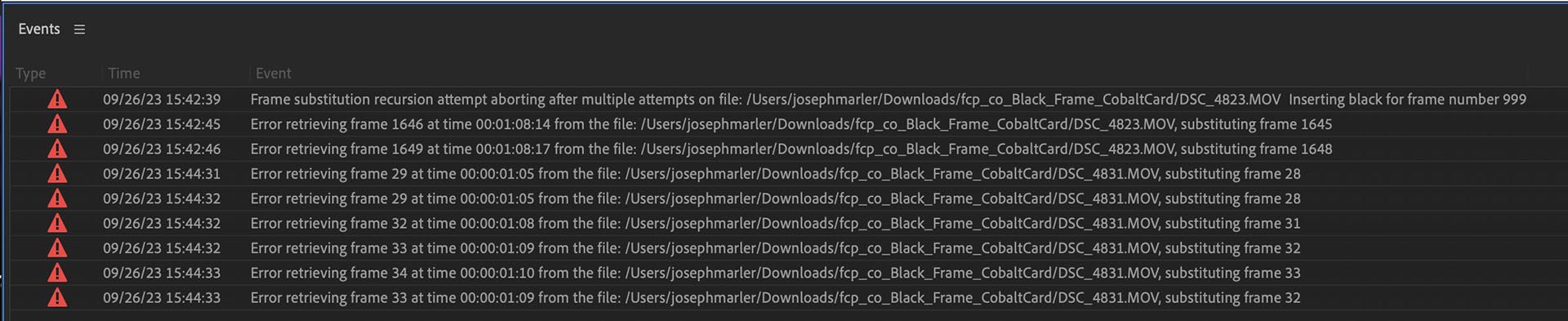
Three files all shows problems on all three NLEs, apparently from file damage. FCP showed a black frame, Resolve Studio shows "Media Missing" for those frames, and Premiere Pro showed a bunch of errors (see attached file).
There's nothing that can be done with NLE software to fix this -- the files are damaged. The damage is more likely "logical", IOW the internal media format is inconsistent.
There are unfortunately no inexpensive simple-to-use tools for validating video media encoding.
There are very expensive tools used by the broadcast and big content streamers. There's a lower-end tool called QCTools for checking the logical layer of video, not whether it is encoded correctly. I have never tried it, and I don't know if it runs on Apple Silicon: mediaarea.net/QCTools
There are command-line tools like ffmpeg and ffprobe which can examine certain things but they perform no interpretation. You'd have to basically use those in conjunction with specs of a given codec to build your own tool: ffmpeg.org/
Three files all shows problems on all three NLEs, apparently from file damage. FCP showed a black frame, Resolve Studio shows "Media Missing" for those frames, and Premiere Pro showed a bunch of errors (see attached file).
There's nothing that can be done with NLE software to fix this -- the files are damaged. The damage is more likely "logical", IOW the internal media format is inconsistent.
There are unfortunately no inexpensive simple-to-use tools for validating video media encoding.
There are very expensive tools used by the broadcast and big content streamers. There's a lower-end tool called QCTools for checking the logical layer of video, not whether it is encoded correctly. I have never tried it, and I don't know if it runs on Apple Silicon: mediaarea.net/QCTools
There are command-line tools like ffmpeg and ffprobe which can examine certain things but they perform no interpretation. You'd have to basically use those in conjunction with specs of a given codec to build your own tool: ffmpeg.org/
Please Log in to join the conversation.
26 Sep 2023 22:33 #127290
by joema
Replied by joema on topic BLACK FRAMES COMING ON TIMELINE FCPX 10.6.8 BUT IN PREMIER PRO
I used the command-line tool ffmpeg to check all the non-RAW files in the Cobalt group. It showed errors on the files that had errors in FCP, Resolve and Premiere. The errors were as follows:
DSC_4824.MP4: "[prores @ 0x125a0a220] invalid plane data size, Last message repeated 2905 times"
DSC_4831.MOV: "[hevc @ 0x127707f20] The cu_qp_delta 66 is outside the valid range [-32, 31].[hevc @ 0x12777f790] The cu_qp_delta -123 is outside the valid range [-32, 31]."
DSC_4823.MOV: "[hevc @ 0x148e78450] The cu_qp_delta -35 is outside the valid range [-32, 31]."
This has nothing to do with FCP. The problems also happen with Resolve Studio and Premiere Pro. For some reason, your media files are damaged.
DSC_4824.MP4: "[prores @ 0x125a0a220] invalid plane data size, Last message repeated 2905 times"
DSC_4831.MOV: "[hevc @ 0x127707f20] The cu_qp_delta 66 is outside the valid range [-32, 31].[hevc @ 0x12777f790] The cu_qp_delta -123 is outside the valid range [-32, 31]."
DSC_4823.MOV: "[hevc @ 0x148e78450] The cu_qp_delta -35 is outside the valid range [-32, 31]."
This has nothing to do with FCP. The problems also happen with Resolve Studio and Premiere Pro. For some reason, your media files are damaged.
Please Log in to join the conversation.
26 Sep 2023 23:38 #127291
by DaveM
Replied by DaveM on topic BLACK FRAMES COMING ON TIMELINE FCPX 10.6.8 BUT IN PREMIER PRO
Joe, thanks for the testing.
Here's a plot of various quantities in QCTools (for DSC_4827.MOV from Cobalt card):
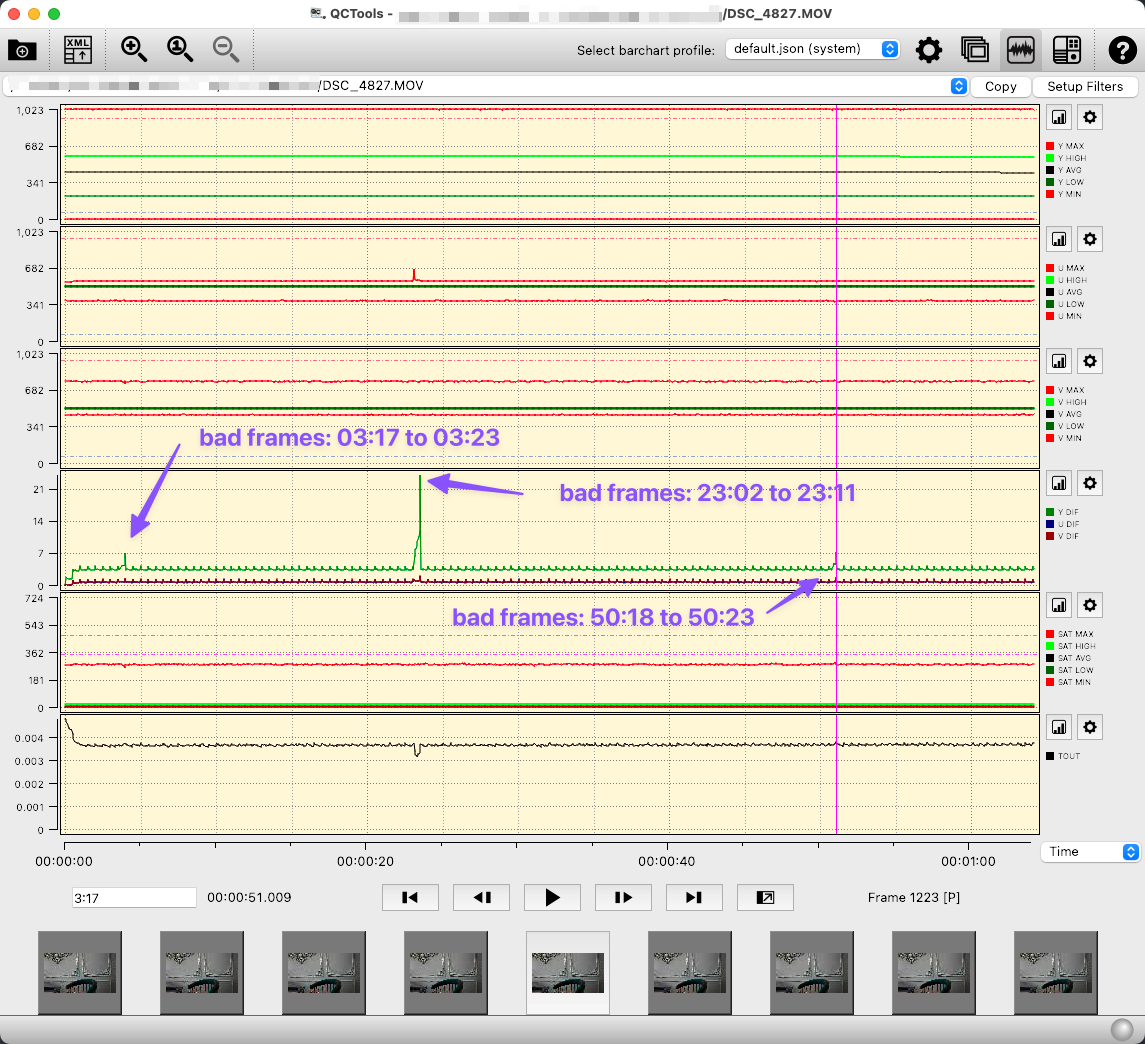
The arrows point the the corrupted frames. In all three instances, the brightness or color levels are showing issues. In the second instance, there also seems to be a timing issue. This graphical info would seem to confirm what ffmpeg provided...
Here's a plot of various quantities in QCTools (for DSC_4827.MOV from Cobalt card):
The arrows point the the corrupted frames. In all three instances, the brightness or color levels are showing issues. In the second instance, there also seems to be a timing issue. This graphical info would seem to confirm what ffmpeg provided...
Please Log in to join the conversation.
