- Posts: 1
- Thank you received: 0
3 Post Moderation Rule for New Boarders (25 Jan 2021)
New boarders will have their posts moderated - Don't worry if you cannot see your post immediately.
FCP Crop Won't Keep Aspect Ratio
- CaseyCayce
-
 Topic Author
- Offline
- New Member
-

Less
More
13 Aug 2021 20:54 #115762
by CaseyCayce
FCP Crop Won't Keep Aspect Ratio was created by CaseyCayce
I’ve been pulling my hair out for over an hour now trying to get FCP to crop and keep the aspect ratio. Every video I’ve watched, everything I’ve read, all say that maintaining aspect ratio in a crop is what FCP naturally does. No, it DOES NOT!!! I’ve got one video clip in this library. Nothing else. It’s in my project timeline. It’s selected. It’s showing in my view window. I choose “Crop” from the lower left 3 options, then select “Crop” from the 3 middle options, next to “Ken Burns”. I get the Crop handles at the corners of my video screen. Pulling those corners into what I need the crop to be, they are definitely NOT keeping the aspect ratio, all over the place. The crop area shown in the attached image is definitely NOT the aspect ration of my video.
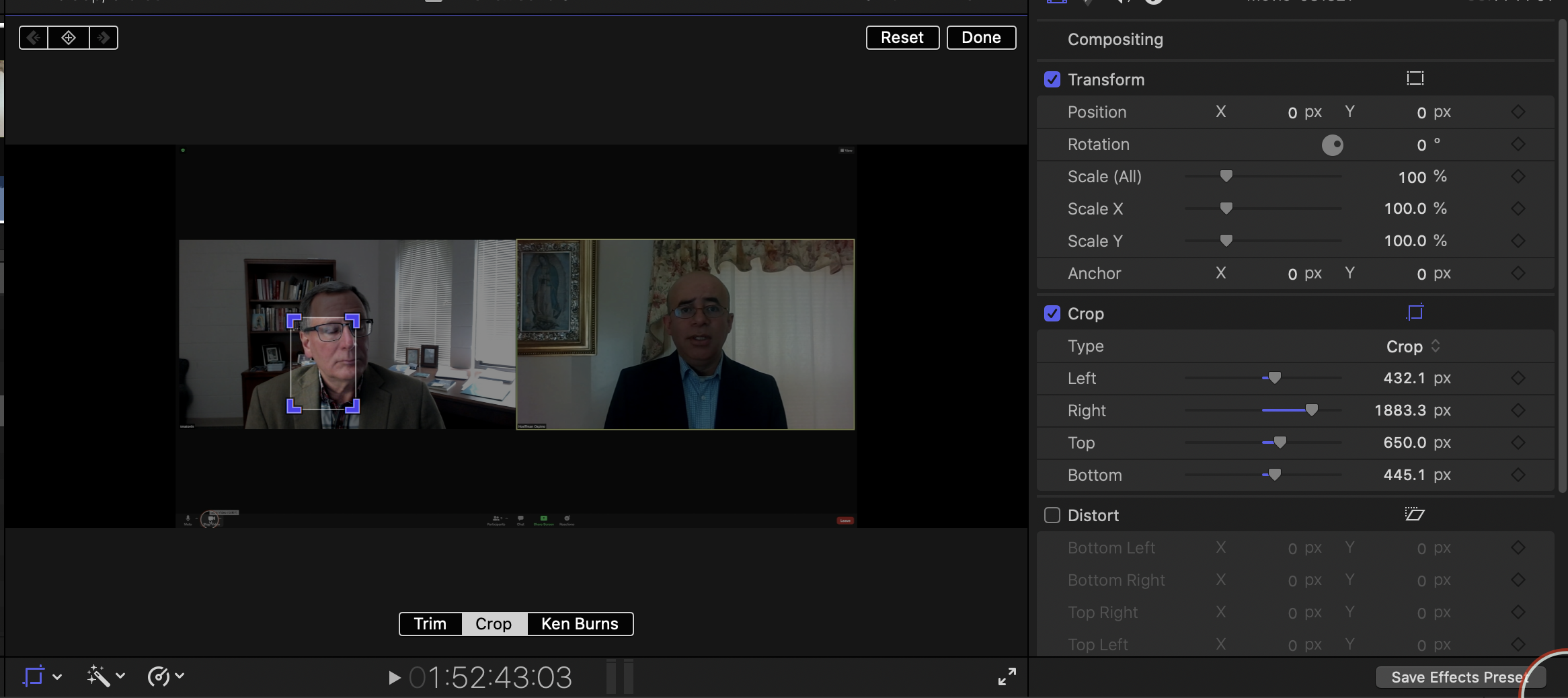 I’m fighting deadline here and need to know why it’s doing this. Please help.Thanks.
Please Log in to join the conversation.
- ronny courtens
-

- Offline
- Moderator
-

Less
More
- Posts: 4455
- Thank you received: 962
13 Aug 2021 22:02 #115764
by ronny courtens
Replied by ronny courtens on topic FCP Crop Won't Keep Aspect Ratio
Welcome to the forums.
If you want to maintain the aspect ratio using "Crop", you need to use the handles in the Viewer and not the sliders in the Inspector.
- Ronny
If you want to maintain the aspect ratio using "Crop", you need to use the handles in the Viewer and not the sliders in the Inspector.
- Ronny
Please Log in to join the conversation.