




- Posts: 10
- Thank you received: 1
3 Post Moderation Rule for New Boarders (25 Jan 2021)
New boarders will have their posts moderated - Don't worry if you cannot see your post immediately.
fcpx m1 projects doesn't match fcpx intel projects
04 Jun 2021 11:41 #114817
by Goncalo
fcpx m1 projects doesn't match fcpx intel projects was created by Goncalo
Hello need some help here. I use the iMac 2020 i9 32 GB RAM 2TB and i use fcpx in all my projects. I edit c-log files from c300iii (not raw, but always c-log2). Now i bought the macbook pro m1 16GB RAM for second computer. Sometimes i need to be far from the office and continue the editing process.
I normally apply color correction via color finale (a software already updated to the m1).
My surprise came when i open the projects that i was working on my intel iMac, they show completely different color correction (i already checked the automatic out that final cut applies and already turned it off). So i really don't know what to do.
Some examples from the difference between opening the project in the m1 and in the iMac.
The log is still intact. if i work the color correction all over again i can match the look i want, but it's completely crazy that i don't get the same image from the exactly same project.
It's a waste of time, when this is all native apps from apple.
Thank you very much for your help.
GF
I normally apply color correction via color finale (a software already updated to the m1).
My surprise came when i open the projects that i was working on my intel iMac, they show completely different color correction (i already checked the automatic out that final cut applies and already turned it off). So i really don't know what to do.
Some examples from the difference between opening the project in the m1 and in the iMac.
The log is still intact. if i work the color correction all over again i can match the look i want, but it's completely crazy that i don't get the same image from the exactly same project.
It's a waste of time, when this is all native apps from apple.
Thank you very much for your help.
GF
Please Log in to join the conversation.
- ronny courtens
-

- Offline
- Moderator
-

Less
More
- Posts: 4455
- Thank you received: 962
04 Jun 2021 12:04 #114818
by ronny courtens
Replied by ronny courtens on topic fcpx m1 projects doesn't match fcpx intel projects
Hi Goncalo, welcome to the forum.
I just did a test opening the same FCP project on an M1 MBP and on an Intel MBP. Different log clips with multiple native Apple color corrections. I can see no difference between the colors on the M1 and the Intel computer. Nor have I heard anyone else reporting such an issue.
You could do the regular thins like resetting your preferences but I don't think that will make a difference here.
I think you might get in touch with Color Finale. That is not a native Apple plugin, so the issue might be there. They have indeed released a version that is compatible with the M1, maybe check if there is a difference between the older Intel version on your Intel Mac and the new one on the M1?
- Ronny
I just did a test opening the same FCP project on an M1 MBP and on an Intel MBP. Different log clips with multiple native Apple color corrections. I can see no difference between the colors on the M1 and the Intel computer. Nor have I heard anyone else reporting such an issue.
You could do the regular thins like resetting your preferences but I don't think that will make a difference here.
I think you might get in touch with Color Finale. That is not a native Apple plugin, so the issue might be there. They have indeed released a version that is compatible with the M1, maybe check if there is a difference between the older Intel version on your Intel Mac and the new one on the M1?
- Ronny
Please Log in to join the conversation.
- Tom Wolsky
-

- Offline
- Moderator
-
04 Jun 2021 12:04 #114819
by Tom Wolsky
Replied by Tom Wolsky on topic fcpx m1 projects doesn't match fcpx intel projects
Have you contacted the plugin developer?
Please Log in to join the conversation.
04 Jun 2021 14:01 #114821
by Goncalo
Replied by Goncalo on topic fcpx m1 projects doesn't match fcpx intel projects
thank you very much for your answer. i've tried opening without the plugin color finale, and i have differences even with the simple native color correction from the final cut pro. i have done some tests with projects from the past with some footage from the c100 and everything is fine. I think the problem isn't the plug in. i think the problem is m1 with canon c-log2 specifically. the only projects that are giving me this problem are the ones with canon c-log 2 from c300iii
Please Log in to join the conversation.
04 Jun 2021 14:47 #114822
by Goncalo
Replied by Goncalo on topic fcpx m1 projects doesn't match fcpx intel projects
Hello, i tried comparing projects without any coloring plug in. Only with the color correction native from fcpx. it still makes a huge difference between the image in the m1 from the image of the mac. same exact project. i done some tests with other footage from sony cameras and c100 (different log) and it was ok even with the plug in coloring from color finale. so i think the problem is with the canon c-log 2 from c300iii (m1 reads it different from intel). i hope they fix this issue in the future.
Please Log in to join the conversation.
- Tom Wolsky
-
- Offline
- Moderator
-
04 Jun 2021 14:53 #114823
by Tom Wolsky
Replied by Tom Wolsky on topic fcpx m1 projects doesn't match fcpx intel projects
Are you sure the monitors are using the same calibration, the default for the devices?
Please Log in to join the conversation.
04 Jun 2021 15:04 #114824
by Goncalo
Replied by Goncalo on topic fcpx m1 projects doesn't match fcpx intel projects
i don't think is a monitor issue, because the projects that open well in both m1 and intel (from sony and c100 footage), open exactly with the same color / image in both computers. the problem is with the c-log 2 specifically (and probably from the c300iii). i don't shoot raw, but shoot all-i and long gop (both options in c-log2 are giving me this problem between computers).
Please Log in to join the conversation.
- ronny courtens
-
- Offline
- Moderator
-
Less
More
- Posts: 4455
- Thank you received: 962
04 Jun 2021 15:14 #114825
by ronny courtens
Replied by ronny courtens on topic fcpx m1 projects doesn't match fcpx intel projects
Can you send us a short clog2 clip for testing? You can upload it to WeTransfer or similar and the post the download link here.
- Ronny
- Ronny
Please Log in to join the conversation.
- Tom Wolsky
-
- Offline
- Moderator
-
04 Jun 2021 15:25 #114826
by Tom Wolsky
Replied by Tom Wolsky on topic fcpx m1 projects doesn't match fcpx intel projects
Yes, have to test the media. First trial with Canon media, C200 Cinema RAW, C300 MkII, and R6, cannot reproduce the problem going from M1 MBP to Intel MBP, both using Big Sur and 10.5.2.
Please Log in to join the conversation.
04 Jun 2021 15:33 #114827
by Goncalo
Replied by Goncalo on topic fcpx m1 projects doesn't match fcpx intel projects
yes of course. here it is. THANK YOU VERY MUCH FOR THE HELP
scriptfactory.wetransfer.com/downloads/3...0210604152641/a9bf8c
it's different from the stills because that clip was very big. this is a 6 second clip. has the same problem. applied simple color correction (no plug in from the fcpx) in the intel mac. open the same project im m1. completely different image. i noticed something in the m1, the color correction was with completely different highlights from what i just set before in the same project in the iMac. it just changed them. surreal. notice that i already tested with sony footage and with clog 1 from c100 and this does not happen. it's only happening with c-log2 from c300mkiii.
scriptfactory.wetransfer.com/downloads/3...0210604152641/a9bf8c
it's different from the stills because that clip was very big. this is a 6 second clip. has the same problem. applied simple color correction (no plug in from the fcpx) in the intel mac. open the same project im m1. completely different image. i noticed something in the m1, the color correction was with completely different highlights from what i just set before in the same project in the iMac. it just changed them. surreal. notice that i already tested with sony footage and with clog 1 from c100 and this does not happen. it's only happening with c-log2 from c300mkiii.
Please Log in to join the conversation.
- Tom Wolsky
-
- Offline
- Moderator
-
04 Jun 2021 16:02 - 04 Jun 2021 16:05 #114828
by Tom Wolsky
Replied by Tom Wolsky on topic fcpx m1 projects doesn't match fcpx intel projects
The original files without LUTs appear different in Intel and M1. I'm wondering if the Canon playback plugin has been or needs to be updated. The original media should appear the same on both systems with with the correct playback plugin. The first is the clip on the Intel machine; the second is the clip on the M1.


The difference is even more pronounced when the LUT is applied. The M1 file looks like it's HDR in Rec 709 library.
The difference is even more pronounced when the LUT is applied. The M1 file looks like it's HDR in Rec 709 library.
Last edit: 04 Jun 2021 16:05 by Tom Wolsky.
Please Log in to join the conversation.
04 Jun 2021 16:37 #114829
by Goncalo
Replied by Goncalo on topic fcpx m1 projects doesn't match fcpx intel projects
Yes, that could be the difference (that amplify with the corrections and plug ins). Didn't even noticed that there was a difference right in the original files.
Any suggestions on how to solve it? (don't know how to update the canon playback plugin - first time i hear of it lol).
The reason i have a 2nd computer is to switch from one to another in a regular basis. if i have to color grade all the project every time i switch computers i'm going to loose my mind at the end of the year
Any suggestions on how to solve it? (don't know how to update the canon playback plugin - first time i hear of it lol).
The reason i have a 2nd computer is to switch from one to another in a regular basis. if i have to color grade all the project every time i switch computers i'm going to loose my mind at the end of the year
Please Log in to join the conversation.
- ronny courtens
-
- Offline
- Moderator
-
Less
More
- Posts: 4455
- Thank you received: 962
04 Jun 2021 17:03 - 04 Jun 2021 17:06 #114830
by ronny courtens
Replied by ronny courtens on topic fcpx m1 projects doesn't match fcpx intel projects
Hi Goncalo,
I get the same results here and I agree with Tom. The same clip without any LUT or corrections appears brighter in the FCP browser on the M1 than on the Intel, as you can see on the scopes in this screenshot. On the original clip, highlights on Intel are around 88%, on M1 they are close to 100%:

When I color correct the clip on Intel and I send the XML over to my M1, everything comes over exactly as it was on the Intel including the color corrections. But of course the picture still appears brighter on the M1. The difference in the highlights is very notable, see screenshot:
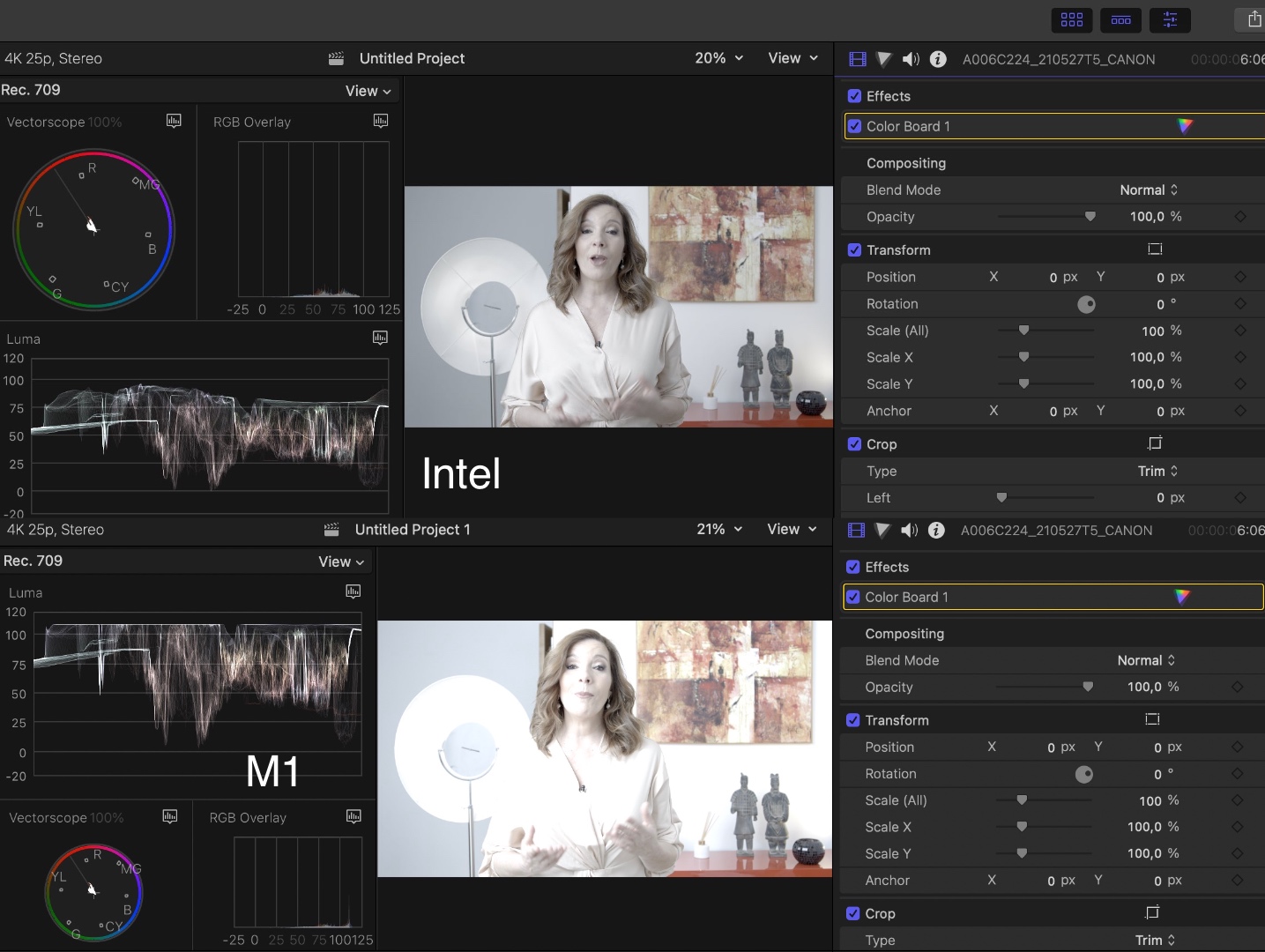
This test is not influenced by monitor calibration: I'm using the internal FCP scopes to measure the difference.
I have checked the Canon site and the Canon plugin for FCP is from November 2020, the specs don't mention compatibility with Silicon Macs. I don't think this would cause the issue anyway as IMO the plugin only works with Canon RAW formats (CRM) and you don't shoot RAW.
As it only happens with this specific format, I think you should report this issue to Canon. I have submitted a report for FCP but it's unlikely that Apple can solve this.
- Ronny
I get the same results here and I agree with Tom. The same clip without any LUT or corrections appears brighter in the FCP browser on the M1 than on the Intel, as you can see on the scopes in this screenshot. On the original clip, highlights on Intel are around 88%, on M1 they are close to 100%:
When I color correct the clip on Intel and I send the XML over to my M1, everything comes over exactly as it was on the Intel including the color corrections. But of course the picture still appears brighter on the M1. The difference in the highlights is very notable, see screenshot:
This test is not influenced by monitor calibration: I'm using the internal FCP scopes to measure the difference.
I have checked the Canon site and the Canon plugin for FCP is from November 2020, the specs don't mention compatibility with Silicon Macs. I don't think this would cause the issue anyway as IMO the plugin only works with Canon RAW formats (CRM) and you don't shoot RAW.
As it only happens with this specific format, I think you should report this issue to Canon. I have submitted a report for FCP but it's unlikely that Apple can solve this.
- Ronny
Last edit: 04 Jun 2021 17:06 by ronny courtens.
Please Log in to join the conversation.


04 Jun 2021 17:12 - 04 Jun 2021 17:17 #114831
by Redifer
Replied by Redifer on topic fcpx m1 projects doesn't match fcpx intel projects
I don't have an M1 Mac to test, but could the MXF file be converted to ProRes 422 using some other app before import to bypass the issue in the mean time?
I found this app. Can't vouch for it's quality but worth a try on a sample (use the free trial)- www.appleproresconverter.com/guide/mxf-t...to-fcp-x-prores.html
EDIT: It looks like Compressor can convert it as well if you have that, but I bet Compressor will have the same issues. I'd try converting it on the Intel Mac. I'd also recommend turning OFF the LUT when converting.
I found this app. Can't vouch for it's quality but worth a try on a sample (use the free trial)- www.appleproresconverter.com/guide/mxf-t...to-fcp-x-prores.html
EDIT: It looks like Compressor can convert it as well if you have that, but I bet Compressor will have the same issues. I'd try converting it on the Intel Mac. I'd also recommend turning OFF the LUT when converting.
Last edit: 04 Jun 2021 17:17 by Redifer.
Please Log in to join the conversation.
- Tom Wolsky
-
- Offline
- Moderator
-
04 Jun 2021 17:21 #114832
by Tom Wolsky
Replied by Tom Wolsky on topic fcpx m1 projects doesn't match fcpx intel projects
I thought there was an XF utility for this media. I tried it but it makes no difference.
Please Log in to join the conversation.
- ronny courtens
-
- Offline
- Moderator
-
Less
More
- Posts: 4455
- Thank you received: 962
04 Jun 2021 17:32 #114833
by ronny courtens
Replied by ronny courtens on topic fcpx m1 projects doesn't match fcpx intel projects
Joe Redifer: brilliant idea!
I have done the test. I have imported the clip in a Library on the Intel machine and have measured the original image using the scopes: whites were at 88%.
Then I have created optimized media for the clip (which is ProRes) and have measured the original image using the scopes: whites were at 100%!
Then I have sent the Library over to M1. Here, I got no difference in the highlights between the original clip and the optimized clip.
So I'm afraid the problem is with the Intel Mac: it shows the highlights of the canon c-2 log footage too low. On the M1, I don't see a difference between original and optimized c2-log footage.
- Ronny
I have done the test. I have imported the clip in a Library on the Intel machine and have measured the original image using the scopes: whites were at 88%.
Then I have created optimized media for the clip (which is ProRes) and have measured the original image using the scopes: whites were at 100%!
Then I have sent the Library over to M1. Here, I got no difference in the highlights between the original clip and the optimized clip.
So I'm afraid the problem is with the Intel Mac: it shows the highlights of the canon c-2 log footage too low. On the M1, I don't see a difference between original and optimized c2-log footage.
- Ronny
Please Log in to join the conversation.
04 Jun 2021 17:32 #114834
by Goncalo
Replied by Goncalo on topic fcpx m1 projects doesn't match fcpx intel projects
Guys, thank you very much for all the help. Really thankful. I'm going to do a test with a conversion to pro res. And already send the problem to canon also. If you have any news at all from apple or fcpx, please let me know. i'll keep you posted from news at my end also. thank you very much for all the help
Please Log in to join the conversation.
- ronny courtens
-
- Offline
- Moderator
-
Less
More
- Posts: 4455
- Thank you received: 962
04 Jun 2021 17:43 #114835
by ronny courtens
Replied by ronny courtens on topic fcpx m1 projects doesn't match fcpx intel projects
Hi Goncalo,
As the problem seems to be with the Intel and only with this specific format, I don't think either Canon or Apple will solve this any day soon.
For your workflow, I would advise you to optimize all the c2-log clips on your Intel Mac. You probably will have to re-adjust the current color corrections by adding an adjustment layer above the c2 clips and bringing the highlights on the adjustment layer down by around 12%.
If optimized files are too heavy to take on the road with your M1, you also can create ProRes proxy media to edit on the road. I have done the same test with proxy media and it gives the same results: original clip on the Intel is incorrect, with proxy media it is correct.
- Ronny
As the problem seems to be with the Intel and only with this specific format, I don't think either Canon or Apple will solve this any day soon.
For your workflow, I would advise you to optimize all the c2-log clips on your Intel Mac. You probably will have to re-adjust the current color corrections by adding an adjustment layer above the c2 clips and bringing the highlights on the adjustment layer down by around 12%.
If optimized files are too heavy to take on the road with your M1, you also can create ProRes proxy media to edit on the road. I have done the same test with proxy media and it gives the same results: original clip on the Intel is incorrect, with proxy media it is correct.
- Ronny
Please Log in to join the conversation.
04 Jun 2021 18:12 - 04 Jun 2021 18:13 #114836
by Goncalo
Replied by Goncalo on topic fcpx m1 projects doesn't match fcpx intel projects
I'm sorry for the dumb question but how can i optimize specific clips? i'm trying since you suggested. i think i did it right. select clip, right click, transcode media to optimized and then the clip appear with this information (see image in attach) that is optimized. if i did it right in my case it does not have any impact in the highlights. still at 85/88%. i have the option of not render. do i have to render the clip to see the effect?
i'm trying since you suggested. i think i did it right. select clip, right click, transcode media to optimized and then the clip appear with this information (see image in attach) that is optimized. if i did it right in my case it does not have any impact in the highlights. still at 85/88%. i have the option of not render. do i have to render the clip to see the effect? 
Last edit: 04 Jun 2021 18:13 by Goncalo.
Please Log in to join the conversation.
- ronny courtens
-
- Offline
- Moderator
-
Less
More
- Posts: 4455
- Thank you received: 962
05 Jun 2021 09:47 - 05 Jun 2021 09:48 #114848
by ronny courtens
Replied by ronny courtens on topic fcpx m1 projects doesn't match fcpx intel projects
No, you don't have to render. It is normal that the optimized clip will look exactly as the original clip on the Intel Mac. But when you copy the Library over to your M1, you will now see that the optimized clip looks exactly as on your Intel. The same trick works with proxy media in case you prefer to have a more lightweight Library to take on the road.
So there are two solutions you can use:
1. Convert after importing (existing project)
Optimize all the c-log2 clips that you have imported into FCP on the Intel Mac (or create proxy media). You can convert all the clips at once, no need to do this clip by clip.
When you copy the Library over to your M1, the clips will look exactly as on your Intel. Even if you already have done color corrections on the Intel.
The only disadvantage of this is that your Library will have all your original Canon clips as well as the transcoded versions. This will take more place in the Library.
2. Convert before importing (totally new project)
Don't import the c-log2 clips in FCP. Instead, convert all your c-log2 clips to ProRes 422 outside of FCP, using a transcoding application such as Compressor, Handbrake, etc...
Then import the ProRes 422 clips into FCP on your Intel Mac or on your M1 Mac, it does not make a difference. Wether you work on Intel or M1, the colors will always remain the same.
The advantage here is that your Library will be lighter because it only has the ProRes 422 clips, the original Canon clips are not imported.
Don't hesitate to post back if you have any further questions.
- Ronny
So there are two solutions you can use:
1. Convert after importing (existing project)
Optimize all the c-log2 clips that you have imported into FCP on the Intel Mac (or create proxy media). You can convert all the clips at once, no need to do this clip by clip.
When you copy the Library over to your M1, the clips will look exactly as on your Intel. Even if you already have done color corrections on the Intel.
The only disadvantage of this is that your Library will have all your original Canon clips as well as the transcoded versions. This will take more place in the Library.
2. Convert before importing (totally new project)
Don't import the c-log2 clips in FCP. Instead, convert all your c-log2 clips to ProRes 422 outside of FCP, using a transcoding application such as Compressor, Handbrake, etc...
Then import the ProRes 422 clips into FCP on your Intel Mac or on your M1 Mac, it does not make a difference. Wether you work on Intel or M1, the colors will always remain the same.
The advantage here is that your Library will be lighter because it only has the ProRes 422 clips, the original Canon clips are not imported.
Don't hesitate to post back if you have any further questions.
- Ronny
Last edit: 05 Jun 2021 09:48 by ronny courtens.
Please Log in to join the conversation.
