




- Posts: 22
- Thank you received: 1
3 Post Moderation Rule for New Boarders (25 Jan 2021)
New boarders will have their posts moderated - Don't worry if you cannot see your post immediately.
FCPX continuous crashing
31 May 2021 09:40 #114715
by Minguzzi
FCPX continuous crashing was created by Minguzzi
Hi everybody, after 3 terrible days trying to solve by myself, finally, I surrender. For some reason my FCXP 10.5.1 goes into crash (shutdown) every time I click on an event containing a project file. I really don't know if is it possible that all project files went corrupted (and this would be a disaster, I've got some of them close to be finished and they took a long time edit). Yesterday evening I play my last chance recovering from a backup disk, a backup of 15 days ago, before the beginning of the problems, but no solution... What have I to do?
Please Log in to join the conversation.
- ronny courtens
-

- Offline
- Moderator
-

Less
More
- Posts: 4455
- Thank you received: 962
31 May 2021 10:29 #114716
by ronny courtens
Replied by ronny courtens on topic FCPX continuous crashing
Welcome to the forum!
Sorry to hear you are having this issue. It's impossible to say what's happening without having more information:
1. Do you only have this problem with a specific Library? When you open any other Library, do the projects in that Library load as expected?
2. Where is the problematic Library located? On the internal drive of your Mac, or on an external drive? Check how much available storage capacity you have on the drive where the problematic Library is located.
3. Are the media stored inside your Library, or are they stored outside of the Library?
These are some questions to start with, please reply so we can see where things might go wrong.
In the meantime, try this:
Instead of clicking on the event that contains your projects, go to Smart Collections, press the triangle to open Smart Collections, and then select "Projects". Now you should see a list of all the Projects inside your Library. Double-click each Project to see if it loads in the timeline, the report back with the results.
Thanks!
- Ronny
Sorry to hear you are having this issue. It's impossible to say what's happening without having more information:
1. Do you only have this problem with a specific Library? When you open any other Library, do the projects in that Library load as expected?
2. Where is the problematic Library located? On the internal drive of your Mac, or on an external drive? Check how much available storage capacity you have on the drive where the problematic Library is located.
3. Are the media stored inside your Library, or are they stored outside of the Library?
These are some questions to start with, please reply so we can see where things might go wrong.
In the meantime, try this:
Instead of clicking on the event that contains your projects, go to Smart Collections, press the triangle to open Smart Collections, and then select "Projects". Now you should see a list of all the Projects inside your Library. Double-click each Project to see if it loads in the timeline, the report back with the results.
Thanks!
- Ronny
Please Log in to join the conversation.
31 May 2021 11:00 - 31 May 2021 11:02 #114717
by Minguzzi
Replied by Minguzzi on topic FCPX continuous crashing
Oh, I remind one thing... Problems begun to start 3 days ago, I created a new prj 4K (4096 × 2160), import two clips in the same values and try to apply on them an effect (magic bullet suite) that probably doesn't support 4k footage... immediately after that (big Cazzata) Final Cut crashed and, from that moment, all the other projects I've tryied to load go to crash Final Cut. Only if I create a new project it works, the old one's doesn't not. to reply to you quest: 1 - Media are stored inside library, 2 - All libraries are located in external drive but I use the by one year in that way without having any issue, until 3 days ago. Thanks for the reply
Last edit: 31 May 2021 11:02 by Minguzzi.
Please Log in to join the conversation.
31 May 2021 11:05 #114718
by Minguzzi
Replied by Minguzzi on topic FCPX continuous crashing
Just another info... in smart collection all the projects icons appears blank, some others are blank with a little red dot in the center and only two of them have a frame of the footage inside
Please Log in to join the conversation.
- ronny courtens
-
- Offline
- Moderator
-
Less
More
- Posts: 4455
- Thank you received: 962
31 May 2021 11:05 #114719
by ronny courtens
Replied by ronny courtens on topic FCPX continuous crashing
Thank you for the information, that certainly narrows down the problem.
Please try my suggestion to go to Smart Collections and load each Project from there instead of clicking on the Event. When you do this, do other Projects open and is it only the 4K Project with the Magic Bullet plugin that does not work?
- Ronny
Please try my suggestion to go to Smart Collections and load each Project from there instead of clicking on the Event. When you do this, do other Projects open and is it only the 4K Project with the Magic Bullet plugin that does not work?
- Ronny
Please Log in to join the conversation.
- ronny courtens
-
- Offline
- Moderator
-
Less
More
- Posts: 4455
- Thank you received: 962
31 May 2021 11:06 #114720
by ronny courtens
Replied by ronny courtens on topic FCPX continuous crashing
Okay, so you cannot open any Project from inside Smart Collections?
- Ronny
- Ronny
Please Log in to join the conversation.
31 May 2021 11:09 - 31 May 2021 11:11 #114721
by Minguzzi
Replied by Minguzzi on topic FCPX continuous crashing
No, that project was moved to trash days ago. Now I recreate a 4K prj and that is the only proj. that work, all my other old prj (done in 1080p with different frame rates) don't work anymore
Last edit: 31 May 2021 11:11 by Minguzzi.
Please Log in to join the conversation.
- ronny courtens
-
- Offline
- Moderator
-
Less
More
- Posts: 4455
- Thank you received: 962
31 May 2021 11:20 #114723
by ronny courtens
Replied by ronny courtens on topic FCPX continuous crashing
Okay, so the problematic Project has been deleted from the Event days ago but now there are older projects in the same Event that don't work anymore. All important information.
Please confirm the following so we can go to the next step:
- When you click on the Event where these older Projects are, FCP crashes. Right?
- When you select any of these Projects in Smart Collections > Projects and you double-click the Project to open it, FCP crashes, right?
- And when you create any new Project in a new Event, it works. Right?
Please confirm the following so we can go to the next step:
- When you click on the Event where these older Projects are, FCP crashes. Right?
- When you select any of these Projects in Smart Collections > Projects and you double-click the Project to open it, FCP crashes, right?
- And when you create any new Project in a new Event, it works. Right?
Please Log in to join the conversation.
31 May 2021 11:21 - 31 May 2021 11:25 #114724
by Minguzzi
Replied by Minguzzi on topic FCPX continuous crashing
I can open only 2 projects over 16, the other 14 prj crash Final Cut also if I stop rendering, and if this can be useful, all the event are in normal condition, without the exclamative dot inside a yellow triangle
Last edit: 31 May 2021 11:25 by Minguzzi.
Please Log in to join the conversation.
31 May 2021 11:25 #114725
by Minguzzi
Replied by Minguzzi on topic FCPX continuous crashing
right
Please Log in to join the conversation.
- ronny courtens
-
- Offline
- Moderator
-
Less
More
- Posts: 4455
- Thank you received: 962
31 May 2021 11:31 #114726
by ronny courtens
Replied by ronny courtens on topic FCPX continuous crashing
Okay, thank you for confirming. Now try this:
1. Create a new Event, call it "Old Projects"
2. Go to the Projects Smart Collection and select a Project that does not open anymore
3. Drag the Project icon from the Smart Collection to the "Old Projects" Event.
4. Double-click the Project in the "Old Projects" Event to open it in the Timeline.
Does that work? If not, we will try another solution.
- Ronny
1. Create a new Event, call it "Old Projects"
2. Go to the Projects Smart Collection and select a Project that does not open anymore
3. Drag the Project icon from the Smart Collection to the "Old Projects" Event.
4. Double-click the Project in the "Old Projects" Event to open it in the Timeline.
Does that work? If not, we will try another solution.
- Ronny
Please Log in to join the conversation.
31 May 2021 11:45 #114727
by Minguzzi
Replied by Minguzzi on topic FCPX continuous crashing
it crash after few seconds of calculate
Please Log in to join the conversation.
- ronny courtens
-
- Offline
- Moderator
-
Less
More
- Posts: 4455
- Thank you received: 962
31 May 2021 11:59 #114728
by ronny courtens
Replied by ronny courtens on topic FCPX continuous crashing
Thank you for trying. By this test, we know now that the problem is not related to the Event where the Projects are. This means that your Projects might have become corrupt. We will do one more test before we get deeper into each Project. This is what you do:
1. Create a new Library, call it "Test".
2. Select the old Library and go to Smart Collections > Projects
3. Select one of the projects that don't work
4. Select File > Copy Project to Library > Test
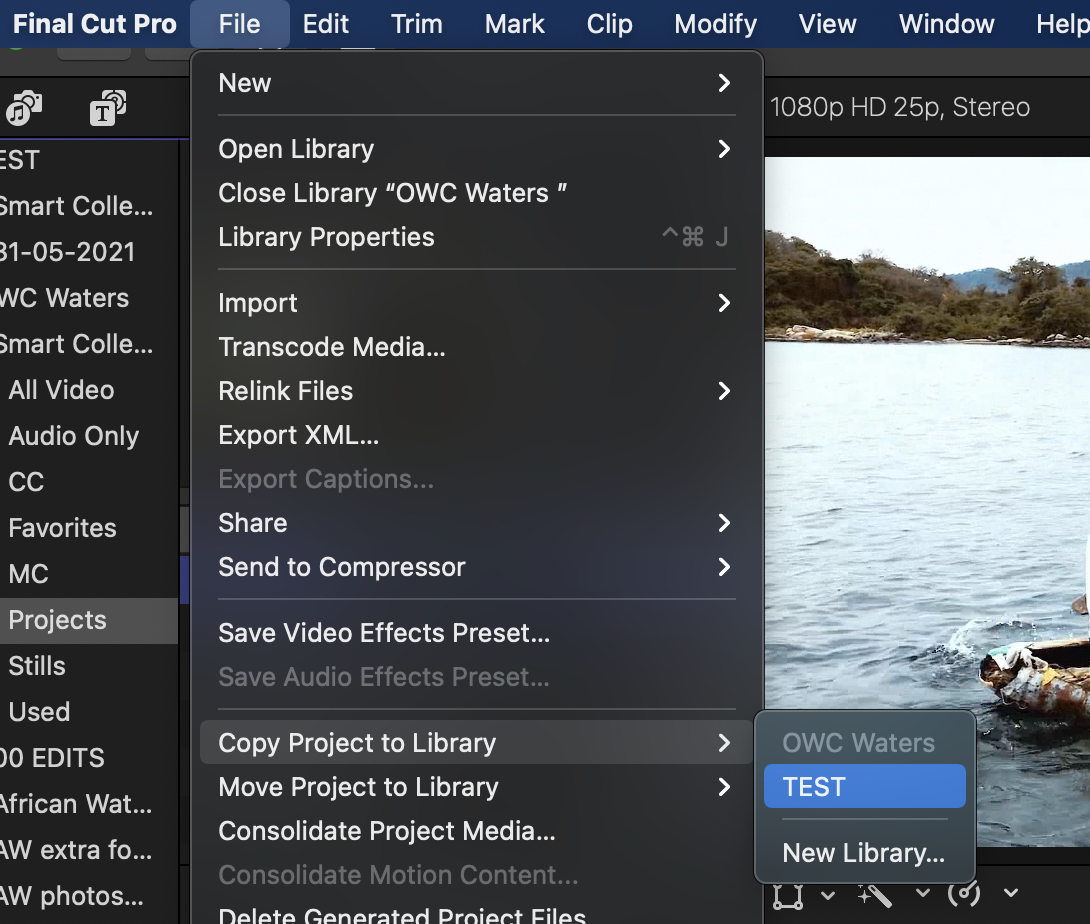
5. A window will open, make sure everything is selected as in the screenshot below and click OK
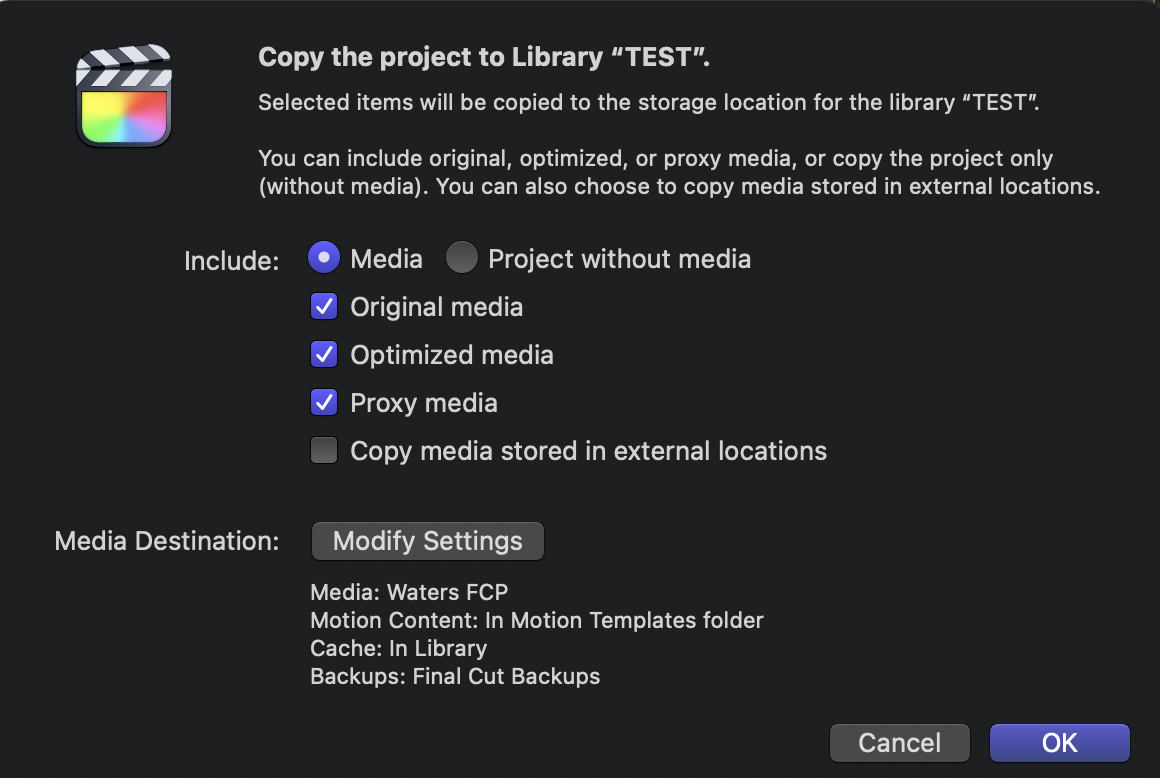
6. FCP will copy the bad Project into the Test Library and it will also copy all the media for this Project into that Library. This may take some time. Wait until it's done, then try to open that Project into the Timeline.
- Ronny
1. Create a new Library, call it "Test".
2. Select the old Library and go to Smart Collections > Projects
3. Select one of the projects that don't work
4. Select File > Copy Project to Library > Test
5. A window will open, make sure everything is selected as in the screenshot below and click OK
6. FCP will copy the bad Project into the Test Library and it will also copy all the media for this Project into that Library. This may take some time. Wait until it's done, then try to open that Project into the Timeline.
- Ronny
Please Log in to join the conversation.
- Tom Wolsky
-

- Offline
- Moderator
-
31 May 2021 12:04 #114729
by Tom Wolsky
Replied by Tom Wolsky on topic FCPX continuous crashing
In addition to all the advice from Ronnie, make sure you reset the preferences whenever the application crashes. Hold Opt-Cmd as you launch the application.
Please Log in to join the conversation.
- ronny courtens
-
- Offline
- Moderator
-
Less
More
- Posts: 4455
- Thank you received: 962
31 May 2021 12:06 #114730
by ronny courtens
Replied by ronny courtens on topic FCPX continuous crashing
Yes, indeed. Great advice, Tom!
- Ronny
- Ronny
Please Log in to join the conversation.
31 May 2021 12:14 - 31 May 2021 12:18 #114731
by Minguzzi
Replied by Minguzzi on topic FCPX continuous crashing
Original media does not exist for some clipsTo copy the files that do exist, click Continue. Clips without original media will appear as missing.
THIS IS WHAT IT SAID and it is strange, non alert sign on event and there are no red clips inside the event
THIS IS WHAT IT SAID and it is strange, non alert sign on event and there are no red clips inside the event
Last edit: 31 May 2021 12:18 by Minguzzi.
Please Log in to join the conversation.
- ronny courtens
-
- Offline
- Moderator
-
Less
More
- Posts: 4455
- Thank you received: 962
31 May 2021 12:21 #114733
by ronny courtens
Replied by ronny courtens on topic FCPX continuous crashing
Okay, at least this gives us an idea where the issue might be.
Click Continue to let the Project copy over to the Test Library with any available media. When the process is done, open the Project in its timeline to see what kind of media is exactly missing. Then we can try a re-link.
- Ronny
Click Continue to let the Project copy over to the Test Library with any available media. When the process is done, open the Project in its timeline to see what kind of media is exactly missing. Then we can try a re-link.
- Ronny
Please Log in to join the conversation.
31 May 2021 12:25 - 31 May 2021 12:49 #114734
by Minguzzi
Replied by Minguzzi on topic FCPX continuous crashing
I've relinked files and re-launch the "copy to project" and now it is going to copy files... act damn. it crash again... reopenFCPX relaunch the "copy project to" and another warning: "Optimized and proxy media do not exist for some clips. To generate optimized and ProRes proxy media, click Transcode. Transcoded media will be created in the folder “FCPX Library”.
Last edit: 31 May 2021 12:49 by Minguzzi.
Please Log in to join the conversation.
- ronny courtens
-
- Offline
- Moderator
-
Less
More
- Posts: 4455
- Thank you received: 962
31 May 2021 12:26 #114735
by ronny courtens
Replied by ronny courtens on topic FCPX continuous crashing
Thank you! Fingers crossed....
- Ronny
- Ronny
Please Log in to join the conversation.
