


- Posts: 8
- Thank you received: 0
3 Post Moderation Rule for New Boarders (25 Jan 2021)
New boarders will have their posts moderated - Don't worry if you cannot see your post immediately.
FCP on M1 Mac Mini doesn't see audio interface
- John Fishback
-
 Topic Author
- Offline
- New Member
-

Less
More
14 May 2021 17:59 #114504
by John Fishback
FCP on M1 Mac Mini doesn't see audio interface was created by John Fishback
We purchased a PreSonus 68c interface to have high-quality audio monitoring from FCP 10.5.2 on an M1 Mac Mini. However, the interface doesn't appear in FCP's Window menu. A/V Output is greyed out. The OS is 11.3.1 and the interface appears and is selected in the Sound System Pref (input and output). Also, it appears in the System Report on the USB bus. The 68c interface is plugged into one of the USB ports on the M1. Any thoughts are much appreciated.
Please Log in to join the conversation.


14 May 2021 23:16 - 15 May 2021 12:44 #114507
by JoeEditor
Replied by JoeEditor on topic FCP on M1 Mac Mini doesn't see audio interface
Audio interfaces won't appear in the A/V Output (meaning combined audio/video out) in the preferences, that's for video monitors that FCP can output a broadcast signal for color and quality monitoring.
Audio output will be handled by the OS (system prefs), not by FCP itself.
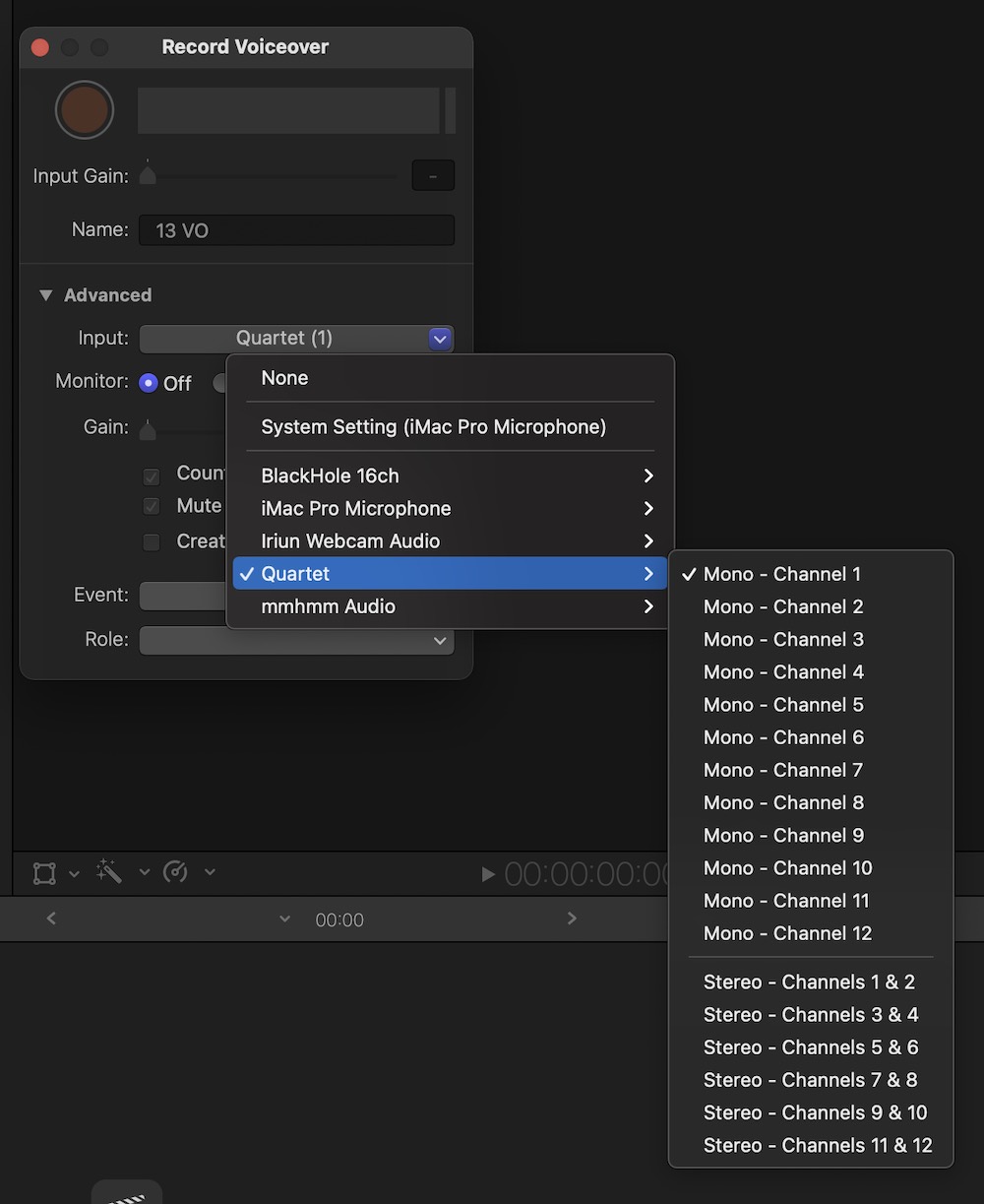
Audio input will be handled by the Input control of the Record Voiceover tool, command option 8.
Audio output will be handled by the OS (system prefs), not by FCP itself.
Audio input will be handled by the Input control of the Record Voiceover tool, command option 8.
Last edit: 15 May 2021 12:44 by JoeEditor.
Please Log in to join the conversation.
- Rinaldo Doon
-
- Offline
- Senior Member
-

Less
More
- Posts: 41
- Thank you received: 11
15 May 2021 09:40 - 15 May 2021 10:22 #114511
by Rinaldo Doon
Replied by Rinaldo Doon on topic FCP on M1 Mac Mini doesn't see audio interface
The audio from any app that can produce it is sent to the destination chosen in the Sound section in System Preferences and can also be selected in the Speaker item in the main menubar of the Mac.
Go to System Preferences and choose Sound. Choose the Output tab at the top. Your Presonus 68c should appear in the list. Select it and also select 'Show volume in menu bar' at the bottom of the window.
Now if you want to switch to any other audio output and back again, you can do it by clicking on the speaker icon and choosing the device.
I am not familiar with the software packaged with the Presonus, but make sure the interface is configured for operation at 48kHz and not 44.1kHz operation.
Go to System Preferences and choose Sound. Choose the Output tab at the top. Your Presonus 68c should appear in the list. Select it and also select 'Show volume in menu bar' at the bottom of the window.
Now if you want to switch to any other audio output and back again, you can do it by clicking on the speaker icon and choosing the device.
I am not familiar with the software packaged with the Presonus, but make sure the interface is configured for operation at 48kHz and not 44.1kHz operation.
Last edit: 15 May 2021 10:22 by Rinaldo Doon.
Please Log in to join the conversation.
- John Fishback
-
Topic Author
- Offline
- New Member
-
Less
More
- Posts: 8
- Thank you received: 0
16 May 2021 16:38 #114521
by John Fishback
Replied by John Fishback on topic FCP on M1 Mac Mini doesn't see audio interface
Thanks. I now see that the audio does appear on the interface. What's odd is the interface isn't connecting properly to the SPDIF input of the Yamaha DM-1000 console, while playing a track in the finder does. I have to wire a couple of TT Bantam patch plugs to XLR female cables and see if the analog audio plays out of the interface.
Please Log in to join the conversation.
- Rinaldo Doon
-
- Offline
- Senior Member
-
Less
More
- Posts: 41
- Thank you received: 11
17 May 2021 08:28 #114527
by Rinaldo Doon
Replied by Rinaldo Doon on topic FCP on M1 Mac Mini doesn't see audio interface
It sounds like it's worth checking that the Yamaha is set to 48kHz as well, as you won't get audio otherwise. Just in case, there is also a sample rate converter facility on the 2TR input which should lock to anything, but it would be best if the desk is working at 48kHz.
Please Log in to join the conversation.
- John Fishback
-
Topic Author
- Offline
- New Member
-
Less
More
- Posts: 8
- Thank you received: 0
17 May 2021 13:59 #114532
by John Fishback
Replied by John Fishback on topic FCP on M1 Mac Mini doesn't see audio interface
Thanks, Rinaldo. The DM-1000 is set to 48k and SRC is on as well. It's weird.
Please Log in to join the conversation.
- Rinaldo Doon
-
- Offline
- Senior Member
-
Less
More
- Posts: 41
- Thank you received: 11
17 May 2021 14:39 - 17 May 2021 14:40 #114533
by Rinaldo Doon
I hardly dare suggest it, but have you assigned the 2TR input to an input channel? It's not like a lot of analogue desks where the 2-Track input bypasses the main input faders part of the desk, you have to make it a source to the desk by assigning it to a fader channel.
Just a thought.
Replied by Rinaldo Doon on topic FCP on M1 Mac Mini doesn't see audio interface
John Fishback wrote: Thanks, Rinaldo. The DM-1000 is set to 48k and SRC is on as well. It's weird.
I hardly dare suggest it, but have you assigned the 2TR input to an input channel? It's not like a lot of analogue desks where the 2-Track input bypasses the main input faders part of the desk, you have to make it a source to the desk by assigning it to a fader channel.
Just a thought.
Last edit: 17 May 2021 14:40 by Rinaldo Doon.
Please Log in to join the conversation.
- John Fishback
-
Topic Author
- Offline
- New Member
-
Less
More
- Posts: 8
- Thank you received: 0
17 May 2021 15:08 #114534
by John Fishback
Replied by John Fishback on topic FCP on M1 Mac Mini doesn't see audio interface
The inputs are assigned. The desk has two digital stereo ins-one is AES and the other is SPDIF. AES is 2D1L & 2D1R and SPDIF is 2D2L & 2D2R. The AES connection is from a Decklink 4K card in another computer which is off when I'm using the M1 Mac Mini.
Please Log in to join the conversation.
