


- Posts: 8
- Thank you received: 0
3 Post Moderation Rule for New Boarders (25 Jan 2021)
New boarders will have their posts moderated - Don't worry if you cannot see your post immediately.
Project's duration doesn't match with the clip's duration when imported.
- im_jerry87
-
 Topic Author
- Offline
- New Member
-

Less
More
20 Dec 2020 14:53 - 20 Dec 2020 15:20 #111632
by im_jerry87
I have a clip [Resolution: 1200x720 | Frame Rate: 23.98] and created a project with the same mentioned clip properties. Then, I imported the clip to the timeline but the duration of the project doesn't match with that of the clip, it was 2 min and 6 frames shorter. So, I checked the Inspector for the clip & the Project, and the settings match [Screenshots attached below]. I also checked the clip's Frame Rate outside of FCP using VLC & IINA and no surprises, it's a 23.98 FPS clip so the issue is with FCP. Instances like this just make me wonder why Final Cut doesn't allow creating a Project using the clip's properties like other NLEs do, it would solve this manual process of looking Inspector for Frame Rate & Resolution, creating a project with those settings, and dealing with this 'duration not matching' issue, etc. Help?
[I'm running FCPX 10.4.9 on macOS 11.1]
[I'm running FCPX 10.4.9 on macOS 11.1]
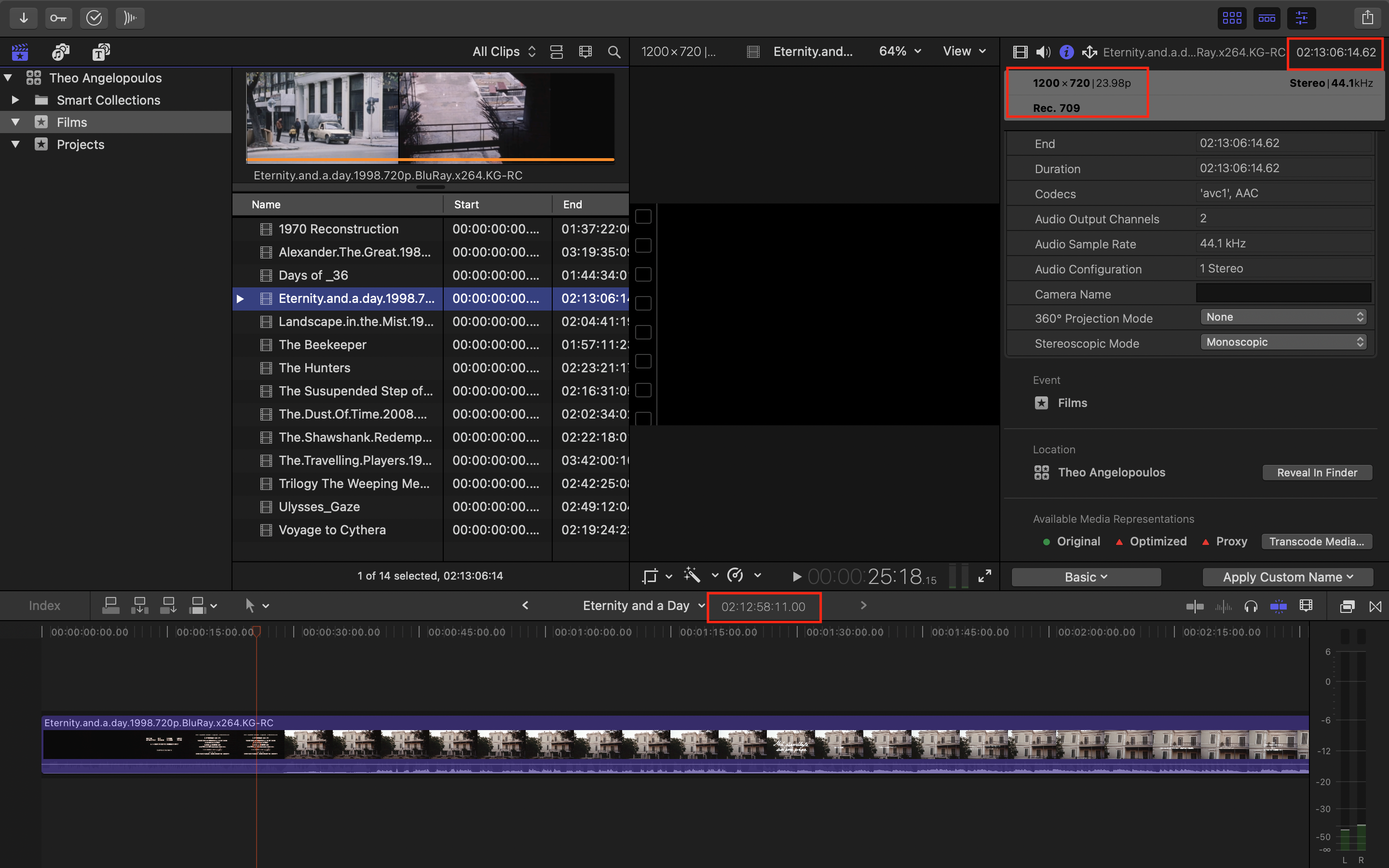
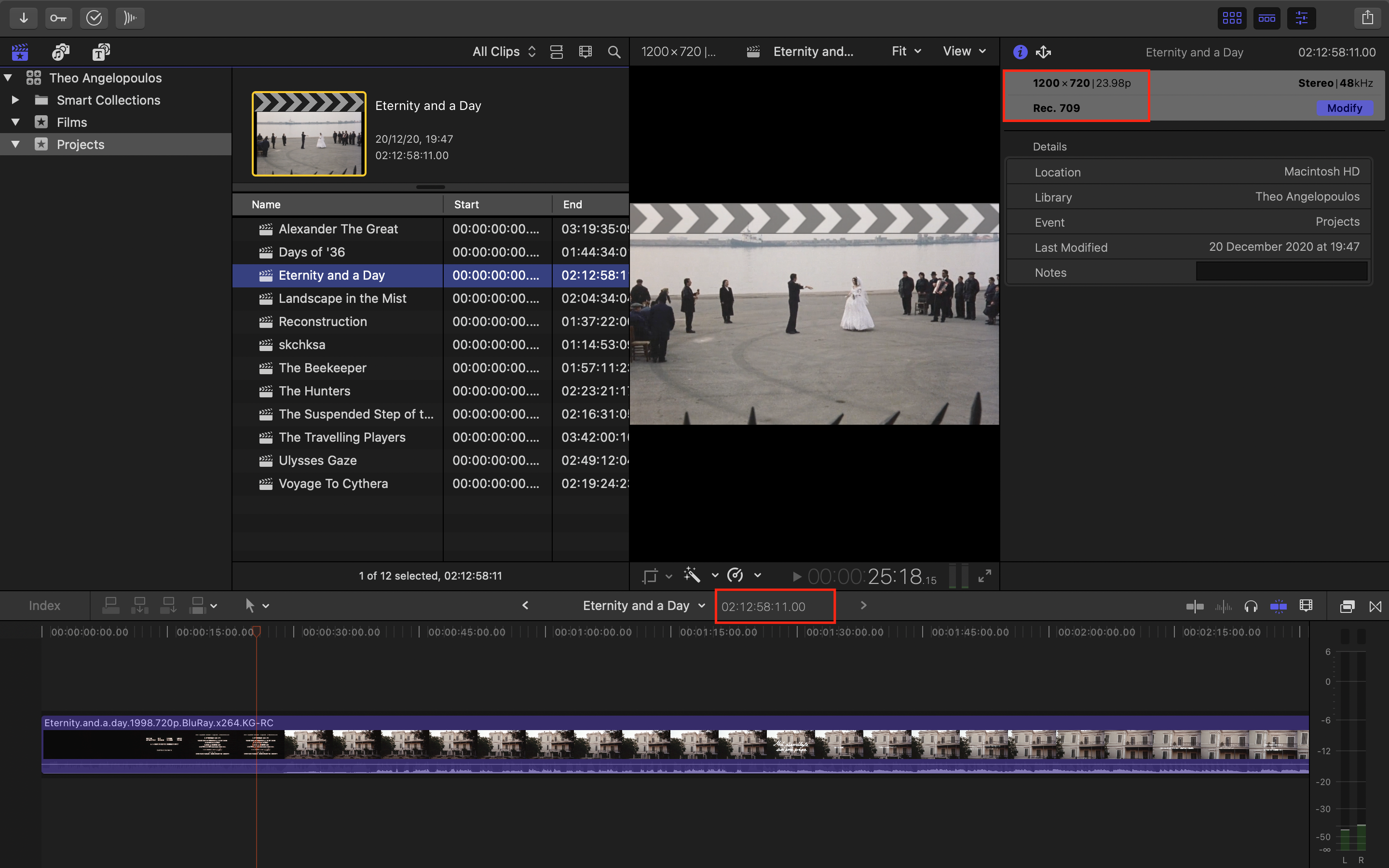
Last edit: 20 Dec 2020 15:20 by im_jerry87.
Please Log in to join the conversation.
- Tom Wolsky
-

- Offline
- Moderator
-

20 Dec 2020 15:11 #111633
by Tom Wolsky
Replied by Tom Wolsky on topic Project's duration doesn't match with the clip's duration when imported.
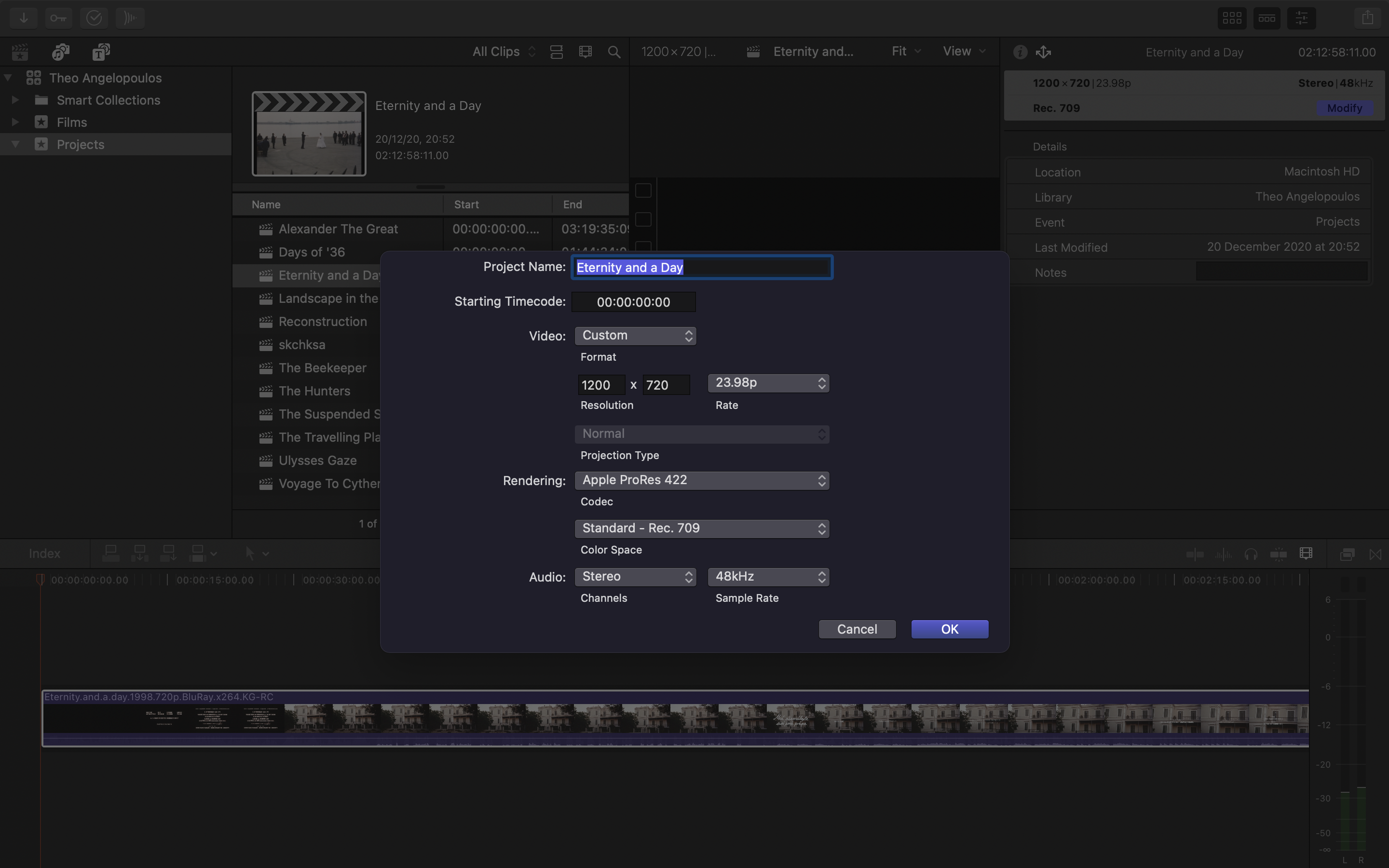
Could you click the project modify button and screenshot the project properties?
Please Log in to join the conversation.
- im_jerry87
-
Topic Author
- Offline
- New Member
-
Less
More
- Posts: 8
- Thank you received: 0
20 Dec 2020 15:26 #111634
by im_jerry87
Replied by im_jerry87 on topic Project's duration doesn't match with the clip's duration when imported.
Screenshot of Project Properties
Please Log in to join the conversation.
- Carsten Orlt
-

- Offline
- Platinum Member
-

Less
More
- Posts: 422
- Thank you received: 82
20 Dec 2020 18:50 #111635
by Carsten Orlt
Replied by Carsten Orlt on topic Project's duration doesn't match with the clip's duration when imported.
But I think you can create a project with the clips setting by right clicking on the clip and select the first menu item ‘New Project’.
Please Log in to join the conversation.
- Tom Wolsky
-
- Offline
- Moderator
-
20 Dec 2020 19:08 #111636
by Tom Wolsky
Replied by Tom Wolsky on topic Project's duration doesn't match with the clip's duration when imported.
Unless it’s been changed I think that will only create standard video presets and not custom resolutions.
Please Log in to join the conversation.
- Carsten Orlt
-
- Offline
- Platinum Member
-
Less
More
- Posts: 422
- Thank you received: 82
20 Dec 2020 19:19 #111637
by Carsten Orlt
Replied by Carsten Orlt on topic Project's duration doesn't match with the clip's duration when imported.
Thanks Tom, I never use it, I only know it exists 
Please Log in to join the conversation.

20 Dec 2020 20:10 #111640
by joema
If you create a project with the default automatic settings, it should automatically conform to the characteristics of the 1st clip added. Can you try that and see what the timeline duration is in the project?
Just to double-check the length, press the R key and raw a range over the clip in the timeline, then inspect the listed duration in yellow numbers below the viewer.
If it still behaves oddly it might be caused by improper metadata in the file's video header. It appears it was ripped from a Blu-Ray, and such software does not always encode files properly. Editing software needs to access more of those metadata fields than a simple playback tool, so sometimes it will play OK in VLC but the editing software can't handle it.
The difference in the two lengths is about 0.1%. That is the same difference as 23.98 vs 24 fps. If the original material was encoded on Blu-Ray at 24.0 fps and the ripping software mis-managed the metadata, and intermixed some header values as 24 fps when the file is actually encoded at 23.98 or vice-versa, then you may see behavior like this.
You could try exporting it from FCP to ProRes 422 and re-importing it, or transcoding it using Handbrake or download the free version of Resolve, import the clip and see how it's managed there.
Replied by joema on topic Project's duration doesn't match with the clip's duration when imported.
im_jerry87 wrote: ...Instances like this just make me wonder why Final Cut doesn't allow creating a Project using the clip's properties like other NLEs do, it would solve this manual process of looking Inspector for Frame Rate & Resolution, creating a project with those settings...
If you create a project with the default automatic settings, it should automatically conform to the characteristics of the 1st clip added. Can you try that and see what the timeline duration is in the project?
Just to double-check the length, press the R key and raw a range over the clip in the timeline, then inspect the listed duration in yellow numbers below the viewer.
If it still behaves oddly it might be caused by improper metadata in the file's video header. It appears it was ripped from a Blu-Ray, and such software does not always encode files properly. Editing software needs to access more of those metadata fields than a simple playback tool, so sometimes it will play OK in VLC but the editing software can't handle it.
The difference in the two lengths is about 0.1%. That is the same difference as 23.98 vs 24 fps. If the original material was encoded on Blu-Ray at 24.0 fps and the ripping software mis-managed the metadata, and intermixed some header values as 24 fps when the file is actually encoded at 23.98 or vice-versa, then you may see behavior like this.
You could try exporting it from FCP to ProRes 422 and re-importing it, or transcoding it using Handbrake or download the free version of Resolve, import the clip and see how it's managed there.
Please Log in to join the conversation.
- im_jerry87
-
Topic Author
- Offline
- New Member
-
Less
More
- Posts: 8
- Thank you received: 0
21 Dec 2020 04:17 - 21 Dec 2020 04:26 #111646
by im_jerry87
Actually, I have tried this before but I tried it again just to confirm and as expected it didn't conform to the 1st clip's properties, the project sticks to the default Frame Rate, and the duration of the project changes accordingly.
Replied by im_jerry87 on topic Project's duration doesn't match with the clip's duration when imported.
joema wrote: If you create a project with the default automatic settings, it should automatically conform to the characteristics of the 1st clip added. Can you try that and see what the timeline duration is in the project?
Actually, I have tried this before but I tried it again just to confirm and as expected it didn't conform to the 1st clip's properties, the project sticks to the default Frame Rate, and the duration of the project changes accordingly.
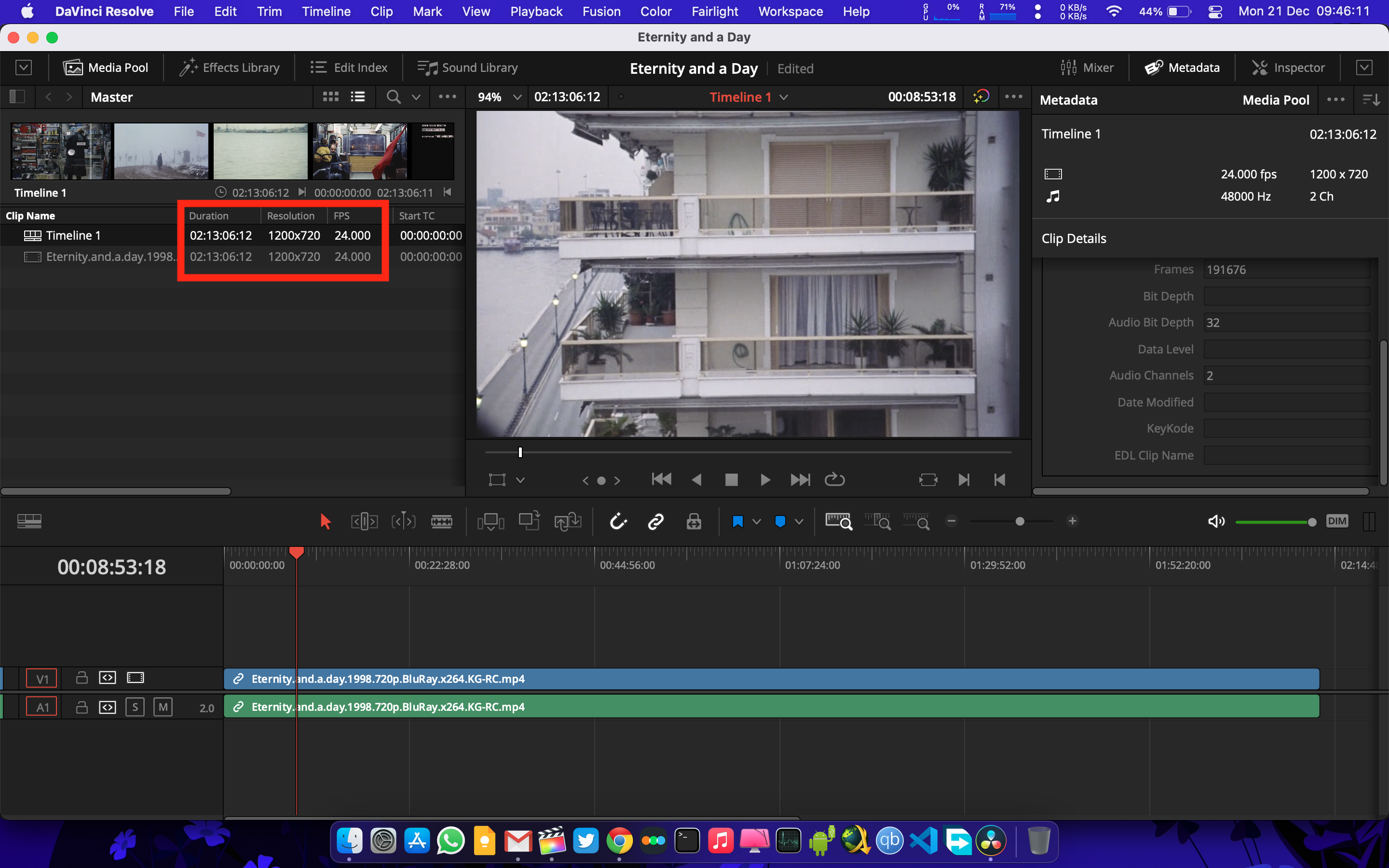
Resolve reads it as a 24 fps clip and the project duration matches with that of the clip. So, as you mentioned the problem might be due to mishandled metadata while ripping. I have set the project in FCP to 24 FPS and while it still doesn't match the exact duration (4 frames shorter) it's not a big deal for me. But still, I wish FCP allows automation of this process. All I did in Resolve was, create a project and just import the clip and it automatically changed the project's setting to the clip's properties, and importantly the duration match exactly (Screenshot attached below)..... download the free version of Resolve, import the clip, and see how it's managed there.
Last edit: 21 Dec 2020 04:26 by im_jerry87.
Please Log in to join the conversation.

21 Dec 2020 12:45 - 21 Dec 2020 12:46 #111647
by JoeEditor
Replied by JoeEditor on topic Project's duration doesn't match with the clip's duration when imported.
This is a known bug for the past couple of versions. I get it couple times a week with my TV station work. If I quite out of FCP and relaunch, it works fine.
Last edit: 21 Dec 2020 12:46 by JoeEditor.
Please Log in to join the conversation.
