


- Posts: 6
- Thank you received: 0
3 Post Moderation Rule for New Boarders (25 Jan 2021)
New boarders will have their posts moderated - Don't worry if you cannot see your post immediately.
FCPX, GH5 HLG/HVEC can't see video?
19 Jun 2020 20:00 #108027
by sgreszcz
FCPX, GH5 HLG/HVEC can't see video? was created by sgreszcz
Hey there,
I'm trying to edit GH5 HLG/HVEV video in FCPX 10.4.8 on OSX Catalina 10.15.5. This is a new computer and I could have sworn that I was able to see and edit that codec in my old Mac. Also, when I export prores 422 with other footage, for some reason I can't playback that output in Quicktime. I tried seeing if I had the proapps codecs installed and googled a bit last night, but couldn't find what I had done wrong... Any ideas?
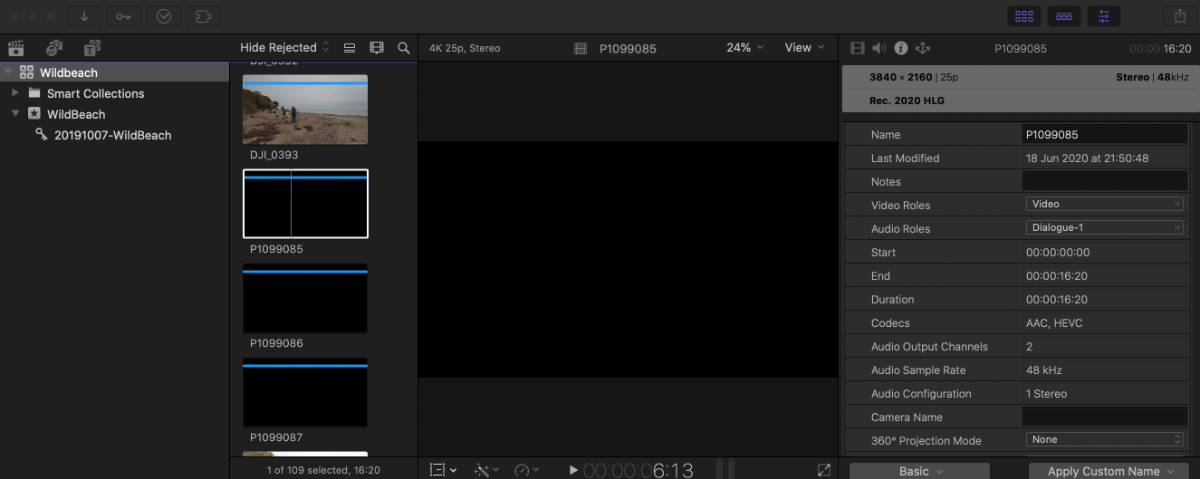
I'm trying to edit GH5 HLG/HVEV video in FCPX 10.4.8 on OSX Catalina 10.15.5. This is a new computer and I could have sworn that I was able to see and edit that codec in my old Mac. Also, when I export prores 422 with other footage, for some reason I can't playback that output in Quicktime. I tried seeing if I had the proapps codecs installed and googled a bit last night, but couldn't find what I had done wrong... Any ideas?
Please Log in to join the conversation.


20 Jun 2020 19:46 - 20 Jun 2020 19:47 #108051
by joema
Replied by joema on topic FCPX, GH5 HLG/HVEC can't see video?
Try resetting FCPX preferences (item 11 on this page):
support.apple.com/en-us/HT203477
On Catalina, Apple Pro Video Formats are updated in System Preferences>Software Update. If an update is needed it will normally show up there.
However you can verify your Pro Video Formats version by doing About this Mac>System Report>Software>Installations, then scroll down. The latest Pro Video Formats is ver. 2.1.1.
If still a problem after that, upload a short test clip to DropBox and post it here so we can examine it. Also please state the year, model and config of your new Mac.
On Catalina, Apple Pro Video Formats are updated in System Preferences>Software Update. If an update is needed it will normally show up there.
However you can verify your Pro Video Formats version by doing About this Mac>System Report>Software>Installations, then scroll down. The latest Pro Video Formats is ver. 2.1.1.
If still a problem after that, upload a short test clip to DropBox and post it here so we can examine it. Also please state the year, model and config of your new Mac.
Last edit: 20 Jun 2020 19:47 by joema.
Please Log in to join the conversation.
28 Jun 2020 20:16 #108298
by sgreszcz
Replied by sgreszcz on topic FCPX, GH5 HLG/HVEC can't see video?
Thanks for the info. I checked the Pro Video Formats (was OK), reset all my preferences, cleaned up all render files using Final Cut Pro Library Manager, and re-imported using "optimise media" and that seemed to fix things.
Please Log in to join the conversation.
