


- Posts: 141
- Thank you received: 2
3 Post Moderation Rule for New Boarders (25 Jan 2021)
New boarders will have their posts moderated - Don't worry if you cannot see your post immediately.
Can't Edit Motion 5 Title in FCP X!
08 Feb 2020 14:54 - 08 Feb 2020 16:53 #104477
by AlexMaxim
Can't Edit Motion 5 Title in FCP X! was created by AlexMaxim
Hey there guys,
We hope that this post finds you in excellent spirits, and that you are all having a wonderful weekend.
We have a really weird problem that we haven't been able to solve: earlier today, we created a simple title in Motion 5, which is editable in FCP X. This title is a subtitle template, so we need the text to be editable in Final Cut Pro X.
However, when we double-click on the title in FCP X, it does not allow us to edit the subtitle template. Instead, it puts the cursor in the middle of the screen, and allows us to type there – which is sort of useless to us as the positioning is wrong and our formatting options are not at that location.
Does anyone have an idea what might be happening? We have never had this problem before.
Any thoughts, suggestions etc. are gratefully received, as ever.
With very best wishes/Alex Maxim
We hope that this post finds you in excellent spirits, and that you are all having a wonderful weekend.
We have a really weird problem that we haven't been able to solve: earlier today, we created a simple title in Motion 5, which is editable in FCP X. This title is a subtitle template, so we need the text to be editable in Final Cut Pro X.
However, when we double-click on the title in FCP X, it does not allow us to edit the subtitle template. Instead, it puts the cursor in the middle of the screen, and allows us to type there – which is sort of useless to us as the positioning is wrong and our formatting options are not at that location.
Does anyone have an idea what might be happening? We have never had this problem before.
Any thoughts, suggestions etc. are gratefully received, as ever.
With very best wishes/Alex Maxim
Last edit: 08 Feb 2020 16:53 by AlexMaxim.
Please Log in to join the conversation.


08 Feb 2020 17:34 #104479
by JoeEditor
Replied by JoeEditor on topic Can't Edit Motion 5 Title in FCP X!
You did publish being able to edit the text, right? Can you zip it up and email me a copy to look over?
benb at bbalser dot com
benb at bbalser dot com
Please Log in to join the conversation.
08 Feb 2020 17:58 - 08 Feb 2020 18:05 #104481
by AlexMaxim
Thank you so much for your kind reply! We've attached these files to this post (they are very small in size). Please let me know if you can't view them.
PS We have also emailed these to you.
Replied by AlexMaxim on topic Can't Edit Motion 5 Title in FCP X!
FCPX.guru wrote: You did publish being able to edit the text, right? Can you zip it up and email me a copy to look over?
benb at bbalser dot com
Thank you so much for your kind reply! We've attached these files to this post (they are very small in size). Please let me know if you can't view them.
PS We have also emailed these to you.
Last edit: 08 Feb 2020 18:05 by AlexMaxim.
Please Log in to join the conversation.
08 Feb 2020 18:27 #104482
by JoeEditor
Replied by JoeEditor on topic Can't Edit Motion 5 Title in FCP X!
Super simple solution! Motion really needs a better text pane in the Inspector. You had a carriage return that left the actual first line of text empty, and the visible text on a second line below it. So you were clicking on the text box, and in the blank line above, so it seemed to not be working correctly.
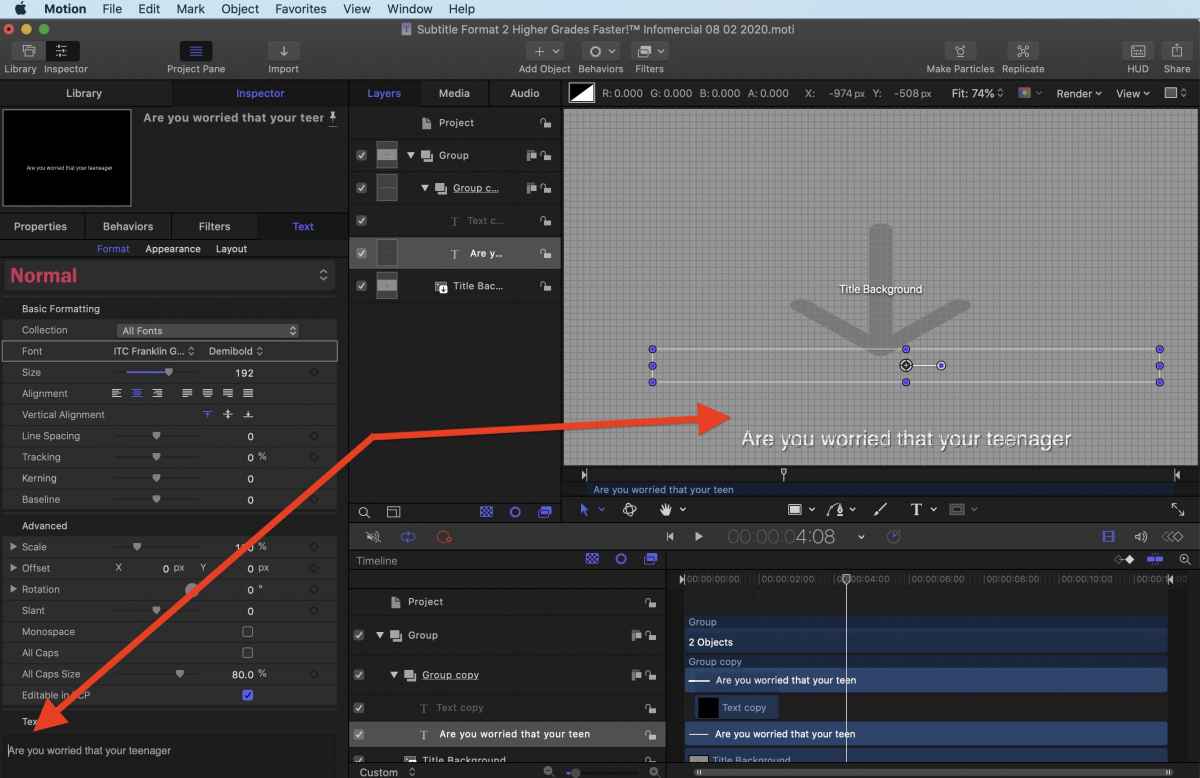
I simply backspaced the cursor to remove it, and it looks fine now.

I simply backspaced the cursor to remove it, and it looks fine now.
Please Log in to join the conversation.
08 Feb 2020 18:40 #104483
by AlexMaxim
THANK YOU SO MUCH!
We were really beginning to wonder whether something was seriously wrong with either FCP X, Motion 5 or us!
This works brilliantly now!
Many thanks once again!
Replied by AlexMaxim on topic Can't Edit Motion 5 Title in FCP X!
FCPX.guru wrote: Super simple solution! Motion really needs a better text pane in the Inspector. You had a carriage return that left the actual first line of text empty, and the visible text on a second line below it. So you were clicking on the text box, and in the blank line above, so it seemed to not be working correctly.
I simply backspaced the cursor to remove it, and it looks fine now.
THANK YOU SO MUCH!
We were really beginning to wonder whether something was seriously wrong with either FCP X, Motion 5 or us!
This works brilliantly now!
Many thanks once again!
Please Log in to join the conversation.
