


3 Post Moderation Rule for New Boarders (25 Jan 2021)
New boarders will have their posts moderated - Don't worry if you cannot see your post immediately.
Changing duration of multiple clips in timeline


Also, I created a 1080p project and used spatial conform and scaling to frame the 4000 x 3000 pixel images the way I want. Is there any benefit, such as a reduced file size on export if I were to batch scale the size of those images in an external program before I bring them into FCPX?
Creating history....one edit at a time !
Please Log in to join the conversation.
- Motion Cut
-

- Offline
- Banned
-

Not sure if you can or how you can change the duration of multiple clips. Did you try control clicking each clip you want to change and setting a time in the inspector window?
Please Log in to join the conversation.
I can select multiple clips in the project window, but the inspector does not allow you to change the duration. It only shows what the actual duration is.
Creating history....one edit at a time !
Please Log in to join the conversation.
- Motion Cut
-
- Offline
- Banned
-
I think this could be another thing to send to Apple in the FCPX Feedback.
Please Log in to join the conversation.
Creating history....one edit at a time !
Please Log in to join the conversation.

Please Log in to join the conversation.
- Tom Wolsky
-

- Offline
- Moderator
-

Please Log in to join the conversation.
The default duration is just like in 7, but the way FCP X handles things it seems weird. In 7, your still was the Pref set default, but if you look at it in the Viewer, you saw In/Out points around 4 seconds, but enough handles to be 10 seconds. When you F10 it into a track it is 4 seconds.
In FCP X it still has the handles making it overall 10 seconds. If you highlight its name in the List view, it will grab the full 10 seconds, then hit Q, W, or E and the full 10 seconds hits the Timeline.
If you click its icon at the top of the list veiw, notice it only selects a 4 second range, then hit Q, W, or E and only 4 seconds hits the Timeline.
In Filmstrip view in the Browser, if you click one at a time, 4 second default range. If you Cmd-click to select several at once, the first one is 4 seconds, the rest are the full 10 seconds.
Apple needs to clean that up. Very messy way of handling stills.
Please Log in to join the conversation.
Please Log in to join the conversation.
BenB wrote: Cmd-D does in fact work to change duration to more than one image/clip/graphic at a time in a Timeline.
Sure BenB did mean Ctrl-D!

Please Log in to join the conversation.
As for performance, I currently have 285 4K images on the timeline scaled anywhere between 45 and 54 % and haven't noticed any performance issues. Hopefully this 12 core with 48 G ram and two 512G SSD's is paying off. I'll keep my fingers crossed.
Creating history....one edit at a time !
Please Log in to join the conversation.
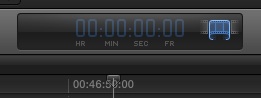
This isn't working for me. I tried selecting all clips in the timeline, in the event viewer and in the project window and hitting ctrl-D (the same as control clicking and selecting "change duration" gives me a blank timecode window with an apparent trim icon. See image. Attempting to trim from one end of the timeline only affects that one clip. What am I doing wrong? I can't enter any number.
Creating history....one edit at a time !
Please Log in to join the conversation.
Creating history....one edit at a time !
Please Log in to join the conversation.
- Motion Cut
-
- Offline
- Banned
-
Glad you got it sorted.
Please Log in to join the conversation.
Please Log in to join the conversation.
Yes, I finally got that to work. Several times when I tried it I was unable to enter a number in the timecode field. I wonder if this could be part of the instability issue you were referring to with many large images in a project.
Creating history....one edit at a time !
Please Log in to join the conversation.

CTRL-D does the trick. And here is another tip: I'm putting in lots of still frames, and I selected them all, and pressed CMD+T to make cross dissolves between all of them.
Later, I wanted to remove all of them with ease. This is how: Click the Show Timeline Index on your left, then search for cross or Cross dissolve and select all the results in the Timeline index and delete them all in one go.
Nice! :lol:
Google food: Remove multiple cross dissolves fcpx
Please Log in to join the conversation.
Creating history....one edit at a time !
Please Log in to join the conversation.
Please Log in to join the conversation.
Please Log in to join the conversation.
