


- Posts: 2
- Thank you received: 0
3 Post Moderation Rule for New Boarders (25 Jan 2021)
New boarders will have their posts moderated - Don't worry if you cannot see your post immediately.
32 bit floating point audio files in FCPX 10.4.7 ?
- cemilrevan
-
 Topic Author
- Offline
- New Member
-

Less
More
09 Nov 2019 21:45 #102553
by cemilrevan
32 bit floating point audio files in FCPX 10.4.7 ? was created by cemilrevan
My team and I have been looking at a new audio recorder for field work (the Mix Pre ii series especially) and I was wondering if FCPX is able to work with 32 bit floating point audio files. Ultimately, our final exports would be in 24 bit but 32 bit would be very helpful for preventing clipped audio and sound mixing.
Unfortunately, I have no way of simply testing this out as I don't have access to a recorder and the sense I get online is that FCPX will accept 32 bit but reformat it to 24, defeating the whole point of recording in 32 bit anyway. I know that Adobe Audition is able to work with 32 bit but unsure about Logic X.
Thank you in advance for your help, curious to hear if anyone has experience working with these files.
Unfortunately, I have no way of simply testing this out as I don't have access to a recorder and the sense I get online is that FCPX will accept 32 bit but reformat it to 24, defeating the whole point of recording in 32 bit anyway. I know that Adobe Audition is able to work with 32 bit but unsure about Logic X.
Thank you in advance for your help, curious to hear if anyone has experience working with these files.
Please Log in to join the conversation.


10 Nov 2019 18:12 #102588
by JoeEditor
Replied by JoeEditor on topic 32 bit floating point audio files in FCPX 10.4.7 ?
Logic has handled floating 32 for a while now, not sure why FCPX wouldn't.
Please Log in to join the conversation.


10 Nov 2019 19:17 - 10 Nov 2019 19:17 #102592
by BCH
Replied by BCH on topic 32 bit floating point audio files in FCPX 10.4.7 ?
32 bits floating point audio works perfectly in FCP 10.4.6 on my iMac. You can download a sample here
www.sounddevices.com/sample-32-bit-float...bit-fixed-wav-files/
Put this sample in fcpx. Don't move gain on the track but add a gain effect and lower the level to -30 db. You will get exactly the same result as the fix file in Izotope (32_bit_float_30_dB_atten.wav)
32 bit float audio Doesn’t work in Logic.

www.sounddevices.com/sample-32-bit-float...bit-fixed-wav-files/
Put this sample in fcpx. Don't move gain on the track but add a gain effect and lower the level to -30 db. You will get exactly the same result as the fix file in Izotope (32_bit_float_30_dB_atten.wav)
32 bit float audio Doesn’t work in Logic.
Last edit: 10 Nov 2019 19:17 by BCH.
Please Log in to join the conversation.

11 Nov 2019 02:57 #102598
by dgwvideo
Creating history....one edit at a time !
Replied by dgwvideo on topic 32 bit floating point audio files in FCPX 10.4.7 ?
Are you saying that when exported out of FCPX, the resulting audio remains 32 bit float? I know it handles it in the timeline, but thought it got flattened to 24 bit upon export.
Creating history....one edit at a time !
Please Log in to join the conversation.
11 Nov 2019 09:14 #102606
by Axel
You could export in "32-bit" (edit Compressor setting), but it doesn't say "float".
There also remains to be confirmed if FCP really acknowledges the non-integer values (those behind the comma) or if 32-bit (with the float-values ignored) just suffice to restore most recordings.
Obviously (I just learned this) these float values are actually stored in the original file, thereby - for all practical purposes - making the bit depth and DR infinite. For video, floating point just refers to the method of calculating integer values (i.e. 256 in 8-bit), the degree of accuracy with which multiple changes are temporarily being computed (avoiding gross rounding errors) before in the final output everything gets again rounded.
Replied by Axel on topic 32 bit floating point audio files in FCPX 10.4.7 ?
dgwvideo wrote: Are you saying that when exported out of FCPX, the resulting audio remains 32 bit float? I know it handles it in the timeline, but thought it got flattened to 24 bit upon export.
You could export in "32-bit" (edit Compressor setting), but it doesn't say "float".
There also remains to be confirmed if FCP really acknowledges the non-integer values (those behind the comma) or if 32-bit (with the float-values ignored) just suffice to restore most recordings.
Obviously (I just learned this) these float values are actually stored in the original file, thereby - for all practical purposes - making the bit depth and DR infinite. For video, floating point just refers to the method of calculating integer values (i.e. 256 in 8-bit), the degree of accuracy with which multiple changes are temporarily being computed (avoiding gross rounding errors) before in the final output everything gets again rounded.
Please Log in to join the conversation.
- cemilrevan
-
Topic Author
- Offline
- New Member
-
Less
More
- Posts: 2
- Thank you received: 0
11 Nov 2019 18:21 #102616
by cemilrevan
Replied by cemilrevan on topic 32 bit floating point audio files in FCPX 10.4.7 ?
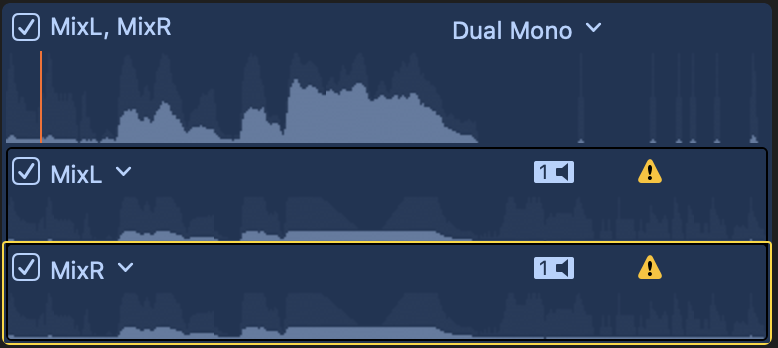
BCH thank you for linking to those soundevices samples, exactly what I needed. 32 bit dynamic range is preserved in the timeline (with gain effect) as you said. It seems like the same is possible in the browser window, even though the thumbnail suggests that the audio is clipped, playback sounds the same as the corrected timeline version. Interestingly enough, if you reduce the individual channels, as opposed to the combined mix, the thumbnail displays the recovered peaks and valleys.

Please Log in to join the conversation.
11 Nov 2019 22:22 #102620
by BCH
Replied by BCH on topic 32 bit floating point audio files in FCPX 10.4.7 ?
I'm saying you can correct or fix a wrong rec level gain on a 32bits floating point audio file. This is the interest of this kind of file. I don't see the interest of keeping 32 bits floating for export and I don't know if it's possible.dgwvideo wrote: Are you saying that when exported out of FCPX, the resulting audio remains 32 bit float? I know it handles it in the timeline, but thought it got flattened to 24 bit upon export.
Please Log in to join the conversation.
25 Feb 2020 00:18 #104898
by Droogles
Replied by Droogles on topic 32 bit floating point audio files in FCPX 10.4.7 ?
I just bought the MixPre-3 II for recording street walks to get a higher dynamic range by using 32 bit floating point. My normal workflow is sync audio to video in FCPX.
I was testing the unit with the Sound Professionals MS-EBH-2 binaural mic plugged into the AUX. I set the gain on the recorder to intentionally clip so I could try to remove the clipping in FCPX. At the beginning of the recording, a door slams and clips. When I apply the Levels effect to it and reduce the gain, it's still clipping. Did the mic itself clip? I am new to audio and looking for some help.
Can someone look at the attached file and let me know if this is the mic or me not understanding how to fix the clipping?
drive.google.com/file/d/1ZaDQ5DFMpGbg-LJ...j-2/view?usp=sharing
Thanks
I was testing the unit with the Sound Professionals MS-EBH-2 binaural mic plugged into the AUX. I set the gain on the recorder to intentionally clip so I could try to remove the clipping in FCPX. At the beginning of the recording, a door slams and clips. When I apply the Levels effect to it and reduce the gain, it's still clipping. Did the mic itself clip? I am new to audio and looking for some help.
Can someone look at the attached file and let me know if this is the mic or me not understanding how to fix the clipping?
drive.google.com/file/d/1ZaDQ5DFMpGbg-LJ...j-2/view?usp=sharing
Thanks
Please Log in to join the conversation.
27 Feb 2020 12:59 #104980
by JoeEditor
Replied by JoeEditor on topic 32 bit floating point audio files in FCPX 10.4.7 ?
Clipping will get recorded and then can't be fixed. NEVER let a signal clip in the original recording. 32-bit floating-point isn't giving you any extra dynamic range you can physically hear, BTW. And it doesn't magically make all clipping in the original recording fixable in post. Only if the recording device uses it to fix it while digitizing the original recording. Clipping is clipping.
We use Zaxcom units that are guaranteed to never record clipping at all. But I get clipping all the time with them. I also get super low audio levels that always need a Gain booster to hear. In all the pro audio gear I've used, I don't buy the hype that 32-bit automatically and magically fixes clipping. I see it daily.
We use Zaxcom units that are guaranteed to never record clipping at all. But I get clipping all the time with them. I also get super low audio levels that always need a Gain booster to hear. In all the pro audio gear I've used, I don't buy the hype that 32-bit automatically and magically fixes clipping. I see it daily.
Please Log in to join the conversation.
27 Feb 2020 13:58 #104987
by Droogles
Replied by Droogles on topic 32 bit floating point audio files in FCPX 10.4.7 ?
Last night, using the same mics and recorder that clipped when the door slammed, I yelled directly into the mic, which clipped to the extreme. All that could be heard was crackling, popping barely any scream. Took the 32 bit file into FCPX and adjusted the gain down and the volume up, and recovered the voice/yell perfectly. So I do seem to have extra dynamic range because the end result was a range that previously was not possible.
My question above was for someone to look at the door slamming clip and determine if the mic itself clipped. It was plugged into the AUX which provides less voltage to the mics, I will soon be feeding phantom power to them which will hopefully help with the range of the mic itself.
Obviously I don't want any clipping in the original recording, however I record continuous street walks and I never know what levels are going to be thrown at me. I like the 32 bit floating point technology as a safety net.
My question above was for someone to look at the door slamming clip and determine if the mic itself clipped. It was plugged into the AUX which provides less voltage to the mics, I will soon be feeding phantom power to them which will hopefully help with the range of the mic itself.
Obviously I don't want any clipping in the original recording, however I record continuous street walks and I never know what levels are going to be thrown at me. I like the 32 bit floating point technology as a safety net.
Please Log in to join the conversation.

27 Feb 2020 17:38 - 27 Feb 2020 17:43 #104993
by joema
I looked at the file and simply pulling down the level in FCPX fixes it. Afterward close examination of the waveform shows there is no clipping left. This is only possible because you used 32-bit recording on the Sound Devices MixPre mark II.
If you apply an audio effect that doesn't work right, it's possible that effect isn't handling 32-bit floating point data correctly.
My doc team has two MixPre-6 IIs and they have saved us several times. However you can still encounter non-fixable clipping if it happens before reaching the recorder. E.g, if the levels on wireless lav TX/RX pair are not set properly, the receiver output can be clipped before even reaching the recorder. Once it is really clipped you can't fix that except by reconstruction methods such as iZotope RX7, and that is only a band-aid.
The reason the MixPre mark II seems to recover from clipping is it's not really clipped. It is only displayed as clipped on the NLE. This is because the mic often has more dynamic range than can be expressed in 16 bit or 24-bit fixed point data, and the NLE waveform display algorithm is set up for that common case.
There may be certain audio effects or procedures in FCPX that don't handle 32-bit floating point audio data perfectly but just grabbing the level and pulling it down works.
Curtis Judd tested the MixPre-6 II extensively in this video and examined the recoverability in both low-input and high-input cases. He properly stresses to not rely on this as it's a poor practice. All it takes is some upstream component to really clip the signal then the miraculous MixPre Mark II can't save you. However it's nonetheless such a major improvement we don't plan on using anything else.
Replied by joema on topic 32 bit floating point audio files in FCPX 10.4.7 ?
Droogles wrote: I just bought the MixPre-3 II for recording street walks to get a higher dynamic range by using 32 bit floating point. My normal workflow is sync audio to video in FCPX.
I was testing the unit with the Sound Professionals MS-EBH-2 binaural mic plugged into the AUX. I set the gain on the recorder to intentionally clip so I could try to remove the clipping in FCPX. At the beginning of the recording, a door slams and clips. When I apply the Levels effect to it and reduce the gain, it's still clipping. Did the mic itself clip? I am new to audio and looking for some help.
Can someone look at the attached file and let me know if this is the mic or me not understanding how to fix the clipping?...
I looked at the file and simply pulling down the level in FCPX fixes it. Afterward close examination of the waveform shows there is no clipping left. This is only possible because you used 32-bit recording on the Sound Devices MixPre mark II.
If you apply an audio effect that doesn't work right, it's possible that effect isn't handling 32-bit floating point data correctly.
My doc team has two MixPre-6 IIs and they have saved us several times. However you can still encounter non-fixable clipping if it happens before reaching the recorder. E.g, if the levels on wireless lav TX/RX pair are not set properly, the receiver output can be clipped before even reaching the recorder. Once it is really clipped you can't fix that except by reconstruction methods such as iZotope RX7, and that is only a band-aid.
The reason the MixPre mark II seems to recover from clipping is it's not really clipped. It is only displayed as clipped on the NLE. This is because the mic often has more dynamic range than can be expressed in 16 bit or 24-bit fixed point data, and the NLE waveform display algorithm is set up for that common case.
There may be certain audio effects or procedures in FCPX that don't handle 32-bit floating point audio data perfectly but just grabbing the level and pulling it down works.
Curtis Judd tested the MixPre-6 II extensively in this video and examined the recoverability in both low-input and high-input cases. He properly stresses to not rely on this as it's a poor practice. All it takes is some upstream component to really clip the signal then the miraculous MixPre Mark II can't save you. However it's nonetheless such a major improvement we don't plan on using anything else.
Last edit: 27 Feb 2020 17:43 by joema.
Please Log in to join the conversation.
27 Feb 2020 18:04 #104995
by Droogles
Replied by Droogles on topic 32 bit floating point audio files in FCPX 10.4.7 ?
Thank you for having a look at the file. I guess the door slam just inherently sounds bad, regardless, since it didn't clip. Out of curiosity and ignorance on my part, how did you see that it was not clipped after adjusting the gain?
I watched the referenced video a few days ago and was really excited by the results that Curtis got. In fact, it's one of the reasons I bought the MixPre. I've been trying other devices like the Tascam DR-100 M3, Zoom H6, etc, but as mentioned, clipping was always a big problem no matter how carefully I planned my walks. I was about to go the Sony recorder route so I'm glad I found people talking about the MixPre in the Sony reviews.
I watched the referenced video a few days ago and was really excited by the results that Curtis got. In fact, it's one of the reasons I bought the MixPre. I've been trying other devices like the Tascam DR-100 M3, Zoom H6, etc, but as mentioned, clipping was always a big problem no matter how carefully I planned my walks. I was about to go the Sony recorder route so I'm glad I found people talking about the MixPre in the Sony reviews.
Please Log in to join the conversation.
27 Feb 2020 18:40 #104997
by BCH
I have downloaded the file and tried it into fcpx. With the gain effect at -16dB the file is no longer clipped. But when we listen, the first door noise is still distorted. So you’re right, it’s the microphone that didn’t support the sound level.
Replied by BCH on topic 32 bit floating point audio files in FCPX 10.4.7 ?
Droogles wrote: I just bought the MixPre-3 II for recording street walks to get a higher dynamic range by using 32 bit floating point. My normal workflow is sync audio to video in FCPX.
I was testing the unit with the Sound Professionals MS-EBH-2 binaural mic plugged into the AUX. I set the gain on the recorder to intentionally clip so I could try to remove the clipping in FCPX. At the beginning of the recording, a door slams and clips. When I apply the Levels effect to it and reduce the gain, it's still clipping. Did the mic itself clip? I am new to audio and looking for some help.
Can someone look at the attached file and let me know if this is the mic or me not understanding how to fix the clipping?
drive.google.com/file/d/1ZaDQ5DFMpGbg-LJ...j-2/view?usp=sharing
Thanks
I have downloaded the file and tried it into fcpx. With the gain effect at -16dB the file is no longer clipped. But when we listen, the first door noise is still distorted. So you’re right, it’s the microphone that didn’t support the sound level.
Please Log in to join the conversation.
27 Feb 2020 19:51 - 27 Feb 2020 19:52 #105001
by joema
You are correct, I missed that. However the remaining flat-topped region is very small after lower levels. I'm not sure how valid listening by ear is. There are various door slams -- apparently different doors -- all sounding different. Nobody knows what a "normal" door slam sounds like - it varies based on many things. Maybe a better test would be a known sound, like a human voice or a "control" recording with the mic further away to avoid clipping at the mic.
The MS-EBH-2 mic spec says dynamic range is 106 dB, so in theory even 24 bit fixed point audio recording could contain that, e.g, a Zoom F8 at 24-bit 192Khz.
16-bit fixed recording equates to 96.3 dB dynamic range, 24-bit fixed is 144.5 dB, and 32-bit float is an incredible 1,528 dB.
It does show that if clipped at the mic or any point in the signal path before reaching the recorder, then 32-bit recording doesn't help. The shotgun we use is the Sennheiser MKH 416 which has a dynamic range of 116 dB and max sound pressure of 130 dB. Even in that case 24-bit fixed point recording will hold that, assuming it's not clipped at 130 dB.
So I admit I don't see where the supposed advantage 32-bit floating point recording comes from, since 24-bit fixed is already greater than the dynamic range of most mics.
That said I know from actual experience that the MixPre Mark II has saved us in several cases. But we realize it's not a catch all, and especially with wireless lavs you must verify TX/RX levels.
Replied by joema on topic 32 bit floating point audio files in FCPX 10.4.7 ?
BCH wrote: ... With the gain effect at -16dB the file is no longer clipped. But when we listen, the first door noise is still distorted. So you’re right, it’s the microphone that didn’t support the sound level.
You are correct, I missed that. However the remaining flat-topped region is very small after lower levels. I'm not sure how valid listening by ear is. There are various door slams -- apparently different doors -- all sounding different. Nobody knows what a "normal" door slam sounds like - it varies based on many things. Maybe a better test would be a known sound, like a human voice or a "control" recording with the mic further away to avoid clipping at the mic.
The MS-EBH-2 mic spec says dynamic range is 106 dB, so in theory even 24 bit fixed point audio recording could contain that, e.g, a Zoom F8 at 24-bit 192Khz.
16-bit fixed recording equates to 96.3 dB dynamic range, 24-bit fixed is 144.5 dB, and 32-bit float is an incredible 1,528 dB.
It does show that if clipped at the mic or any point in the signal path before reaching the recorder, then 32-bit recording doesn't help. The shotgun we use is the Sennheiser MKH 416 which has a dynamic range of 116 dB and max sound pressure of 130 dB. Even in that case 24-bit fixed point recording will hold that, assuming it's not clipped at 130 dB.
So I admit I don't see where the supposed advantage 32-bit floating point recording comes from, since 24-bit fixed is already greater than the dynamic range of most mics.
That said I know from actual experience that the MixPre Mark II has saved us in several cases. But we realize it's not a catch all, and especially with wireless lavs you must verify TX/RX levels.
Last edit: 27 Feb 2020 19:52 by joema.
Please Log in to join the conversation.
27 Feb 2020 22:56 #105003
by BCH
I think there is a small advantage. Even if the 116db MKH 416 dynamic range is included in the dynamic range of a 24 bit. Very low sounds are close to noise floor. Whereas with a 32 bit floating file the mic dynamic range can be placed in the middle of the 1528 dB dynamic range and the very low sounds are far from preamps noise floor, and you can apply a lot of gains without increase noise . At least without preamps noise because with very low sounds, you will always be close to the mic noise floor. In the other side, there is no risk of clipping with very loud sounds as long as you do not exceed the maximum mic sound pressure.
Replied by BCH on topic 32 bit floating point audio files in FCPX 10.4.7 ?
joema wrote:
So I admit I don't see where the supposed advantage 32-bit floating point recording comes from, since 24-bit fixed is already greater than the dynamic range of most mics.BCH wrote: ... With the gain effect at -16dB the file is no longer clipped. But when we listen, the first door noise is still distorted. So you’re right, it’s the microphone that didn’t support the sound level.
That said I know from actual experience that the MixPre Mark II has saved us in several cases. But we realize it's not a catch all, and especially with wireless lavs you must verify TX/RX levels.
I think there is a small advantage. Even if the 116db MKH 416 dynamic range is included in the dynamic range of a 24 bit. Very low sounds are close to noise floor. Whereas with a 32 bit floating file the mic dynamic range can be placed in the middle of the 1528 dB dynamic range and the very low sounds are far from preamps noise floor, and you can apply a lot of gains without increase noise . At least without preamps noise because with very low sounds, you will always be close to the mic noise floor. In the other side, there is no risk of clipping with very loud sounds as long as you do not exceed the maximum mic sound pressure.
Please Log in to join the conversation.
28 Feb 2020 22:06 #105022
by BCH

Replied by BCH on topic 32 bit floating point audio files in FCPX 10.4.7 ?
If the file is clipped when we lower the gain, the top of the waveform remains flat.Droogles wrote: I guess the door slam just inherently sounds bad, regardless, since it didn't clip. Out of curiosity and ignorance on my part, how did you see that it was not clipped after adjusting the gain?
Please Log in to join the conversation.
29 Feb 2020 11:46 #105036
by joema
It was possibly very slightly clipped on the first door slam, as shown by FCPX. However when examining the waveform in iZotope RX7 Advanced, it really doesn't look clipped. A high zoom levels in RX7, the waveform of the 1st door slam has some odd smooth sections vs all the others, but the overlaid spectrogram shows audio data there. Maybe it was between bounces of the door vibrating in the frame a few milliseconds:
joema.smugmug.com/Video-Projects/MixPre-...7-Advanced/n-3vDdgx/
Replied by joema on topic 32 bit floating point audio files in FCPX 10.4.7 ?
Droogles wrote: ... how did you see that it was not clipped after adjusting the gain?...
It was possibly very slightly clipped on the first door slam, as shown by FCPX. However when examining the waveform in iZotope RX7 Advanced, it really doesn't look clipped. A high zoom levels in RX7, the waveform of the 1st door slam has some odd smooth sections vs all the others, but the overlaid spectrogram shows audio data there. Maybe it was between bounces of the door vibrating in the frame a few milliseconds:
joema.smugmug.com/Video-Projects/MixPre-...7-Advanced/n-3vDdgx/
Please Log in to join the conversation.
