


- Posts: 55
- Thank you received: 0
3 Post Moderation Rule for New Boarders (25 Jan 2021)
New boarders will have their posts moderated - Don't worry if you cannot see your post immediately.
New Update pushing footage into extended range IRE
07 Oct 2019 23:16 #101883
by Matthew
New Update pushing footage into extended range IRE was created by Matthew
I have no idea why, but all of my standard, Rec709 footage, which should be 0-100IRE now shows as -20 to 109 IR - Are there settings to change this?
Please Log in to join the conversation.
08 Oct 2019 03:22 #101887
by Matthew
Replied by Matthew on topic New Update pushing footage into extended range IRE
Seems to only happen on Canon MJPEG codec footage.
Please Log in to join the conversation.
- Tom Wolsky
-

- Offline
- Moderator
-

08 Oct 2019 05:58 #101892
by Tom Wolsky
Replied by Tom Wolsky on topic New Update pushing footage into extended range IRE
Curious. What exactly are the specs of the media?
Please Log in to join the conversation.

08 Oct 2019 11:56 #101900
by JoeEditor
Replied by JoeEditor on topic New Update pushing footage into extended range IRE
My updated FCPX is showing the same range on the scale. But it is only the range markers, you're footage is still REC 709 and within its normal parameters. Only a GUI update, you're screenshot is not showing anything abnormal in the waveform itself, from what I see.
Please Log in to join the conversation.
08 Oct 2019 14:54 #101905
by Matthew
Replied by Matthew on topic New Update pushing footage into extended range IRE
Thats not true. Shadows are clearly being crushed. Please see this image. Top is FCPX, bottom is what old FCPX used to show -
imgur.com/a/EZ5QclU
Please Log in to join the conversation.
08 Oct 2019 21:46 #101917
by Matthew
Replied by Matthew on topic New Update pushing footage into extended range IRE
does anyone no how to contact pro apps support? I've got ruined projects because of this.
Please Log in to join the conversation.
- haysoos123
-

- Offline
- Platinum Member
-

Less
More
- Posts: 402
- Thank you received: 72
08 Oct 2019 22:53 #101918
by haysoos123
Replied by haysoos123 on topic New Update pushing footage into extended range IRE
You should be able to file a report in the normal way, in the menu Final Cut Pro->Provide Final Cut Pro Feedback. Please do so for bugs like this, the more reports the better.
I did notice that there was an update to Pro Apps support that went along with the 10.4.7 update, where they'll update support for codecs. Perhaps the bug was introduced with that. Are you running 10.4.7 with that update?
I did notice that there was an update to Pro Apps support that went along with the 10.4.7 update, where they'll update support for codecs. Perhaps the bug was introduced with that. Are you running 10.4.7 with that update?
Please Log in to join the conversation.
09 Oct 2019 01:40 #101920
by Matthew
Replied by Matthew on topic New Update pushing footage into extended range IRE
Yea I was running 10 .4.7 and then I downgraded to 10.4.6. It now has the same issue with 10.4.6 so I’m guessing it’s a the pro video formats update. I’m really screwed if I can’t fix this.
Please Log in to join the conversation.
12 Oct 2019 11:14 #102015
by Axel
Just yesterday made a clean install of Catalina and then downloaded FCP 10.4.7. No additional content loaded yet, no pro video update run.
Yet, shockingly, I see the same issue. Ordinary XAVC (Sony, not Canon) in a 709 library/timeline.
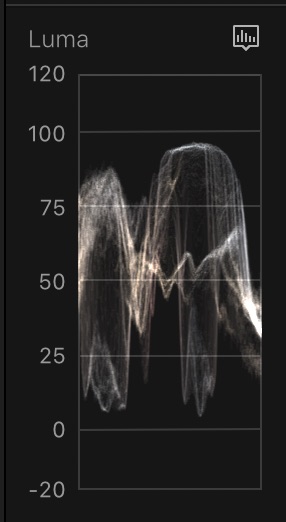
Then I opened an old ("test"-) library and allowed it to be conformed. Relief: blacks weren't crushed, whites not clipped. But I do know for sure that the material was evenly stretched between 0 and 100 IRE, almost all clips. And this is how the 10.4.7 scopes read the clips:
We had a similar problem with 10.4.0 in December 2017, where the wheels and the board behaved weirdly in either 709 or 2020. It was then demonstrated by Simon Ubsdell in a video. But outright denied by the usual suspects. Until in April 2018 10.4.1 came out with a bugfix. No excuses from Apple.
I am also shocked to learn that going back to 10.4.6 didn't help. What are we supposed to do? Color correct by appearance without scopes in the meantime?
Replied by Axel on topic New Update pushing footage into extended range IRE
Matthew wrote: Yea I was running 10 .4.7 and then I downgraded to 10.4.6. It now has the same issue with 10.4.6 so I’m guessing it’s a the pro video formats update. I’m really screwed if I can’t fix this.
Just yesterday made a clean install of Catalina and then downloaded FCP 10.4.7. No additional content loaded yet, no pro video update run.
Yet, shockingly, I see the same issue. Ordinary XAVC (Sony, not Canon) in a 709 library/timeline.
Then I opened an old ("test"-) library and allowed it to be conformed. Relief: blacks weren't crushed, whites not clipped. But I do know for sure that the material was evenly stretched between 0 and 100 IRE, almost all clips. And this is how the 10.4.7 scopes read the clips:
We had a similar problem with 10.4.0 in December 2017, where the wheels and the board behaved weirdly in either 709 or 2020. It was then demonstrated by Simon Ubsdell in a video. But outright denied by the usual suspects. Until in April 2018 10.4.1 came out with a bugfix. No excuses from Apple.
I am also shocked to learn that going back to 10.4.6 didn't help. What are we supposed to do? Color correct by appearance without scopes in the meantime?
Please Log in to join the conversation.
12 Oct 2019 20:22 #102020
by Matthew
Replied by Matthew on topic New Update pushing footage into extended range IRE
This is super frustrating. It seems like it may be a Catalina Issue Axel. You have the problem with Catalina and no pro video formats update, and I have another Mac running 10.4.7 and High Sierra with no problems.
Please Log in to join the conversation.
12 Oct 2019 20:24 #102021
by Matthew
Replied by Matthew on topic New Update pushing footage into extended range IRE
Also Alex, my scopes show below 0 IRE, but the image ALSO crushes there as well. It's literally crushing the shadows. See the pics here Top is with the update. - imgur.com/a/EZ5QclU
Please Log in to join the conversation.
12 Oct 2019 20:26 #102022
by JoeEditor
Replied by JoeEditor on topic New Update pushing footage into extended range IRE
FYI, I'm having serious GUI issues all over FCPX and Motion.
Please Log in to join the conversation.
- Tom Wolsky
-
- Offline
- Moderator
-
12 Oct 2019 21:03 #102024
by Tom Wolsky
Replied by Tom Wolsky on topic New Update pushing footage into extended range IRE
Menus? There’s a problem with increase contrast and reduce transparency in Accessibility.
Please Log in to join the conversation.
13 Oct 2019 03:34 #102025
by Axel
Can you give some examples?
For the time being, I am going to file a feedback/complaint. And I‘m not going back to High Sierra - too much hassle. Instead, I‘ll roundtrip with Resolve for color. Never been more easy and reliable.
Replied by Axel on topic New Update pushing footage into extended range IRE
FCPX.guru wrote: FYI, I'm having serious GUI issues all over FCPX and Motion.
Can you give some examples?
For the time being, I am going to file a feedback/complaint. And I‘m not going back to High Sierra - too much hassle. Instead, I‘ll roundtrip with Resolve for color. Never been more easy and reliable.
Please Log in to join the conversation.
- Joris Vertenten
-
- Offline
- Junior Member
-

Less
More
- Posts: 24
- Thank you received: 2
13 Oct 2019 16:10 - 13 Oct 2019 16:14 #102031
by Joris Vertenten
Replied by Joris Vertenten on topic New Update pushing footage into extended range IRE
This?
Check @fcpxpert1 , he posted a solution for this [maybe] on twitter.
[for some reason I couldn't post a screenshot?]
Check @fcpxpert1 , he posted a solution for this [maybe] on twitter.
[for some reason I couldn't post a screenshot?]
Last edit: 13 Oct 2019 16:14 by Joris Vertenten.
Please Log in to join the conversation.
13 Oct 2019 17:35 #102033
by Axel
Replied by Axel on topic New Update pushing footage into extended range IRE
That would be this:
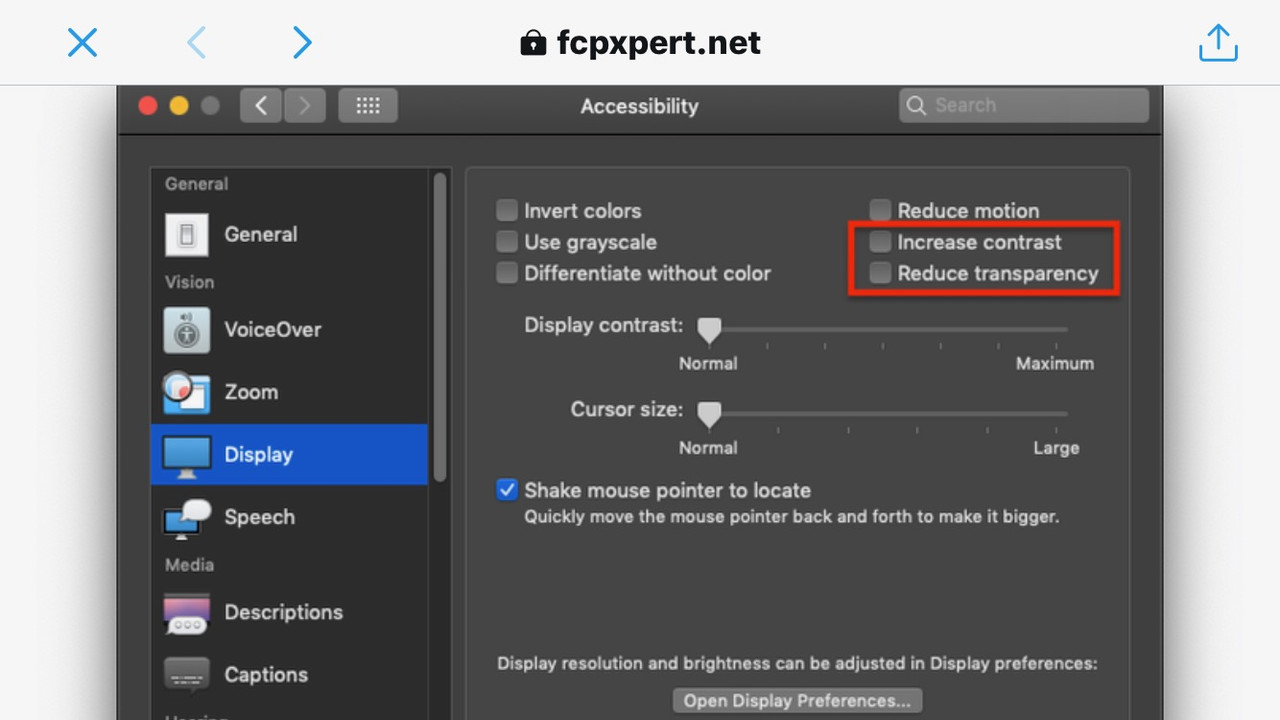
Looks different in Catalina. But it wasn't checked by default, unfortunately
Looks different in Catalina. But it wasn't checked by default, unfortunately
Please Log in to join the conversation.
22 Nov 2019 00:51 #102757
by Matthew
Replied by Matthew on topic New Update pushing footage into extended range IRE
I've spent over 2 hours on the phone with apple explains this. They wanted to create a partition on my computer remotely and do some testing. I asked why I can't just send them the footage (again) to test on their own machines. 
Really frustrating because now all of my reminders won't work on my machine unless I upgrade to Catalina, but the footage is trashed.
Really frustrating because now all of my reminders won't work on my machine unless I upgrade to Catalina, but the footage is trashed.
Please Log in to join the conversation.
- company motion
-
- Offline
- New Member
-

Less
More
- Posts: 1
- Thank you received: 0
13 May 2020 14:31 #107141
by company motion
Replied by company motion on topic New Update pushing footage into extended range IRE
Hi Matthew,
I was wondering if you find a solution to this problem. It's infuriating!
Many thanks in advance
Mike
I was wondering if you find a solution to this problem. It's infuriating!
Many thanks in advance
Mike
Please Log in to join the conversation.
14 May 2020 03:48 #107154
by Matthew
Replied by Matthew on topic New Update pushing footage into extended range IRE
I spent an hour on the phone with Apple on two different occasions. After explaining exactly what the problem is and how to fix it, no solution. They see the MJPEG codec like the cdrom and want to kill it. I explained how we all have archives of this footage, they suggested transcoding it. I explained that I cant transcode it because FCPX cant read it properly to transcode. No help.
I reverted back to Mojave and have been transcoding weddings to h265 from the mjpeg codec. Reads fine and is much smaller.
I reverted back to Mojave and have been transcoding weddings to h265 from the mjpeg codec. Reads fine and is much smaller.
Please Log in to join the conversation.
