


- Posts: 786
- Thank you received: 21
3 Post Moderation Rule for New Boarders (25 Jan 2021)
New boarders will have their posts moderated - Don't worry if you cannot see your post immediately.
Lens Flare title in FCP X- how to move type AND flare effect.
- Jonathan Levin
-
 Topic Author
- Offline
- Platinum Member
-

Less
More
05 Jul 2018 20:34 #96232
by Jonathan Levin
Hi all.
I am trying to use the Lens Flare title in FCP X. The default position for the text is center.

I want to move that toward the lower left of the frame, but I would also like the flare effect to move with it. It seems that I can only move the text.

Any ideas?
Thanks.
JL
I am trying to use the Lens Flare title in FCP X. The default position for the text is center.
I want to move that toward the lower left of the frame, but I would also like the flare effect to move with it. It seems that I can only move the text.
Any ideas?
Thanks.
JL
Please Log in to join the conversation.

05 Jul 2018 21:02 #96233
by dgwvideo
Creating history....one edit at a time !
Replied by dgwvideo on topic Lens Flare title in FCP X- how to move type AND flare effect.
Jonathan,
I have this same default behavior, text moves either with inspector position or by dragging - but flare stays centered. You can either go into Motion and adjust this, or make the title a compound clip. As a CC you will be able to use the transform tools in the inspector to move the title along with the flare.
- Dan
I have this same default behavior, text moves either with inspector position or by dragging - but flare stays centered. You can either go into Motion and adjust this, or make the title a compound clip. As a CC you will be able to use the transform tools in the inspector to move the title along with the flare.
- Dan
Creating history....one edit at a time !
Please Log in to join the conversation.
- Jonathan Levin
-
Topic Author
- Offline
- Platinum Member
-
Less
More
- Posts: 786
- Thank you received: 21
05 Jul 2018 22:26 #96235
by Jonathan Levin
Replied by Jonathan Levin on topic Lens Flare title in FCP X- how to move type AND flare effect.
Dan,
Thanks for your help. I’ll try the CC route first. I’ll have to see if any other preset titles exhibits this behavior. I don’t know if this is something new or if it was like this in previous versions of X.
Cheers!
Thanks for your help. I’ll try the CC route first. I’ll have to see if any other preset titles exhibits this behavior. I don’t know if this is something new or if it was like this in previous versions of X.
Cheers!
Please Log in to join the conversation.

06 Jul 2018 01:04 #96236
by JoeEditor
Replied by JoeEditor on topic Lens Flare title in FCP X- how to move type AND flare effect.
Has always been that way. Text box is a separate entity from the flare. Open a copy in Motion, link them into a group, published position parameters for the group.
Or just the position OSC tool.
Or just the position OSC tool.

Please Log in to join the conversation.
- Jonathan Levin
-
Topic Author
- Offline
- Platinum Member
-
Less
More
- Posts: 786
- Thank you received: 21
06 Jul 2018 01:35 #96238
by Jonathan Levin
Replied by Jonathan Levin on topic Lens Flare title in FCP X- how to move type AND flare effect.
Thanks FPX.guru.
What is OSC tool?
If I do this in motion, would I select title, then use a “send to motion”, edit in motion and then send back to Fcp? I wouldn’t want to overwrite the original fcp version, maybe just save as my own preset.
What is OSC tool?
If I do this in motion, would I select title, then use a “send to motion”, edit in motion and then send back to Fcp? I wouldn’t want to overwrite the original fcp version, maybe just save as my own preset.
Please Log in to join the conversation.
06 Jul 2018 01:48 #96239
by dgwvideo
Creating history....one edit at a time !
Replied by dgwvideo on topic Lens Flare title in FCP X- how to move type AND flare effect.
OSC is the On Screen Control and there is a checkbox to publish it in Motion in the inspector. In the FCPX title browser, find the original title and control click and select "Open a copy in Motion".
Creating history....one edit at a time !
Please Log in to join the conversation.
- Jonathan Levin
-
Topic Author
- Offline
- Platinum Member
-
Less
More
- Posts: 786
- Thank you received: 21
06 Jul 2018 16:48 #96243
by Jonathan Levin
Replied by Jonathan Levin on topic Lens Flare title in FCP X- how to move type AND flare effect.
Thanks Dan. I'm going to play with this right now
Please Log in to join the conversation.
- Jonathan Levin
-
Topic Author
- Offline
- Platinum Member
-
Less
More
- Posts: 786
- Thank you received: 21
06 Jul 2018 17:16 - 06 Jul 2018 17:26 #96244
by Jonathan Levin
Replied by Jonathan Levin on topic Lens Flare title in FCP X- how to move type AND flare effect.
Well the CC method worked great! I need to make 11 of these "name" title things. So what I did was make a duplicate c;lip of the original "masako" clip. Then in the dupe I changed the name, "kimberlee". So I'll have 11 compound clips.
I tried to just copy and paste the compound clip to project, change name, color etc., but it also chnged the original, thus the dupelicate method.


I did open the Lens-flare title in Motion, but way over my head, though I know very simple things in Motion. I suppose I should know how to do this.
Thanks for your invaluable help again!
Jonathan
I tried to just copy and paste the compound clip to project, change name, color etc., but it also chnged the original, thus the dupelicate method.
I did open the Lens-flare title in Motion, but way over my head, though I know very simple things in Motion. I suppose I should know how to do this.
Thanks for your invaluable help again!
Jonathan
Last edit: 06 Jul 2018 17:26 by Jonathan Levin.
Please Log in to join the conversation.
06 Jul 2018 19:07 #96246
by dgwvideo
Creating history....one edit at a time !
Replied by dgwvideo on topic Lens Flare title in FCP X- how to move type AND flare effect.
Jonathan,
When you wish to duplicate the CC, select under the Clip menu in FCPX and choose "Reference new Parent Clip". This will allow the duplicate to be unique and any changes will not affect the original CC. Do this for each version you need to make.
When you wish to duplicate the CC, select under the Clip menu in FCPX and choose "Reference new Parent Clip". This will allow the duplicate to be unique and any changes will not affect the original CC. Do this for each version you need to make.
Creating history....one edit at a time !
Please Log in to join the conversation.
- Jonathan Levin
-
Topic Author
- Offline
- Platinum Member
-
Less
More
- Posts: 786
- Thank you received: 21
06 Jul 2018 20:18 #96247
by Jonathan Levin
Replied by Jonathan Levin on topic Lens Flare title in FCP X- how to move type AND flare effect.
Nice shortcut Dan!!!!
Please Log in to join the conversation.
06 Jul 2018 22:26 #96248
by JoeEditor
No, look at the image, I'm using the OSC built-in to FCPX. Click that button in the bottom left of the Viewer pane, and just move the whole thing. No CC needed.
Replied by JoeEditor on topic Lens Flare title in FCP X- how to move type AND flare effect.
dgwvideo wrote: OSC is the On Screen Control and there is a checkbox to publish it in Motion in the inspector. In the FCPX title browser, find the original title and control click and select "Open a copy in Motion".
No, look at the image, I'm using the OSC built-in to FCPX. Click that button in the bottom left of the Viewer pane, and just move the whole thing. No CC needed.
Please Log in to join the conversation.
- Jonathan Levin
-
Topic Author
- Offline
- Platinum Member
-
Less
More
- Posts: 786
- Thank you received: 21
06 Jul 2018 22:57 #96249
by Jonathan Levin
Replied by Jonathan Levin on topic Lens Flare title in FCP X- how to move type AND flare effect.
Ok. The OSC that selects Transform, Crop, Distort (not at computer) in FCP X.
When I clicked on that (Transform) and click and drag, just the text moves, the flare effect stays centered. Because I’m old and horrible I am sure I am missing something. Dgwvideos method worked fine, but the ability to move text/effect together in the viewer would be awesome. May seem hokeybut I love this effect especially for the project I’m involved with and will probably kill me :blink:
When I clicked on that (Transform) and click and drag, just the text moves, the flare effect stays centered. Because I’m old and horrible I am sure I am missing something. Dgwvideos method worked fine, but the ability to move text/effect together in the viewer would be awesome. May seem hokeybut I love this effect especially for the project I’m involved with and will probably kill me :blink:
Please Log in to join the conversation.
07 Jul 2018 04:20 #96251
by JoeEditor
Replied by JoeEditor on topic Lens Flare title in FCP X- how to move type AND flare effect.
When I'm using it, the whole thing drags. Don't click the text, click anywhere else. Works great for me.
Please Log in to join the conversation.
- Karsten Schlüter
-

- Offline
- Moderator
-

Less
More
- Posts: 3790
- Thank you received: 718
07 Jul 2018 05:41 - 07 Jul 2018 05:42 #96256
by Karsten Schlüter
hmm, but then, the LF-title behaves like an adjustment layer and, although just the title is selected, the whole clip moves. At last here …
… but, we know the naughty one:
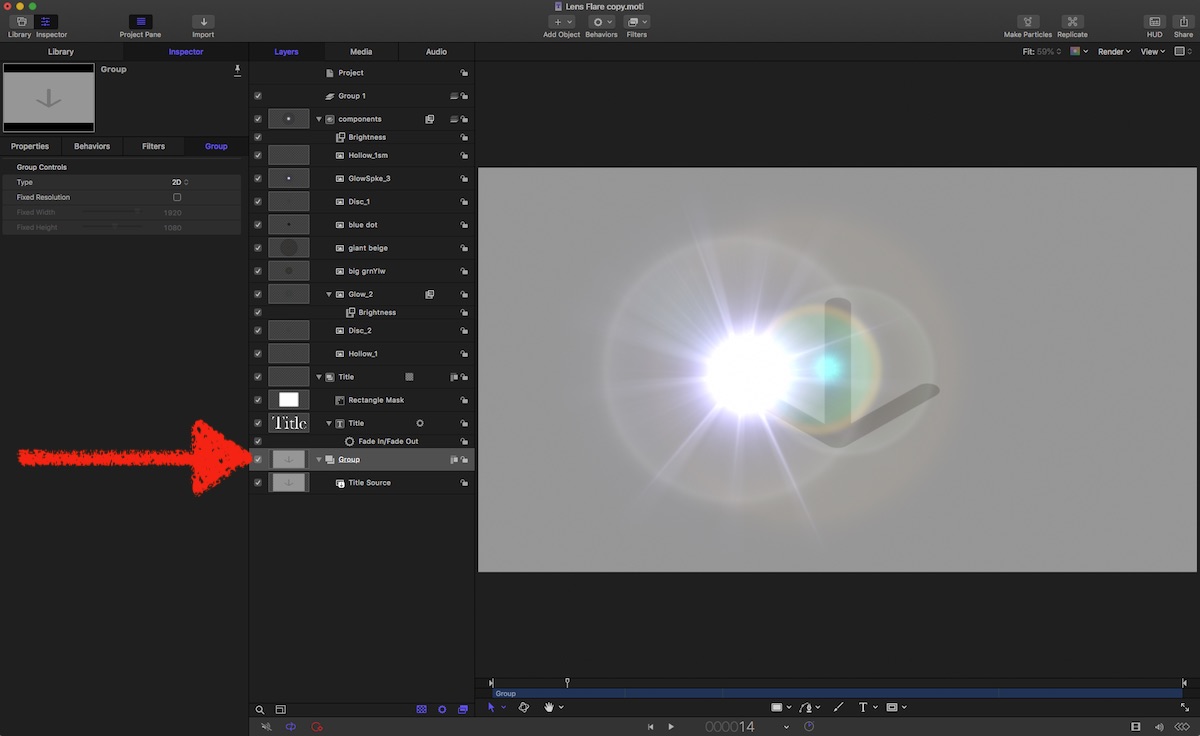
open a copy of that title in Motion, delete the Source Group - and you can use the OSC for positioning the flare and the Transform tool to move the title … with sticky LF… and no CCs, parented or not.-
Replied by Karsten Schlüter on topic Lens Flare title in FCP X- how to move type AND flare effect.
FCPX.guru wrote: … I'm using the OSC built-in to FCPX. Click that button in the bottom left of the Viewer pane, and just move the whole thing. No CC needed.
hmm, but then, the LF-title behaves like an adjustment layer and, although just the title is selected, the whole clip moves. At last here …
… but, we know the naughty one:
open a copy of that title in Motion, delete the Source Group - and you can use the OSC for positioning the flare and the Transform tool to move the title … with sticky LF… and no CCs, parented or not.-
Last edit: 07 Jul 2018 05:42 by Karsten Schlüter.
Please Log in to join the conversation.
07 Jul 2018 12:12 #96259
by JoeEditor
Replied by JoeEditor on topic Lens Flare title in FCP X- how to move type AND flare effect.
Good catch! And still easier than using CCs all over the place.
Please Log in to join the conversation.
- Jonathan Levin
-
Topic Author
- Offline
- Platinum Member
-
Less
More
- Posts: 786
- Thank you received: 21
07 Jul 2018 14:08 #96261
by Jonathan Levin
Replied by Jonathan Levin on topic Lens Flare title in FCP X- how to move type AND flare effect.
Thanks Karsten.
So after deleting that group, how do you save back to fcpx with a new name so it shows in title browser? I’m going to try this today.
JL
So after deleting that group, how do you save back to fcpx with a new name so it shows in title browser? I’m going to try this today.
JL
Please Log in to join the conversation.
- Karsten Schlüter
-
- Offline
- Moderator
-
Less
More
- Posts: 3790
- Thank you received: 718
07 Jul 2018 15:31 #96262
by Karsten Schlüter
… when you follow the usual routine (right-click in title-browser, 'open copy in Motion'), it HAS already a new name (lens flare copy) and is in the correct location. When you hit Save in Motion, you're free to give a new, completely different name...
… just [strike]obey[/strike] do as intended …
Replied by Karsten Schlüter on topic Lens Flare title in FCP X- how to move type AND flare effect.
Jonathan Levin wrote: … how do you save back to fcpx with a new name so it shows in title browser? …
… when you follow the usual routine (right-click in title-browser, 'open copy in Motion'), it HAS already a new name (lens flare copy) and is in the correct location. When you hit Save in Motion, you're free to give a new, completely different name...
… just [strike]obey[/strike] do as intended …
Please Log in to join the conversation.
- Jonathan Levin
-
Topic Author
- Offline
- Platinum Member
-
Less
More
- Posts: 786
- Thank you received: 21
07 Jul 2018 15:50 #96263
by Jonathan Levin
Replied by Jonathan Levin on topic Lens Flare title in FCP X- how to move type AND flare effect.
Thank you my friend! Obeying is my specialty. Remembering....not so much.
Good info on multiple ways to handle this.
Good info on multiple ways to handle this.
Please Log in to join the conversation.
- Karsten Schlüter
-
- Offline
- Moderator
-
Less
More
- Posts: 3790
- Thank you received: 718
07 Jul 2018 16:04 #96265
by Karsten Schlüter
Advantage to that method: acts, when done, like any title, without any compounding, parenting, wotever...
Disadvantage : you have to customize in Motion - not everybody's task…
so, indeed, both methods are legit …
yep, that 'remembering' things gets more difficult every year… what was the question…?
Replied by Karsten Schlüter on topic Lens Flare title in FCP X- how to move type AND flare effect.
Jonathan Levin wrote: …
Good info on multiple ways to handle this.
Advantage to that method: acts, when done, like any title, without any compounding, parenting, wotever...
Disadvantage : you have to customize in Motion - not everybody's task…
so, indeed, both methods are legit …
yep, that 'remembering' things gets more difficult every year… what was the question…?
Please Log in to join the conversation.
- Jonathan Levin
-
Topic Author
- Offline
- Platinum Member
-
Less
More
- Posts: 786
- Thank you received: 21
07 Jul 2018 18:56 #96266
by Jonathan Levin
Replied by Jonathan Levin on topic Lens Flare title in FCP X- how to move type AND flare effect.
Thanks Karsten!
So one last question then:
If I come up with another situation like this with another preset tile I like and I want to move it's position, do you just open that title in Motion, delete the Source group, and re-save? I don't know how many of FCP X titles behave, so this would be interesting to know.
I wonder why they have a "Source" group, or what it does. My knowledge of Motion is limited for now.
JL
So one last question then:
If I come up with another situation like this with another preset tile I like and I want to move it's position, do you just open that title in Motion, delete the Source group, and re-save? I don't know how many of FCP X titles behave, so this would be interesting to know.
I wonder why they have a "Source" group, or what it does. My knowledge of Motion is limited for now.
JL
Please Log in to join the conversation.
