


- Posts: 164
- Thank you received: 0
3 Post Moderation Rule for New Boarders (25 Jan 2021)
New boarders will have their posts moderated - Don't worry if you cannot see your post immediately.
iMac slowing down
23 May 2018 14:19 #95605
by Neil P
iMac slowing down was created by Neil P
Hi gang,
Sorry about the duff question but my iMac slows right down when i open FCPX., it's ok for first couple of minutes but then I get the wheel of Death and everything brings to a halt even when I have a small project on there. It's very frustrating as I have lots of room on my Mac. Any ideas, I'm supposed to edit a film this week so I'm abit stressed about it.
I've recently update the FCPX software but to be fair it was going this before.
Here ares my Macs details etc
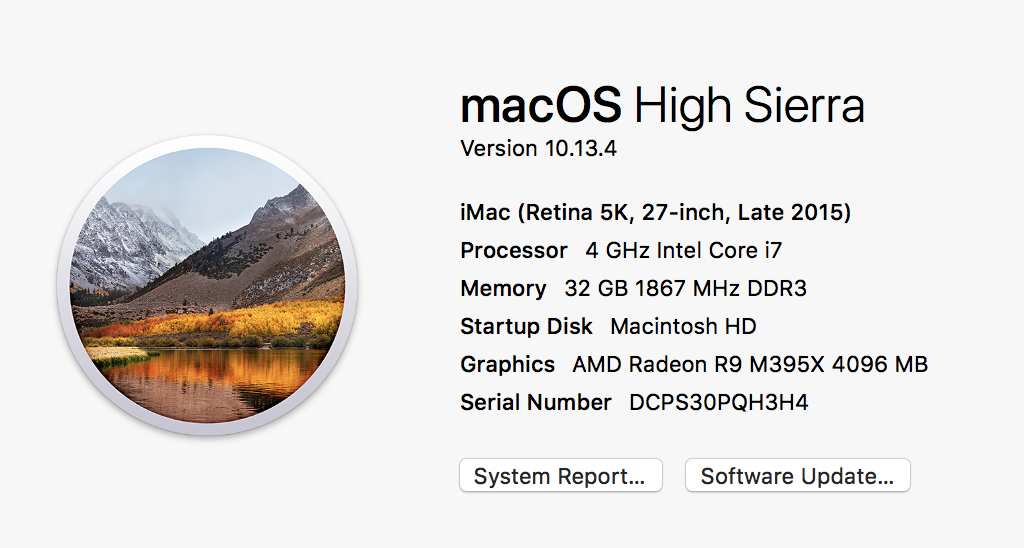
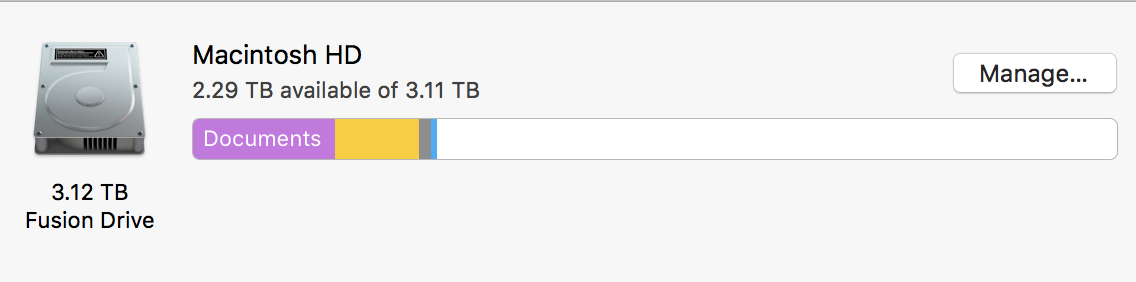
Sorry about the duff question but my iMac slows right down when i open FCPX., it's ok for first couple of minutes but then I get the wheel of Death and everything brings to a halt even when I have a small project on there. It's very frustrating as I have lots of room on my Mac. Any ideas, I'm supposed to edit a film this week so I'm abit stressed about it.
I've recently update the FCPX software but to be fair it was going this before.
Here ares my Macs details etc
Please Log in to join the conversation.
- JarrodMFay
-

- Offline
- Elite Member
-

Less
More
- Posts: 172
- Thank you received: 34
23 May 2018 15:34 #95607
by JarrodMFay
Replied by JarrodMFay on topic iMac slowing down
Couple quick questions to get a better idea. Are you editing from an external drive? If so, what type? What type of footage are you editing with primarily? Was your OS update a clean one or just added to your existing system?
Please Log in to join the conversation.


23 May 2018 17:06 - 23 May 2018 17:06 #95608
by joema
FCPX performance can be significantly affected by the library size and complexity. E.g, if you have many saved project snapshots, it can be quite slow to open. If the machine or FCPX has crashed or hung several times it might have corrupted something inside the library.
It's often good to trash user preferences as described in this article, then create and open an empty library and import a few clips. support.apple.com/en-us/HT203477
Remember after doing this you'll have to reset all desired user prefs such as turning off background render, disable "copy files to library", disable create proxies for multicam (assuming you want that), etc.
See if that is slow. If the problem continues, you could try copying your small project from your current library to the new test library. If you drag/drop that it will copy over only the required media for that project. Consolidate that new library to make sure all needed media is there, then close the old library, restart FCPX, open the new library with the small project and its media and see if that's slow.
As Jarrod said, if any of your media is on an external drive, eliminate that by creating the new test library on your Mac HD, then disconnecting your external drive. If the problem goes away look at the external drive more closely, e.g, run Black Magic disk test and examine performance, run Disk Utility First Aid to ensure it's OK, etc.
Replied by joema on topic iMac slowing down
Neil P wrote: ...my iMac slows right down when i open FCPX., it's ok for first couple of minutes but then I get the wheel of Death and everything brings to a halt even when I have a small project on there...
FCPX performance can be significantly affected by the library size and complexity. E.g, if you have many saved project snapshots, it can be quite slow to open. If the machine or FCPX has crashed or hung several times it might have corrupted something inside the library.
It's often good to trash user preferences as described in this article, then create and open an empty library and import a few clips. support.apple.com/en-us/HT203477
Remember after doing this you'll have to reset all desired user prefs such as turning off background render, disable "copy files to library", disable create proxies for multicam (assuming you want that), etc.
See if that is slow. If the problem continues, you could try copying your small project from your current library to the new test library. If you drag/drop that it will copy over only the required media for that project. Consolidate that new library to make sure all needed media is there, then close the old library, restart FCPX, open the new library with the small project and its media and see if that's slow.
As Jarrod said, if any of your media is on an external drive, eliminate that by creating the new test library on your Mac HD, then disconnecting your external drive. If the problem goes away look at the external drive more closely, e.g, run Black Magic disk test and examine performance, run Disk Utility First Aid to ensure it's OK, etc.
Last edit: 23 May 2018 17:06 by joema.
Please Log in to join the conversation.
23 May 2018 18:43 #95609
by Neil P
Replied by Neil P on topic iMac slowing down
Hi
I used to put my footage on an external hard drive and connect via Thunderbolt . As it was running slow I now keep my footage on my mac, but it still runs slow. My footage is average footage, not 4K raw or anything.
I used to put my footage on an external hard drive and connect via Thunderbolt . As it was running slow I now keep my footage on my mac, but it still runs slow. My footage is average footage, not 4K raw or anything.
Please Log in to join the conversation.
23 May 2018 18:48 #95610
by Neil P
Replied by Neil P on topic iMac slowing down
Thanks for your advice,
I'll check out the article.and do a few tests.
I do create a new Library on every project so my Library are fairly small.
Neil
I'll check out the article.and do a few tests.
I do create a new Library on every project so my Library are fairly small.
Neil
Please Log in to join the conversation.
23 May 2018 19:19 #95611
by joema
If you don't close your many libraries, it costs FCPX some overhead to open them all when starting up.
Since each library is an independent island of data, it can become very cumbersome to have related material spread across multiple libraries. But if each of your overall projects are unrelated and you don't need to query for past clips, that's less an issue.
So you have everything on the system drive. Is that Fusion, SSD or what? Can you run Black Magic disk test on it to check performance?
Replied by joema on topic iMac slowing down
Neil P wrote: ...
I do create a new Library on every project so my Library are fairly small....
If you don't close your many libraries, it costs FCPX some overhead to open them all when starting up.
Since each library is an independent island of data, it can become very cumbersome to have related material spread across multiple libraries. But if each of your overall projects are unrelated and you don't need to query for past clips, that's less an issue.
So you have everything on the system drive. Is that Fusion, SSD or what? Can you run Black Magic disk test on it to check performance?
Please Log in to join the conversation.
23 May 2018 19:42 #95612
by Neil P
Replied by Neil P on topic iMac slowing down
The projects are unrelated. It's a Fusion Drive so half SSD (if that makes sense ?)
Is Black Magic Disk test a free download ?
Neil
Is Black Magic Disk test a free download ?
Neil
Please Log in to join the conversation.
23 May 2018 19:52 #95613
by joema
Yes it's free: itunes.apple.com/us/app/blackmagic-disk-...st/id425264550?mt=12
There are three Fusion Drive sizes, 1TB, 2TB and 3TB. Which one is it, and how much empty space?
Replied by joema on topic iMac slowing down
Neil P wrote: The projects are unrelated. It's a Fusion Drive so half SSD (if that makes sense ?)
Is Black Magic Disk test a free download ?...
Yes it's free: itunes.apple.com/us/app/blackmagic-disk-...st/id425264550?mt=12
There are three Fusion Drive sizes, 1TB, 2TB and 3TB. Which one is it, and how much empty space?
Please Log in to join the conversation.
23 May 2018 19:55 - 23 May 2018 19:56 #95614
by Neil P
Replied by Neil P on topic iMac slowing down
Hi , I did a speed test but I have no idea if the test is good or not or what it is telling me. Take a look at the screen grab, any thoughts ?
Last edit: 23 May 2018 19:56 by Neil P.
Please Log in to join the conversation.
23 May 2018 19:56 #95615
by joema
I don't see it, just type in the read/write numbers in a post.
Replied by joema on topic iMac slowing down
Neil P wrote: Hi , I did a speed test but I have no idea if the test is good or not or what it is telling me. Take a look at the screen grab, any thoughts ?
I don't see it, just type in the read/write numbers in a post.
Please Log in to join the conversation.
23 May 2018 19:57 #95616
by Neil P
Replied by Neil P on topic iMac slowing down
Write 362.8
Read 1322.1
Read 1322.1
Please Log in to join the conversation.
23 May 2018 20:02 #95617
by joema
Replied by joema on topic iMac slowing down
OK that performance should be good enough. What size is the drive and how much free space?
Please Log in to join the conversation.
23 May 2018 20:07 #95618
by Neil P
Replied by Neil P on topic iMac slowing down
Check out my first post at the top of this thread, is that the correct info ?
Sorry, I can't seem to upload pics at the moment
Neil
Sorry, I can't seem to upload pics at the moment
Neil
Please Log in to join the conversation.
23 May 2018 22:38 #95619
by joema
Replied by joema on topic iMac slowing down
Sorry, I missed that. Your free space is OK, also Black Magic perf. is OK. The next step is trash FCPX prefs as indicated in the article, and try a single test library with just your project and media for that project.
If that's still slow, then remove all effects from that test project and try that: support.apple.com/kb/PH12615?locale=en_US&viewlocale=en_US
If that's still slow, then remove all effects from that test project and try that: support.apple.com/kb/PH12615?locale=en_US&viewlocale=en_US
Please Log in to join the conversation.
- JarrodMFay
-
- Offline
- Elite Member
-
Less
More
- Posts: 172
- Thank you received: 34
23 May 2018 22:44 #95620
by JarrodMFay
Replied by JarrodMFay on topic iMac slowing down
If all of this doesn't speed things up then consider doing a clean install of High Sierra and reinstalling FCPX first. Then test it for speed. Assuming it's faster then, install other apps/plugins one at a time and test FCPX speed as you go to see if one of them is slowing it down. Most likely it would only be related items like FCPX plugins but you never know. Good luck!
Please Log in to join the conversation.
- Karsten Schlüter
-

- Offline
- Moderator
-

Less
More
- Posts: 3790
- Thank you received: 718
24 May 2018 05:43 #95622
by Karsten Schlüter
sorry this snarky comment, but that's a habitual ritual on inferior systems
A good start is this list:
support.apple.com/en-us/HT203477
Next, aside hardware checkups, some simple basics, e.g. switching of Background Render (… error description in OP) …
… that re-install-advice, imho, in just very, very cases fixes anything …
Replied by Karsten Schlüter on topic iMac slowing down
JarrodMFay wrote: … consider doing a clean install of High Sierra and reinstalling FCPX …
sorry this snarky comment, but that's a habitual ritual on inferior systems
A good start is this list:
support.apple.com/en-us/HT203477
Next, aside hardware checkups, some simple basics, e.g. switching of Background Render (… error description in OP) …
… that re-install-advice, imho, in just very, very cases fixes anything …
Please Log in to join the conversation.
- JarrodMFay
-
- Offline
- Elite Member
-
Less
More
- Posts: 172
- Thank you received: 34
24 May 2018 12:58 #95631
by JarrodMFay
Replied by JarrodMFay on topic iMac slowing down
Interesting. Until last year I was using a 2010 Mac Pro loaded down with many applications, plugins, etc.. I was experiencing lagging performance in FCPX. After trying all the usual tricks, I did a clean reinstall of the OS and just loaded back the items I really needed and I saw a very noticeable increase in FCPX speed. I've also heard that advised by several FCPX expert users over the years. Maybe it's just the placebo effect at work but my experience was enough for me to recommend it to others.
Please Log in to join the conversation.
24 May 2018 14:30 #95636
by Neil P
Replied by Neil P on topic iMac slowing down
What to you mean by a clean reinstall of the OS ?
thanks
Neil
thanks
Neil
Please Log in to join the conversation.
- JarrodMFay
-
- Offline
- Elite Member
-
Less
More
- Posts: 172
- Thank you received: 34
24 May 2018 14:38 #95637
by JarrodMFay
Replied by JarrodMFay on topic iMac slowing down
When you install the OS you have the option of installing it while leaving all other files in place or doing a "clean install" where it deletes everything and starts over with no files saved. It will be like you just bought the computer and you'll have to reinstall all of your apps, etc.. Obviously you should do a thorough backup of your drive before doing this procedure in case you need to save any of your files.
Please Log in to join the conversation.

25 May 2018 03:37 #95645
by dgwvideo
Creating history....one edit at a time !
Replied by dgwvideo on topic iMac slowing down
If the OP is still having problems, I would suggest trying #9 in the Apple support document - create a new user account. Report back if that makes any difference before doing anything else.
Creating history....one edit at a time !
Please Log in to join the conversation.
