


- Posts: 1080
- Thank you received: 106
3 Post Moderation Rule for New Boarders (25 Jan 2021)
New boarders will have their posts moderated - Don't worry if you cannot see your post immediately.
Speed Bladed clips with optical flow applied won't render
21 Jun 2017 04:55 - 21 Jun 2017 04:55 #88922
by Redifer
Speed Bladed clips with optical flow applied won't render was created by Redifer
Is this a known bug? I can speed blade a clip ( Shift + B ) and adjust the speed of each side of the cut, etc. I can then apply optical flow. It does it's thing and completes. I have a Mac Pro trash can so it's not always powerful enough to play back optical flow clips without dropping some frames, so I like to render these just to make sure it all looks good so I can adjust things if they're not. I think that's reasonable. But they absolutely will not render. Everything else in the timeline will. Upon export, FCPX flips out and complains that optical flow is not done (it is) and that effects could be pure crap upon export. It exports fine with optical flow effect applied.
So... known bug?
So... known bug?
Last edit: 21 Jun 2017 04:55 by Redifer.
Please Log in to join the conversation.

21 Jun 2017 10:06 #88925
by JoeEditor
Replied by JoeEditor on topic Speed Bladed clips with optical flow applied won't render
Know bug, I do this daily, very frustrating. I export anyway, and things seem to be fine, though.
Please Log in to join the conversation.

21 Jun 2017 13:03 #88928
by anickt
Replied by anickt on topic Speed Bladed clips with optical flow applied won't render
This has been going on for a while. I have reported it several times. Haven't seen it lately in new projects. Have you tried trashing your render files? Exports are fine in spite of the warning.
Please Log in to join the conversation.
21 Jun 2017 15:24 - 26 Jun 2017 15:23 #88931
by JoeEditor
Replied by JoeEditor on topic Speed Bladed clips with optical flow applied won't render
I've tried trashing renders and pref files, no difference. I do at least 2- 3 exports almost daily with this bug popping up. But yeah, exports seems to come out just fine. I ignore it. Has been with us since 10.3.3. Hoping 10.3.5 fixes it finally.
Last edit: 26 Jun 2017 15:23 by JoeEditor.
Please Log in to join the conversation.

26 Jun 2017 14:38 #89002
by Schnurr
Replied by Schnurr on topic Speed Bladed clips with optical flow applied won't render
since 10.3.3  ) according to google search this kind of bug dates back to posts from 2013 so I doubt that this will be fixed in 10.3.5 but own you a beer if this would be true
 Please Log in to join the conversation.
26 Jun 2017 20:10 #89009
by Redifer
Replied by Redifer on topic Speed Bladed clips with optical flow applied won't render
Apple usually doesn't seem too keen on fixing bugs. And the ones they DO fix are ones I never run in to. So either they don't want to fix them, they don't have the programming expertise to fix them, or they don't have the budget to fix them.
Please Log in to join the conversation.
27 Jun 2017 06:18 #89013
by Axel
Some bugs are not just suboptimal command lines that can be detected and changed, they are deeply hidden in the app's source code. A very early bug was that FCP X crashed on playing back compound clips. Very big parts of the code had to be rewritten to fix this (before, nesting clips changed the size of the whole project files dramatically, after the fix they just grew by a few KB). Is a new version a "refurbished" one? Rewritten from scratch? Hastily overhauled? The background tasks feel like something inherent, to fix this they had to go back very far - which undoubtedly would introduce new bugs.
Replied by Axel on topic Speed Bladed clips with optical flow applied won't render
Redifer wrote: Apple usually doesn't seem too keen on fixing bugs. And the ones they DO fix are ones I never run in to. So either they don't want to fix them, they don't have the programming expertise to fix them, or they don't have the budget to fix them.
Some bugs are not just suboptimal command lines that can be detected and changed, they are deeply hidden in the app's source code. A very early bug was that FCP X crashed on playing back compound clips. Very big parts of the code had to be rewritten to fix this (before, nesting clips changed the size of the whole project files dramatically, after the fix they just grew by a few KB). Is a new version a "refurbished" one? Rewritten from scratch? Hastily overhauled? The background tasks feel like something inherent, to fix this they had to go back very far - which undoubtedly would introduce new bugs.
Please Log in to join the conversation.
- ronny courtens
-

- Offline
- Moderator
-

Less
More
- Posts: 4455
- Thank you received: 962
27 Jun 2017 07:18 #89014
by ronny courtens
Replied by ronny courtens on topic Speed Bladed clips with optical flow applied won't render
What Axel says, plus: problems can get fixed much easier when they are real bugs that affect every user and thus can be easily reproduced.
I have tested this particular report on a 2015 MBP running 10.12.5 and FCPX 10.3.4, and I am not able to reproduce the problem. Everything works as expected:
- Ronny
I have tested this particular report on a 2015 MBP running 10.12.5 and FCPX 10.3.4, and I am not able to reproduce the problem. Everything works as expected:
- Ronny
Please Log in to join the conversation.
27 Jun 2017 07:35 #89016
by Redifer
Replied by Redifer on topic Speed Bladed clips with optical flow applied won't render
This is a real bug. It's completely ridiculous to insinuate that it's not. It's not my problem to worry about what Apple's woes are or if they made a mistake 6 versions back that caused this. But my guess is they don't have the budget to hire more programmers to fix these things and therefore must prioritize bug fixes. Like I said, the bug fixes that I see reportedly fixed when the app updates are usually ones I've never encountered. Those must not be real bugs either if Ive never encountered them.
Please Log in to join the conversation.
- ronny courtens
-
- Offline
- Moderator
-
Less
More
- Posts: 4455
- Thank you received: 962
27 Jun 2017 08:24 #89017
by ronny courtens
Replied by ronny courtens on topic Speed Bladed clips with optical flow applied won't render
I just wanted to show that the issue you have reported does not affect everyone, which obviously makes it harder to reproduce and to fix. That's all.
- Ronny
- Ronny
Please Log in to join the conversation.
27 Jun 2017 10:03 #89019
by Schnurr
Replied by Schnurr on topic Speed Bladed clips with optical flow applied won't render
Ronny
try it with an iPhone 7 and latest FCPX and then apply the optical flow... bang and you receive the message at least with my iPhone7, FCPX version and iMac 21)
Ahh just did it with one clip so no complicated project at all laugh...
try it with an iPhone 7 and latest FCPX and then apply the optical flow... bang and you receive the message at least with my iPhone7, FCPX version and iMac 21
)Ahh just did it with one clip so no complicated project at all laugh...
Please Log in to join the conversation.
27 Jun 2017 11:05 - 27 Jun 2017 11:07 #89023
by JoeEditor
Replied by JoeEditor on topic Speed Bladed clips with optical flow applied won't render
The pro video apps team is sizable, very skilled & knowledgable. Most all are experienced in video production. They put their all into their work. It's a minor bug, I ignore it, my work moves forward and looks great on export.
I've worked professionally for software development companies for close to 30 years, large and small. I know that the size of a development teams does not make solving coding issues any easier or faster. Some bugs that seem easy to fix by end users are often not easy at all and take time. Especially when that fix has a negative impact on new functions those same end users are demanding.
I give the hard working, devoted, highly skilled, sizable pro video app team the benefit of the doubt and have full confidence in them. Especially after having seen the team in person, and having spoken to a couple of them.
I've worked professionally for software development companies for close to 30 years, large and small. I know that the size of a development teams does not make solving coding issues any easier or faster. Some bugs that seem easy to fix by end users are often not easy at all and take time. Especially when that fix has a negative impact on new functions those same end users are demanding.
I give the hard working, devoted, highly skilled, sizable pro video app team the benefit of the doubt and have full confidence in them. Especially after having seen the team in person, and having spoken to a couple of them.
Last edit: 27 Jun 2017 11:07 by JoeEditor.
Please Log in to join the conversation.
- Karsten Schlüter
-

- Offline
- Moderator
-
Less
More
- Posts: 3790
- Thank you received: 718
27 Jun 2017 14:41 #89029
by Karsten Schlüter
Nope, not here, in my cheap set-up, iPhone6, macMini2012, FC v10.3.4 …
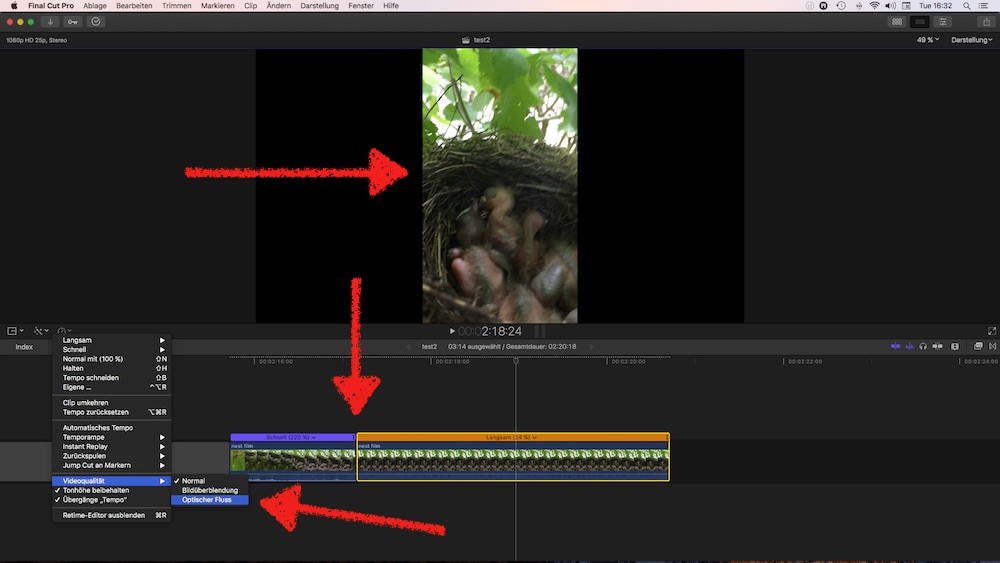
iPhone Video (proof: vertical video syndrome :woohoo: ) , split, retimed, OF => smooth playback, no complains on export, …
So, I'm with Ronny…
Replied by Karsten Schlüter on topic Speed Bladed clips with optical flow applied won't render
Schnurr wrote: … try it with an iPhone 7 and latest FCPX and then apply the optical flow... bang and you receive the message ...
Nope, not here, in my cheap set-up, iPhone6, macMini2012, FC v10.3.4 …
iPhone Video (proof: vertical video syndrome :woohoo: ) , split, retimed, OF => smooth playback, no complains on export, …
So, I'm with Ronny…
Please Log in to join the conversation.
27 Jun 2017 15:59 #89030
by Redifer
Replied by Redifer on topic Speed Bladed clips with optical flow applied won't render
I always forget that on this forum, Apple can do absolutely no wrong.
Please Log in to join the conversation.
- Karsten Schlüter
-
- Offline
- Moderator
-
Less
More
- Posts: 3790
- Thank you received: 718
27 Jun 2017 16:12 #89031
by Karsten Schlüter
Replied by Karsten Schlüter on topic Speed Bladed clips with optical flow applied won't render
… three persons share their observations of an FCPX misbehave, two spent time and fail to re-enact it…
And THIS is your conclusion?
Merry Xmas … :lol:
And THIS is your conclusion?
Redifer wrote: I always forget that on this forum, Apple can do absolutely no wrong.
Merry Xmas … :lol:
Please Log in to join the conversation.
27 Jun 2017 16:21 - 27 Jun 2017 16:24 #89032
by JoeEditor
Replied by JoeEditor on topic Speed Bladed clips with optical flow applied won't render
It is well know fact that not all bugs show up on all systems. It is also a known fact that when this happens, trying to isolate the cause becomes more difficult for any software development team, no matter the size or budget.
No one said this was not a bug, simply that since not everyone experiences it, it is probably a difficult one to isolate and correct. I personally see the error message daily, and things export just fine. I know several other editors here on this forum and locally having this issue. I know many more who don't see it. Doesn't mean we're attacking you.
No one said Apple can do no wrong, just trying to keep things in a factual perspective. Nothing personal, man. Just trying to figure things out.
If you're really so unhappy with FCPX, Apple, and this forum, there's always PPro or MC or Vegas or GrassValley or any number of other very capable NLEs and user forums to choose from.
No one said this was not a bug, simply that since not everyone experiences it, it is probably a difficult one to isolate and correct. I personally see the error message daily, and things export just fine. I know several other editors here on this forum and locally having this issue. I know many more who don't see it. Doesn't mean we're attacking you.
No one said Apple can do no wrong, just trying to keep things in a factual perspective. Nothing personal, man. Just trying to figure things out.
If you're really so unhappy with FCPX, Apple, and this forum, there's always PPro or MC or Vegas or GrassValley or any number of other very capable NLEs and user forums to choose from.
Last edit: 27 Jun 2017 16:24 by JoeEditor.
Please Log in to join the conversation.
27 Jun 2017 16:38 #89034
by Redifer
Replied by Redifer on topic Speed Bladed clips with optical flow applied won't render
No, it's the general vibe of "Apple can't be expected to fix it quickly" "Apple's time is better spent fixing real bugs" and the usual round of circlejerking that happens whenever Ronny posts anything defending Apple, which he always does, of course.… three persons share their observations of an FCPX misbehave, two spent time and fail to re-enact it…
And THIS is your conclusion
Who said I was unhappy enough to rage-quit Apple? Just because I use their stuff doesn't mean I need to always hold them in such endearing terms though. Doesn't mean I have to believe they are doing the absolute best that they can. My next computer might be a Hackintosh though as I could build a far more powerful computer for far cheaper than what Apple charges. And even when it become incompatible, the cost of making it compatible would still be lower, even when added to the original PC cost. I'm still undecided on that. Definitely wanna see what the new Mac Pro looks like in 2019 first. As far as forums go, I rarely post on them.If you're really so unhappy with FCPX, Apple, and this forum...
Please Log in to join the conversation.
- haysoos123
-

- Offline
- Platinum Member
-

Less
More
- Posts: 402
- Thank you received: 72
27 Jun 2017 22:06 #89037
by haysoos123
Replied by haysoos123 on topic Speed Bladed clips with optical flow applied won't render
To refocus to the matter at hand, what kind of footage are you doing this on? Can you provide a sample piece of footage so that others can try to duplicate the bug, on similar hardware? For example, I can try it quickly because I have a trashcan mac here. The key really is reproducibility with the same hardware/codec combo.
Please Log in to join the conversation.
27 Jun 2017 22:46 - 27 Jun 2017 22:48 #89039
by Redifer
Replied by Redifer on topic Speed Bladed clips with optical flow applied won't render
You bet! Download this small 60MB file (for some reason the ZIP file is slightly BIGGER than the actual videofile contained within).
www.gamesack.net/test.zip
Take that into FCPX. Speed blade it. Adjust one area so it is faster or slower than the rest. What I would do at this point would be to cut (regular blade) the part that's been speed adjusted and apply optical flow to only the retimed part, as there is no need to optical flow anything at 100% speed. Now render (select all and Control + R). It will render except for the part that has been optically flowed. Try to export. FCPX will complain. Tell it to STFU and export anyway. It will be fine.
The problem is that it makes realtime previewing impossible without exporting. Optical Flow isn't always desired, sometimes frame-blending achieves a more desirable result, etc. Can't tell without exporting first.
Take that into FCPX. Speed blade it. Adjust one area so it is faster or slower than the rest. What I would do at this point would be to cut (regular blade) the part that's been speed adjusted and apply optical flow to only the retimed part, as there is no need to optical flow anything at 100% speed. Now render (select all and Control + R). It will render except for the part that has been optically flowed. Try to export. FCPX will complain. Tell it to STFU and export anyway. It will be fine.
The problem is that it makes realtime previewing impossible without exporting. Optical Flow isn't always desired, sometimes frame-blending achieves a more desirable result, etc. Can't tell without exporting first.
Last edit: 27 Jun 2017 22:48 by Redifer.
Please Log in to join the conversation.
- ronny courtens
-
- Offline
- Moderator
-
Less
More
- Posts: 4455
- Thank you received: 962
28 Jun 2017 06:36 #89043
by ronny courtens
Replied by ronny courtens on topic Speed Bladed clips with optical flow applied won't render
I downloaded the clip and tried to reproduce the problem on a MacBookPro. No dice, everything works as expected. I will post a screen grab this evening as I have to rush now.
So it's not related to the format of the clip. Possibly a combination of hardware and software versions. Will test later today on different configurations.
- Ronny
So it's not related to the format of the clip. Possibly a combination of hardware and software versions. Will test later today on different configurations.
- Ronny
Please Log in to join the conversation.
