


- Posts: 13
- Thank you received: 0
3 Post Moderation Rule for New Boarders (25 Jan 2021)
New boarders will have their posts moderated - Don't worry if you cannot see your post immediately.
Applying Effects to a 1080p multicam clip containing 4k footage
25 May 2017 23:18 - 26 May 2017 18:06 #88343
by Danno
Hello All,
I am familiar with applying effects in the angle editor of a multicam clip and aware of the benefits. I have a project that requires me to occasionally add effects to the selected angle at a specific time. If I apply the effect in the angle editor it will show the effect each time that angle is selected which is not what I want. When applying the effect directly to a multicam selection that is a scaled/ reframed 4k source, the image gets cropped to what I guess is a 1080 window. This applies to FCPX native effects as well as a 3rd party lut utility.
Has anyone experienced this or know what I need to do to correct this?
Thanks,
Daniel
I am familiar with applying effects in the angle editor of a multicam clip and aware of the benefits. I have a project that requires me to occasionally add effects to the selected angle at a specific time. If I apply the effect in the angle editor it will show the effect each time that angle is selected which is not what I want. When applying the effect directly to a multicam selection that is a scaled/ reframed 4k source, the image gets cropped to what I guess is a 1080 window. This applies to FCPX native effects as well as a 3rd party lut utility.
Has anyone experienced this or know what I need to do to correct this?
Thanks,
Daniel
Last edit: 26 May 2017 18:06 by Danno.
Please Log in to join the conversation.
27 May 2017 17:18 #88388
by Danno
Replied by Danno on topic Applying Effects to a 1080p multicam clip containing 4k footage
Also I am on version 10.3.3. If additional information needed, please let me know.
Peace
Peace
Please Log in to join the conversation.


28 May 2017 13:36 #88399
by JoeEditor
Replied by JoeEditor on topic Applying Effects to a 1080p multicam clip containing 4k footage
I've never seen applying an effect crop or resize an image in the Timeline. Version 10.3.4 just released with a bunch of bug fixes, try that. I'm trying to replicate it, but can't.
Please Log in to join the conversation.
- Karsten Schlüter
-

- Offline
- Moderator
-

Less
More
- Posts: 3790
- Thank you received: 718
29 May 2017 06:34 - 29 May 2017 06:37 #88418
by Karsten Schlüter
two questions:
if you know the specific time to apply an effect - why do you do it in the Angle, not in the Project?
And, secondly: Which effect?
I guess a 3rd party one (don't tell me pixelfilmstudios!) ?
… because, when the 'effect' uses internally for instance masks or solids in an odd way , indeed it could be, it gets 'cropped' applied to larger resolutions than the effect was made for …
I'm a (non-commercial to my excuse) plugin-maker, and frankly spoken: have never checked my stuff for 4k-compliance :huh:
Replied by Karsten Schlüter on topic Applying Effects to a 1080p multicam clip containing 4k footage
Danno wrote: … occasionally add effects to the selected angle at a specific time. …image gets cropped to what I guess is a 1080 window. …
two questions:
if you know the specific time to apply an effect - why do you do it in the Angle, not in the Project?
And, secondly: Which effect?
I guess a 3rd party one (don't tell me pixelfilmstudios!) ?
… because, when the 'effect' uses internally for instance masks or solids in an odd way , indeed it could be, it gets 'cropped' applied to larger resolutions than the effect was made for …
I'm a (non-commercial to my excuse) plugin-maker, and frankly spoken: have never checked my stuff for 4k-compliance :huh:
Last edit: 29 May 2017 06:37 by Karsten Schlüter.
Please Log in to join the conversation.
29 May 2017 21:28 - 30 May 2017 04:18 #88445
by Danno
The reason I doubt this is the case is that the effects work as expected applied directly to 4K clips. It's when applied to a 1080p multicam clip containing 4K footage that I have the issue. It's like FCPX is reading something from the multicam settings indicating it is a 1080 multicam clip.
Replied by Danno on topic Applying Effects to a 1080p multicam clip containing 4k footage
Karsten Schlüter wrote: … because, when the 'effect' uses internally for instance masks or solids in an odd way , indeed it could be, it gets 'cropped' applied to larger resolutions than the effect was made for …
The reason I doubt this is the case is that the effects work as expected applied directly to 4K clips. It's when applied to a 1080p multicam clip containing 4K footage that I have the issue. It's like FCPX is reading something from the multicam settings indicating it is a 1080 multicam clip.
Last edit: 30 May 2017 04:18 by Karsten Schlüter.
Please Log in to join the conversation.
30 May 2017 12:17 #88464
by lichinho
Replied by lichinho on topic Applying Effects to a 1080p multicam clip containing 4k footage
Can you tell us which effect this is?
Please Log in to join the conversation.
30 May 2017 14:20 #88469
by Danno
Replied by Danno on topic Applying Effects to a 1080p multicam clip containing 4k footage
My apology, I meant to include it in the last post.
The problem occurs with every effect included with FCPX except for the following...
It also happens with all of the few 3rd party effects I have which are
The problem occurs with every effect included with FCPX except for the following...
- color correction
- keyer
- luma keyer
- draw mask
- drop shadow
It also happens with all of the few 3rd party effects I have which are
- LUT utility
- Color Finale
Please Log in to join the conversation.
30 May 2017 15:19 #88470
by lichinho
Replied by lichinho on topic Applying Effects to a 1080p multicam clip containing 4k footage
Can you name one specific example of built-in effect that does this, and also post a screenshot?
Please Log in to join the conversation.
30 May 2017 17:51 #88472
by Danno
Replied by Danno on topic Applying Effects to a 1080p multicam clip containing 4k footage
One specific example would be the "black & white" effect. I'll have to post a screenshot when I get to my computer.
Please Log in to join the conversation.
31 May 2017 10:30 - 31 May 2017 10:36 #88485
by lichinho
I think I see what you mean now.
Make a 1080 multicam clip.
One of the angles contains a 4K clip, with Spatial Conform set to None.
All fine.
Now in the timeline, you can the use Tranform tool on this clip, and it appears to "work", i.e. you can use the extra pixels to reframe. Once you add black and white that extra pixels are cropped.
IMHO, the Black and White is working CORRECTLY, the bug is when you first are able to "pan".
I have added a screenshot. See the onscreen controls for the transform? They indicate the size of the clip, and yet there is content *outside* them! That is the bug. Somehow, adding Black and White makes the limits of the frame appear correctly (if unexpectedly!).
Replied by lichinho on topic Applying Effects to a 1080p multicam clip containing 4k footage
I think I see what you mean now.
Make a 1080 multicam clip.
One of the angles contains a 4K clip, with Spatial Conform set to None.
All fine.
Now in the timeline, you can the use Tranform tool on this clip, and it appears to "work", i.e. you can use the extra pixels to reframe. Once you add black and white that extra pixels are cropped.
IMHO, the Black and White is working CORRECTLY, the bug is when you first are able to "pan".
I have added a screenshot. See the onscreen controls for the transform? They indicate the size of the clip, and yet there is content *outside* them! That is the bug. Somehow, adding Black and White makes the limits of the frame appear correctly (if unexpectedly!).
Last edit: 31 May 2017 10:36 by lichinho.
Please Log in to join the conversation.
31 May 2017 12:02 #88487
by Danno
Replied by Danno on topic Applying Effects to a 1080p multicam clip containing 4k footage
Thanks for the response. Your screenshot is an excellent representation of what I'm experiencing. I have went through each and every effect included with FCPX hoping to isolate the problem and this happens with them all except for the few I mentioned in my previous post. This not only happens with the pan controls. You can simply change the scale to 50% and instantly see the clip cropped to the 1080 boundary. For some reason this only happens with the multicam clip.
Is there someway to convert the multicam selections into regular clip selections? I have an approximately 2 hour multicam edit with a cut ranging from every 1 to 5 seconds.
Is there someway to convert the multicam selections into regular clip selections? I have an approximately 2 hour multicam edit with a cut ranging from every 1 to 5 seconds.
Please Log in to join the conversation.
31 May 2017 13:07 #88492
by lichinho
Replied by lichinho on topic Applying Effects to a 1080p multicam clip containing 4k footage
Just in case I haven't been completely clear:
- what you see in the screenshot *without* the black and white effect is WRONG - you should not see a part of the clip that is outside its "bounding box".
- what you see in the screenshot *with* black and white is RIGHT; the multicam clip is 1080, and has been shifted to the left, so the right part of the frame is seen as black (or, had I placed another video below, would have shown part of that other clip).
One thing this example may help to make clearer is the difference between applying an effect to an angle and applying an effect to the multicam clip in the timeline.
If you shift the 4K clip to the left in the Angle Editor, then it will all be fine.
If you want to do this only for a part of the 4K and not all of it, the right thing to do is to use the blade tool *in the Angle Editor* and apply the effect to only the part you want.
- what you see in the screenshot *without* the black and white effect is WRONG - you should not see a part of the clip that is outside its "bounding box".
- what you see in the screenshot *with* black and white is RIGHT; the multicam clip is 1080, and has been shifted to the left, so the right part of the frame is seen as black (or, had I placed another video below, would have shown part of that other clip).
One thing this example may help to make clearer is the difference between applying an effect to an angle and applying an effect to the multicam clip in the timeline.
If you shift the 4K clip to the left in the Angle Editor, then it will all be fine.
If you want to do this only for a part of the 4K and not all of it, the right thing to do is to use the blade tool *in the Angle Editor* and apply the effect to only the part you want.
Please Log in to join the conversation.
31 May 2017 13:16 #88493
by Danno
Replied by Danno on topic Applying Effects to a 1080p multicam clip containing 4k footage
For some reason I only see one screenshot. I am unable to see the one in "black-and-white". Only see the one in color.
Please Log in to join the conversation.
31 May 2017 13:43 - 31 May 2017 13:46 #88494
by lichinho
Replied by lichinho on topic Applying Effects to a 1080p multicam clip containing 4k footage
Sorry, probably it was too big and I didn't realize it did not appear in the post.
Here is the screenshot (I hope...)
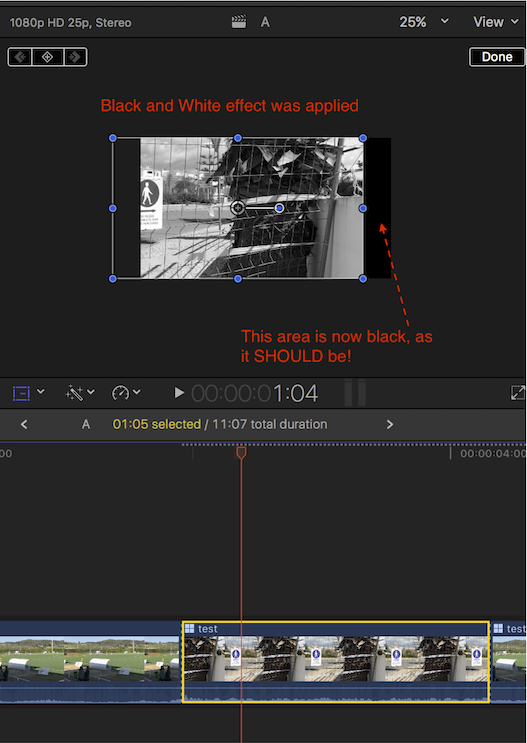
Here is the screenshot (I hope...)
Last edit: 31 May 2017 13:46 by lichinho.
Please Log in to join the conversation.
31 May 2017 14:17 #88495
by Danno
Replied by Danno on topic Applying Effects to a 1080p multicam clip containing 4k footage
First of all, I really appreciate you helping out; I'm still transitioning to this software so I'm hoping it is something that I'm missing because this doesn't happen when effect is applied directly to 4k clips. We may be saying the same thing but to be sure, I've posted an example of my experience below.
Please Log in to join the conversation.
- Tom Wolsky
-

- Offline
- Moderator
-
31 May 2017 14:36 #88496
by Tom Wolsky
Replied by Tom Wolsky on topic Applying Effects to a 1080p multicam clip containing 4k footage
This is not new to 10.3. The effect needs to be placed inside the multicam clip not in the project for the scaling function to behave as you want.
Please Log in to join the conversation.
31 May 2017 14:38 #88497
by lichinho
Replied by lichinho on topic Applying Effects to a 1080p multicam clip containing 4k footage
I realize this can be confusing.
Think for a moment that you place a 1080p clip on a 1080p timeline.
What would happen if you scale it down to, say, 50%? Basically, what we see in your video - I don't think this would be controversial in the least. We are just seeing the whole clip scaled down, and there are no extra pixels to fill the black area around it.
Well, you ARE scaling a 1080p clip (your multicam clip).
You were expecting that, because the selected angle contains a 4K clip, that clip's extra pixels would be available to you.
But the multicam clip, and hence each of its angles, is only 1080p. What part of the original 4K clip, and at what scale, goes into the angle, is determined by you - in the Angle Editor.
I will try to do a little video in the hope that it will make this clearer.
To make matters simpler, instead of a multicam clip, I will just wrap a 4K clip in a 1080p compound clip.
Think for a moment that you place a 1080p clip on a 1080p timeline.
What would happen if you scale it down to, say, 50%? Basically, what we see in your video - I don't think this would be controversial in the least. We are just seeing the whole clip scaled down, and there are no extra pixels to fill the black area around it.
Well, you ARE scaling a 1080p clip (your multicam clip).
You were expecting that, because the selected angle contains a 4K clip, that clip's extra pixels would be available to you.
But the multicam clip, and hence each of its angles, is only 1080p. What part of the original 4K clip, and at what scale, goes into the angle, is determined by you - in the Angle Editor.
I will try to do a little video in the hope that it will make this clearer.
To make matters simpler, instead of a multicam clip, I will just wrap a 4K clip in a 1080p compound clip.
Please Log in to join the conversation.
31 May 2017 14:45 #88498
by Danno
Replied by Danno on topic Applying Effects to a 1080p multicam clip containing 4k footage
Thanks Tom. So there are instances throughout the multicam clip that require a specific effect. Would you suggest re-cutting those segments in the angle editor and applying the effect to only it to prevent it from showing up each time that angle is selected? Just seems like a lot to have to do.
Please Log in to join the conversation.
31 May 2017 14:48 #88499
by Danno
Replied by Danno on topic Applying Effects to a 1080p multicam clip containing 4k footage
Cool. Just wondering why it scales fine until the effect is applied. If it's not a bug I just need to get my head wrapped around this before deciding on a workflow for the next project.
Please Log in to join the conversation.
31 May 2017 14:49 #88500
by lichinho
The part where it "scales fine" is THE bug!
Replied by lichinho on topic Applying Effects to a 1080p multicam clip containing 4k footage
Danno wrote: Cool. Just wondering why it scales fine until the effect is applied. If it's not a bug I just need to get my head wrapped around this before deciding on a workflow for the next project.
The part where it "scales fine" is THE bug!
Please Log in to join the conversation.
