


- Posts: 228
- Thank you received: 16
3 Post Moderation Rule for New Boarders (25 Jan 2021)
New boarders will have their posts moderated - Don't worry if you cannot see your post immediately.
Multicam and GoPro's / combine files
21 May 2017 12:08 #88208
by Schnurr
Multicam and GoPro's / combine files was created by Schnurr
Hi, I am making my first steps with FCPX & Multicam and must say I like it.
Question is due to the fact that I record with one iP7 and 3 GoPros the GoPros start recording every 10-12min with a new filename (GP01, GP02, GP03,...). As such I had to 1st unit all eg. 3 clips from camera 1 and export these clip in ONE new H264 file. This is quite a time consuming job but I guess I can't tell FCPX that GP02 is the continue file from GP01 and belongs to angle A. and GP03...
Any recommendation to quickly add GP02 and GP03 to GP01 and export as one file.
Question is due to the fact that I record with one iP7 and 3 GoPros the GoPros start recording every 10-12min with a new filename (GP01, GP02, GP03,...). As such I had to 1st unit all eg. 3 clips from camera 1 and export these clip in ONE new H264 file. This is quite a time consuming job but I guess I can't tell FCPX that GP02 is the continue file from GP01 and belongs to angle A. and GP03...
Any recommendation to quickly add GP02 and GP03 to GP01 and export as one file.
Please Log in to join the conversation.
- Tom Wolsky
-

- Offline
- Moderator
-

21 May 2017 12:39 #88209
by Tom Wolsky
Replied by Tom Wolsky on topic Multicam and GoPro's / combine files
You don't need to do this. Assign angle numbers in the inspector to each shot from the same camera. Do this before you create the multicam clip. All the shots from the same camera will be combined into a single lane in the multicam clip.
Please Log in to join the conversation.


21 May 2017 14:00 - 21 May 2017 14:51 #88212
by JoeEditor
Replied by JoeEditor on topic Multicam and GoPro's / combine files
We use GoPros all the time and do this. First, in the GoPro, give each a unique name. Like we use "GoPro 001", "GoPro 002", "GoPro 003", etc. Then when you do your Multicam, you can have Angle Assembly arranged by Camera Name. Or like Tom says and have Angle Assembly arranged by Angle Name. Either works. Point is FCPX will import the Camera Name from a GoPro which saves a step in doing multicams over and over from the same set of cameras.
Since your GoPros record off and on (as ours also do) you must set all the times/dates in all your GoPros as closely as possible. In fact, my camera crew leads me to believe there is a way to sync time/date of several GoPros together, but I've no clue how that's done. But even doing it manually, you'll be close enough.
Creating your Multicam, the automatic settings should handle all of this just fine.
Once the Multicam is made, you may have to double-click it to open it into the Angle Editor, and nudge any clip that isn't perfectly lined up.
More info:
help.apple.com/finalcutpro/mac/10.3/#/ver23c764f1
Since your GoPros record off and on (as ours also do) you must set all the times/dates in all your GoPros as closely as possible. In fact, my camera crew leads me to believe there is a way to sync time/date of several GoPros together, but I've no clue how that's done. But even doing it manually, you'll be close enough.
Creating your Multicam, the automatic settings should handle all of this just fine.
Once the Multicam is made, you may have to double-click it to open it into the Angle Editor, and nudge any clip that isn't perfectly lined up.
More info:
help.apple.com/finalcutpro/mac/10.3/#/ver23c764f1
Last edit: 21 May 2017 14:51 by JoeEditor.
Please Log in to join the conversation.
- Karsten Schlüter
-

- Offline
- Moderator
-
Less
More
- Posts: 3790
- Thank you received: 718
21 May 2017 16:45 - 21 May 2017 16:50 #88224
by Karsten Schlüter
Replied by Karsten Schlüter on topic Multicam and GoPro's / combine files
… what Tom and Ben already said:
no need to prep any files.
'cause we two have the same goal (pun intended), my workflow is:
step 0 : is DOES help to have a similar Timestamp, but not needed; many of my last weeks recordings are timetravelled from 2001 .....
step 1: import all material from one cam. select all clips in the Event Browser (could be done WHILE Import … one of the many marvels of FCPX I don't get ), and in the Inspector, give all clips one unique Camera Name (e.g. left, right, main); what I do additionally: in the Notes field I mark 1st half, 2nd half
step 2: looking MANUALLY ('ear-ly'?? ) for referees whistle in each first clip of each cam; set a Marker(M)
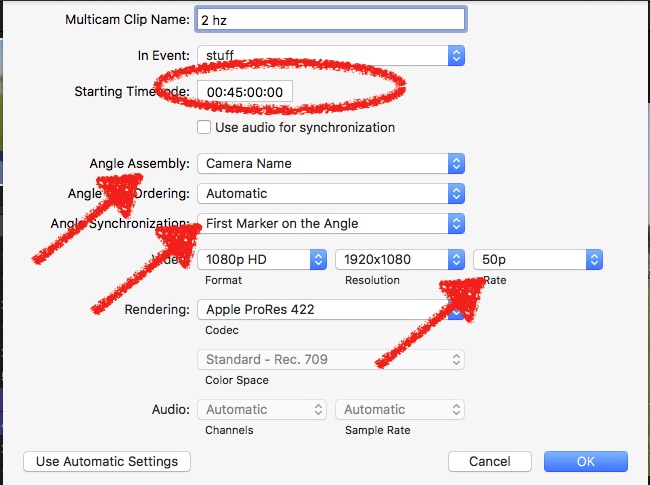
step 3: select all clips noted as '1st Half', create New Multicam; follow settings in screenshot:
a few 'tricks'
• synch by First Marker / uncheck Synch by Audio
• Angle Assembly Cam Name: all clips from one cam, even with pauses (battery swap, lazy operator, …) , will arrange automatically in one track
• for 2nd half set starting TC to 45min = by simple hovering over the MC in the Event Browser you see, when something's happening (ok, your Junior League perhaps set to 00:30.00)
• Video: set to highest values of ALL Cams, example: you have a 4k/30p source, and a 1080/50p source = set MC to 4k/50 - why? if your Project is 1080/25, you can reframe AND retime lossless! (and no, files don't get bloated, MCs are just 'virtual', reference files …
Next: J/K/L and I/O and F = I favorize a whole game of 90min in less than 20min...
If you're really good, add keywords (keycombo!) , 'year in review', 'very best', 'MY son' etc
Drag all Favorites into Timeline
For edit, set one cam as Audio Source (I prefer the one far far away from yelling soccer-moms…). Edit TVtruck- style: hit play, switch angles by 1/2/3 (hint: use same scheme every week, here: 1=main, manned cam, 2+4 left, 3+5 right … no need for Angle Viewer!)
Adjust edits; Angle switch too early/too late? hit T and shift the edit point; alt-drag clips to duplicate for replay/slowmo Hint: create a keyboard shortcut for 'Automatic Speed', here: ctrl-shift-G (Geschwindigkeit) = if the clip has a higher framerate than Project, you instantly get a nice slowmo
If you have a Custom Dissolve, right-click, set it to Standard = cmd-T applies your own nice Bundesliga-swoosh ...
Add 'Package', check for mistakes, dub Audio of coach getting ballistic (for that purpose I do have an Event 'Standards', such as logos, 'stadium atmosphere' etc etc) ; hit Share, done.
… which reminds me, I planned to publish my whole workflow with illustrations … hmm, some future I'll do LOL
no need to prep any files.
'cause we two have the same goal (pun intended), my workflow is:
step 0 : is DOES help to have a similar Timestamp, but not needed; many of my last weeks recordings are timetravelled from 2001 .....
step 1: import all material from one cam. select all clips in the Event Browser (could be done WHILE Import … one of the many marvels of FCPX I don't get
), and in the Inspector, give all clips one unique Camera Name (e.g. left, right, main); what I do additionally: in the Notes field I mark 1st half, 2nd halfstep 2: looking MANUALLY ('ear-ly'??
) for referees whistle in each first clip of each cam; set a Marker(M)step 3: select all clips noted as '1st Half', create New Multicam; follow settings in screenshot:
a few 'tricks'
• synch by First Marker / uncheck Synch by Audio
• Angle Assembly Cam Name: all clips from one cam, even with pauses (battery swap, lazy operator, …) , will arrange automatically in one track
• for 2nd half set starting TC to 45min = by simple hovering over the MC in the Event Browser you see, when something's happening (ok, your Junior League perhaps set to 00:30.00)
• Video: set to highest values of ALL Cams, example: you have a 4k/30p source, and a 1080/50p source = set MC to 4k/50 - why? if your Project is 1080/25, you can reframe AND retime lossless! (and no, files don't get bloated, MCs are just 'virtual', reference files …
Next: J/K/L and I/O and F = I favorize a whole game of 90min in less than 20min...
If you're really good, add keywords (keycombo!) , 'year in review', 'very best', 'MY son' etc
Drag all Favorites into Timeline
For edit, set one cam as Audio Source (I prefer the one far far away from yelling soccer-moms…). Edit TVtruck- style: hit play, switch angles by 1/2/3 (hint: use same scheme every week, here: 1=main, manned cam, 2+4 left, 3+5 right … no need for Angle Viewer!)
Adjust edits; Angle switch too early/too late? hit T and shift the edit point; alt-drag clips to duplicate for replay/slowmo Hint: create a keyboard shortcut for 'Automatic Speed', here: ctrl-shift-G (Geschwindigkeit) = if the clip has a higher framerate than Project, you instantly get a nice slowmo
If you have a Custom Dissolve, right-click, set it to Standard = cmd-T applies your own nice Bundesliga-swoosh ...
Add 'Package', check for mistakes, dub Audio of coach getting ballistic (for that purpose I do have an Event 'Standards', such as logos, 'stadium atmosphere' etc etc) ; hit Share, done.
… which reminds me, I planned to publish my whole workflow with illustrations … hmm, some future I'll do LOL
Last edit: 21 May 2017 16:50 by Karsten Schlüter.
Please Log in to join the conversation.
22 May 2017 08:56 - 22 May 2017 09:17 #88233
by Schnurr
Replied by Schnurr on topic Multicam and GoPro's / combine files
Thank you all three for your valuable feedback!
So far with combining the GoPros in one file everything worked very well even with the "use audio for sync" might be due to the smaller soccer field and loud referee signal at the start.
But trying to accomplish the same with the multiple native go pro files I am struggling. As Karsten suggested (and I did before as well for my non Multicam edits). Tried with automatic audio and manual 1st marker setting. I guess later markers on the clips are out of influence.
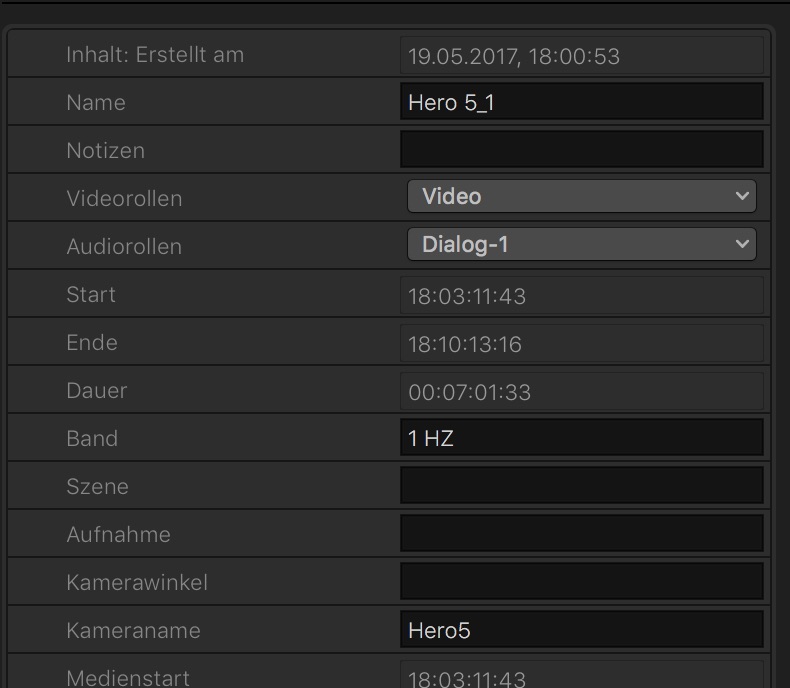
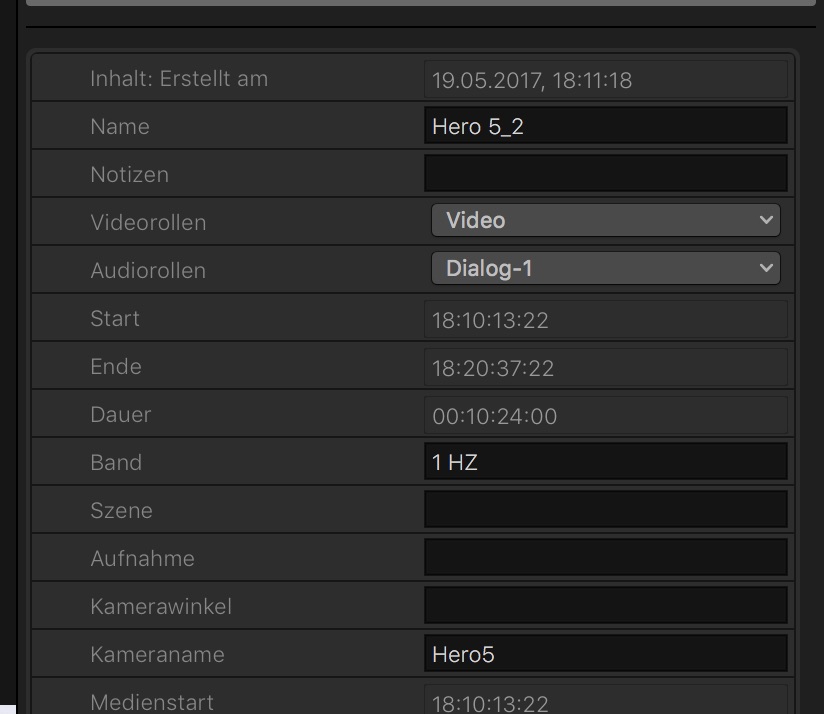
import looks like above. And added later as well a angle name for "Kamerawinkel" like "Behind goal 1"
even tried it as well with angle names "Kamerawinkel" and "Aufnahme" or "Szene" but unfortunaly no sync order is displayed in the "editor" or I receive black content although the data/clip is there even for that sequence in the viewer.
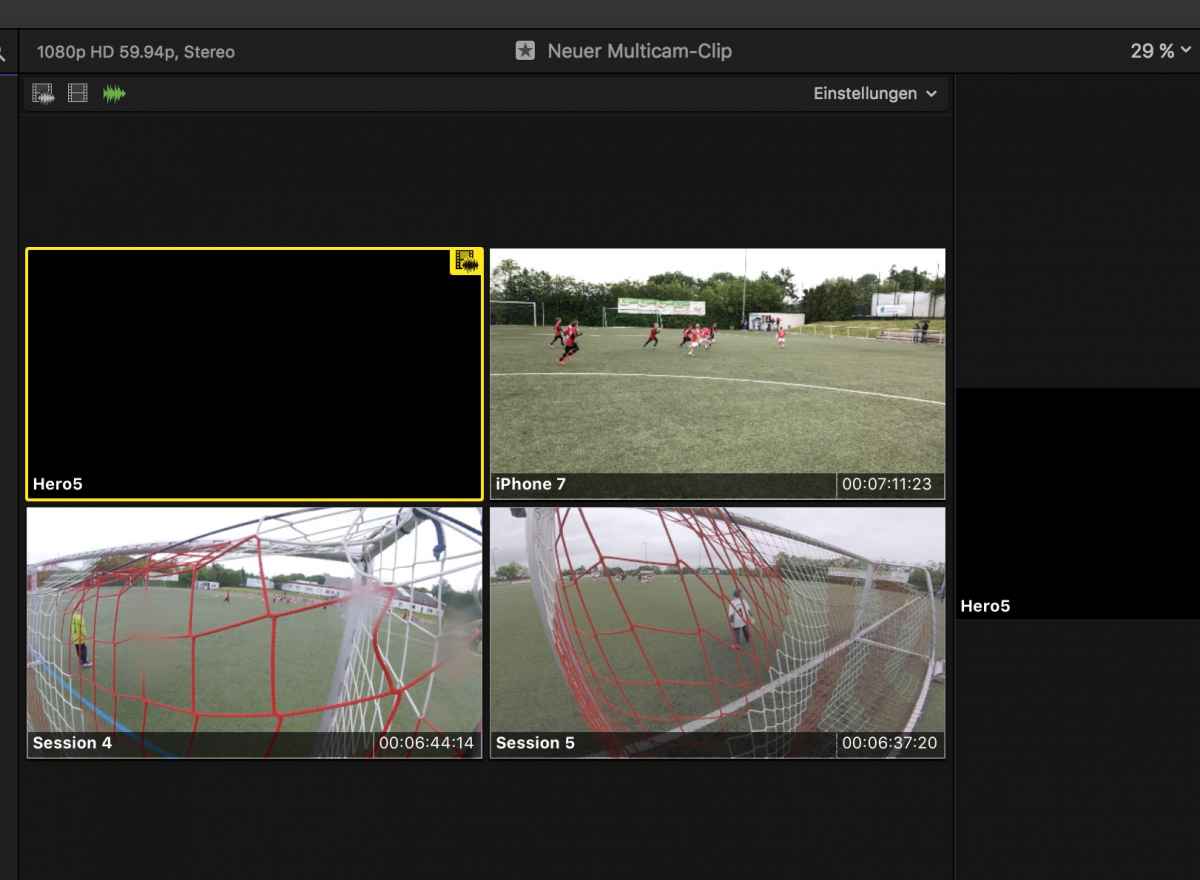
Any ideas what I am doing wrong ?
At Guru, would be interesting to see how goPros can be synced on time because even the manual or automatic time setting differs from the world time
So far with combining the GoPros in one file everything worked very well even with the "use audio for sync" might be due to the smaller soccer field and loud referee signal at the start.
But trying to accomplish the same with the multiple native go pro files I am struggling. As Karsten suggested (and I did before as well for my non Multicam edits). Tried with automatic audio and manual 1st marker setting. I guess later markers on the clips are out of influence.
import looks like above. And added later as well a angle name for "Kamerawinkel" like "Behind goal 1"
even tried it as well with angle names "Kamerawinkel" and "Aufnahme" or "Szene" but unfortunaly no sync order is displayed in the "editor" or I receive black content although the data/clip is there even for that sequence in the viewer.
Any ideas what I am doing wrong ?
At Guru, would be interesting to see how goPros can be synced on time because even the manual or automatic time setting differs from the world time
Last edit: 22 May 2017 09:17 by Schnurr.
Please Log in to join the conversation.
- Karsten Schlüter
-
- Offline
- Moderator
-
Less
More
- Posts: 3790
- Thank you received: 718
22 May 2017 09:21 #88234
by Karsten Schlüter
Replied by Karsten Schlüter on topic Multicam and GoPro's / combine files
… ah, 'one more thing' conc. MultiCams:
BEFORE you do 'New MC', check all clips participating for 'selections. Have a look attached screenshot:
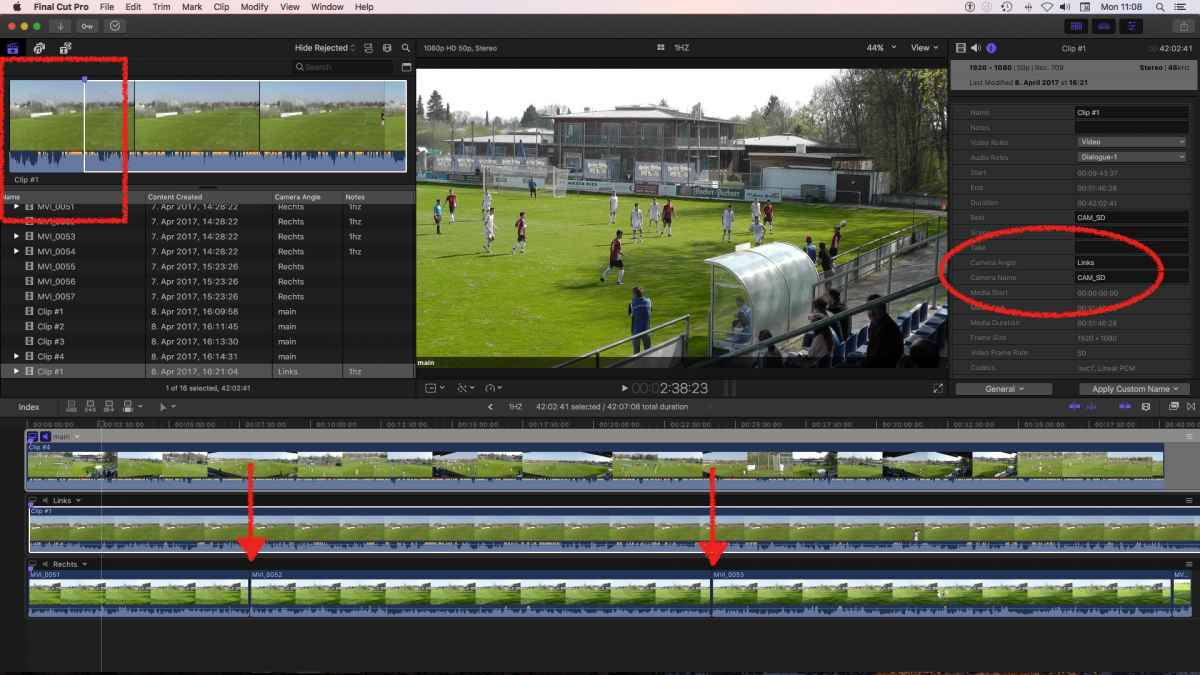
Clip#1/Left has a selected Range - a few secs before the synchMarker (bluedot) 'til its end.
When 'multicamming', the NON_selected parts will not appear in the final MC.
Here in my case: a set the unmanned cam to rec about 5-10mn before the actual game = no need to add that to the final MC
So, for your case:
give all clips from one Angle the same Cam Angle name
try my manual marker method - it's blazing fast
AND check - if you want to use the whole clip - no selections are made!
… happened to me quite often: before doing the whole match, I pick up some stuff, e.g. to send the shooter of a goal a 'preview'.
… but then… that 30secs selection is still 'active' = in the MC 99% is black!
Or, when I don't preselect, the cam I set ON first shows a pic whereas the others not - lots of walking on a soccer-field
BEFORE you do 'New MC', check all clips participating for 'selections. Have a look attached screenshot:
Clip#1/Left has a selected Range - a few secs before the synchMarker (bluedot) 'til its end.
When 'multicamming', the NON_selected parts will not appear in the final MC.
Here in my case: a set the unmanned cam to rec about 5-10mn before the actual game = no need to add that to the final MC
So, for your case:
give all clips from one Angle the same Cam Angle name
try my manual marker method - it's blazing fast
AND check - if you want to use the whole clip - no selections are made!
… happened to me quite often: before doing the whole match, I pick up some stuff, e.g. to send the shooter of a goal a 'preview'.
… but then… that 30secs selection is still 'active' = in the MC 99% is black!
Or, when I don't preselect, the cam I set ON first shows a pic whereas the others not - lots of walking on a soccer-field
Please Log in to join the conversation.
22 May 2017 16:50 - 22 May 2017 17:52 #88237
by Schnurr
Replied by Schnurr on topic Multicam and GoPro's / combine files
Hi Karsten,
no selections had been made because sync wasn't in order. If all works I will of course work with "F". I tried with "manual marker sync"
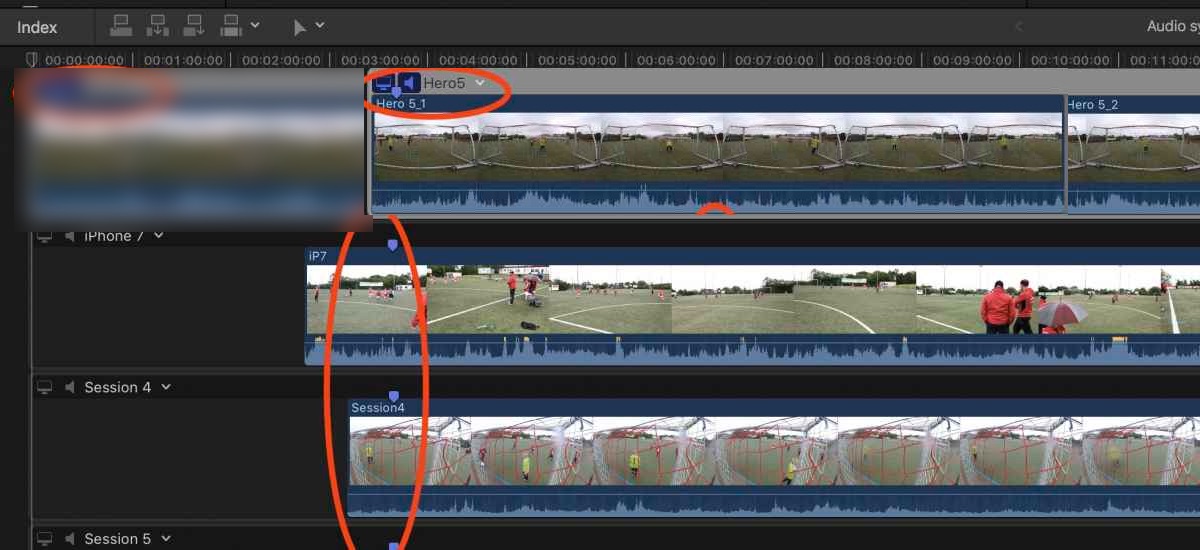
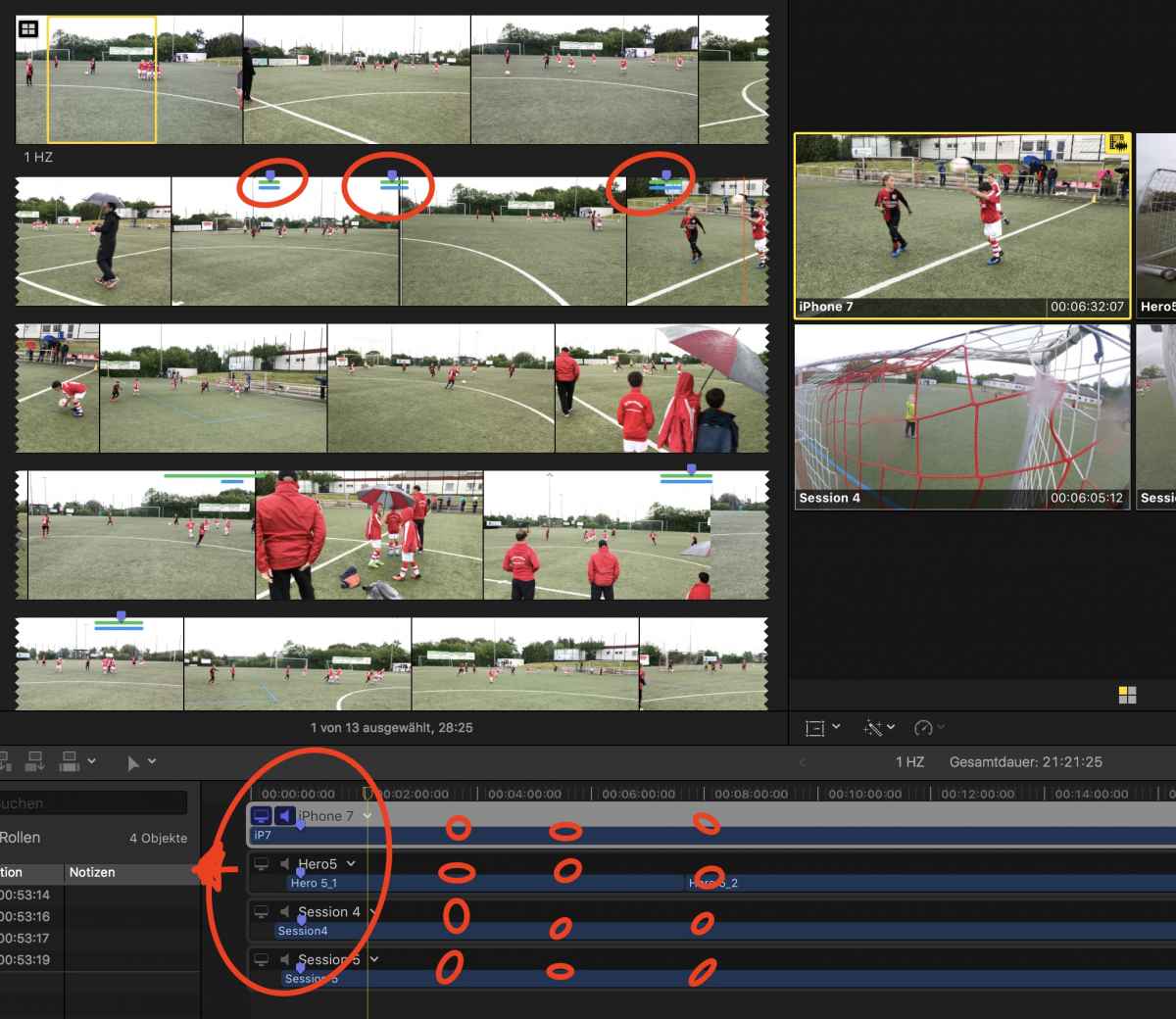
Issue on my side was that FCPX included some "blank"
see screenshot.
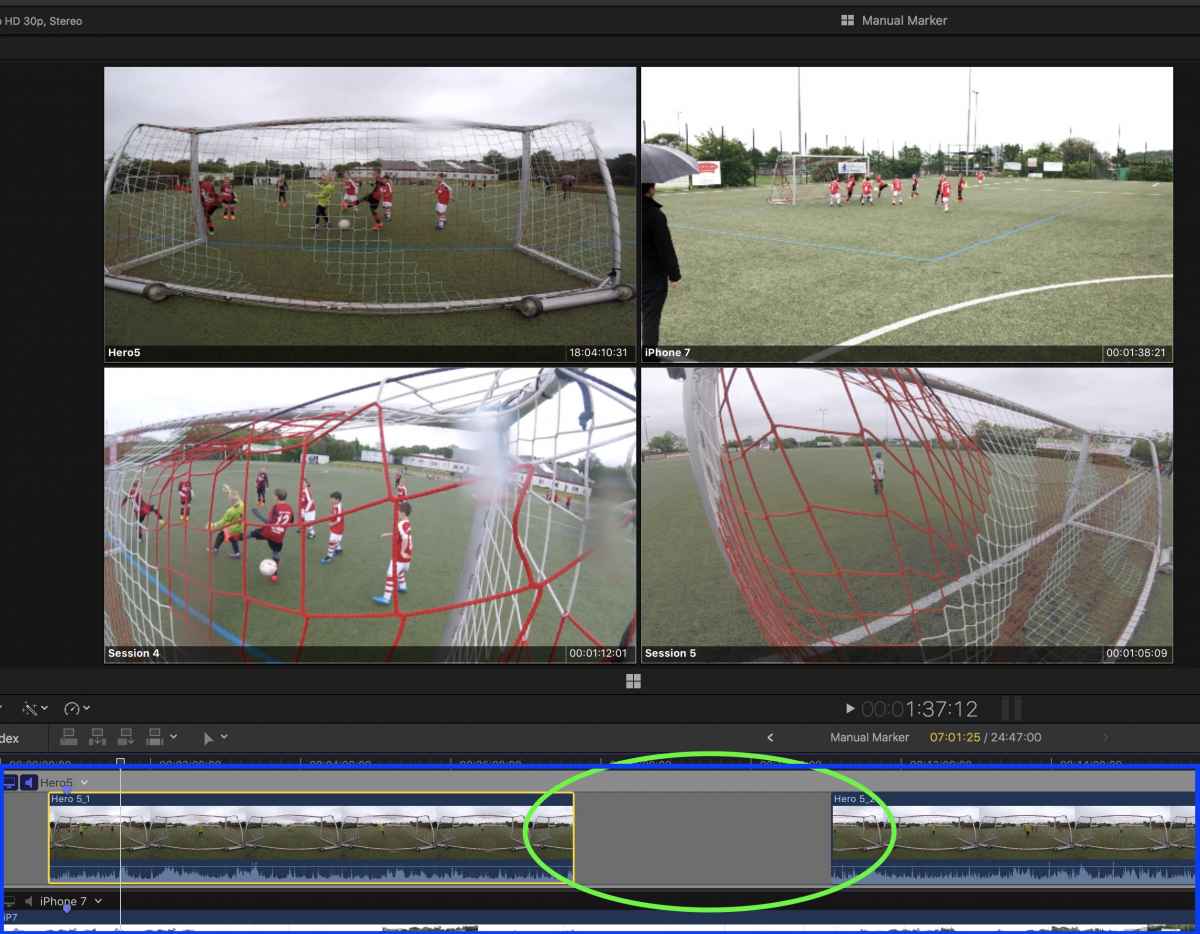
Question is of course 1) why and 2) whether there is a way to "auto snap" Hero 5_2 to the previous clip in this case Hero 5_1 because moving it manly requires some super precise positioning (; and : keys) of the following clips from of course the same camera.
Furthermore how to close the the window in the timeline (blue box) didn't figure out how to do that as such never opened it before and is there a way to zoom into the eg. 4 angle cameras would help to adjust the clips.
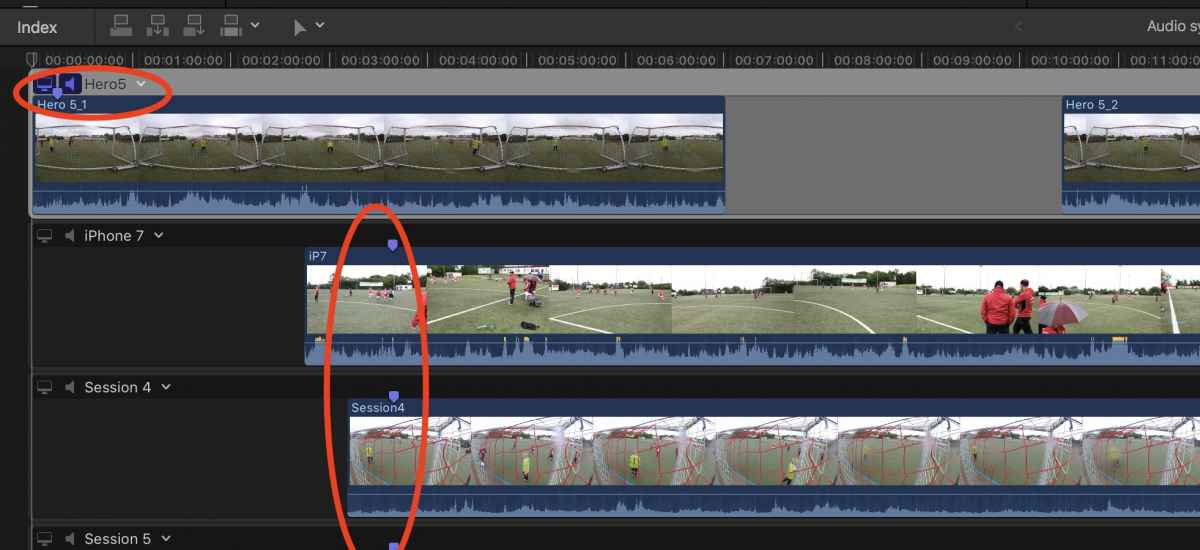
in addition for the combined GoPro clip (put manually all GoPro files into one mov and reimported that into fcpx, see initial post) "Audio Auto Sync" worked pretty good but for the split ones as you can see in the screenshot the sync is far out of order. As such Hero_1 needs to be manually shifted to Hero_2 to the right. Again question for auto-snapping.
update:
Tried finally MC & GoPro with other clips and worked pretty well (Audio sync) so I assume this is due to these specific clips so lets see how others do work. But nevertheless question remains whether there is a "auto snap" function in case this grey area appears and how to close the MC clip in the timeline. Tx
no selections had been made because sync wasn't in order. If all works I will of course work with "F". I tried with "manual marker sync"
Issue on my side was that FCPX included some "blank"
see screenshot.
Question is of course 1) why and 2) whether there is a way to "auto snap" Hero 5_2 to the previous clip in this case Hero 5_1 because moving it manly requires some super precise positioning (; and : keys) of the following clips from of course the same camera.
Furthermore how to close the the window in the timeline (blue box) didn't figure out how to do that as such never opened it before
and is there a way to zoom into the eg. 4 angle cameras would help to adjust the clips.in addition for the combined GoPro clip (put manually all GoPro files into one mov and reimported that into fcpx, see initial post) "Audio Auto Sync" worked pretty good but for the split ones as you can see in the screenshot the sync is far out of order. As such Hero_1 needs to be manually shifted to Hero_2 to the right. Again question for auto-snapping.
update:
Tried finally MC & GoPro with other clips and worked pretty well (Audio sync) so I assume this is due to these specific clips so lets see how others do work. But nevertheless question remains whether there is a "auto snap" function in case this grey area appears and how to close the MC clip in the timeline. Tx
Last edit: 22 May 2017 17:52 by Schnurr.
Please Log in to join the conversation.
- Karsten Schlüter
-
- Offline
- Moderator
-
Less
More
- Posts: 3790
- Thank you received: 718
23 May 2017 03:38 #88246
by Karsten Schlüter
Replied by Karsten Schlüter on topic Multicam and GoPro's / combine files
those gaps appear, afaik, only if for whatever reason the Timecode/Timestamp has 'gaps' - then the Angle Assembly looks like in your screenshot.
… had that phenomenon some times = in the Event Browser/Content Created the wrong TimeStamp was visible, in one case a day later, longest game ever LOL ...
• if TC/TS is correct, the Angle Assembly creates no gaps.
• If there ARE actually 'gaps' on recording (cam not running constantly, battery/card swap) there HAVE to be 'gaps' to keep synchro.
• if gaps are unintentionally, you can manually adjust the clips in each track; with snapOn (shortcut: N), the clip will attach seamless to the other, with comma and dot you move the clip as usual single-framed ....
… had that phenomenon some times = in the Event Browser/Content Created the wrong TimeStamp was visible, in one case a day later, longest game ever LOL ...
Schnurr wrote: … question remains whether there is a "auto snap" function …
• if TC/TS is correct, the Angle Assembly creates no gaps.
• If there ARE actually 'gaps' on recording (cam not running constantly, battery/card swap) there HAVE to be 'gaps' to keep synchro.
• if gaps are unintentionally, you can manually adjust the clips in each track; with snapOn (shortcut: N), the clip will attach seamless to the other, with comma and dot you move the clip as usual single-framed ....
Please Log in to join the conversation.
23 May 2017 08:36 - 23 May 2017 08:37 #88258
by Schnurr
Replied by Schnurr on topic Multicam and GoPro's / combine files
Hi
Tx. sure would understand the issue with the gap due to missing raw material but in my case the gap from the GoPros is 3-5frames and not 3-4 minutes. But okay the other example worked pretty well (not the one below)
In case Apple reads the forum. Please include as well a zoom option within the "Multicam viewer" as it's done in the editor window would ease the process for soccer edits)
and the small "<" sign closes the MC window. Now need to understand in more detail these 3 options regarding sound at the top left corner of MC and why FCPX creates blank black space in MC
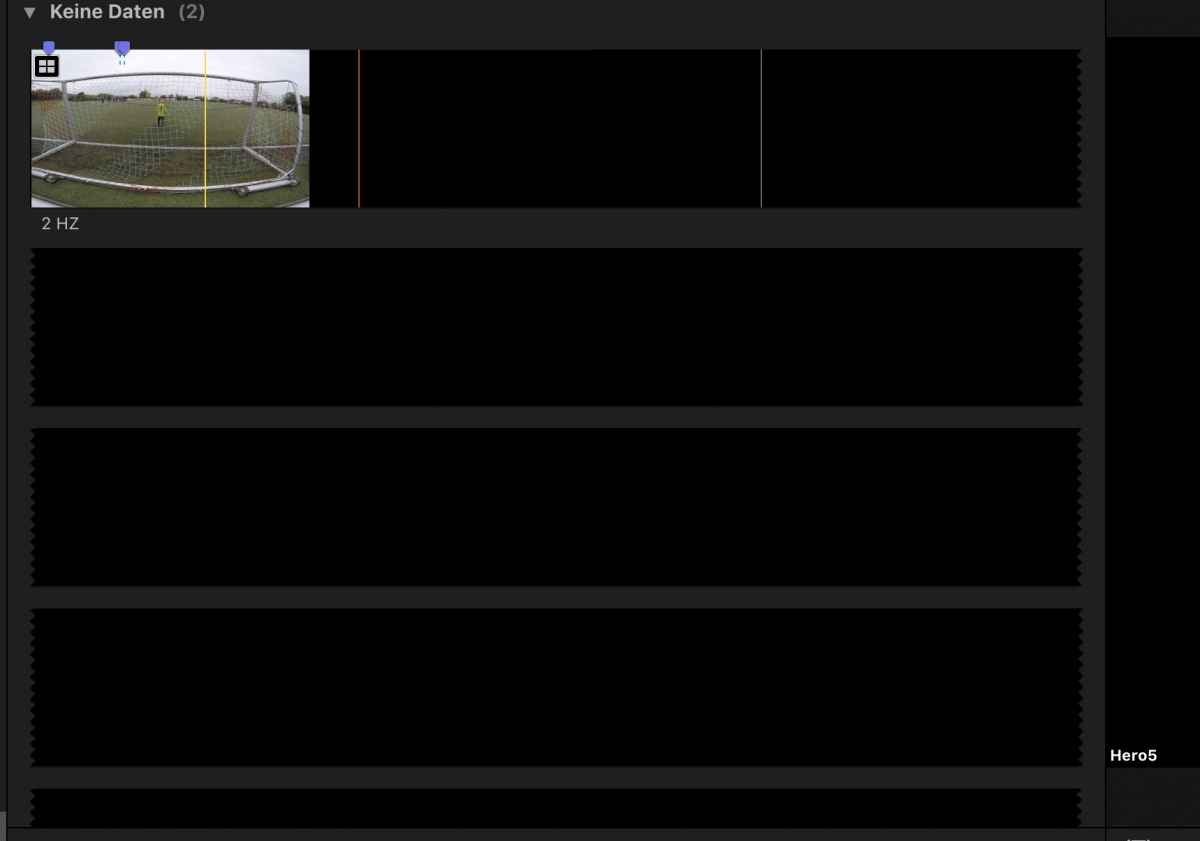
Tx. sure would understand the issue with the gap due to missing raw material but in my case the gap from the GoPros is 3-5frames and not 3-4 minutes. But okay the other example worked pretty well (not the one below)
In case Apple reads the forum. Please include as well a zoom option within the "Multicam viewer" as it's done in the editor window would ease the process for soccer edits
)and the small "<" sign closes the MC window. Now need to understand in more detail these 3 options regarding sound at the top left corner of MC and why FCPX creates blank black space in MC
Last edit: 23 May 2017 08:37 by Schnurr.
Please Log in to join the conversation.
- Karsten Schlüter
-
- Offline
- Moderator
-
Less
More
- Posts: 3790
- Thank you received: 718
23 May 2017 10:08 - 23 May 2017 10:11 #88259
by Karsten Schlüter
Replied by Karsten Schlüter on topic Multicam and GoPro's / combine files
there's something wrong with your 'Angle Clip Ordering', look:
shifting clip 'Hero 5_1' to its correct position = matching makers, no more 'gaps'.
Aside the Inspector tells all TimeStamps, Startingpoints and lengths are correct:
Hero5_1 is 7min long, ending at 18:10
Hero5_2 starts at 18:10
so, …check your Settings 'Angle Clip Ordering' when creating the MC.
…<cough> you haven't manually give new creation dates for the clips, haven't you? :blink:
Don't know what exactly you mean with the 'Multicam Viewer' -but the usual zoom commands.cmd-+/ cmd- -, or pinch'n zoom, work in all 'windows'
shifting clip 'Hero 5_1' to its correct position = matching makers, no more 'gaps'.
Aside the Inspector tells all TimeStamps, Startingpoints and lengths are correct:
Hero5_1 is 7min long, ending at 18:10
Hero5_2 starts at 18:10
so, …check your Settings 'Angle Clip Ordering' when creating the MC.
…<cough> you haven't manually give new creation dates for the clips, haven't you? :blink:
In case Apple reads the forum. Please include as well a zoom option within the "Multicam viewer"
Don't know what exactly you mean with the 'Multicam Viewer' -but the usual zoom commands.cmd-+/ cmd- -, or pinch'n zoom, work in all 'windows'
Last edit: 23 May 2017 10:11 by Karsten Schlüter.
Please Log in to join the conversation.
24 May 2017 07:17 #88302
by Schnurr
Replied by Schnurr on topic Multicam and GoPro's / combine files
Yes I shifted that to the right and worked but ...
1) This I would call "MC window" as such zooming doesn't work in that window
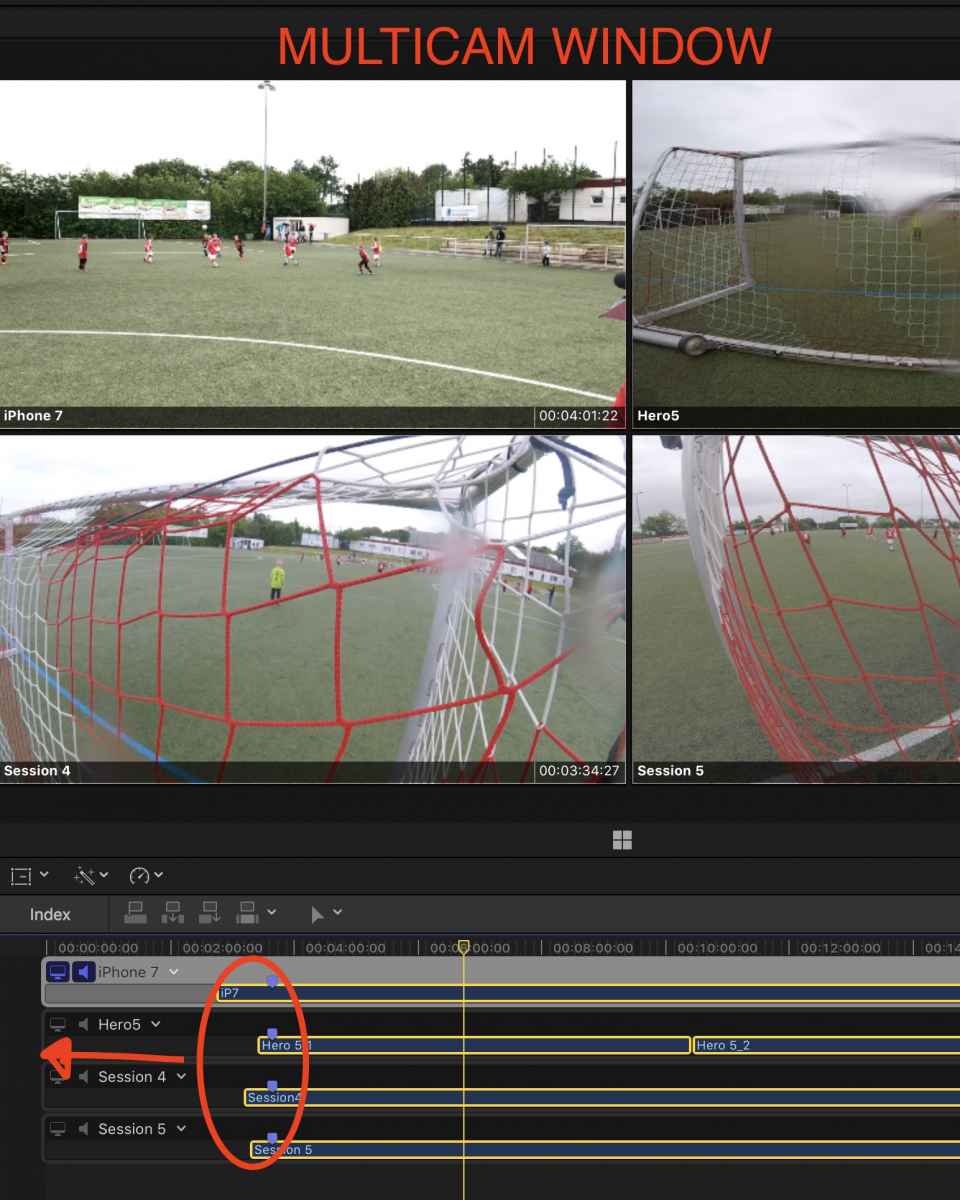
in addition I had for all clips some blank space at the beginning as such I moved it to the right
but then
2) all the markers I set in the MC clip shifted as well and changed their position within the clip!!!!. This I wouldn't expect. Even putting them in the timeline in a project clip marker position are moved.
3) Don't understand why the markers from the MC clip are not visible in the "MC timeline" but okay they appear while putting the clips in a project timeline. So okay and fine. Just using it a 1st time)
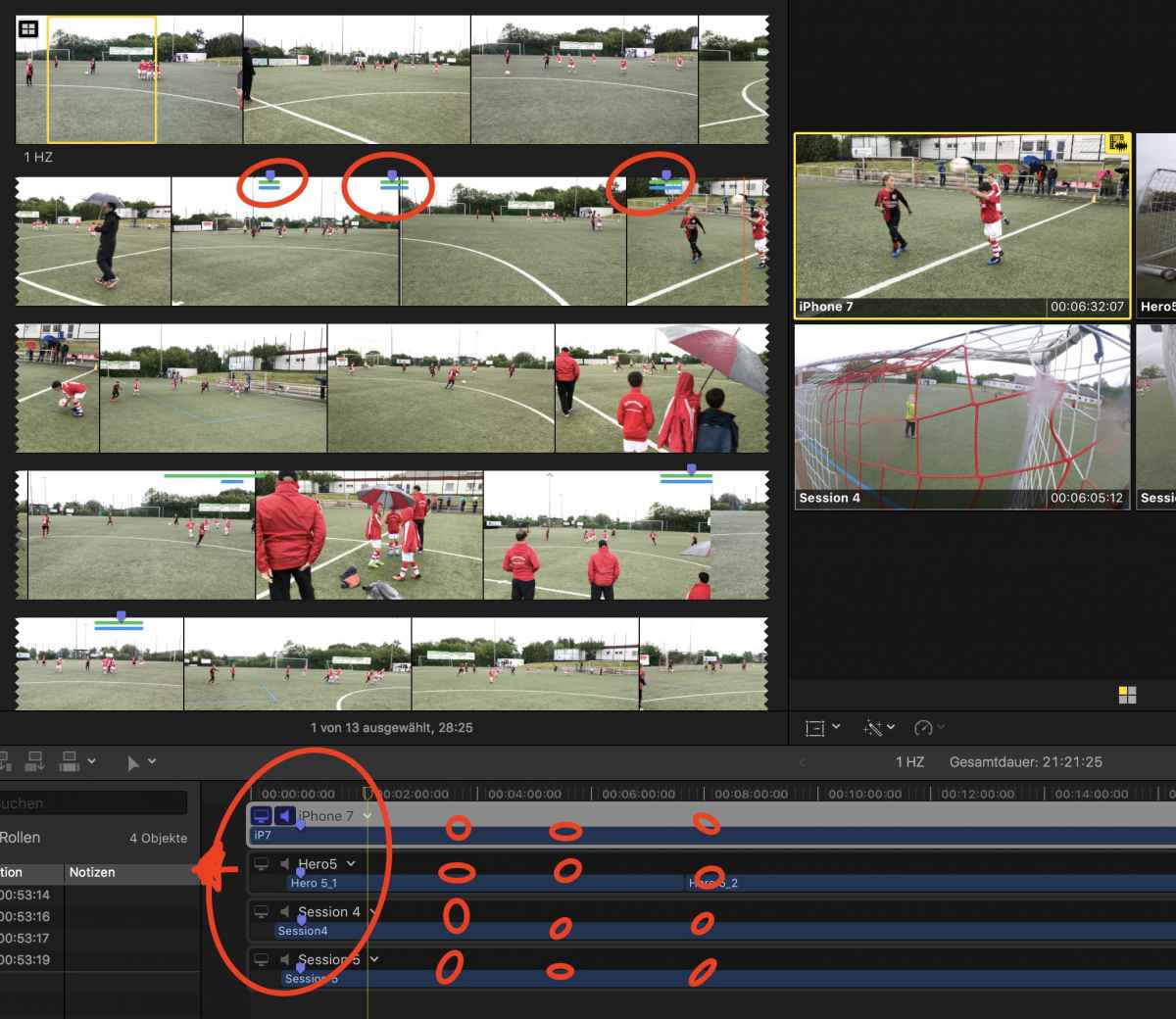
Cool is the shortkey with "alt" or option key to move to a camera selection instead of a blade tool. Ahhh and one thing that I read in Apple instruction is to set markers for the beginning and to leave the "Audio sync" feature one this would improve the sync as well. I did that and at least my blank & black areas disappeared.
1) This I would call "MC window" as such zooming doesn't work in that window
in addition I had for all clips some blank space at the beginning as such I moved it to the right
but then
2) all the markers I set in the MC clip shifted as well and changed their position within the clip!!!!. This I wouldn't expect. Even putting them in the timeline in a project clip marker position are moved.
3) Don't understand why the markers from the MC clip are not visible in the "MC timeline" but okay they appear while putting the clips in a project timeline. So okay and fine. Just using it a 1st time
)
Cool is the shortkey with "alt" or option key to move to a camera selection instead of a blade tool. Ahhh and one thing that I read in Apple instruction is to set markers for the beginning and to leave the "Audio sync" feature one this would improve the sync as well. I did that and at least my blank & black areas disappeared.
Please Log in to join the conversation.
24 May 2017 07:18 - 24 May 2017 07:18 #88303
by Schnurr
Replied by Schnurr on topic Multicam and GoPro's / combine files
Yes I shifted that to the right and worked some more observations...
1) This I would call "MC window" as such zooming doesn't work in that window
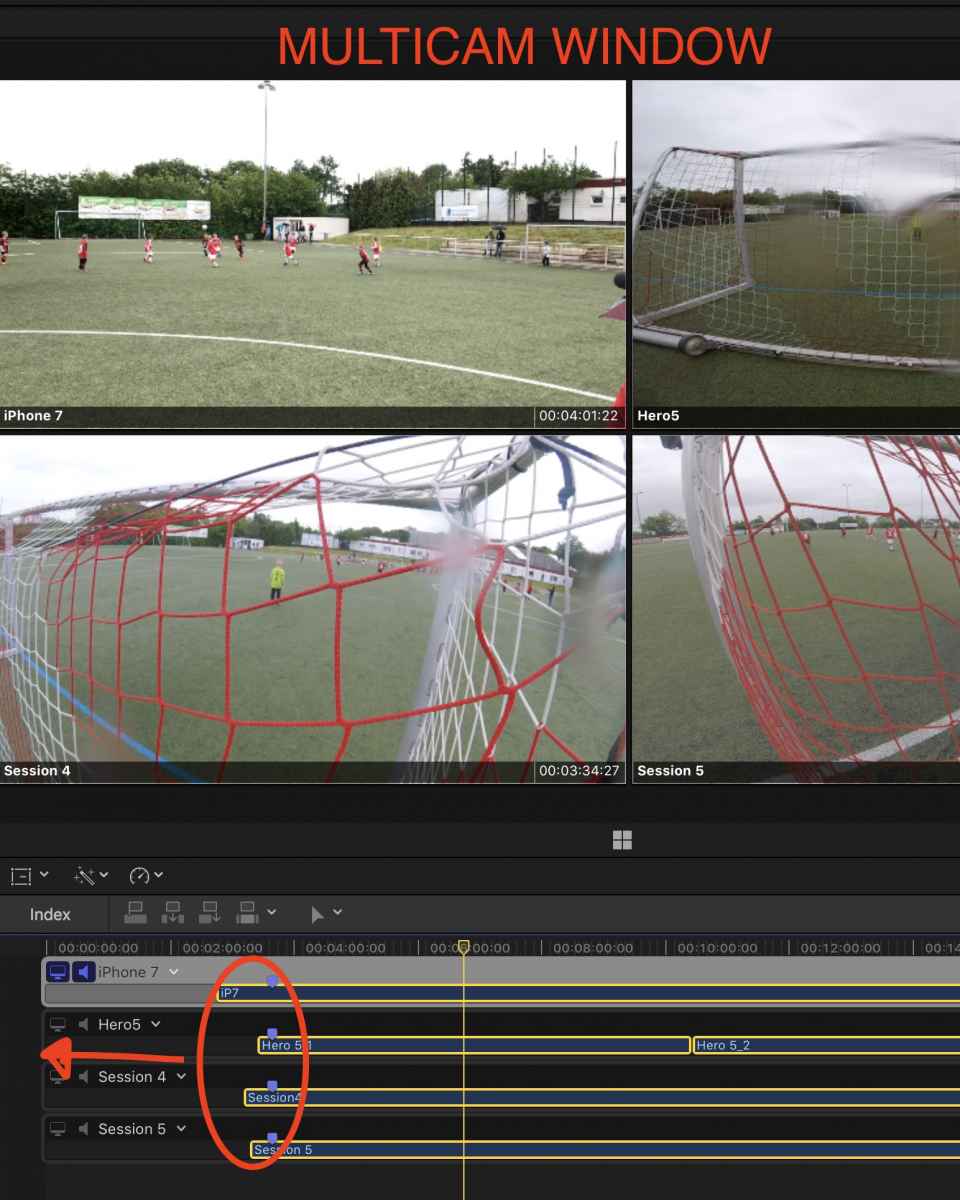
in addition I had for all clips some blank space at the beginning as such I moved it to the right
but then
2) all the markers I set in the MC clip shifted as well and changed their position within the clip!!!!. This I wouldn't expect. Even putting them in the timeline in a project clip marker position are moved.
3) Don't understand why the markers from the MC clip are not visible in the "MC timeline" but okay they appear while putting the clips in a project timeline. So okay and fine. Just using it a 1st time)
Cool is the shortkey with "alt" or option key to move to a camera selection instead of a blade tool. Ahhh and one thing that I read in Apple instruction is to set markers for the beginning and to leave the "Audio sync" feature one this would improve the sync as well. I did that and at least my blank & black areas disappeared.
1) This I would call "MC window" as such zooming doesn't work in that window
in addition I had for all clips some blank space at the beginning as such I moved it to the right
but then
2) all the markers I set in the MC clip shifted as well and changed their position within the clip!!!!. This I wouldn't expect. Even putting them in the timeline in a project clip marker position are moved.
3) Don't understand why the markers from the MC clip are not visible in the "MC timeline" but okay they appear while putting the clips in a project timeline. So okay and fine. Just using it a 1st time
)
Cool is the shortkey with "alt" or option key to move to a camera selection instead of a blade tool. Ahhh and one thing that I read in Apple instruction is to set markers for the beginning and to leave the "Audio sync" feature one this would improve the sync as well. I did that and at least my blank & black areas disappeared.
Last edit: 24 May 2017 07:18 by Schnurr.
Please Log in to join the conversation.
- Karsten Schlüter
-
- Offline
- Moderator
-
Less
More
- Posts: 3790
- Thank you received: 718
25 May 2017 08:59 #88317
by Karsten Schlüter
Replied by Karsten Schlüter on topic Multicam and GoPro's / combine files
… I'm.a bit lost in you description… 
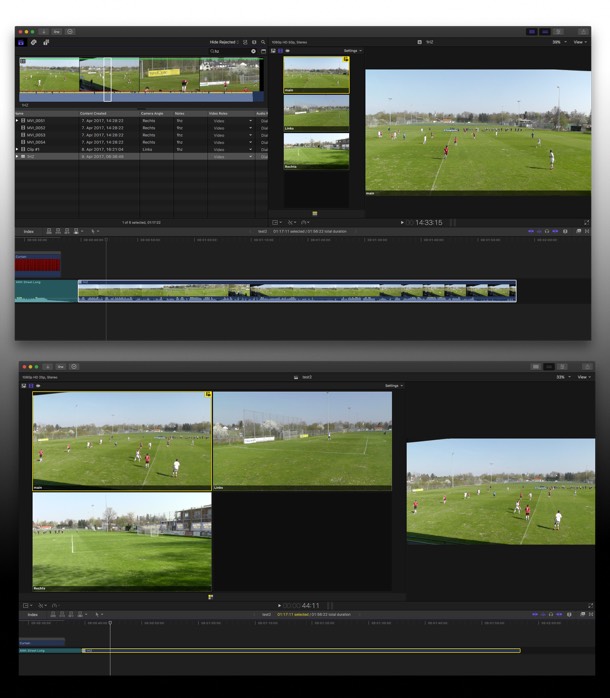
but for future references:
that is the Angle Viewer ('Winkel' im Sinne von Perspektive , nicht 'Engel' )
And, yes, that is correct:
the Size of the Angle Previews is determined by numbers of angles and layout of Workspace
but for future references:
that is the Angle Viewer ('Winkel' im Sinne von Perspektive , nicht 'Engel'
)And, yes, that is correct:
the Size of the Angle Previews is determined by numbers of angles and layout of Workspace
Please Log in to join the conversation.
31 May 2017 08:27 - 31 May 2017 08:28 #88482
by Schnurr
Replied by Schnurr on topic Multicam and GoPro's / combine files
"… I'm.a bit lost in you description…"
yes, I am getting a Pro editor and things get more complicated) and cool how easy it is to adjust the "cut" of the clips or camera views in the TL with MC.
1) by the way in your post #88224 what did you mean with "add Package"?
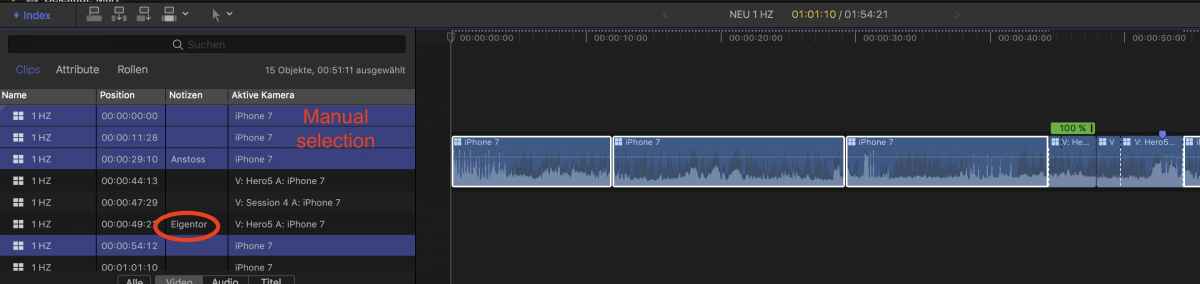
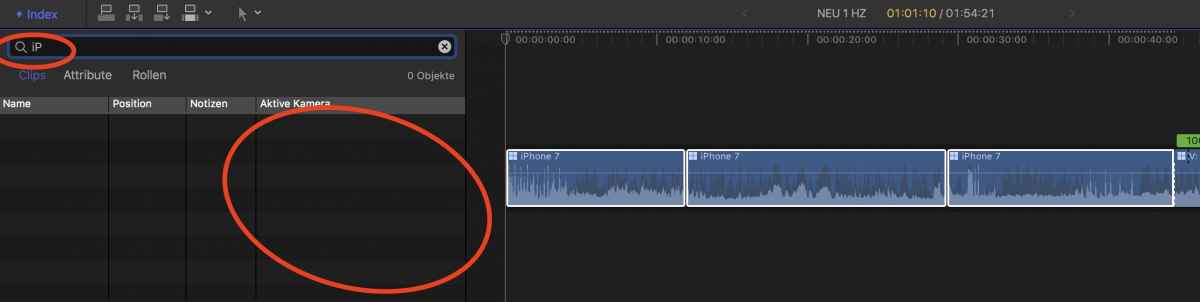
2) Do you work in MC with roles for the different cameras ? Background is that I want to easily filter in the index on cameras. Of course I could do that by the column "active camera" but this requires manual selection (my experience so far)
I tried with the search filed and entered "iP" but this seems to work only on "Clip name" and not with "active camera" or the other columns.
what I did expect as well that setting a note in this case "Eigentor" see pic 1 this would then apply as well in the other views as this impacts the same clip. Hmmm..
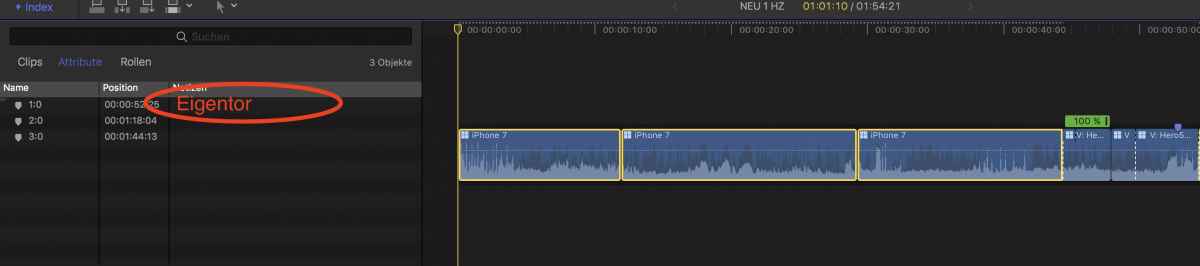
yes, I am getting a Pro editor and things get more complicated
) and cool how easy it is to adjust the "cut" of the clips or camera views in the TL with MC.1) by the way in your post #88224 what did you mean with "add Package"?
2) Do you work in MC with roles for the different cameras ? Background is that I want to easily filter in the index on cameras. Of course I could do that by the column "active camera" but this requires manual selection (my experience so far)
I tried with the search filed and entered "iP" but this seems to work only on "Clip name" and not with "active camera" or the other columns.
what I did expect as well that setting a note in this case "Eigentor" see pic 1 this would then apply as well in the other views as this impacts the same clip. Hmmm..
Last edit: 31 May 2017 08:28 by Schnurr.
Please Log in to join the conversation.
15 Jun 2017 10:56 - 15 Jun 2017 21:23 #88802
by Schnurr
Replied by Schnurr on topic Multicam and GoPro's / combine files
Hi
a good description regarding MC, keywords and how to apply notes into MC clips.
blog.frame.io/2016/10/18/make-fcp-x-log-better-1/
Works for me right now great as notes are displayed under index and even searchable as well the hint from Alex4D under the comments was a good advice regarding ranking with stars like **, ***. TX
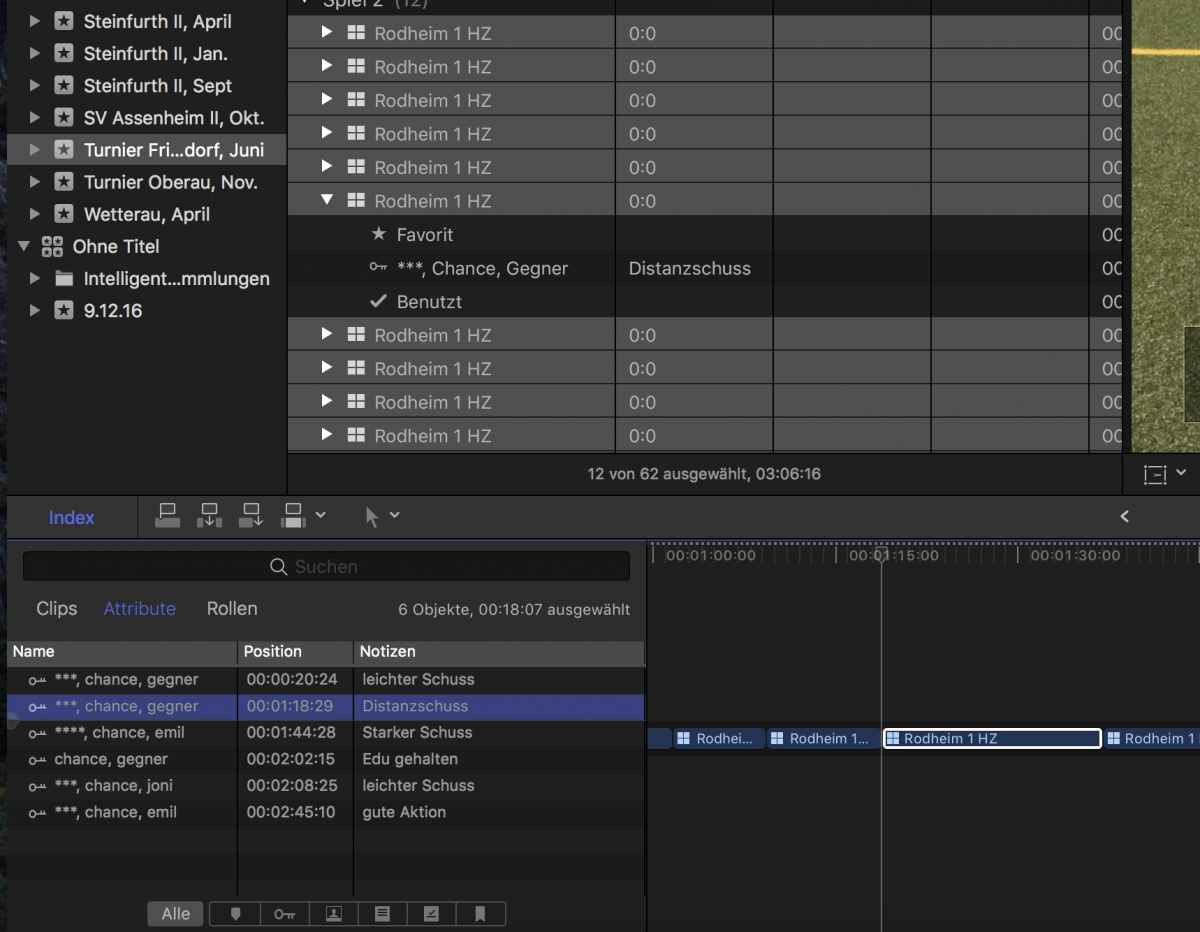
a good description regarding MC, keywords and how to apply notes into MC clips.
blog.frame.io/2016/10/18/make-fcp-x-log-better-1/
Works for me right now great as notes are displayed under index and even searchable
as well the hint from Alex4D under the comments was a good advice regarding ranking with stars like **, ***. TX
Last edit: 15 Jun 2017 21:23 by Schnurr.
Please Log in to join the conversation.
21 Sep 2017 12:07 #90703
by Schnurr
Replied by Schnurr on topic Multicam and GoPro's / combine files
Hi Karsten,
as MC is a great tool which gets very convenient did you put it on the next level regarding color correction due to the multiple and different cameras used for your soccer games e.g. ColorChecker and Color FInal or DaVinci ?
Tobias
as MC is a great tool which gets very convenient did you put it on the next level regarding color correction due to the multiple and different cameras used for your soccer games e.g. ColorChecker and Color FInal or DaVinci ?
Tobias
Please Log in to join the conversation.
- Karsten Schlüter
-
- Offline
- Moderator
-
Less
More
- Posts: 3790
- Thank you received: 718
21 Sep 2017 14:07 #90708
by Karsten Schlüter
nope.
for my soccer-reports (had to pause that due to my medical conditions…) I gave up on matching cameras in post: the automatisms get confused by the '80%-of-frame-is-one-colour' = matching the green results in non-matching tricots, plus, I was taught, I would need 'vectors' to get rid of specific hue isues (Panasonic purple skies…) = DaVinci/Color Finale = <noise of head hitting desktop>
No, the best is matching cameras … in an ideal world, I would use 6 identical cameras LOL!
Or, even worse: the extreme lights our stage-crew sets in school's theatre plays. Luckily, I found - by sheer eye-sight - a mostly matching set-up for two diff. cams:
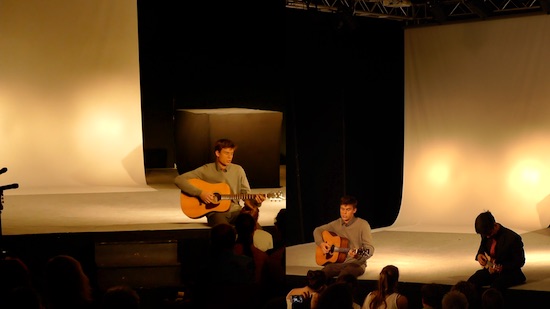
And for other projects, I just 'balance' in the Angle Editor … (not needed, if those &%$§"!! school kids would listen to me to white balance the cams … grrrr)
'We' just finished a project 'music video' = plastered my DuoTone effect across the whole thing - done, who cares for adjustments :
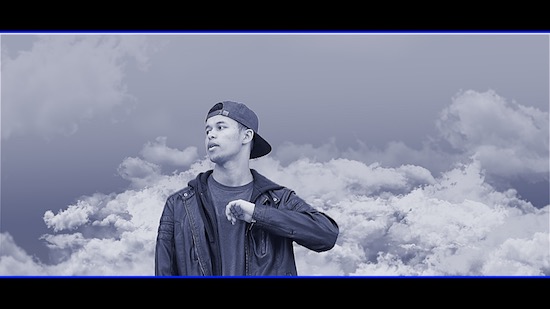
hahahaaa!
for a new, longer Project, I'm considering b/w … seriously, for a documentation.....?
But colour correction for soccer reports? Just in-camera …
THANKS for the interesting link!
Replied by Karsten Schlüter on topic Multicam and GoPro's / combine files
Schnurr wrote: Hi Karsten,… did you put it on the next level regarding color correction …
nope.
for my soccer-reports (had to pause that due to my medical conditions…) I gave up on matching cameras in post: the automatisms get confused by the '80%-of-frame-is-one-colour' = matching the green results in non-matching tricots, plus, I was taught, I would need 'vectors' to get rid of specific hue isues (Panasonic purple skies…) = DaVinci/Color Finale = <noise of head hitting desktop>
No, the best is matching cameras … in an ideal world, I would use 6 identical cameras LOL!
Or, even worse: the extreme lights our stage-crew sets in school's theatre plays. Luckily, I found - by sheer eye-sight - a mostly matching set-up for two diff. cams:
And for other projects, I just 'balance' in the Angle Editor … (not needed, if those &%$§"!! school kids would listen to me to white balance the cams … grrrr)
'We' just finished a project 'music video' = plastered my DuoTone effect across the whole thing - done, who cares for adjustments :
hahahaaa!
for a new, longer Project, I'm considering b/w … seriously, for a documentation.....?
But colour correction for soccer reports? Just in-camera …
THANKS for the interesting link!
Please Log in to join the conversation.
22 Sep 2017 11:15 - 22 Sep 2017 11:23 #90724
by Schnurr
Replied by Schnurr on topic Multicam and GoPro's / combine files
Hi Karsten,
1st and most important all the best wishes for your personal health! and return to the soccer court.
I will give a X-rite colorchecker a chance and lets see how it will end up with the IPhone, Gorpos and Spark and color grading central or in other words will try to understand that
Funny just see on FB: wiral.org maybe for a soccer ...
1st and most important all the best wishes for your personal health! and return to the soccer court.
I will give a X-rite colorchecker a chance and lets see how it will end up with the IPhone, Gorpos and Spark and color grading central or in other words will try to understand that
Funny just see on FB: wiral.org
maybe for a soccer ...
Last edit: 22 Sep 2017 11:23 by Schnurr.
Please Log in to join the conversation.
