


- Posts: 48
- Thank you received: 2
3 Post Moderation Rule for New Boarders (25 Jan 2021)
New boarders will have their posts moderated - Don't worry if you cannot see your post immediately.
audio plugins I can't launch
24 Feb 2017 09:54 #86087
by schloerg
audio plugins I can't launch was created by schloerg
When I met an audio-plugin on an audio/video file in the timeline, I should than be able to launch the plugin from the inspector by clicking it once. But only the plugins that come with final cut will open for further adjustments, all logic, osx and third party plugins will not show up by clicking them.
I'm on fcpx 10.3.2, sierra, on a late 2015 imac fully loaded.
I'm on fcpx 10.3.2, sierra, on a late 2015 imac fully loaded.
Please Log in to join the conversation.
- ronny courtens
-

- Offline
- Moderator
-

Less
More
- Posts: 4455
- Thank you received: 962
24 Feb 2017 14:42 #86092
by ronny courtens
Replied by ronny courtens on topic audio plugins I can't launch
If the plugins work as expected but the plugin UI cannot be opened from the Inspector, first thing I would do is delete the FCP X preferences and see if this solves the issue.
- Ronny
- Ronny
Please Log in to join the conversation.
24 Feb 2017 14:47 #86093
by schloerg
Replied by schloerg on topic audio plugins I can't launch
Thank you Ronny for the quick reply.
I have done this already, also trashed the cache. No reaction. The windows won't open from the inspector.
I have done this already, also trashed the cache. No reaction. The windows won't open from the inspector.
Please Log in to join the conversation.
- ronny courtens
-
- Offline
- Moderator
-
Less
More
- Posts: 4455
- Thank you received: 962
24 Feb 2017 15:25 #86094
by ronny courtens
Replied by ronny courtens on topic audio plugins I can't launch
I have been looking for posts about similar issues, but have been unable to find one. Thus seems to be quite an unusual situation. Have you tried re-installing FCP X? This should launch the AU validation test which could solve the issue.
- Ronny
- Ronny
Please Log in to join the conversation.
24 Feb 2017 15:33 #86095
by schloerg
Replied by schloerg on topic audio plugins I can't launch
I have tried that too, by deleting the com.apple.audio.InfoHelper.plist, which forces FCPX to revalidate the audio- plugins. No result so far, this is strange behavior.
Please Log in to join the conversation.
- ronny courtens
-
- Offline
- Moderator
-
Less
More
- Posts: 4455
- Thank you received: 962
24 Feb 2017 15:43 #86096
by ronny courtens
Replied by ronny courtens on topic audio plugins I can't launch
As the issue only happens with AU plugins (the Apple filters are Core Audio), I would create a new admin user to see if you still have the problem when opening FCP X with the new user. Doing this test usually helps a lot in trying to find the actual cause of a problem.
- Ronny
- Ronny
Please Log in to join the conversation.
24 Feb 2017 15:59 #86098
by schloerg
Replied by schloerg on topic audio plugins I can't launch
Created a new user, the same happens
Please Log in to join the conversation.
- ronny courtens
-
- Offline
- Moderator
-
Less
More
- Posts: 4455
- Thank you received: 962
24 Feb 2017 16:02 #86099
by ronny courtens
Replied by ronny courtens on topic audio plugins I can't launch
This means that there are no problems with your preferences, your plugins or your current account.
Although we don't have the solution yet, this test already rules out a lot of probable causes. So we should concentrate on FCP X again. I would advise you to do a complete removal and reinstall of the app. This usually only takes 10 minutes.
- Ronny
Although we don't have the solution yet, this test already rules out a lot of probable causes. So we should concentrate on FCP X again. I would advise you to do a complete removal and reinstall of the app. This usually only takes 10 minutes.
- Ronny
Please Log in to join the conversation.
25 Feb 2017 12:49 #86108
by schloerg
Replied by schloerg on topic audio plugins I can't launch
I reinstalled, still no lauching of the audio Plugins.
Please Log in to join the conversation.


25 Feb 2017 14:16 - 25 Feb 2017 14:27 #86109
by JoeEditor
Replied by JoeEditor on topic audio plugins I can't launch
Do you happen to have Logic Pro X installed on your system?
You can click on the Control Panel icon to bring up the control panel of plugins found in the " Final Cut Pro" category, but not plugins in the other categories? I've never seen this before. Just to clarify...
If you click the Disclosure Triangle, do you have access to all of the pliug-in's manual controls?

You can click on the Control Panel icon to bring up the control panel of plugins found in the " Final Cut Pro" category, but not plugins in the other categories? I've never seen this before. Just to clarify...
If you click the Disclosure Triangle, do you have access to all of the pliug-in's manual controls?
Last edit: 25 Feb 2017 14:27 by JoeEditor.
Please Log in to join the conversation.
25 Feb 2017 15:04 - 25 Feb 2017 15:05 #86110
by schloerg
Replied by schloerg on topic audio plugins I can't launch
I found out accidentely: when I click on the very left edge of the tiny icon, the plugin will open. I can click all 'final cut' icon everywhere and it opens, all third party, logic and osx will have this 'click on the left edge' behavior. When I click in the middle than there is the 'show' and 'hide' action. As if the writing reaches inside the icon. So I guess it comes from the translation, the german words are much longer than the english ones. (Ausblenden + Anzeigen instead of show+hide)
Thank you Ronny and FCPX.guru for your time and help.
Thank you Ronny and FCPX.guru for your time and help.

Last edit: 25 Feb 2017 15:05 by schloerg.
Please Log in to join the conversation.
25 Feb 2017 15:39 #86111
by JoeEditor
Replied by JoeEditor on topic audio plugins I can't launch
Fill out the feedback form, let the development team know about this, please.
Please Log in to join the conversation.
25 Feb 2017 15:43 #86112
by schloerg
Replied by schloerg on topic audio plugins I can't launch
And I think I'm right. 'Final cut' plugs you can 'show'+'hide' and the icon to launch is than inside the window that expands below. All other plugs have the icon left to the writing 'show'+'hide'.

Please Log in to join the conversation.

25 Feb 2017 17:38 #86117
by dgwvideo
Creating history....one edit at a time !
Replied by dgwvideo on topic audio plugins I can't launch
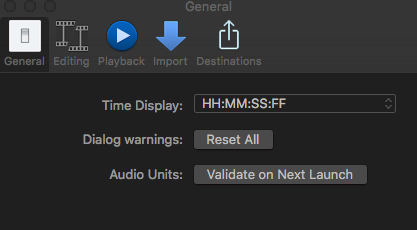
Glad you got it figured out. AND - in the future, you do not need to manually remove the audio plist file to have FCPX reevaluate audio units. You can simply open FCPX preferences and click the "Validate on next launch" button and FCPX will evaluate all audio units the next time it starts.
Creating history....one edit at a time !
Please Log in to join the conversation.
25 Feb 2017 17:41 #86118
by schloerg
Replied by schloerg on topic audio plugins I can't launch
thank you for the tip!
Please Log in to join the conversation.

03 Dec 2020 03:10 #111201
by EDuran2
Replied by EDuran2 on topic audio plugins I can't launch
Can anyone help me? I accidentally downloaded the a waves pack that I did not own. It caused it to pop-up the failed-plug in message. I deleted the shell and tried everything above and still have no success launching the app. I also have a primarily music set up with a larger focus on logic. Could the issue be that I have audio hi-jack running in low-security mode to allow the program to take control of the mac's internal audio system? I have no intention of using audio-plugs ins final cut as I prefer working in Logic.
Thanks
Thanks
Please Log in to join the conversation.
03 Dec 2020 19:41 #111221
by JoeEditor
Replied by JoeEditor on topic audio plugins I can't launch
All you needed to do was a simple uninstall.
www.waves.com/support/uninstall-waves-products
www.waves.com/support/uninstall-waves-products
Please Log in to join the conversation.
