


- Posts: 971
- Thank you received: 46
3 Post Moderation Rule for New Boarders (25 Jan 2021)
New boarders will have their posts moderated - Don't worry if you cannot see your post immediately.
Camera Archiving-is it good?
Less
More
05 Jul 2016 05:13 #78371
by MsJustine
Camera Archiving-is it good? was created by MsJustine
What I have yet to fully understand is the logic of Apple in regards media ingestion in FCPX! By this I mean in classic FCP you had to options, log+transfer and log+capture, log+transfer was for non tape based media, and log+capture was for tape based media, you could set import ranges in log+transfer and ingest what you needed through a dedicated window, which was great, as hard drive space back then was limited and expensive, so why ingest stuff that is garbage media!!
Now FCPX seems to be a bit backwards, you reject once ingested, wasting storage space as there is no dedicated ingest for only usable media, and any method is a simple work around, surely before X was published, this was a known thing, what I see has happened is we in our haste to improve actually ended up back in time, film stock with limited recording, and a fuss to deal with, tape was cheap, lightweight, easy to use, in fact tape was only ever used twice, once to record, once to ingest, and stored, now we have gone back to film reels, digital cards are nothing more than digital film reels, and a bloody hassle!!
It is bordering on the ludicrous that this video has to be made, should not have any need for camera archiving, in fact camera archiving should be like compressor, a separate app, and "media transfer" should be the way we ingest media like we did in FCP7, through a dedicated window that opens, so you see the clips, set in/out import ranges, and only those ranges imported, not the entire card, which might only contain 30% usable, but you have to dedicate 100% of the media to storage!!!!
Not a single update solves this, and I am loosing my love of FCPX, it used to be the best, but it is the best of the rest, stupid ideas like this, really, in 20 updates, not solved, 2, sorry 3 versions of FCPX, and no one thought ingesting and camera archiving a good idea??
Am I the only one that thinks this method of camera archiving is a bit stupid, looks good, but in practice is a terrible solution???
Why has no one commented on the insanity of ingesting media on FCPX? Drag and drop, yay, but not on the wasteful way we have to reject media once ingested, why not have this option at the ingest stage, let me decide what ranges to import, then once imported, give me the option to then create camera archive or "format or delete" the card in question.
Why is camera archiving the only solution? If they could solve this, by they I mean Apple, they could solve this in 32bit, with a great possibly buggy method, log+transfer, I guess buggy, as it was never updated as it should have been, maybe focused on FCP8, then 9, then X, something has gotten lost in the madness!!
Camera Archiving is a terrible solution, just about as as bad as 10.0 was, and I am not expecting any update in the future, if there is in indeed updates, none promised, so I am not expecting this stupid idea to be relegated out of existence, or made a separate app like compressor is!!!
I think camera archive is a misguided approach to lazy problem solving, just rapidly loosing my love of FCPX!!
Now FCPX seems to be a bit backwards, you reject once ingested, wasting storage space as there is no dedicated ingest for only usable media, and any method is a simple work around, surely before X was published, this was a known thing, what I see has happened is we in our haste to improve actually ended up back in time, film stock with limited recording, and a fuss to deal with, tape was cheap, lightweight, easy to use, in fact tape was only ever used twice, once to record, once to ingest, and stored, now we have gone back to film reels, digital cards are nothing more than digital film reels, and a bloody hassle!!
It is bordering on the ludicrous that this video has to be made, should not have any need for camera archiving, in fact camera archiving should be like compressor, a separate app, and "media transfer" should be the way we ingest media like we did in FCP7, through a dedicated window that opens, so you see the clips, set in/out import ranges, and only those ranges imported, not the entire card, which might only contain 30% usable, but you have to dedicate 100% of the media to storage!!!!
Not a single update solves this, and I am loosing my love of FCPX, it used to be the best, but it is the best of the rest, stupid ideas like this, really, in 20 updates, not solved, 2, sorry 3 versions of FCPX, and no one thought ingesting and camera archiving a good idea??
Am I the only one that thinks this method of camera archiving is a bit stupid, looks good, but in practice is a terrible solution???
Why has no one commented on the insanity of ingesting media on FCPX? Drag and drop, yay, but not on the wasteful way we have to reject media once ingested, why not have this option at the ingest stage, let me decide what ranges to import, then once imported, give me the option to then create camera archive or "format or delete" the card in question.
Why is camera archiving the only solution? If they could solve this, by they I mean Apple, they could solve this in 32bit, with a great possibly buggy method, log+transfer, I guess buggy, as it was never updated as it should have been, maybe focused on FCP8, then 9, then X, something has gotten lost in the madness!!
Camera Archiving is a terrible solution, just about as as bad as 10.0 was, and I am not expecting any update in the future, if there is in indeed updates, none promised, so I am not expecting this stupid idea to be relegated out of existence, or made a separate app like compressor is!!!
I think camera archive is a misguided approach to lazy problem solving, just rapidly loosing my love of FCPX!!
Please Log in to join the conversation.
05 Jul 2016 12:47 #78375
by BenB
Replied by BenB on topic Camera Archiving-is it good?
Who shoots on tape or film anymore?
Please Log in to join the conversation.
Less
More
- Posts: 971
- Thank you received: 46
05 Jul 2016 13:05 #78376
by MsJustine
Replied by MsJustine on topic Camera Archiving-is it good?
Let me explain, if my camera was not nationalised, as we call it here, I would be shooting on tape, damn fine camera, loved it, cost a year's savings to buy, and what I was saying is that the new cards everyone loves is really just a digital form of the olden days of shooting reels of film, in that film stock was not cheap, cards can be very expensive, and hold only a few minutes of data, in much the same way as old film had a fixed reel length, you had to be very selective in what you shot.
FCPX makes a mockery in a way of editing, it has failed miserably in dealing with card based media, camera archive was a 2 day brainstorm that is frankly really not fit for function, it took me a long time to understand and get frustrated enough to speak out.
How FCPX handles ingestion is really quite poor, FCP classic at least made a great attempt when card, P2 as example or blue ray based disk, XDCAM as example, you could ingest what you needed, format and reuse, making the rejection at import, NOT AFTER.
After ingestion is simply too late, this is what I am saying, Apple made a massive error, not corrected in 10.1, or 10.2, it should have been, and Camera Archive a separate app, so that if you want to archive all and sundry, you can, not use Camera Archive in the ingestion phase, that is just stupid [Steve's words]
Ingesting 100% of media then rejecting once ingested is stupid!!
FCPX makes a mockery in a way of editing, it has failed miserably in dealing with card based media, camera archive was a 2 day brainstorm that is frankly really not fit for function, it took me a long time to understand and get frustrated enough to speak out.
How FCPX handles ingestion is really quite poor, FCP classic at least made a great attempt when card, P2 as example or blue ray based disk, XDCAM as example, you could ingest what you needed, format and reuse, making the rejection at import, NOT AFTER.
After ingestion is simply too late, this is what I am saying, Apple made a massive error, not corrected in 10.1, or 10.2, it should have been, and Camera Archive a separate app, so that if you want to archive all and sundry, you can, not use Camera Archive in the ingestion phase, that is just stupid [Steve's words]
Ingesting 100% of media then rejecting once ingested is stupid!!
Please Log in to join the conversation.
- Tom Wolsky
-

- Offline
- Moderator
-

05 Jul 2016 14:37 #78379
by Tom Wolsky
Replied by Tom Wolsky on topic Camera Archiving-is it good?
Really confused about what you're trying to say
"we ingest media like we did in FCP7, through a dedicated window that opens, so you see the clips, set in/out import ranges, and only those ranges imported, not the entire card, "
This is in FCP. Very much like it is in FCP7. There is an import window in which you can select portions of clips as you like.
Not clear on whether you're talking about tape based or card based media. Card based media operation is basically the same as legacy FCP. The SOP in 7 was you archive the camera original properly. (FCPX has a built-in function for that, but you're not required to use it. Many use other methods of archiving.) You then use the import window/log and transfer to ingest selectively from the camera archive. There is nothing new here. If you are suggesting only archiving selective portions of card media into an archive, I think that's an incredibly short sighted policy, but if you really want to don't bother archiving the camera original. Import selectively into FCP and then archive the imported media.
"How FCPX handles ingestion is really quite poor, FCP classic at least made a great attempt when card, P2 as example or blue ray based disk, XDCAM as example, you could ingest what you needed, format and reuse, making the rejection at import, NOT AFTER."
Not sure what this is talking about, but FCP has been able for many versions to selectively import clips or both single or multiple portions of clips without ingesting all the media.
"we ingest media like we did in FCP7, through a dedicated window that opens, so you see the clips, set in/out import ranges, and only those ranges imported, not the entire card, "
This is in FCP. Very much like it is in FCP7. There is an import window in which you can select portions of clips as you like.
Not clear on whether you're talking about tape based or card based media. Card based media operation is basically the same as legacy FCP. The SOP in 7 was you archive the camera original properly. (FCPX has a built-in function for that, but you're not required to use it. Many use other methods of archiving.) You then use the import window/log and transfer to ingest selectively from the camera archive. There is nothing new here. If you are suggesting only archiving selective portions of card media into an archive, I think that's an incredibly short sighted policy, but if you really want to don't bother archiving the camera original. Import selectively into FCP and then archive the imported media.
"How FCPX handles ingestion is really quite poor, FCP classic at least made a great attempt when card, P2 as example or blue ray based disk, XDCAM as example, you could ingest what you needed, format and reuse, making the rejection at import, NOT AFTER."
Not sure what this is talking about, but FCP has been able for many versions to selectively import clips or both single or multiple portions of clips without ingesting all the media.
Please Log in to join the conversation.
05 Jul 2016 15:01 #78381
by VidGreg
Replied by VidGreg on topic Camera Archiving-is it good?
Hi MsJ
FCPX does indeed have all the features you want.
First, "Camera Archive" is different from "Importing Media".
A "Camera Archive" which you can do inside of FCPX or in the Finder, creates an exact copy of the camera card including preserving the cards file structure. Apple has no control of how the camera manufacture creates this file structure and the manufacture can change it at any time and they must submit the details and transfer protocols to Apple. Apple will then include the code in "ProApp Updates" for specific cameras.
So why create a "Camera Archive"? Insurance and data integrity. It also allows you to erase the card immediately for reuse. Yes, CA is a full copy, no selection of only some clips, and you should store this on a separate drive (or 2-3) from where you store your working media.
Camera Archive is a separate window and process from "Import Media" though you access it just like you would by clicking on "Import Media" (cmmd i) select your camera/card source but then you click on the "Camera Archive…" (lower left corner of import window) create a file name and select storage location. It will then create an exact copy preserving the file structure of the card itself.
FCPX treats this "Archive" as a card itself, not as part of media inside a project. You still need to import separately.
This is insurance and well worth the cost of hdd space, IMHO.
If you want to "Import Media" for a project, you can indeed only import selected clips from either the original card itself or from the "Camera Archive" created above.
Once you select the source, you can view the clips, select the ones you want, once you make a selection(s), then "Import Selected" becomes available instead of "Import All". You can also select multiple clips and even come back later and import additional clips. This only imports the media selected, so yes you can pre-select the media. You can skim the media for rapid selection.
You can also set "Ranges" for import, just like you would set a Range inside FCPX browser. Then the Range(s) will be imported.
Do note that when FCPX imports the media, it does not import the file structure of the camera card, and depending on your settings, it may transcode the media on import.
So FCPX does allow you to only import certain clips/ranges, not all clips if you want. It also allows you to create a Camera Archive (Which is the first thing I do to a separate drive).
IMHO drive space is cheap, yes I can appreciate that I live in USA and don't face the same VATs as other countries. The choice is yours as too how much you save. Been bitten by lost files, I maintain many backups on separate drives.
So people should be clear about the differences in "Camera Archive" and working "Import Media".
Hope this helps and restores your fondness for FCPX, Greg
FCPX does indeed have all the features you want.
First, "Camera Archive" is different from "Importing Media".
A "Camera Archive" which you can do inside of FCPX or in the Finder, creates an exact copy of the camera card including preserving the cards file structure. Apple has no control of how the camera manufacture creates this file structure and the manufacture can change it at any time and they must submit the details and transfer protocols to Apple. Apple will then include the code in "ProApp Updates" for specific cameras.
So why create a "Camera Archive"? Insurance and data integrity. It also allows you to erase the card immediately for reuse. Yes, CA is a full copy, no selection of only some clips, and you should store this on a separate drive (or 2-3) from where you store your working media.
Camera Archive is a separate window and process from "Import Media" though you access it just like you would by clicking on "Import Media" (cmmd i) select your camera/card source but then you click on the "Camera Archive…" (lower left corner of import window) create a file name and select storage location. It will then create an exact copy preserving the file structure of the card itself.
FCPX treats this "Archive" as a card itself, not as part of media inside a project. You still need to import separately.
This is insurance and well worth the cost of hdd space, IMHO.
If you want to "Import Media" for a project, you can indeed only import selected clips from either the original card itself or from the "Camera Archive" created above.
Once you select the source, you can view the clips, select the ones you want, once you make a selection(s), then "Import Selected" becomes available instead of "Import All". You can also select multiple clips and even come back later and import additional clips. This only imports the media selected, so yes you can pre-select the media. You can skim the media for rapid selection.
You can also set "Ranges" for import, just like you would set a Range inside FCPX browser. Then the Range(s) will be imported.
Do note that when FCPX imports the media, it does not import the file structure of the camera card, and depending on your settings, it may transcode the media on import.
So FCPX does allow you to only import certain clips/ranges, not all clips if you want. It also allows you to create a Camera Archive (Which is the first thing I do to a separate drive).
IMHO drive space is cheap, yes I can appreciate that I live in USA and don't face the same VATs as other countries. The choice is yours as too how much you save. Been bitten by lost files, I maintain many backups on separate drives.
So people should be clear about the differences in "Camera Archive" and working "Import Media".
Hope this helps and restores your fondness for FCPX, Greg
Please Log in to join the conversation.
Less
More
- Posts: 971
- Thank you received: 46
05 Jul 2016 15:32 #78384
by MsJustine
Replied by MsJustine on topic Camera Archiving-is it good?
Thanks Vidgreg
I fully understand what a Camera Archive is, and I know how to use it,I passed the useless FCPX certification.
Maybe it is because hard drives cost more than my rent here, that I have a huge problem with how data is saved, space is a premium, so creating an archive, then rejecting clips, space wasted.
My love of FCPX is at it's lowest, really I am not feeling anything like I used to towards it, just finding aspects that should have been better now, not being improved, sorry, it is just me, or maybe Apple just feels the same.
Look FCPX is a great NLE, far better than classic, never used Premiere much, but tracks are hell, just find simple things that should be just there, not there, zooms into clip in listview, that inability, boils my blood, makes me so angry!!!
Sorry, just me...sorry
I fully understand what a Camera Archive is, and I know how to use it,I passed the useless FCPX certification.
Maybe it is because hard drives cost more than my rent here, that I have a huge problem with how data is saved, space is a premium, so creating an archive, then rejecting clips, space wasted.
My love of FCPX is at it's lowest, really I am not feeling anything like I used to towards it, just finding aspects that should have been better now, not being improved, sorry, it is just me, or maybe Apple just feels the same.
Look FCPX is a great NLE, far better than classic, never used Premiere much, but tracks are hell, just find simple things that should be just there, not there, zooms into clip in listview, that inability, boils my blood, makes me so angry!!!
Sorry, just me...sorry
Please Log in to join the conversation.
05 Jul 2016 15:46 #78388
by VidGreg
Replied by VidGreg on topic Camera Archiving-is it good?
An Archive is a full exact copy, you can't delete portions of it. That is not the purpose nor definition of a Camera Archive.
That was my point.
If you don't want an archive, and your priority is saving disk space, mount your camera card, select only the clips or portions of clips you want, then import. No wasted space!
Also no insurance.
Then erase your camera card and face the music when you find some corrupted files. Of course that will be Apple's fault too!
Don't share your anger.
Choice is yours including using different NLE or just reading a book instead.
Cheers, Greg
That was my point.
If you don't want an archive, and your priority is saving disk space, mount your camera card, select only the clips or portions of clips you want, then import. No wasted space!
Also no insurance.
Then erase your camera card and face the music when you find some corrupted files. Of course that will be Apple's fault too!
Don't share your anger.
Choice is yours including using different NLE or just reading a book instead.
Cheers, Greg
Please Log in to join the conversation.
- Jonathan Levin
-

- Offline
- Platinum Member
-

Less
More
- Posts: 786
- Thank you received: 21
05 Jul 2016 16:28 #78394
by Jonathan Levin
Replied by Jonathan Levin on topic Camera Archiving-is it good?
VidGreg.
Thanks for your info. I wasn't aware that you could just import just certain ranges (in and out) from the import media. I agree about saving a camera archive some place else.
So just to get this straight, if you have two clips on a card, and one clip is 5 minutes and I just want to save 1 minute of that, I can somehow import that with out the additional 4 minutes plus xxx amount of un-needed video?
And to take that a step further, can you have multiple ranges (in and out) on a clip in the import window, or do they need to be done individually.
I too would love that if it was the case. That way I could choose not to import the parts of clip where I am yelling at models, assistants, clients.... :woohoo:
Jonathan
Thanks for your info. I wasn't aware that you could just import just certain ranges (in and out) from the import media. I agree about saving a camera archive some place else.
So just to get this straight, if you have two clips on a card, and one clip is 5 minutes and I just want to save 1 minute of that, I can somehow import that with out the additional 4 minutes plus xxx amount of un-needed video?
And to take that a step further, can you have multiple ranges (in and out) on a clip in the import window, or do they need to be done individually.
I too would love that if it was the case. That way I could choose not to import the parts of clip where I am yelling at models, assistants, clients.... :woohoo:
Jonathan
Please Log in to join the conversation.
- Tom Wolsky
-
- Offline
- Moderator
-
05 Jul 2016 16:35 - 05 Jul 2016 16:37 #78398
by Tom Wolsky
Replied by Tom Wolsky on topic Camera Archiving-is it good?
Shift-Cmd-I and O to add multiple selections.
Last edit: 05 Jul 2016 16:37 by Tom Wolsky.
Please Log in to join the conversation.
- Tom Wolsky
-
- Offline
- Moderator
-
05 Jul 2016 16:37 #78399
by Tom Wolsky
Replied by Tom Wolsky on topic Camera Archiving-is it good?
There's supposed to be an image there that isn't appearing.
Please Log in to join the conversation.

05 Jul 2016 18:42 #78400
by ButchM
Yes ... and no ...
The concept of retaining the entire digital archive as structured on a camera data card is a greta policy. Especially for cameras that record in the AVCHD (.mts) format.
However, as utilized by many in a FCP X workflow ... maybe not so much for every FCP X user.
First, to have a complete copy of the original on hand with all the metadata for each and every clip as the camera created it is a great idea.
In a multi-user, multi-purpose workflow, it can be quite problematic.
For many FCP X users, it is more than likely that a single card will contain footage destined for a single specific project. Importing a Camera Archive is not much of an issue ... more than likely, the clips contained in the archive won't need to be distributed among a large group of editors.
Most of the video I, and my staff of six photographer/videographers capture on a daily basis are of a journalistic nature. Hard and soft news, events, government/political coverage, feature stories, breaking news and action sports coverage.
I may return to the office after a full day's shooting and have as many as several hundred individual clips destined for 6-10 different story projects that are to be handled by 4-6 editors (including myself) ... same for all 6 of my staff. It's not uncommon to have 100's of clips that require being disseminated to a dozen or more editors serving 8-10 publication outlets.
In this situation, sending everyone a complete archive is impractical. That's why we use Edit Ready to re-wrap the .mts clips into .mov clips. The latter have no issue residing outside the comfort of the camera archive structure. Yes, I am fully aware that FCPX can handle individual .mts files, though not all of our editors use FCP X. We have to allow for those folks that don't know any better
The clips are re-named upon conversion to our corporate naming structure, Directly following conversion, the individual clips are further refined by star ratings, color labels and more importantly keywords BEFORE they are ever handed off to the editors. The clip names are NEVER changed after the fact so that ANYONE in the pipeline can easily search, track and retrieve any clip they desire.
Our workflow won't work for everyone (there rarely is a chiseled in granite, solitary workflow that works for everyone) ... but it does keep the amount of data required for specific projects much more manageable.
Replied by ButchM on topic Camera Archiving-is it good?
MsJustine wrote: Camera Archiving-is it good?
Yes ... and no ...
The concept of retaining the entire digital archive as structured on a camera data card is a greta policy. Especially for cameras that record in the AVCHD (.mts) format.
However, as utilized by many in a FCP X workflow ... maybe not so much for every FCP X user.
First, to have a complete copy of the original on hand with all the metadata for each and every clip as the camera created it is a great idea.
In a multi-user, multi-purpose workflow, it can be quite problematic.
For many FCP X users, it is more than likely that a single card will contain footage destined for a single specific project. Importing a Camera Archive is not much of an issue ... more than likely, the clips contained in the archive won't need to be distributed among a large group of editors.
Most of the video I, and my staff of six photographer/videographers capture on a daily basis are of a journalistic nature. Hard and soft news, events, government/political coverage, feature stories, breaking news and action sports coverage.
I may return to the office after a full day's shooting and have as many as several hundred individual clips destined for 6-10 different story projects that are to be handled by 4-6 editors (including myself) ... same for all 6 of my staff. It's not uncommon to have 100's of clips that require being disseminated to a dozen or more editors serving 8-10 publication outlets.
In this situation, sending everyone a complete archive is impractical. That's why we use Edit Ready to re-wrap the .mts clips into .mov clips. The latter have no issue residing outside the comfort of the camera archive structure. Yes, I am fully aware that FCPX can handle individual .mts files, though not all of our editors use FCP X. We have to allow for those folks that don't know any better
The clips are re-named upon conversion to our corporate naming structure, Directly following conversion, the individual clips are further refined by star ratings, color labels and more importantly keywords BEFORE they are ever handed off to the editors. The clip names are NEVER changed after the fact so that ANYONE in the pipeline can easily search, track and retrieve any clip they desire.
Our workflow won't work for everyone (there rarely is a chiseled in granite, solitary workflow that works for everyone) ... but it does keep the amount of data required for specific projects much more manageable.
Please Log in to join the conversation.


05 Jul 2016 19:28 #78401
by smg669
Your second sentence seems to completely disprove your first sentence.
Replied by smg669 on topic Camera Archiving-is it good?
MsJustine wrote: Thanks Vidgreg
I fully understand what a Camera Archive is, and I know how to use it,I passed the useless FCPX certification.
Maybe it is because hard drives cost more than my rent here, that I have a huge problem with how data is saved, space is a premium, so creating an archive, then rejecting clips, space wasted.
Your second sentence seems to completely disprove your first sentence.
Please Log in to join the conversation.

05 Jul 2016 20:35 #78402
by anickt
Replied by anickt on topic Camera Archiving-is it good?
I don't find there to be anything inherently wrong with Camera Archiving and there are certainly situations where it makes sense.
I don't use it because I don't really need that function. Horses for courses.
I don't use all of Photoshop either but that doesn't mean somebody else doesn't need the functions I don't use.
I don't use it because I don't really need that function. Horses for courses.
I don't use all of Photoshop either but that doesn't mean somebody else doesn't need the functions I don't use.
Please Log in to join the conversation.
05 Jul 2016 20:51 #78403
by VidGreg
Replied by VidGreg on topic Camera Archiving-is it good?
Hi Jonathon L
"And to take that a step further, can you have multiple ranges (in and out) on a clip in the import window, or do they need to be done individually."
Yep as Tom says, just select additional ranges by holding down the Shift/Command keys and hitting "i" for in and "o" for out. This is the same behavior as in the Library Browser. Then just press Import Selected.
If you are fumble fingered as I, then it can be a little dicey as sometimes I forget to add the shift key somewhere along the way and lose all previous selections. Especially bad after second wine or beer. Then I fall back on importing individual clips/ranges. After a 3rd glass, who cares :silly:
BTW you can also drag select clips/range too.
"I too would love that if it was the case. That way I could choose not to import the parts of clip where I am yelling at models, assistants, clients.... :woohoo:"
Don't believe this for a minute, you way too nice guy to yell
Happy Editing, Greg
"And to take that a step further, can you have multiple ranges (in and out) on a clip in the import window, or do they need to be done individually."
Yep as Tom says, just select additional ranges by holding down the Shift/Command keys and hitting "i" for in and "o" for out. This is the same behavior as in the Library Browser. Then just press Import Selected.
If you are fumble fingered as I, then it can be a little dicey as sometimes I forget to add the shift key somewhere along the way and lose all previous selections. Especially bad after second wine or beer. Then I fall back on importing individual clips/ranges. After a 3rd glass, who cares :silly:
BTW you can also drag select clips/range too.
"I too would love that if it was the case. That way I could choose not to import the parts of clip where I am yelling at models, assistants, clients.... :woohoo:"
Don't believe this for a minute, you way too nice guy to yell
Happy Editing, Greg
Please Log in to join the conversation.
- Jonathan Levin
-
- Offline
- Platinum Member
-
Less
More
- Posts: 786
- Thank you received: 21
05 Jul 2016 21:29 #78405
by Jonathan Levin
Replied by Jonathan Levin on topic Camera Archiving-is it good?
Hi Greg. Thanks for that. I try and be mean, but I gues it just doesn't work 
And thanks to you Tom et al....
OK, so I have my media import window open, I've selected a clip from the desktop I wanted to test and I can not seem to get command-shift I or O to do anything.
I do see the import selected blue button. It seems like I can only import the entire clip and not part of it. I've gotta be something wrong... Screen shot attached.
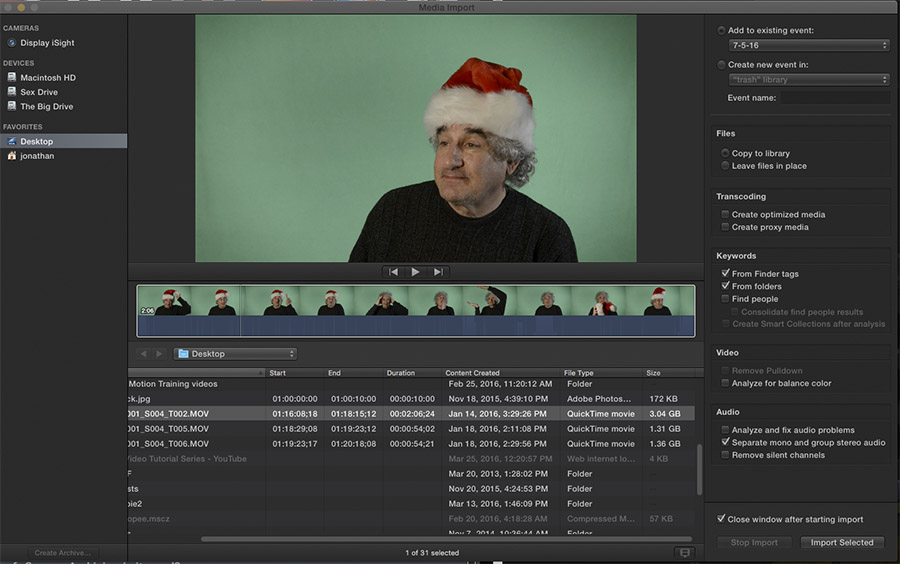
And thanks to you Tom et al....
OK, so I have my media import window open, I've selected a clip from the desktop I wanted to test and I can not seem to get command-shift I or O to do anything.
I do see the import selected blue button. It seems like I can only import the entire clip and not part of it. I've gotta be something wrong... Screen shot attached.
Please Log in to join the conversation.
- Andreas Kiel
-

- Offline
- Platinum Member
-
Less
More
- Posts: 1077
- Thank you received: 189
05 Jul 2016 21:30 #78406
by Andreas Kiel
Replied by Andreas Kiel on topic Camera Archiving-is it good?
I don't understand why Apple "invented" the camera archive format.
If you want a copy go the save way and make an iso image of it.
You can do that with any kind of folder.
If you you want to import portions of movies you can do this easily with QT Player 7 or in a more FCPX way with my virtualCamCard.
- Andreas
If you want a copy go the save way and make an iso image of it.
You can do that with any kind of folder.
If you you want to import portions of movies you can do this easily with QT Player 7 or in a more FCPX way with my virtualCamCard.
- Andreas
Please Log in to join the conversation.
- Tom Wolsky
-
- Offline
- Moderator
-
05 Jul 2016 21:36 #78407
by Tom Wolsky
Replied by Tom Wolsky on topic Camera Archiving-is it good?
Selective importing is only available when importing from a camera, camera card, or camera archive. When importing from a hard drive you have to import the entire clip.
Please Log in to join the conversation.
- Jonathan Levin
-
- Offline
- Platinum Member
-
Less
More
- Posts: 786
- Thank you received: 21
05 Jul 2016 22:34 #78408
by Jonathan Levin
Replied by Jonathan Levin on topic Camera Archiving-is it good?
Tom thanks for clearing that up.
Would video shot to an external recorder like Atomos be considered a camera card? Or does there actually need to be a physical video camera connected?
It would be cool if you could import parts of a clip that just resides someplace on hdd. Maybe this is what MsJustine is talking about.
Sorry for confusion.
JL
Would video shot to an external recorder like Atomos be considered a camera card? Or does there actually need to be a physical video camera connected?
It would be cool if you could import parts of a clip that just resides someplace on hdd. Maybe this is what MsJustine is talking about.
Sorry for confusion.
JL
Please Log in to join the conversation.
- Tom Wolsky
-
- Offline
- Moderator
-
05 Jul 2016 22:59 #78410
by Tom Wolsky
Replied by Tom Wolsky on topic Camera Archiving-is it good?
Don't know about the Atmos.
You should check out Andreas' VirtualCamCard. It lets you take a stack of clips and put them into a container that behaves like a camera card, so you can selective edit items on import even though they're coming from a hard drive.
You should check out Andreas' VirtualCamCard. It lets you take a stack of clips and put them into a container that behaves like a camera card, so you can selective edit items on import even though they're coming from a hard drive.
Please Log in to join the conversation.
- Karsten Schlüter
-

- Offline
- Moderator
-
Less
More
- Posts: 3790
- Thank you received: 718
06 Jul 2016 06:22 #78414
by Karsten Schlüter
My assumption is, that's a left-over from iMovie...-
It's 'Camera-archive', not 'My imports backup'... and for hobbyists like me, it was clever to option a 'copy whole card to drive' from within NLE ... Some folks are overchallenged by Finder operations ...
But why it's not optional to make selections on import of mp4/mov is a huuuuge riddle to me either.-
Replied by Karsten Schlüter on topic Camera Archiving-is it good?
Andreas Kiel wrote: I don't understand why Apple "invented" the camera archive format. ...
My assumption is, that's a left-over from iMovie...-
It's 'Camera-archive', not 'My imports backup'... and for hobbyists like me, it was clever to option a 'copy whole card to drive' from within NLE ... Some folks are overchallenged by Finder operations ...
But why it's not optional to make selections on import of mp4/mov is a huuuuge riddle to me either.-
Please Log in to join the conversation.
