


- Posts: 13
- Thank you received: 0
3 Post Moderation Rule for New Boarders (25 Jan 2021)
New boarders will have their posts moderated - Don't worry if you cannot see your post immediately.
GoPro + Logic Pro X: Audio Drift in FCPX
- brett.michael
-
 Topic Author
- Offline
- New Member
-

Less
More
11 Jun 2016 06:35 - 11 Jun 2016 06:36 #77732
by brett.michael
GoPro + Logic Pro X: Audio Drift in FCPX was created by brett.michael
I realize this is not so much an FCPX topic but I feel there may be more knowledgable people here, so here goes:
I recently came into ownership of a GoPro Hero 2 and finally gave it a try, with external audio, today. My external audio recorder was Logic Pro X (same setup I use with my DSLR on a regular basis).
Once I finished my recording (~1.5 hours) I imported into FCPX only to find a terrible drift problem (yes, they are both at the same sample rate). A few minutes into the footage it's already drifted noticeably, and over the entire duration the Logic audio ends up something like 5-6 seconds behind the GoPro footage.
I read some topics about h.264 files and tried various things (such as converting to 29.97 and 23.976 frames using QT Pro) but nothing worked. I ensured my Logic audio was bounced using the original clock with which it was recorded (an external audio interface) and tried things such as importing the video into Logic (instead of audio and video in FCPX) and experienced the same problem. Has anyone had this experience? I'm surprised the GoPro clock would vary by this much. I've never noticed any issues like this with the same setup and my Canon 70d.
I recently came into ownership of a GoPro Hero 2 and finally gave it a try, with external audio, today. My external audio recorder was Logic Pro X (same setup I use with my DSLR on a regular basis).
Once I finished my recording (~1.5 hours) I imported into FCPX only to find a terrible drift problem (yes, they are both at the same sample rate). A few minutes into the footage it's already drifted noticeably, and over the entire duration the Logic audio ends up something like 5-6 seconds behind the GoPro footage.
I read some topics about h.264 files and tried various things (such as converting to 29.97 and 23.976 frames using QT Pro) but nothing worked. I ensured my Logic audio was bounced using the original clock with which it was recorded (an external audio interface) and tried things such as importing the video into Logic (instead of audio and video in FCPX) and experienced the same problem. Has anyone had this experience? I'm surprised the GoPro clock would vary by this much. I've never noticed any issues like this with the same setup and my Canon 70d.
Last edit: 11 Jun 2016 06:36 by brett.michael.
Please Log in to join the conversation.
- Tom Wolsky
-

- Offline
- Moderator
-

11 Jun 2016 06:46 #77733
by Tom Wolsky
Replied by Tom Wolsky on topic GoPro + Logic Pro X: Audio Drift in FCPX
Same sample rate? What sample rate? Are you using the sync function in FCP? What frame rate is the original?
Please Log in to join the conversation.
- brett.michael
-
Topic Author
- Offline
- New Member
-
Less
More
- Posts: 13
- Thank you received: 0
11 Jun 2016 06:51 #77734
by brett.michael
Replied by brett.michael on topic GoPro + Logic Pro X: Audio Drift in FCPX
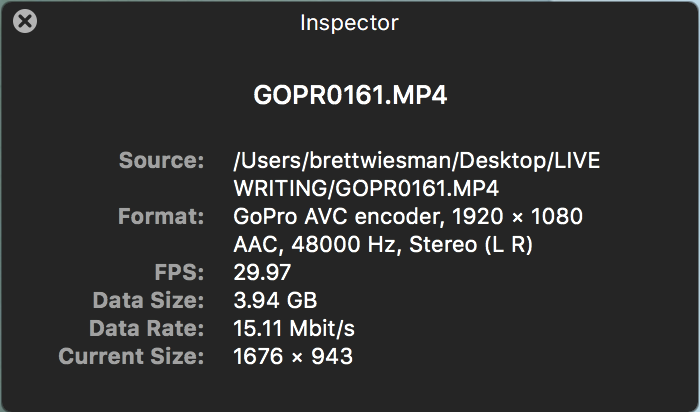
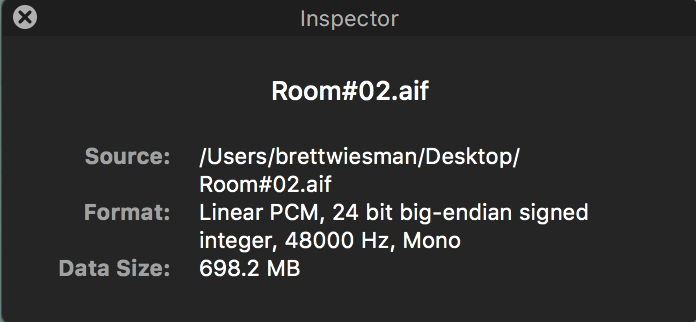
The GoPro, FCPX and Logic Pro X are all at a sample rate of 48kHz. The synchronize function in FCPX results in the outcome stated above. Actually, the sync function struggles to line up both my "alignment clap" at the front of the footage as well as the rest of the footage. Likewise, if I manually align the clap transients the drift results in a similar fashion (as I'd expect). The GoPro footage is 29.97 in h.264 format.
Please Log in to join the conversation.
- Tom Wolsky
-
- Offline
- Moderator
-
11 Jun 2016 07:04 #77735
by Tom Wolsky
Replied by Tom Wolsky on topic GoPro + Logic Pro X: Audio Drift in FCPX
Open the files in the QT player and post screenshots of what it says in the inspector window.
Please Log in to join the conversation.
- brett.michael
-
Topic Author
- Offline
- New Member
-
Less
More
- Posts: 13
- Thank you received: 0
11 Jun 2016 07:08 #77736
by brett.michael
Replied by brett.michael on topic GoPro + Logic Pro X: Audio Drift in FCPX
Files attached!
Please Log in to join the conversation.
- Tom Wolsky
-
- Offline
- Moderator
-
11 Jun 2016 07:59 #77737
by Tom Wolsky
Replied by Tom Wolsky on topic GoPro + Logic Pro X: Audio Drift in FCPX
Can't see why it would drift if the frame rate is constant. Try opening the sync file in the timeline and doing a speed change on the audio.
Please Log in to join the conversation.


11 Jun 2016 08:06 #77738
by Redifer
Replied by Redifer on topic GoPro + Logic Pro X: Audio Drift in FCPX
Have you tried Plural Eyes? Supposedly it will stretch your audio to fit the video from what I hear.
Please Log in to join the conversation.
- Karsten Schlüter
-

- Offline
- Moderator
-
Less
More
- Posts: 3790
- Thank you received: 718
11 Jun 2016 08:17 #77739
by Karsten Schlüter
Replied by Karsten Schlüter on topic GoPro + Logic Pro X: Audio Drift in FCPX
aside audio samplerates…
and your project is set to 29.97 either?
and your project is set to 29.97 either?
Please Log in to join the conversation.

11 Jun 2016 11:08 - 11 Jun 2016 11:09 #77742
by BenB
Replied by BenB on topic GoPro + Logic Pro X: Audio Drift in FCPX
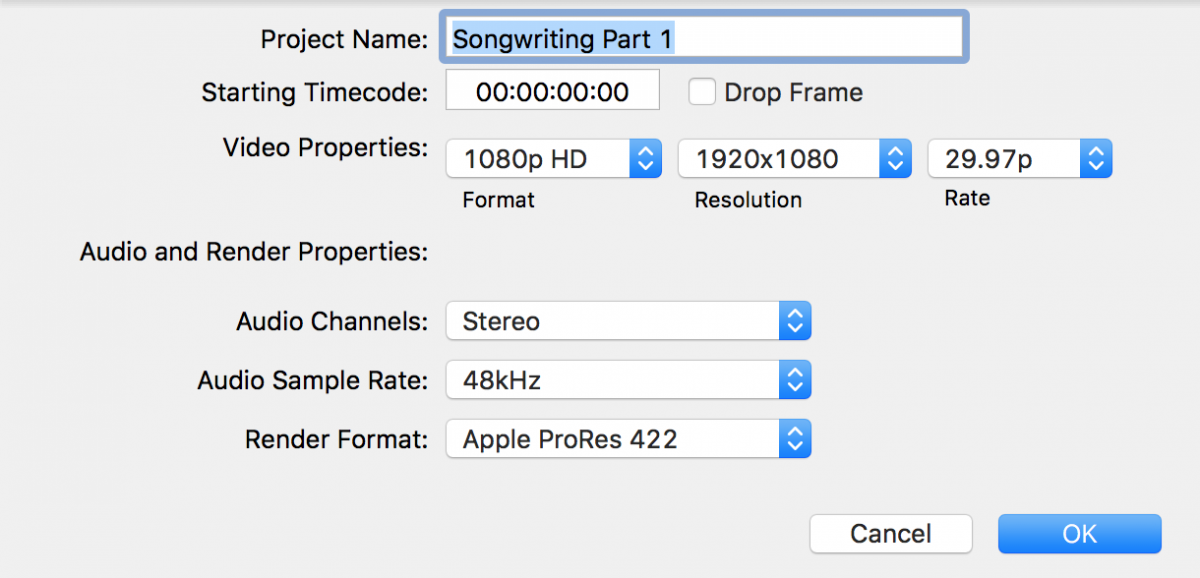
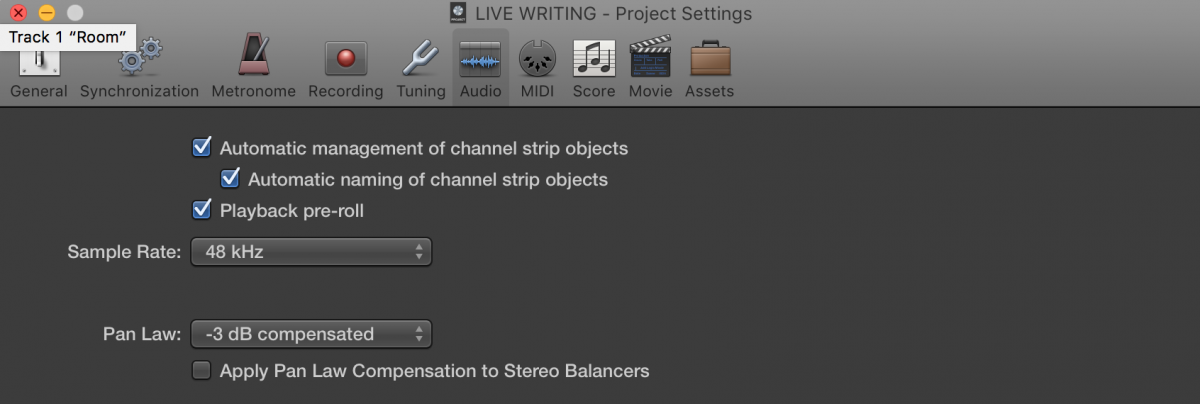
I'd like to see screen shots of both the FCPX and LPX project sample rate settings, just to verify. I've never seen anything but sample rate mismatch cause drift over time.
Also, open the raw clips in QT Player. Do they drift there or not? If so, it's the camera. A Hero2 is an old model, wondering if it was recorded that way, or changing in your apps.
Also, open the raw clips in QT Player. Do they drift there or not? If so, it's the camera. A Hero2 is an old model, wondering if it was recorded that way, or changing in your apps.
Last edit: 11 Jun 2016 11:09 by BenB.
Please Log in to join the conversation.
- brett.michael
-
Topic Author
- Offline
- New Member
-
Less
More
- Posts: 13
- Thank you received: 0
11 Jun 2016 16:22 #77744
by brett.michael
Replied by brett.michael on topic GoPro + Logic Pro X: Audio Drift in FCPX
Tom: I was confused by that, as well, but I can see all the files are 48k, and both Logic and FCPX are at 48k. I did play with changing the audio speed in the sync file but the artifacts are immediately audible (especially during music portions - this is a live songwriting video). So, in the end, I'll do this if need be but never use the GoPro again  As we know, even though all the clocks say "48k" that is still relative to whatever it references (crystal, RC, etc) and maybe the Hero2 just has a crappy clock.
Redifer: Thanks for the suggestion. I'll look into Plural Eyes if I can't figure anything else out. At the end of the day, it will be a band-aid for this project and I'll likely move on from the GoPro (if it ends up being the culprit - testing to follow)
Karsten: Yes, all projects are at 29.97 (both Logic and FCPX)
BenB: I've attached screenshots of sample rates. I'm not sure how to open in QT and check for drift, however. This would require starting an mp4 and a wav file, somehow aligned to my clap transient (which occur at different times relative to the respective file start), and then listening to both until the end to determine how far off they are. Am I missing something simple here?
As we know, even though all the clocks say "48k" that is still relative to whatever it references (crystal, RC, etc) and maybe the Hero2 just has a crappy clock.Redifer: Thanks for the suggestion. I'll look into Plural Eyes if I can't figure anything else out. At the end of the day, it will be a band-aid for this project and I'll likely move on from the GoPro (if it ends up being the culprit - testing to follow)
Karsten: Yes, all projects are at 29.97 (both Logic and FCPX)
BenB: I've attached screenshots of sample rates. I'm not sure how to open in QT and check for drift, however. This would require starting an mp4 and a wav file, somehow aligned to my clap transient (which occur at different times relative to the respective file start), and then listening to both until the end to determine how far off they are. Am I missing something simple here?
Please Log in to join the conversation.
11 Jun 2016 16:48 #77745
by BenB
Replied by BenB on topic GoPro + Logic Pro X: Audio Drift in FCPX
If all is set equally, then something ain't right, this shouldn't technically be happening. It will be very interesting to finally find out what the culprit is. I'm stumped.
Please Log in to join the conversation.
- brett.michael
-
Topic Author
- Offline
- New Member
-
Less
More
- Posts: 13
- Thank you received: 0
11 Jun 2016 21:04 #77751
by brett.michael
Replied by brett.michael on topic GoPro + Logic Pro X: Audio Drift in FCPX
Ok guys, my fears may have proven true!
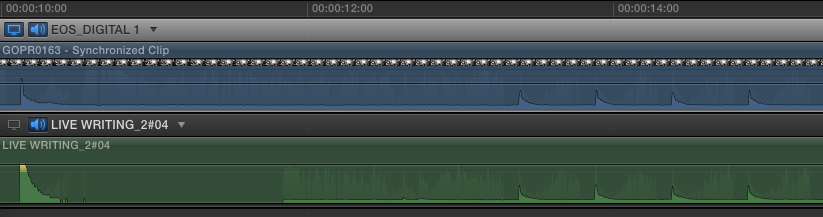
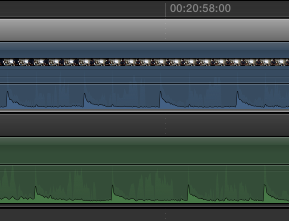
I set up a test - once again the GoPro running on it's own and Logic recording audio. I played a metronome in the room and both devices picked up that one sound source. After 20 minutes I brought the files into FCPX. I aligned them by my initial clap (just to mimic my other recording - I know the metronome would have sufficed). The first picture is the beginning of the footage, the second is twenty minutes later. HUGE drift in the clock... Thoughts??
And yes, I once again verified all my sample and frame rates match (Y)
I set up a test - once again the GoPro running on it's own and Logic recording audio. I played a metronome in the room and both devices picked up that one sound source. After 20 minutes I brought the files into FCPX. I aligned them by my initial clap (just to mimic my other recording - I know the metronome would have sufficed). The first picture is the beginning of the footage, the second is twenty minutes later. HUGE drift in the clock... Thoughts??
And yes, I once again verified all my sample and frame rates match (Y)
Please Log in to join the conversation.
- MarkNelsonMovies
-
- Offline
- Elite Member
-

Less
More
- Posts: 256
- Thank you received: 48
11 Jun 2016 22:34 #77753
by MarkNelsonMovies
Replied by MarkNelsonMovies on topic GoPro + Logic Pro X: Audio Drift in FCPX
If the same thing works fine with the Canon 70d, I'd chalk it up to the GoPro and move on, at the time they weren't a very experienced camera company.
It may be possible that the camera is recording at 30fps and not 29.97, and then FCPX is slowing it down to match, or maybe the gopro uses a flexible frame rate for better low light.
I would put the audio in the primary storyline, add the video as an attached clip, set the attachment point to the start of the sound, then go to the end and re-time the video clip by dragging the retime handle so that the end of the sound lines up, then enable optical flow if necessary.
It may be possible that the camera is recording at 30fps and not 29.97, and then FCPX is slowing it down to match, or maybe the gopro uses a flexible frame rate for better low light.
I would put the audio in the primary storyline, add the video as an attached clip, set the attachment point to the start of the sound, then go to the end and re-time the video clip by dragging the retime handle so that the end of the sound lines up, then enable optical flow if necessary.
Please Log in to join the conversation.
- brett.michael
-
Topic Author
- Offline
- New Member
-
Less
More
- Posts: 13
- Thank you received: 0
12 Jun 2016 01:45 #77754
by brett.michael
Replied by brett.michael on topic GoPro + Logic Pro X: Audio Drift in FCPX
Yeah, the 70d works perfect! And you're very right, the Hero 2 was still when they were young. I can't say I'd be that surprised - the GoPros are still tiny and what they do is amazing considering that.
I did think about 30 vs 29.97. I'm not sure how the meta data is created so someone else would have to tell me if its possible for this to happen (given that QT and FCPX tell me the files are at 29.97). Maybe I'll get the motivation to do the math and see how off it actually is!
I'll likely retime, as you suggested, and move on!
Thanks, all, for the responses and thoughts!
I did think about 30 vs 29.97. I'm not sure how the meta data is created so someone else would have to tell me if its possible for this to happen (given that QT and FCPX tell me the files are at 29.97). Maybe I'll get the motivation to do the math and see how off it actually is!
I'll likely retime, as you suggested, and move on!
Thanks, all, for the responses and thoughts!
Please Log in to join the conversation.
12 Jun 2016 12:43 #77760
by BenB
Replied by BenB on topic GoPro + Logic Pro X: Audio Drift in FCPX
I have seen issues with the earlier GoPro models, but since the 3 and 4, I've not seen any issues.
Please Log in to join the conversation.
- brett.michael
-
Topic Author
- Offline
- New Member
-
Less
More
- Posts: 13
- Thank you received: 0
12 Jun 2016 13:02 #77762
by brett.michael
Replied by brett.michael on topic GoPro + Logic Pro X: Audio Drift in FCPX
Good to know, thanks!
Please Log in to join the conversation.
- brett.michael
-
Topic Author
- Offline
- New Member
-
Less
More
- Posts: 13
- Thank you received: 0
13 Jun 2016 21:55 #77786
by brett.michael
Replied by brett.michael on topic GoPro + Logic Pro X: Audio Drift in FCPX
Alright y'all, I've got a little update.
I recorded a slightly-longer-than-usual song, with a spoken intro, yesterday, with the Canon 70d and my normal Logic setup. That setup uses a Behringer UMC404HD. This is a very inexpensive, 4-pre interface that is 1/4 the price of competitors in it's space but sounds nearly identical in A/B testing - I originally bought a few different units to compare (Y)
Anyway, thanks to this longer-than-usual clip I am again seeing drift between my audio and video. I'm gonna run another test tonight, this time with both cameras (and maybe my Canon 60d, as well, just for kicks) to see which is the most off.
In the meantime, if you have any thoughts let me know... Thanks!
I recorded a slightly-longer-than-usual song, with a spoken intro, yesterday, with the Canon 70d and my normal Logic setup. That setup uses a Behringer UMC404HD. This is a very inexpensive, 4-pre interface that is 1/4 the price of competitors in it's space but sounds nearly identical in A/B testing - I originally bought a few different units to compare (Y)
Anyway, thanks to this longer-than-usual clip I am again seeing drift between my audio and video. I'm gonna run another test tonight, this time with both cameras (and maybe my Canon 60d, as well, just for kicks) to see which is the most off.
In the meantime, if you have any thoughts let me know... Thanks!
Please Log in to join the conversation.
14 Jun 2016 03:13 #77793
by BenB
Replied by BenB on topic GoPro + Logic Pro X: Audio Drift in FCPX
Why not just record audio directly to the Canon? Why record to Logic? Or why not just record directly to QT Player, make is much simpler and easier. Just thinking out loud.
Please Log in to join the conversation.
- brett.michael
-
Topic Author
- Offline
- New Member
-
Less
More
- Posts: 13
- Thank you received: 0
14 Jun 2016 05:38 #77797
by brett.michael
Replied by brett.michael on topic GoPro + Logic Pro X: Audio Drift in FCPX
Yeah, totally fair question. The reason is, for my personal videos I am usually running my Shure SM7B for vocals and a separate DI for my acoustic guitar (and often do other instrumental overdubs, in post, too). So it's easier in the end and gives me the control I need with the gear I already have and use. Furthermore, for some bigger productions I multitrack even more inputs (a band, for example).
Please Log in to join the conversation.
14 Jun 2016 12:26 - 14 Jun 2016 12:28 #77821
by BenB
Replied by BenB on topic GoPro + Logic Pro X: Audio Drift in FCPX
Yeah, multiple inputs, yep. Just be VERY overly paranoid about sample rates in LPX. Unfortunately it is way too easy to record at the wrong settings. Wish they'd simplify that and show it on-screen somewhere that it is easily verifiable.
Last edit: 14 Jun 2016 12:28 by BenB.
Please Log in to join the conversation.
