


3 Post Moderation Rule for New Boarders (25 Jan 2021)
New boarders will have their posts moderated - Don't worry if you cannot see your post immediately.
Need urgent help: conforming for DCP

I posted the same question yesterday but I didn't explain the thing very well.
I have two projects in FCPX in 23,98. One has stereo sound, the other one is exactly the same with 5.1 sound.
I need to deliver 1 video file with no sound, and 2 audio files (2.0 and 5.1), everything conformed at 24p, to make a DCP.
I am confused about the right approach:
- If I export the video file only, I can open compressor and choose 24p but there are two options in retiming: Set duration to 99,90% (which performs a recompression I guess), or Source frames play at 24 (which performs a reconform I guess)
- For audio: it's not in frames but in frequencies. Currently my files are in 48khz, so how to change the duration and still get a 48Khz file and not a 47,9Hz ?
I am very confused here. We already did a DCP of the film once but it went wrong (I gave a 23,98p file) and went out of sync.
Thank you !!!!!
Please Log in to join the conversation.
- simon_hutchings
-

- Offline
- Junior Member
-

- Posts: 34
- Thank you received: 7
The other option would be is to create compound chips of the 23.98 versions and place into 24p projects.
Another way would be to export 23.98 masters and import in to FCPX and place those onto 24p timelines.
Not sure what way would be less render time.
Please Log in to join the conversation.
[strike]If the whole project is 23.98 the generally accepted practice is to take the small hit in speeding up the the audio and do a straight conform of 23.98 to 24 fps. Adding the extra frames to a 23.98 to 24 fps although hardly noticeable could be problematic.
It sounds like the audio and video file are separate so best to put them in a compound clip first (at 23.98) and then put that compound clip in a 24 fps timeline. Then choose "automatic speed" and it will slow it down ever so slightly. This is a tiny slowdown so the retiming will still read 100% but you will see the length shorten just a bit. I just did a hour and a half clip and the 23.98 version was 1:35:23:17 and the 24 version was 1:35:17:23, so a 5 second speed up over an hour and a half.
Watch through to ensure everything is good to go. Then export your files for DCP and you'll be good to go.[/strike]
Please Log in to join the conversation.
Please Log in to join the conversation.
FCPX shines with those conforming things, I must say.
Thank you thank you thank you
Please Log in to join the conversation.
- ronny courtens
-

- Offline
- Moderator
-

- Posts: 4455
- Thank you received: 962
- Ronny
Please Log in to join the conversation.
I'm still a little unclear on the specifics of what is happening with the 23.98 to 24 "automatic" rate conversion. Do you know?
T.
Please Log in to join the conversation.
- ronny courtens
-
- Offline
- Moderator
-
- Posts: 4455
- Thank you received: 962
FCP X will automatically perform a rate conform when you drop 23.98 fps footage into a 24 fps timeline. Because the difference between 23.98 and 24 is only 0.04%, a duplicate frame will only be added every 1000 frames. So the conform process should not introduce any visual artifacts, and the duration of the movie will always be maintained. If you do notice any visual artifacts in a clip (which could happen in rare cases on long and very slow camera movements), you can change the frame sampling method from "Floor" to "Optical Flow" for that particular clip. This will analyze the clip to determine the directional movement of pixels and then draw portions of the new frames, instead of simply adding full frames based on the nearest integer.
- Ronny
Please Log in to join the conversation.
- Andreas Kiel
-
- Offline
- Platinum Member
-

- Posts: 1077
- Thank you received: 189
I think the problems you described are no problems - so no need to conform.
Any "half-up-to-date" DCP player does support NTSC timing. In case not I have serious doubts the 0.1 % speed change will be noticed even by specialists.
- Andreas
Please Log in to join the conversation.
Yes you're right I know but... last time I sent 23,98fps to the Post company, but something went wrong there, they seemed to have conformed the video and not the audio (or the other way around) and I ended up with a DCP slightly out of sync at the end of the film. Which I only found out at a festival screening...
So this time I'm being over-cautious and preparing everything in 24p.
Please Log in to join the conversation.


Firstly, when conforming 23.98 fps to 24 fps, extra frames are never added or duplicated if done correctly. Frame count and time code stay exactly the same for 23.98 and 24 fps, only playback speed changes. Luckily, this is exactly what FCP X does when conforming a 23.98 clip to a 24 fps timeline, so the previous tip of adding your 23.98 master to a 24 fps timeline and re-exporting is a good one. If feature length, the 24 fps export will be a few seconds shorter than the 23.98 master due to the higher playback speed, which is how it should be. Audio is conformed with the video so everything stays in sync, which can easily be confirmed when playing back the 24 fps export. So, to answer tpayton: the automatic conform from 23.98 to 24 fps plays back existing frames at a slightly higher frame rate and speeds up audio to match.
23.98 fps is not a valid frame rate for DCP, so somewhere along the way it will have to be converted to 24 fps. As you have experienced, this can easily cause sync problem if done incorrectly, which is why it is much better to do the conform yourself and verify sync before handing off the master.
So, how can frame count and timecode stay the same for the different frame rates, someone may ask? That's because the timecode for a 23.98 timeline runs a little bit slower than an actual timekeeping clock. That means that a 23.98 timeline that is 30:00:00 long in timecode will actually take 30 minutes and 1.8 seconds to play back when measured with a stopwatch. If you were to conform this project to 24 fps, you would get a timeline that plays back in exactly 30 minutes and 0.0 seconds. The number of frames is the same, only playback speed is altered.
Although conforming in FCP X is nearly fool-proof, my (admittedly not so thorough) testing has found that audio pitch is changed ever so slightly. That means conforming a 23.98 master to 24 fps will cause a rise in pitch by 0.1%. I would consider this negligible in nearly all cases, but if you want automatic pitch adjustment, Compressor can be used for the conform. Drop the 23.98 master into Compressor and choose your output settings. Then, in the Video tab, set frame rate to 24. Next, in the General tab, set retiming to "So source frames play at 24 fps". Lastly, make sure that "Copy audio tracks from source" is NOT selected in the audio tab. Start batch, and verify sync when done.
TL;DR: drop your 23.98 clip in a 24 fps timeline and you'll be fine, like tpayton said.
Please Log in to join the conversation.
Please Log in to join the conversation.
- ronny courtens
-
- Offline
- Moderator
-
- Posts: 4455
- Thank you received: 962
Thank you for the extensive explanation. Always good to hear different opinions. But with all due respect, your information is not entirely correct. Let's go through the steps one by one:
1. First, something we all agree on: to conform a 23.98fps video to 24fps, you should drop the 23.98fps video into a 24fps timeline. Actually, there is no other way you can do this inside the NLE. So that's obvious.
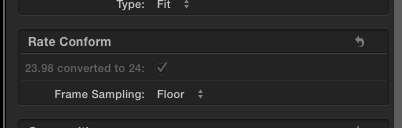
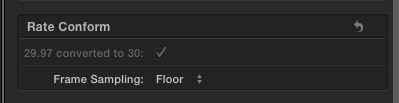
2. As T. said, when you drop a 23.98fps video a 24fps timeline, FCP X automatically applies a Rate Conform:
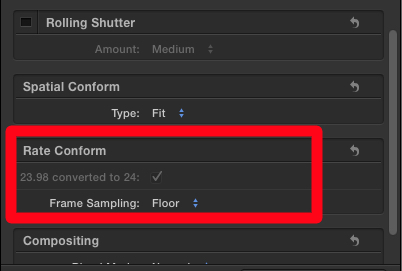
Now you say:
"Frame count and time code stay exactly the same for 23.98 and 24 fps, only playback speed changes. Luckily, this is exactly what FCP X does when conforming a 23.98 clip to a 24 fps timeline"
"If feature length, the 24 fps export will be a few seconds shorter than the 23.98 master due to the higher playback speed, which is how it should be. "
That is incorrect, and here's how you can test this.
- Create a 100 minute 23.98fps ProRes movie in Motion and import the movie in FCP X:
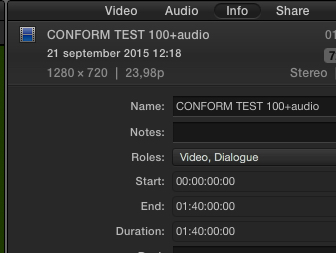
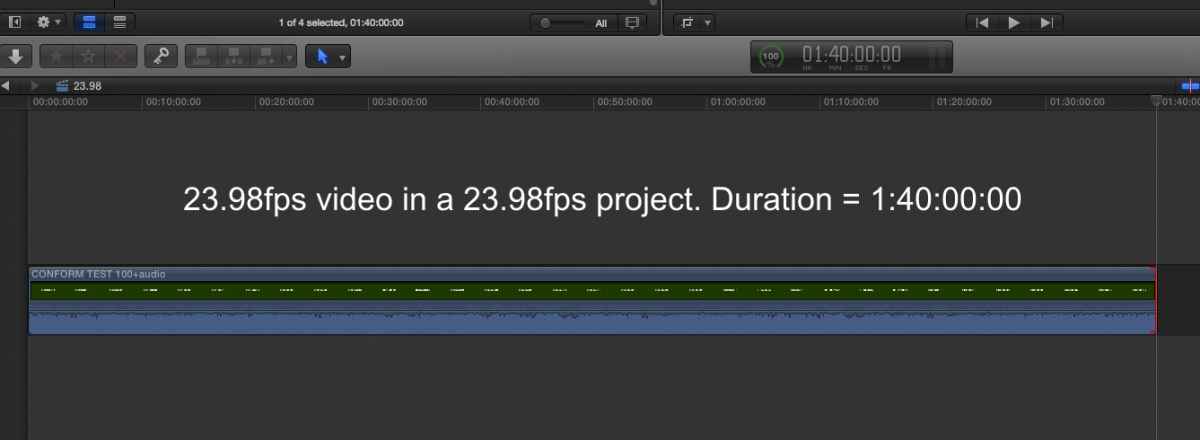
- Create a new project with "Video Properties based on first clip", then drop the 23.98fps movie onto the timeline. The time base of the project will be set to 23.98fps and he duration of the movie will be 100 minutes (which is obvious):
- Now create a new 24fps project and drop the 23.98fps movie onto the 24fps timeline. FCP X will automatically conform the 23.98fps movie to 24fps:
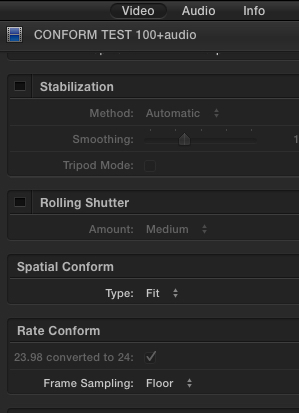
But, opposed to what you say, the duration of the movie will NOT be changed. It will still be exactly 100 minutes:
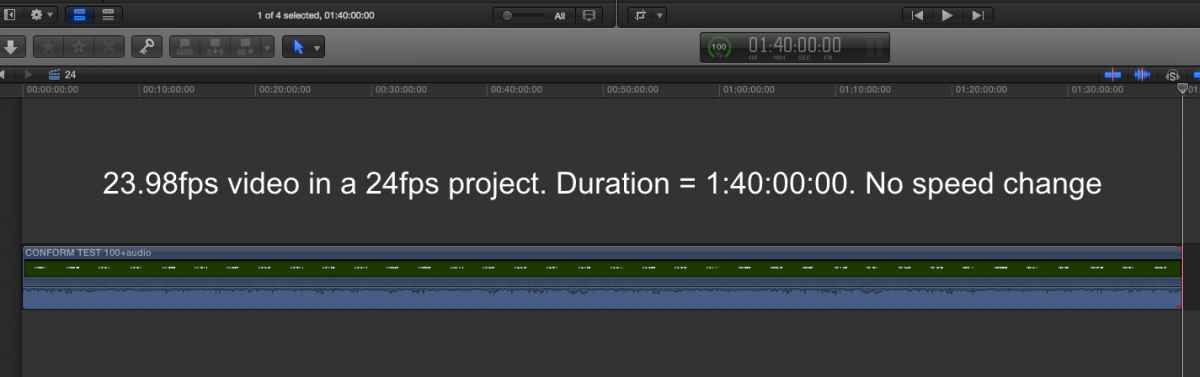
So you see that, when performing an automatic Rate Conform from 23.98fps to 24fps, FCP X does not apply a speed change to the 23.98fps video. It just conforms the original frame rate to the project frame rate, as the name says.
If you want to make the 23.98fps video play at its native frame rate in the 24fps project, you should use the "Automatic Speed" function inside FCP X:
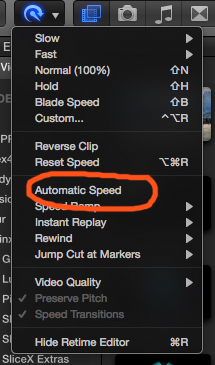
This will make your 23.98fps video play faster by 0,1%, which means that the duration of the video will be 0,1% shorter. With a 100 minute movie (6000 seconds) this is very easy to see because the duration will be exactly 6 seconds shorter (6000 frames x 0,001= 6 frames):
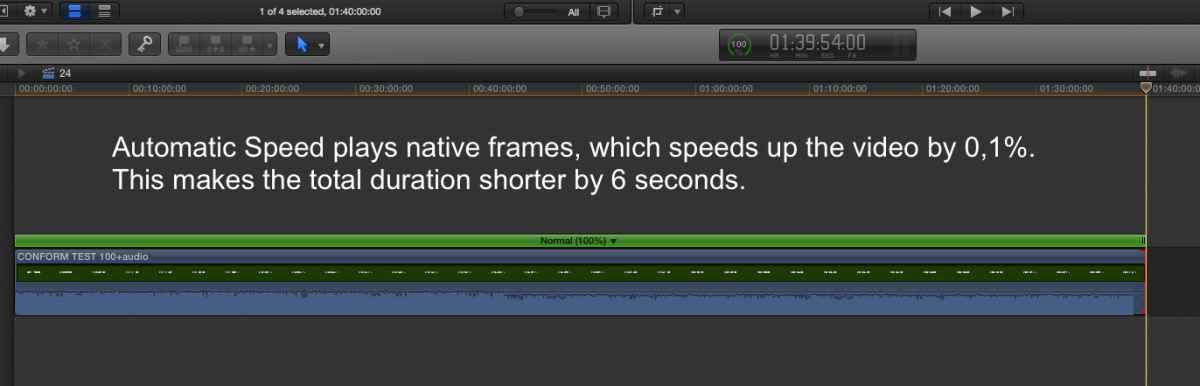
Note: although the Retime bar in the screenshot above still shows 100%, this is not accurate because the Retime bar cannot show speed differences of 0,1%. The render bar above the video and the shorter duration of the video prove that a speed change of 0,1%has been applied.
So, to recap, in FCP X you have the choice:
- either you use the automatic Rate Conform to conform the frame rate of you video to a timeline with a different frame rate (which will keep the playback speed and the duration of your video intact)
- or you select Automatic Speed to make your video play at its original frame rate inside a timeline with a different frame rate (which will cause a change in playback speed and in duration of your video).
As we all said: to conform 23.98fps to 24fps one should just use the automatic Rate Conform. The difference between 23.98 and 24 is so minimal that Automatic Speed is not required.
And there's one more little thing I would like to set right.
3. You say: "That means conforming a 23.98 master to 24 fps will cause a rise in pitch by 0.1%. I would consider this negligible in nearly all cases, but if you want automatic pitch adjustment, Compressor can be used for the conform."
Again, that's not entirely correct.
In the Retime menu, FCP X has a "Preserve Pitch" option which is set to "on" by default:
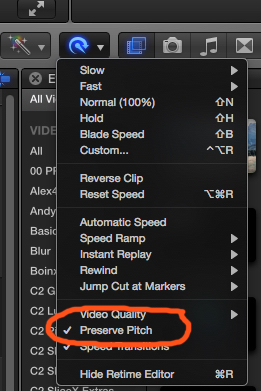
When you apply a speed change to a clip, this will NOT cause a change in pitch when this option is checked. However, if you don't want FCP X to preserve the pitch, you can un-check this option. No need to go into Compressor for any of this.
Best wishes,
- Ronny
Please Log in to join the conversation.
You effectively can't verify actual time for a 23.98 fps timeline in FCP X as you have done in your examples, since the timecode does not match a real timekeeper. The numbers given in FCP X are not time, they are timecode (in 23.98 timelines). So yes, a 24 fps clip of 100 minutes will show timecode length of 1:40:00:00 in a 23.98 fps timeline (timecode stays the same as I have said previously), it's just that playback speed is changed, so that actual playback time will be slightly longer. Think of it as a reel of celluloid where each frame has its timecode burned in. Running the projector at different speeds results in different playback times, but the timecode stays the same. That's exactly how 23.98 fps works.
If you are familiar with NTSC timecode, you know that there is drop-frame and non drop-frame. The DF timecode has gaps in its timecode to make sure that the timecode keeps up with a timekeeper. That means that there are certain timecodes that don't exist in a NTSC DF. From Wikipedia :
For example, the sequence when frame counts are dropped:
01:08:59:28
01:08:59:29
01:09:00:02
01:09:00:03
For a 23.98 fps timecode to keep up with a real clock, there would need to be similar drops in timecode. You can easily confirm that there are no such drops. Burning timecode into a 23.98 fps timeline of arbitrary length confirms this. Once again, think of the projector playing back at 23.98 fps instead of 24 fps. No drops in frames/timecodes, just a slightly longer playback time.
This is important so I'll put it on its own line:
There is no such thing as a drop-frame 23.98 fps timecode.
Since there are no dropped frames, it is impossible for a 23.98 fps timecode to keep up with a real clock, so it doesn't.
Another way to test this is to drop a 23.98 clip in at 24 fps timeline and attempt to find duplicated frames. There won't be any. A duplicated frame every 1000 frames would be immensely more noticeable than just "dialing up the projector speed" by 0,1%. Fortunately, there are no duplicated frames when done correctly.
There have been several claims in this thread that the difference between 23.98 and 24 fps is so small that you don't have to worry. A 6 seconds sync drift over a 100 minute movie is far from negligible, which is exactly what you run the risk of experiencing if being careless. Manoucho accounted for precisely this problem and it is the assumption that a timeline of 1:40:00:00 always is exactly 100 minutes long that causes this issue. Since video and audio are handled separately in DCP creation, having all assets in 24 fps instead of 23.98 fps is vital. If you have a video asset in 23.98 fps that in timecode is 1:40:00:00 long and try to match it to an audio asset that is 100 minutes and 0.0 seconds long, you will have sync problems.
There are lots of ways of confirming that what I am saying is true, and I have outlined a few above. The key is that you can not use timecode in FCP X to indicate actual time, when the timeline is set to 23.98 fps. Just export a 23.98 fps timeline and check length in QT Pro 7. The time and timecode do not match, as they shouldn't.
Please Log in to join the conversation.
- Andreas Kiel
-
- Offline
- Platinum Member
-
- Posts: 1077
- Thank you received: 189
today is good day to send a reply - i have a somehow acceptable internet connection.
i will try to keep my comment short hoping it will make it's way to the forum.
joe, ronny an t.payton are all right with their way of explaining this kind of "conform".
joe says fcpx won't display the right tc - that's correct.
ronny and t.payton say it will work this way - also correct.
joe's explanation is half way correct.
ntsc timing means a real world second is 1001/1000 ntsc serconds.
to compensate a long time ago for ntsc there is a drop frame mode. BUT for 29.97 ONLY.
23.976 lacks this "feature" and people have to live with this time difference.
joe's example using qt 7 is correct and can be reproduced by everybody.
once upon a time there had been an apple software package named fcp studio. during that time people were able to work with a reliable time code handling (iin case they knew enough about).
conforming was a snip of fingers - even right out of that nle included in that package.
most people knew that a 90 minute program would cause 6 real world frames of time and that there would be a slight audio pitch.
many "30-second-ad-producers" have had some painful and expensive real world experience. for whatever reasons their spot were too long
 .
.so all of us have to live with this never ending story.
- andreas.
btw: smpte dcp supports 24000/1001, 24000/1000, 25, 30000/1001, 30, 48, 60000/1001, 60
Please Log in to join the conversation.
- ronny courtens
-
- Offline
- Moderator
-
- Posts: 4455
- Thank you received: 962
Is internet really so bad in Germany? Whatever happened to "Deutsche Gründlichkeit" ?

- Ronny
Please Log in to join the conversation.
Luckily everyone agrees that the easiest solution is to use the automatic conform in FCP X, so the solution to the original question is clear, despite all the confusion about what is actually going on behind the scenes. The two notions in this thread I wanted to refute were that
1) FCP X duplicates frames when conforming between 23.98 and 24 fps. FCP X should not and does not.
2) the difference between 23.98 and 24 fps is negligible and therefore nothing to worry about. The sync issue the original poster accounted for is precisely the reason to worry. When handing off 23.98 fps material for DCP creation, this very sync issue is a very real possibility. If conforming to 24 fps first you are all but assured to avoid at least this issue.
I had no idea that the /1001 frame rates were allowed in DCPs. The only one I've seen to be allowed is 23.98 for the ancient MPEG2 format which hopefully no one uses anymore for DCPs. I'd like to read more about how it works, in particular with regards to subtitles. Do you have any links?
Still, I know for a fact that at least some high end DCP creation software cannot create 23.98 fps DCPs, and video assets with that frame rate are rejected. This means that in practice, unless you are specifically asked to supply 23.98 fps material for DCP creation, you are better off conforming to 24 fps to avoid potential issues.
Please Log in to join the conversation.


I have sort of an odd mission ahead of me. I'm being asked to make a DCP of an entire short film collection as 1 DCP. I'd rather make once DCP per film, but that is not an option.
My question is one of frame rates, some of the films are 29.97, others are 23.98. So I'm trying to figure out the best way of "optimizing" the conform.
is it better to conform 23.97 to 30 for the DCP or 29.97 to 24 for the DCP? My gut tells me that this is based on each film and it's content, which is where the pickle presents itself. Should I go through compressor when I conform each film? or is using a FCPX timeline and outputting a prores good enough?
Thanks,
Please Log in to join the conversation.
However, for your project, while you could try to conform both to 24p, I would keep the 23.98 24p and the 29.97 30p. Both of which have "special" rate conforming in FCPX. Just pop those in the delivery spec Project timeline and you're good to go.
Please Log in to join the conversation.
- islam.belal
-
- Offline
- New Member
-

- Posts: 2
- Thank you received: 0
We make a film in Egypt
We finished the edit on fcpx at 23.98 fps
Because we shoot by canon 5d iii which give us 24(23.98)
Now we need mix aaf
But we afraid
Will mix at 23.98? ( protools don't have it, 23.976 only)
Or we should modify the project on 24 fps then export aaf and mix at 24 fps?
Please help us
Thanks
Please Log in to join the conversation.
