


- Posts: 190
- Thank you received: 0
3 Post Moderation Rule for New Boarders (25 Jan 2021)
New boarders will have their posts moderated - Don't worry if you cannot see your post immediately.
Creating reverb at end of clip.
13 May 2015 14:17 #64427
by Seany
Creating reverb at end of clip. was created by Seany
I want to add reverb to the end of a clip/ last frame, so that it reverberates after the last image until a certain point in time. How is this done, I've read this is done using a compound gap clip at the end of the clip or a hold frame but I'm not exactly sure of the sequence of the process, could someone run me through any options for this?
Many thanks.
S
Many thanks.
S
Please Log in to join the conversation.

13 May 2015 14:27 #64428
by rjvddoes
Replied by rjvddoes on topic Creating reverb at end of clip.
Charlie Austin came up with a wonderful trick for this.
He has a short youtube where he explains the technique.
You can find it here:
fcpxpert.net/2015/02/12/another-one/
He has a short youtube where he explains the technique.
You can find it here:
fcpxpert.net/2015/02/12/another-one/
Please Log in to join the conversation.
- ronny courtens
-

- Offline
- Moderator
-

Less
More
- Posts: 4455
- Thank you received: 962
13 May 2015 14:50 #64429
by ronny courtens
Replied by ronny courtens on topic Creating reverb at end of clip.
Hi Seany,
You have an audio clip (or a video clip with embedded audio) to which you want to add a reverb that extends beyond the length of the clip. So you will have to make the clip longer:
Open the clip in its own timeline, add a gap clip at the end of the clip and then return to the main timeline.
Now you can extend the clip in the main timeline and apply a reverb effect to it.
In earlier versions this workflow did not work well with Logic reverb effects such as SpaceDesigner or PlatinumVerb, but now it does.
- Ronny
You have an audio clip (or a video clip with embedded audio) to which you want to add a reverb that extends beyond the length of the clip. So you will have to make the clip longer:
Open the clip in its own timeline, add a gap clip at the end of the clip and then return to the main timeline.
Now you can extend the clip in the main timeline and apply a reverb effect to it.
In earlier versions this workflow did not work well with Logic reverb effects such as SpaceDesigner or PlatinumVerb, but now it does.
- Ronny
Please Log in to join the conversation.
13 May 2015 15:09 #64430
by Seany
Replied by Seany on topic Creating reverb at end of clip.
Thanks, I want the reverb to activate at the end of the clip, do I have to cmd blade to create a smaller clip at the end of the clip to add reverb to?
Please Log in to join the conversation.

13 May 2015 15:18 #64431
by plysat
Nope, just keyframe the mix (wet/dry) in the inspector. And FWIW, Either modifying the clip as Ronny notes, or the hold frame trick will work. If you have a clip that you intend to add verb to more than once... say an effect that you'll be using a few times, using the open in timeline trick on the master in your Library may save you some time. For a quick one-off the hold frame works great..
Can't sleep? Try this: fcpxpert.net ;-)
Replied by plysat on topic Creating reverb at end of clip.
Seany wrote: Thanks, I want the reverb to activate at the end of the clip, do I have to cmd blade to create a smaller clip at the end of the clip to add reverb to?
Nope, just keyframe the mix (wet/dry) in the inspector. And FWIW, Either modifying the clip as Ronny notes, or the hold frame trick will work. If you have a clip that you intend to add verb to more than once... say an effect that you'll be using a few times, using the open in timeline trick on the master in your Library may save you some time. For a quick one-off the hold frame works great..
Can't sleep? Try this: fcpxpert.net ;-)
Please Log in to join the conversation.
13 May 2015 15:30 #64433
by Seany
Replied by Seany on topic Creating reverb at end of clip.
Thanks, I'm not quite sure I understand how to keyframe the wet/dry mix, place cursor at point in timeline that reverb is activated, then add keyframe, i.e whichever wet/dry parameter I want?
Please Log in to join the conversation.
- ronny courtens
-
- Offline
- Moderator
-
Less
More
- Posts: 4455
- Thank you received: 962
13 May 2015 15:43 #64434
by ronny courtens
Replied by ronny courtens on topic Creating reverb at end of clip.
Most reverb effects have parameters that you can keyframe in the Inspector:
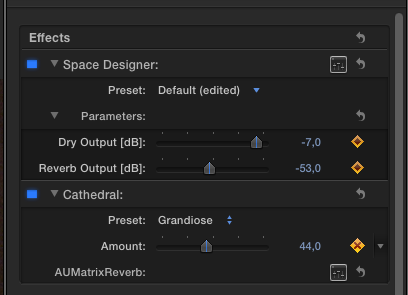
Dry is the original audio (no reverb).
Wet is the amount of reverb.
So you can add a reverb effect to an entire clip with Wet or Amount set to zero, and at the place you want the reverb to start you can use keyframes to increase the amount of reverb.
- Ronny
Dry is the original audio (no reverb).
Wet is the amount of reverb.
So you can add a reverb effect to an entire clip with Wet or Amount set to zero, and at the place you want the reverb to start you can use keyframes to increase the amount of reverb.
- Ronny
Please Log in to join the conversation.
13 May 2015 15:51 #64435
by Seany
Replied by Seany on topic Creating reverb at end of clip.
Ah yes thanks for clarification.
Please Log in to join the conversation.
13 May 2015 15:59 #64436
by Seany
Replied by Seany on topic Creating reverb at end of clip.
When I open the clip in it's own timeline and add gap clip to the end and then go back in to main timeline the gap clip disappears, why might this be?
Please Log in to join the conversation.
13 May 2015 16:01 #64437
by Seany
Replied by Seany on topic Creating reverb at end of clip.
Could it be i'm exiting the specific timeline incorrectly?
Please Log in to join the conversation.
- ronny courtens
-
- Offline
- Moderator
-
Less
More
- Posts: 4455
- Thank you received: 962
13 May 2015 16:02 #64438
by ronny courtens
Replied by ronny courtens on topic Creating reverb at end of clip.
The gap is there, just extend the clip on the main timeline.
- Ronny
- Ronny
Please Log in to join the conversation.
13 May 2015 16:17 #64439
by Seany
Replied by Seany on topic Creating reverb at end of clip.
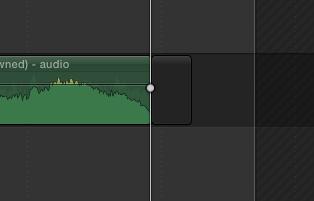
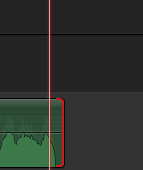
I'm doing something incorrectly, extending the clip in the main timeline is not possible, i get the red end of material closed bracket.
How do I exit the timeline to the main timeline, I realise I've been using 'go back in timeline history' function.
How do I exit the timeline to the main timeline, I realise I've been using 'go back in timeline history' function.
Please Log in to join the conversation.
- ronny courtens
-
- Offline
- Moderator
-
Less
More
- Posts: 4455
- Thank you received: 962
13 May 2015 16:29 #64440
by ronny courtens
Replied by ronny courtens on topic Creating reverb at end of clip.
Let's start from scratch.
Here I have a "reverb test "clip in the "Test project" timeline:
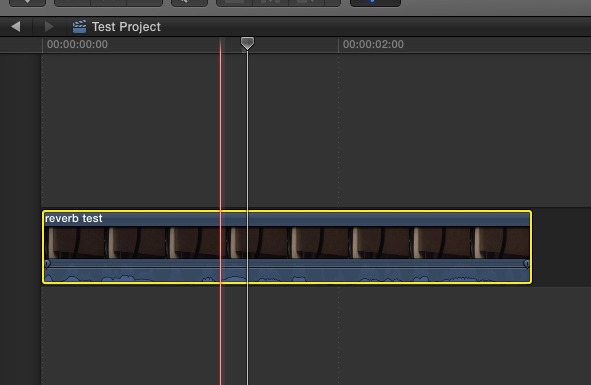
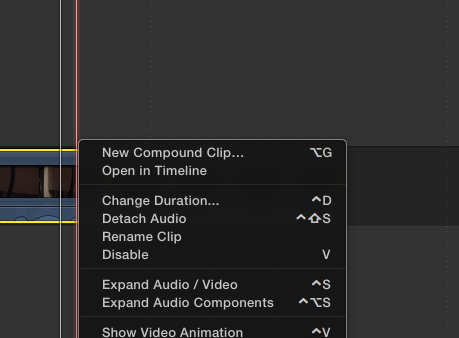
I right-click the clip and choose Open in Timeline:
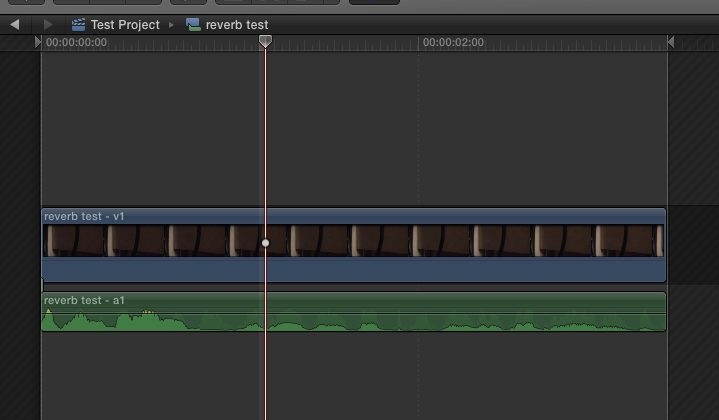
The clip opens in its own timeline, which is called "reverb test", just like the clip:
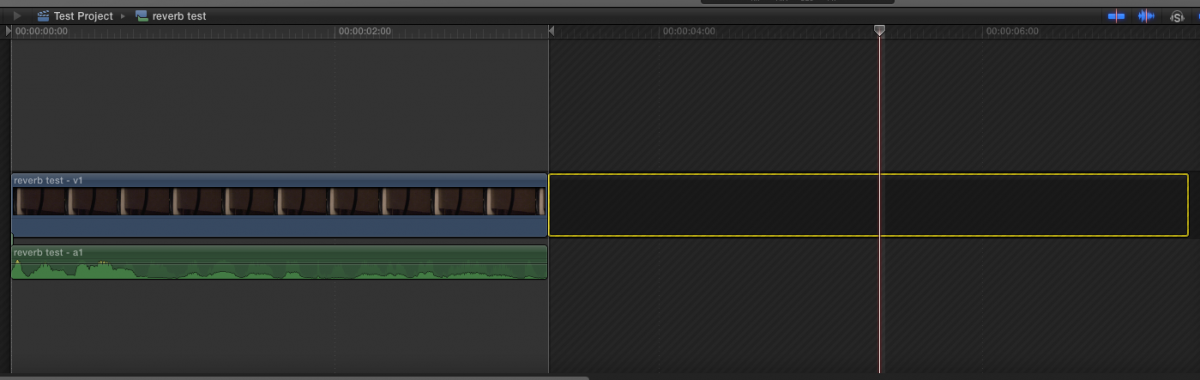
Now I add a gap clip at the end of the reverb test timeline:
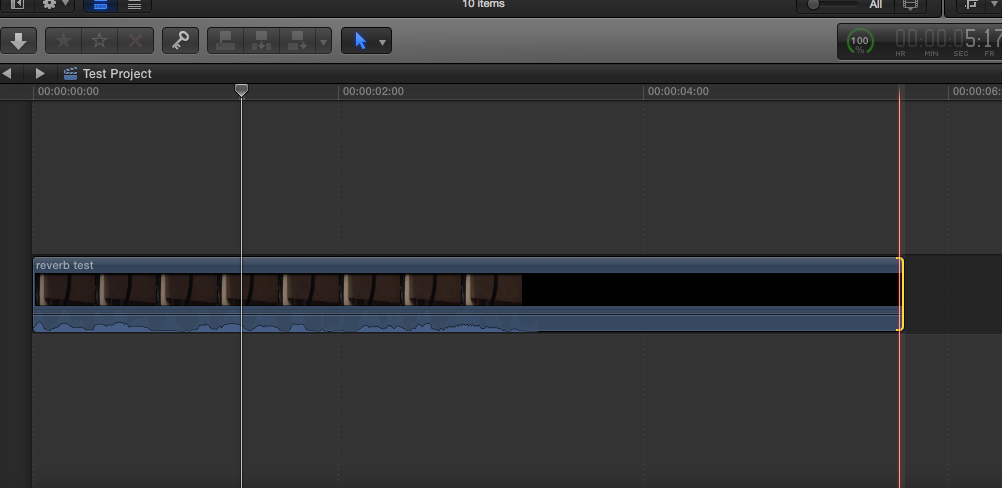
I go back to the "Test project" timeline by pressing the little history arrow, and now I can extend the clip:
- Ronny
Here I have a "reverb test "clip in the "Test project" timeline:
I right-click the clip and choose Open in Timeline:
The clip opens in its own timeline, which is called "reverb test", just like the clip:
Now I add a gap clip at the end of the reverb test timeline:
I go back to the "Test project" timeline by pressing the little history arrow, and now I can extend the clip:
- Ronny
Please Log in to join the conversation.
13 May 2015 17:25 #64443
by Seany
Replied by Seany on topic Creating reverb at end of clip.
Thanks, does it make a difference if the audio is a connected clip?
Please Log in to join the conversation.
- ronny courtens
-
- Offline
- Moderator
-
Less
More
- Posts: 4455
- Thank you received: 962
13 May 2015 17:38 #64444
by ronny courtens
Replied by ronny courtens on topic Creating reverb at end of clip.
No, that doesn't make any difference.
- Ronny
- Ronny
Please Log in to join the conversation.
14 May 2015 17:31 #64488
by Seany
Replied by Seany on topic Creating reverb at end of clip.
Unfortunately the effect does not seem to last as long as the extended gap clip on the video clip. I wonder is it just the reverb setting I'm using?
Sorry for the persistant ignorance here!!
Sorry for the persistant ignorance here!!
Please Log in to join the conversation.
14 May 2015 17:38 #64489
by plysat
Likely the setting. Try something like "cathedral" that has a long decay, then mess with the wet/dry mix so it's where you want it...
Can't sleep? Try this: fcpxpert.net ;-)
Replied by plysat on topic Creating reverb at end of clip.
Seany wrote: Unfortunately the effect does not seem to last as long as the extended gap clip on the video clip. I wonder is it just the reverb setting I'm using?
Sorry for the persistant ignorance here!!
Likely the setting. Try something like "cathedral" that has a long decay, then mess with the wet/dry mix so it's where you want it...
Can't sleep? Try this: fcpxpert.net ;-)
Please Log in to join the conversation.
14 May 2015 17:44 #64490
by Seany
Replied by Seany on topic Creating reverb at end of clip.
Ah so the setting only last as long as erm the setting, but can potentially last as long as one extends the gap clip adn then creates a setting that matches?
Please Log in to join the conversation.
14 May 2015 17:47 #64491
by plysat
Kind of, yes. Best advice is to just create a copy of the clip to test on, and try different effects settings, just play around. If it gets messed up just delete the effect and start over.
Can't sleep? Try this: fcpxpert.net ;-)
Replied by plysat on topic Creating reverb at end of clip.
Seany wrote: Ah so the setting only last as long as erm the setting, but can potentially last as long as one extends the gap clip adn then creates a setting that matches?
Kind of, yes.
Best advice is to just create a copy of the clip to test on, and try different effects settings, just play around. If it gets messed up just delete the effect and start over. Can't sleep? Try this: fcpxpert.net ;-)
Please Log in to join the conversation.
14 May 2015 17:50 #64492
by Seany
Replied by Seany on topic Creating reverb at end of clip.
Cheers, I'm just trying to work out the logical purpose of the gap clip really.
But i'll try your suggestion anyway. Thanks again.
But i'll try your suggestion anyway. Thanks again.
Please Log in to join the conversation.
