


- Posts: 61
- Thank you received: 2
3 Post Moderation Rule for New Boarders (25 Jan 2021)
New boarders will have their posts moderated - Don't worry if you cannot see your post immediately.
They took away our tracks, but gave us LANES
27 Mar 2015 10:17 #61970
by chrisb
They took away our tracks, but gave us LANES was created by chrisb
With the no-tracks "evolution" I was pondering what could be done to better organise the timeline with regards to clips.
This led me to the idea of having an addition to 'roles' in the timeline called 'Lanes'.
'Lanes' would basically sort/group the clips on your timeline according to the defined roles.
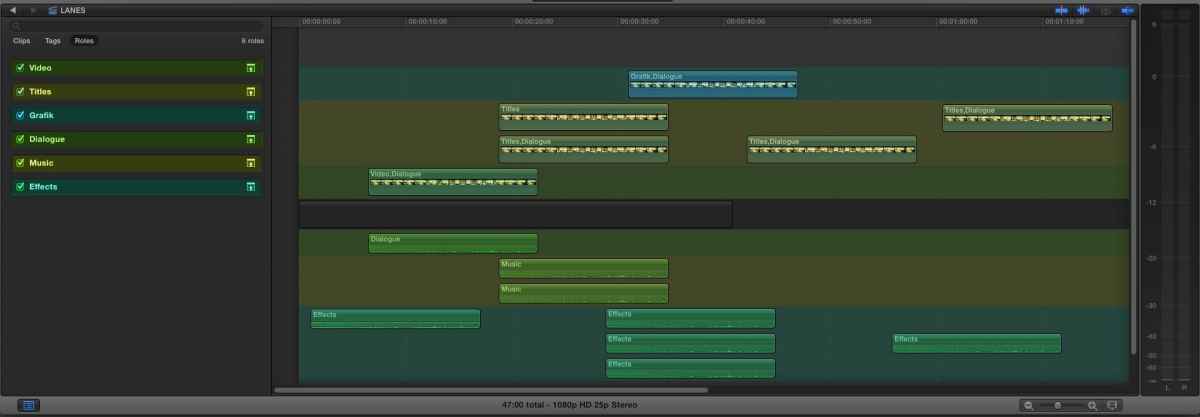
This led me to the idea of having an addition to 'roles' in the timeline called 'Lanes'.
'Lanes' would basically sort/group the clips on your timeline according to the defined roles.
Please Log in to join the conversation.

27 Mar 2015 10:21 #61971
by Emmanuel
Replied by Emmanuel on topic They took away our tracks, but gave us LANES
What you mean is that tracks would automatically gather together if they are part of the same role ?
Please Log in to join the conversation.
27 Mar 2015 10:22 #61972
by chrisb
Replied by chrisb on topic They took away our tracks, but gave us LANES
yes
Please Log in to join the conversation.
27 Mar 2015 10:39 #61973
by Emmanuel
Replied by Emmanuel on topic They took away our tracks, but gave us LANES
I like it.
I already do something like this using adjustment layers but you're idea is nice.
Call Apple
But let's see what comes in the next version (I hope next week) I hope they've tackled some of the issues with tracks and sound in general.
I already do something like this using adjustment layers but you're idea is nice.
Call Apple
But let's see what comes in the next version (I hope next week) I hope they've tackled some of the issues with tracks and sound in general.
Please Log in to join the conversation.

Less
More
- Posts: 971
- Thank you received: 46
27 Mar 2015 11:27 #61975
by MsJustine
Replied by MsJustine on topic They took away our tracks, but gave us LANES
I think with compound clips this could be done as a work around, you can assign roles to the compound clip, the idea would maybe be better to have color coded roles so you can see at a glance various roles..
Please Log in to join the conversation.
- Karsten Schlüter
-

- Offline
- Moderator
-

Less
More
- Posts: 3790
- Thank you received: 718
27 Mar 2015 12:54 #61977
by Karsten Schlüter
In the Timeline Index you can 'bundle by roles' … to, e.g. adjust all Dialogues by +2dB , or to mute all Titles or whatever.....
And a graphical represenation of roles along a time-axis helps me to do what…?
Replied by Karsten Schlüter on topic They took away our tracks, but gave us LANES
Please ignore my ignorance - but what for?chrisb wrote: …'Lanes' would basically sort/group the clips on your timeline according to the defined roles.…
In the Timeline Index you can 'bundle by roles' … to, e.g. adjust all Dialogues by +2dB , or to mute all Titles or whatever.....
And a graphical represenation of roles along a time-axis helps me to do what…?
Please Log in to join the conversation.
27 Mar 2015 13:14 #61980
by chrisb
Replied by chrisb on topic They took away our tracks, but gave us LANES
So, what is what in this timeline? Some people might like having a better view of where different elements are.
Yes, you can choose a role and adjust parameters. But your timeline still looks messy. Some people like order.
I think it would be a nice addition to roles. Different strokes, for different folks - I , for one, find the Precision Editor 100% useless for example. Others might like it.
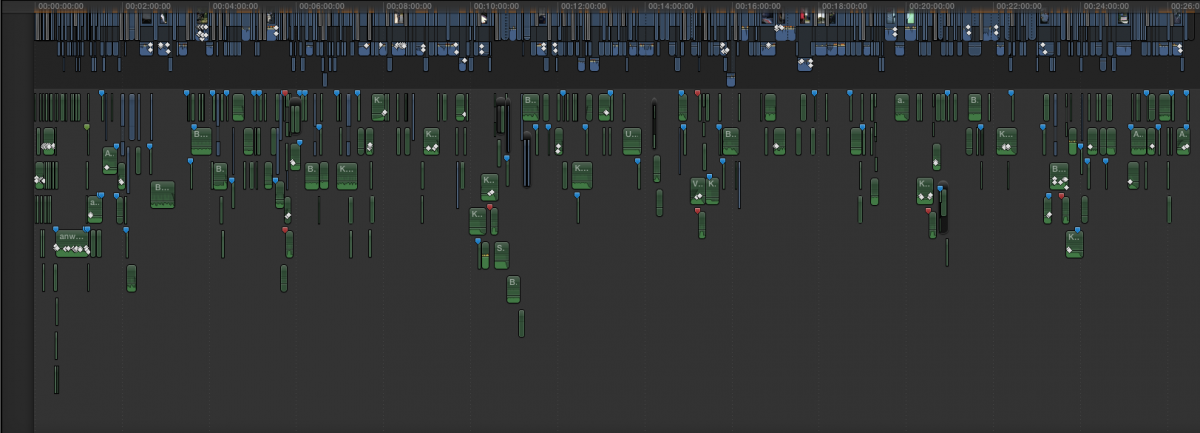
Yes, you can choose a role and adjust parameters. But your timeline still looks messy. Some people like order.
I think it would be a nice addition to roles. Different strokes, for different folks - I , for one, find the Precision Editor 100% useless for example. Others might like it.
Please Log in to join the conversation.
- Karsten Schlüter
-
- Offline
- Moderator
-
Less
More
- Posts: 3790
- Thank you received: 718
27 Mar 2015 13:30 #61982
by Karsten Schlüter
No, my timelines don't look like that - I'm a huge fan of cmd-alt-arrow down.
In your example, there're dozens of points in the timeline, where 4 (5?) video-tracks are stapled - what for? Usually, you show one pic at a time...... (ok, diff. story with complex compos ... not FCPX' main feature)
That is 'tracks' - and FCPX isn't made for tracks.
(complete other story for audio… => LogicX)
I meant my question seriousiy, not to offend you!
I'm a beginner reg FCPX, still hungry learning new tricks.
I understand the benefits of the Timeline Index… but 'lanes' …?
Replied by Karsten Schlüter on topic They took away our tracks, but gave us LANES
chrisb wrote: So, what is what in this timeline? …. But your timeline still looks messy. Some people like order.…
No, my timelines don't look like that - I'm a huge fan of cmd-alt-arrow down.
In your example, there're dozens of points in the timeline, where 4 (5?) video-tracks are stapled - what for? Usually, you show one pic at a time...... (ok, diff. story with complex compos ... not FCPX' main feature)
That is 'tracks' - and FCPX isn't made for tracks.
(complete other story for audio… => LogicX)
I meant my question seriousiy, not to offend you!
I'm a beginner reg FCPX, still hungry learning new tricks.
I understand the benefits of the Timeline Index… but 'lanes' …?
Please Log in to join the conversation.

27 Mar 2015 13:43 #61983
by bobmax48
Replied by bobmax48 on topic They took away our tracks, but gave us LANES
I do not understand why the Percision Editor is considered 100% useless. It is the easiest way to make sure where a transition begins and ends. The only addition I would like to see now is that you can create key frames for audio in the transition. Right now you have to move the transition to create those key frames. I use the editor every day.
Please Log in to join the conversation.
27 Mar 2015 13:54 - 27 Mar 2015 14:04 #61984
by chrisb
It is not considered useless as such. It is just a feature *I* have no use for in my daily editing flow as I can edit faster without having to use the precision editor.
Replied by chrisb on topic They took away our tracks, but gave us LANES
I do not understand why the Percision Editor is considered 100% useless. It is the easiest way to make sure where a transition begins and ends. The only addition I would like to see now is that you can create key frames for audio in the transition. Right now you have to move the transition to create those key frames. I use the editor every day.
It is not considered useless as such. It is just a feature *I* have no use for in my daily editing flow as I can edit faster without having to use the precision editor.
Last edit: 27 Mar 2015 14:04 by chrisb.
Please Log in to join the conversation.
27 Mar 2015 14:02 - 27 Mar 2015 14:03 #61985
by chrisb
None taken
cmd-alt-arrow down is 'overwrite to primary storyline'... I am also a fan but do not see the point here? What would be nice, is a shortcut to move clips up and down - at the moment you have to drag clips up and down using the mouse.
Nope - there are no "stacked" video tracks as such. You can see a couple of video clips beneath the main storyline. I only use the audio from those. Yeah, I could've ctrl-shift-s'ed them to break apart the audio from the video - but I might have to cut to the picture later.
The benefit of 'lanes' would be to visually organise your timeline in a way that mimics a "traditional" NLE without actually *being* tracks.
Replied by chrisb on topic They took away our tracks, but gave us LANES
No, my timelines don't look like that - I'm a huge fan of cmd-alt-arrow down.
In your example, there're dozens of points in the timeline, where 4 (5?) video-tracks are stapled - what for? Usually, you show one pic at a time...... (ok, diff. story with complex compos ... not FCPX' main feature)
That is 'tracks' - and FCPX isn't made for tracks.
(complete other story for audio… => LogicX)
I meant my question seriousiy, not to offend you!
I'm a beginner reg FCPX, still hungry learning new tricks.
I understand the benefits of the Timeline Index… but 'lanes' …?
None taken
cmd-alt-arrow down is 'overwrite to primary storyline'... I am also a fan but do not see the point here? What would be nice, is a shortcut to move clips up and down - at the moment you have to drag clips up and down using the mouse.
Nope - there are no "stacked" video tracks as such. You can see a couple of video clips beneath the main storyline. I only use the audio from those. Yeah, I could've ctrl-shift-s'ed them to break apart the audio from the video - but I might have to cut to the picture later.
The benefit of 'lanes' would be to visually organise your timeline in a way that mimics a "traditional" NLE without actually *being* tracks.
Last edit: 27 Mar 2015 14:03 by chrisb.
Please Log in to join the conversation.

27 Mar 2015 14:13 #61986
by anickt
Replied by anickt on topic They took away our tracks, but gave us LANES
Effective use of secondary storylines would help with a lot of this. If I had time I would make a tutorial but I don't. Maybe the Ripple guys can do it. 
Please Log in to join the conversation.
- Karsten Schlüter
-
- Offline
- Moderator
-
Less
More
- Posts: 3790
- Thank you received: 718
27 Mar 2015 14:13 - 27 Mar 2015 14:15 #61987
by Karsten Schlüter
(^^^^ meant funny!!)
But, ok, you found a way to mimic tracks in a no-tracks-needed environment …
Each to their own - not my cup of [strike]tea[/strike] coffee…
Replied by Karsten Schlüter on topic They took away our tracks, but gave us LANES
I guess, you presume my reply to that...chrisb wrote: … The benefit of 'lanes' would be to visually organise your timeline in a way that mimics a "traditional" NLE …
You're screenshot contradicts this statement… :woohoo:chrisb wrote: … Some people like order. …
(^^^^ meant funny!!)
But, ok, you found a way to mimic tracks in a no-tracks-needed environment …
Each to their own - not my cup of [strike]tea[/strike] coffee…
Last edit: 27 Mar 2015 14:15 by Karsten Schlüter.
Please Log in to join the conversation.

27 Mar 2015 14:28 - 27 Mar 2015 14:34 #61989
by TGC
Replied by TGC on topic They took away our tracks, but gave us LANES
This is a really elegant description from Marcus Moore about how roles could be used for audio organisation. I'd love this.
disproportionatepictures.blogspot.co.uk/2014/05/roles.html
Thes pictures show a before and after of how roles organising could help the view of a sequence.
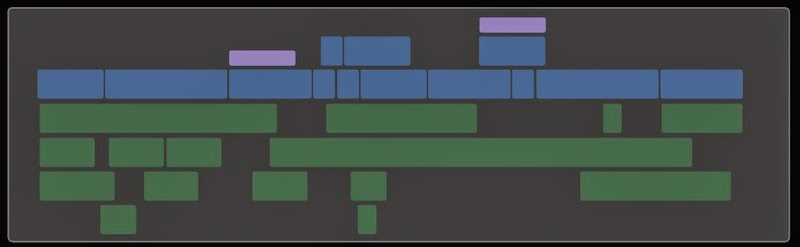
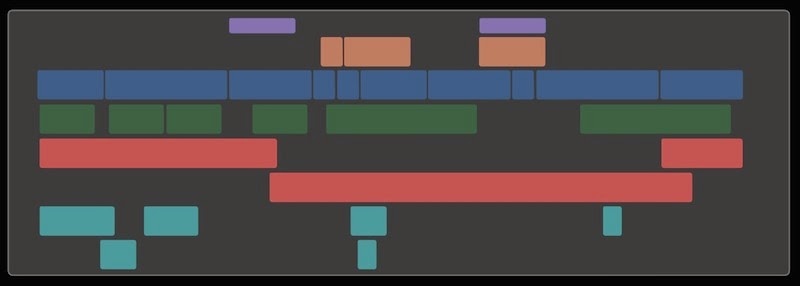
I love the idea that when you connect Effects they jump to the effects area. Music jumps to the music area etc.
disproportionatepictures.blogspot.co.uk/2014/05/roles.html
Thes pictures show a before and after of how roles organising could help the view of a sequence.
I love the idea that when you connect Effects they jump to the effects area. Music jumps to the music area etc.
Last edit: 27 Mar 2015 14:34 by TGC. Reason: spelling
Please Log in to join the conversation.
27 Mar 2015 14:37 #61990
by chrisb
Very nice indeed. Had forgotten about that. Basically the same result as my own thoughts. I think roles are somewhat under-utilised for timeline organisation at the moment. And color coding needs to happen!
Replied by chrisb on topic They took away our tracks, but gave us LANES
TGC wrote: This is a really elegant description from Marcus Moore about how roles could be used for audio organisation. I'd love this.
disproportionatepictures.blogspot.co.uk/2014/05/roles.html
Thes pictures show a before and after of how roles organising could help the view of a sequence.
I love the idea that when you connect Effects they jump to the effects area. Music jumps to the music area etc.
Very nice indeed. Had forgotten about that. Basically the same result as my own thoughts. I think roles are somewhat under-utilised for timeline organisation at the moment. And color coding needs to happen!
Please Log in to join the conversation.
27 Mar 2015 15:07 #61992
by Emmanuel
Replied by Emmanuel on topic They took away our tracks, but gave us LANES
I really think (hope) that Apple is aware that roles have much more potential than what they are giving us now.
I expect we will see some improvements in the future versions.
I expect we will see some improvements in the future versions.
Please Log in to join the conversation.
- haysoos123
-

- Offline
- Platinum Member
-

Less
More
- Posts: 402
- Thank you received: 72
27 Mar 2015 23:18 #62018
by haysoos123
Replied by haysoos123 on topic They took away our tracks, but gave us LANES
Yes, at lot of us have been clamoring for this very feature... vertical roles organization and color-coding. I have actually called it 'lanes' myself. For video it's not so simple because the stacking order is important, but there needs to be a way to at least add a native separator that's NOT a clip like an adjustment layer. It should just be a thin line, and I would be happy... and while we're at it, there should be a keyboard shortcut for moving clips up and down other than the one to move it in/out of the primary storyline.
Please Log in to join the conversation.
27 Mar 2015 23:55 #62021
by plysat
For what it's worth, they *are* called Lanes, that's the actual term used by FCP in the databases/xml etc. what you all are talking about should be called "highways" (a lot of lanes lol)
Role grouping is a cool idea, with a couple problems. the biggest one is how you would deal with clips containing multiple Roles. For what I do, most clips have DIA and FX embedded. What happens to this? same with color coding... rainbow clips? I'm sure this is on Apples radar, who knows what they'll come up with.
Can't sleep? Try this: fcpxpert.net ;-)
Replied by plysat on topic They took away our tracks, but gave us LANES
haysoos123 wrote: ...I have actually called it 'lanes' myself.
For what it's worth, they *are* called Lanes, that's the actual term used by FCP in the databases/xml etc. what you all are talking about should be called "highways" (a lot of lanes lol)
Role grouping is a cool idea, with a couple problems. the biggest one is how you would deal with clips containing multiple Roles. For what I do, most clips have DIA and FX embedded. What happens to this? same with color coding... rainbow clips? I'm sure this is on Apples radar, who knows what they'll come up with.
Can't sleep? Try this: fcpxpert.net ;-)
Please Log in to join the conversation.
- haysoos123
-
- Offline
- Platinum Member
-
Less
More
- Posts: 402
- Thank you received: 72
28 Mar 2015 00:27 #62023
by haysoos123
I think the simplest thing is to have it grouped by the top channel if unexpanded, but when you expand it, the different channels slot into their roles. An alternative is to have no grouping for multichannel audio (so it'd be just like it is now), and then when you expand it, then they get organized. This has to pretty much happen anyway, I think, because that's how you would deal with audio attached to video in the primary storyline... when it's unexpanded, it has to be in the primary.
By the way, I think this role grouping should be an optional view that can by turned on/off with a hotkey.
Replied by haysoos123 on topic They took away our tracks, but gave us LANES
plysat wrote:
haysoos123 wrote: ...I have actually called it 'lanes' myself.
For what it's worth, they *are* called Lanes, that's the actual term used by FCP in the databases/xml etc. what you all are talking about should be called "highways" (a lot of lanes lol)
Role grouping is a cool idea, with a couple problems. the biggest one is how you would deal with clips containing multiple Roles. For what I do, most clips have DIA and FX embedded. What happens to this? same with color coding... rainbow clips? I'm sure this is on Apples radar, who knows what they'll come up with.
I think the simplest thing is to have it grouped by the top channel if unexpanded, but when you expand it, the different channels slot into their roles. An alternative is to have no grouping for multichannel audio (so it'd be just like it is now), and then when you expand it, then they get organized. This has to pretty much happen anyway, I think, because that's how you would deal with audio attached to video in the primary storyline... when it's unexpanded, it has to be in the primary.
By the way, I think this role grouping should be an optional view that can by turned on/off with a hotkey.
Please Log in to join the conversation.
28 Mar 2015 02:10 #62026
by BenB
Replied by BenB on topic They took away our tracks, but gave us LANES
You do know you can manually adjust what sits in what lane, right? Arrange them as you wish? Just saying....
Please Log in to join the conversation.
