


- Posts: 103
- Thank you received: 2
3 Post Moderation Rule for New Boarders (25 Jan 2021)
New boarders will have their posts moderated - Don't worry if you cannot see your post immediately.
How to remove footage in timeline before starting point
02 Mar 2015 08:05 #60675
by Brinky
How to remove footage in timeline before starting point was created by Brinky
Hi,
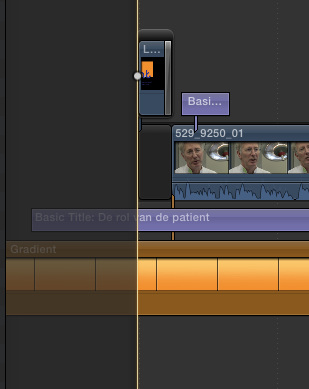
As you can see in enclosed screenshot I have some footage before the start of the movie. It happened when trying to get some space. How can I remove this? There should be a simple trick?
tia
As you can see in enclosed screenshot I have some footage before the start of the movie. It happened when trying to get some space. How can I remove this? There should be a simple trick?
tia
Please Log in to join the conversation.
- Tom Wolsky
-

- Offline
- Moderator
-

02 Mar 2015 08:11 #60676
by Tom Wolsky
Replied by Tom Wolsky on topic How to remove footage in timeline before starting point
It looks like you're inside a compound clip not inside a project. What are you doing?
Please Log in to join the conversation.
02 Mar 2015 08:18 - 02 Mar 2015 08:18 #60677
by Brinky
Replied by Brinky on topic How to remove footage in timeline before starting point
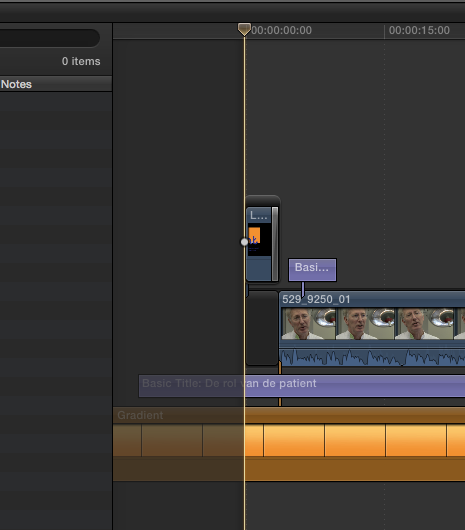
Hi Tom, No I'm not working in a compound clip. It's the original timeline. I've enclosed a bigger screen shot
Last edit: 02 Mar 2015 08:18 by Brinky.
Please Log in to join the conversation.
- Tom Wolsky
-
- Offline
- Moderator
-
02 Mar 2015 08:21 #60678
by Tom Wolsky
Replied by Tom Wolsky on topic How to remove footage in timeline before starting point
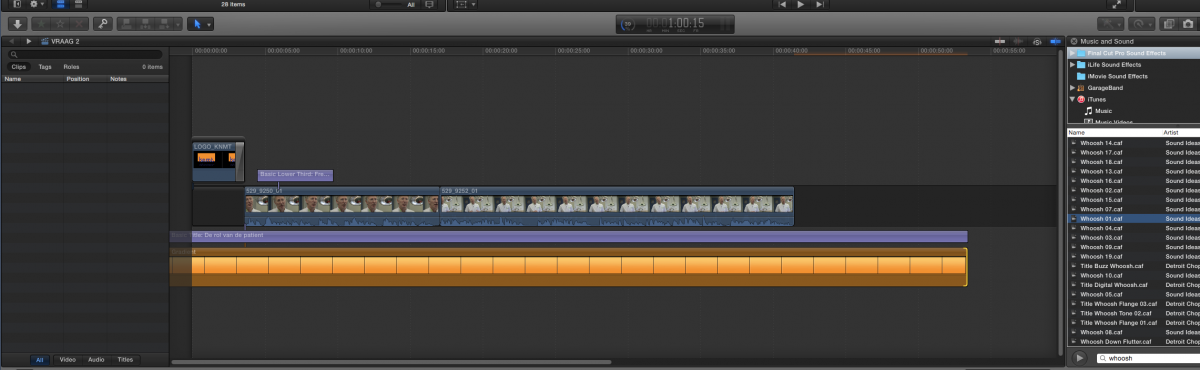
Not big enough. Need the upper left corner of the timeline.
Please Log in to join the conversation.
02 Mar 2015 08:23 #60679
by Brinky
Replied by Brinky on topic How to remove footage in timeline before starting point
Here u are 
Please Log in to join the conversation.
- ronny courtens
-

- Offline
- Moderator
-
Less
More
- Posts: 4455
- Thank you received: 962
02 Mar 2015 08:29 #60680
by ronny courtens
Replied by ronny courtens on topic How to remove footage in timeline before starting point
Put your playhead at the start of the timeline and press ALT+W.
- Ronny
- Ronny
Please Log in to join the conversation.
02 Mar 2015 08:33 #60681
by Brinky
Replied by Brinky on topic How to remove footage in timeline before starting point
Hi,
Did this. It's a bit of a work around but it works. Thanks.
Did this. It's a bit of a work around but it works. Thanks.
Please Log in to join the conversation.
- ronny courtens
-
- Offline
- Moderator
-
Less
More
- Posts: 4455
- Thank you received: 962
02 Mar 2015 08:35 #60682
by ronny courtens
Replied by ronny courtens on topic How to remove footage in timeline before starting point
Hi Peter,
I agree with Tom this is not normal. Usually you can only see this in a Compound Clip. So how did you get to this? Did you delete something at the front of the timeline?
Groeten uit België
- Ronny
I agree with Tom this is not normal. Usually you can only see this in a Compound Clip. So how did you get to this? Did you delete something at the front of the timeline?
Groeten uit België
- Ronny
Please Log in to join the conversation.
02 Mar 2015 08:39 - 02 Mar 2015 08:40 #60683
by Brinky
Replied by Brinky on topic How to remove footage in timeline before starting point
I think I dragged (at 00.00.00.) a connected clip to the left. Dragging a clip in the primary storyline is no problem. I can drag the whole clip to the left again but then things can be out of sync.
Groeten uit Holland
Groeten uit Holland
Last edit: 02 Mar 2015 08:40 by Brinky.
Please Log in to join the conversation.
- ronny courtens
-
- Offline
- Moderator
-
Less
More
- Posts: 4455
- Thank you received: 962
02 Mar 2015 08:49 #60684
by ronny courtens
Replied by ronny courtens on topic How to remove footage in timeline before starting point
Well that's really strange. I am trying to reproduce this but there is no way I can drag any clip beyond the 00.00.00 marker. I think we will have to consider this as an exceptional phenomenon  If you ever get this again, inserting a gap clip pushes everything to the right again without losing sync.
Good to see so many people in Holland are using FCP X, especially in Amsterdam which is one of my favorite places
Happy editing!
- Ronny
If you ever get this again, inserting a gap clip pushes everything to the right again without losing sync.Good to see so many people in Holland are using FCP X, especially in Amsterdam which is one of my favorite places
Happy editing!
- Ronny
Please Log in to join the conversation.
02 Mar 2015 08:53 #60685
by Brinky
Replied by Brinky on topic How to remove footage in timeline before starting point
Well not only in Amsterdam. Thanks for the help.
Thanks for the help. Please Log in to join the conversation.
- Tom Wolsky
-
- Offline
- Moderator
-
02 Mar 2015 08:55 #60686
by Tom Wolsky
Replied by Tom Wolsky on topic How to remove footage in timeline before starting point
I don't think you HAVE to cut it off. It shouldn't export. Only the area from the start of the timeline should export
Please Log in to join the conversation.
02 Mar 2015 08:56 #60687
by Brinky
Replied by Brinky on topic How to remove footage in timeline before starting point
That's true.
Please Log in to join the conversation.


02 Mar 2015 12:34 #60695
by BenB
Replied by BenB on topic How to remove footage in timeline before starting point
Yeah, I also tried playing with timecode, starting at 1 hour rather than zero, and same thing, can't pull a clip any further left than the beginning of the timeline. Which BTW defeats the whole purpose of starting a film at the 1 hour mark. That said, with digital editing, that 1 hour starting mark was only to accommodate outdated negative cutting from an EDL technology.
Please Log in to join the conversation.
- Wavehog.Films
-

- Offline
- New Member
-

Less
More
- Posts: 8
- Thank you received: 0
02 Mar 2015 20:07 #60721
by Wavehog.Films
Replied by Wavehog.Films on topic How to remove footage in timeline before starting point
It looks like a clip below the primary storyline is before the starting point. (To reproduce that, option drag the primary storyline clip down. Then trim a bit off the head of the primary storyline clip).
To get rid of the sections before the starting point:
(i) Select the clip (e.g., the orange one)
(ii) Function + Left Arrow (to move the playhead to the beginning of timeline)
(iii) Option + Left Bracket ("[") (to trim the orange clip to the playhead)
To get rid of the sections before the starting point:
(i) Select the clip (e.g., the orange one)
(ii) Function + Left Arrow (to move the playhead to the beginning of timeline)
(iii) Option + Left Bracket ("[") (to trim the orange clip to the playhead)
Please Log in to join the conversation.
- Squamish ed
-
- Offline
- Elite Member
-

Less
More
- Posts: 238
- Thank you received: 20
02 Mar 2015 20:28 #60723
by Squamish ed
Ed
Replied by Squamish ed on topic How to remove footage in timeline before starting point
I have had that too. I went searching just now and found a secondary storyline to the left of the timeline start. There was a transition on it too but it disappeared as I was grabbing this screen shot. It appeared during my editing a week or two ago but didn't affect anything, including export, so I ignored it. If I use my mouse to try to drag the timeline further to the right I can still see a transition there but I can't get a screen capture because it requires using my mouse to hold it so it's exposed.
Ed

Please Log in to join the conversation.
- Karsten Schlüter
-

- Offline
- Moderator
-
Less
More
- Posts: 3790
- Thank you received: 718
03 Mar 2015 06:45 #60740
by Karsten Schlüter
Replied by Karsten Schlüter on topic How to remove footage in timeline before starting point
That's easy to re-enact:
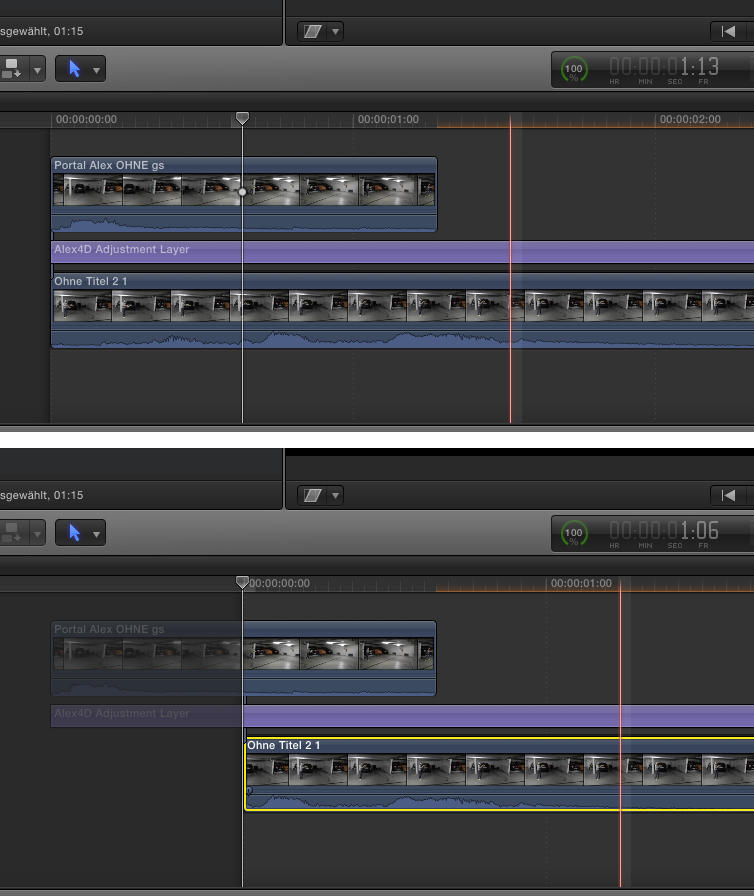
In a Project timeline ...
A title and a Q-nnected clip.
Then, shortening the main storyline via alt-left bracket - kaboom! :woohoo:
In a Project timeline ...
A title and a Q-nnected clip.
Then, shortening the main storyline via alt-left bracket - kaboom! :woohoo:
Please Log in to join the conversation.
- Squamish ed
-
- Offline
- Elite Member
-
Less
More
- Posts: 238
- Thank you received: 20
03 Mar 2015 23:33 #60782
by Squamish ed
Ed
Replied by Squamish ed on topic How to remove footage in timeline before starting point
Interesting. It looks a bit like the effect you get in the precision editor. Wonder why?
Ed
Please Log in to join the conversation.
04 Mar 2015 00:15 #60784
by BenB
Replied by BenB on topic How to remove footage in timeline before starting point
Timeline starts with the first frame of the first clip in the Primary Storyline. Any attached clips that extend before it, exist, but in the void you can't play in. Just the way FCPX is. Start of Primary Storyline is the start of the Timeline, that's where the timecode starts.
Please Log in to join the conversation.
