


3 Post Moderation Rule for New Boarders (25 Jan 2021)
New boarders will have their posts moderated - Don't worry if you cannot see your post immediately.
FCPX and Mid-Side recordings
LLAP,
James
Taipei, Taiwan
Please Log in to join the conversation.
- ronny courtens
-

- Offline
- Moderator
-

- Posts: 4455
- Thank you received: 962
You deal with MS audio in FCP X just like you would deal with it in any DAW. In a regular MS recording you will get 2 mono channels from the audio guy: 1 Mid-audio channel and 1 Side-audio channel.
- Put the Mid-audio clip in the timeline and leave it untouched.
- Put the Side-audio clip right under the M-audio clip. Set its Channel Configuration to "Left".
- Add a second instance of the Side-audio clip right under the first instance. Set its channel configuration to "Right". Then add the Gain filter to the clip and in the Inspector > Gain Filter parameters check the "Phase Right" checkbox.
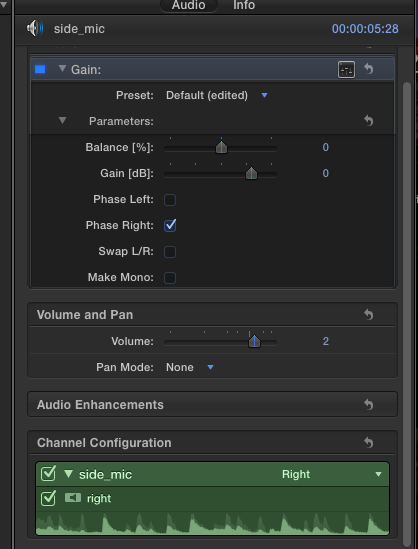
Play the timeline. When mixing, use the Mid-channel to get the level of the instrument relative to the overall mix. Then bring up the two Side-channels. The more Side-channel audio you add, the wider the stereo spread will be.
- Ronny
Please Log in to join the conversation.
So in this case just add a second instance of the Side audio under the first and adjust?
I rather not use two mins (one cardioid / omni and one figure
 so I am looking into getting an all-in-one MS mic to record.
 LLAP,
James
Taipei, Taiwan
Please Log in to join the conversation.


Please Log in to join the conversation.
- ronny courtens
-
- Offline
- Moderator
-
- Posts: 4455
- Thank you received: 962
Interesting suggestion, so I tried it on a non-decoded MS recording but it does not work. I'm afraid it's a little more complicated that this. You need 180° phase inversion to recreate the stereo spread from a mono Side-mic recording, and none of the Surround options allow for this. For anyone interested in this, here's a simplified description of how MS recording and decoding works: www.bhphotovideo.com/explora/audio/tips-...ophone-configuration
@James:
- If you want to use an all-in-one MS microphone you can find some models that have MS decoding integrated in the mic. The decoded signal is sent as a stereo signal to the recorder. The disadvantage of such a setup is that the stereo spread is pre-determined while recording (by adjusting the mic).
- Also, some recorders such as the Zoom have an MS option that decodes the signals of a dual mic MS setup.
Both of these options are fine if your only goal is to produce a stereo file that won't give any issues when played in mono (which was the original purpose of MS recording and the reason why MS is often used in professional broadcast audio recording). But if you want full control over the relation between the Mid-mic and the Side-mic channels in post the dual mic setup and the classic DAW approach will give you the best results.
While looking for other options I found a free AU plugin for ProTools/Logic and FCP X that is supposed to make MS decoding easier. I may be an idiot, but I found it more difficult to work with than just duplicating the side channel and inverting the phase. Anyway, if you want to try it out just google "Voxengo MSED".
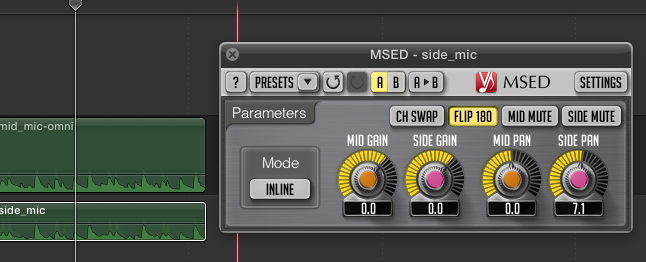
- Ronny
Please Log in to join the conversation.
ronny courtens wrote: @James:
- Also, some recorders such as the Zoom have an MS option that decodes the signals of a dual mic MS setup.
While looking for other options I found a free AU plugin for ProTools/Logic and FCP X that is supposed to make MS decoding easier. I may be an idiot, but I found it more difficult to work with than just duplicating the side channel and inverting the phase. Anyway, if you want to try it out just google "Voxengo MSED".
Thanks again Ronny! I will put off the all-in-one mic solution and give this plug-in a try. I'll look into this more.
LLAP,
James
Taipei, Taiwan
Please Log in to join the conversation.

There is a MS AU plugin for the Zoom H6 made by Zoom: www.zoom.co.jp/products/h6/software/
Unfortunately it is only 32 bit and therefore it will not work in FCPX. Let's hope they release af 64 bit version.
Please Log in to join the conversation.
- ronny courtens
-
- Offline
- Moderator
-
- Posts: 4455
- Thank you received: 962
Yes I have heard of that one. But you are correct: it's only 32-bit, so it won't work.
- Ronny
Please Log in to join the conversation.
- Roadswitcher
-

- Offline
- Senior Member
-

- Posts: 56
- Thank you received: 4
www.sanken-mic.com/en/product/product.cfm/9.1001300
This way, you can still get an audio couple from a soundman, over cable or wireless and keep a vision angle related separate MS audio track.
Used this setup in documentary shooting when we were still capturing on tape, mixing would be done by using three inputs on a studio mixdesk, first and third slice fed with the Side signal through a Y cable, while the second slice would get the Mono signal.
As Ronny already said, it's essential to have one of the Side inputs in reversed phase, something any mixer can do.
That was the good old analog way to do it, but it had the advantage of being a "visibly understandable" mixing principle, the middle pots position against the two (in sync) outer pots giving you a clear control of widening or narrowing the stereo base, depending on the picture content.
Another reason why I personally regret the absence of a graphical Mixer in FCPX, since in FCP7 we could emulate this way of "keeping an eye" on the stereo effect.
If only the Voxengo plugin had a more base related interface, it would have made up somhow this cruel absence of a mixer.
I enjoy usually to control my levels with keyframed envelopes, I enjoy having been given the gift of "roles", but sometimes having a "mixer", in real life or just virtual is a much more direct way to play with levels.
Just my "oldtimer" opinion.
Alex
Please Log in to join the conversation.
- simon.a.billington
-
- Offline
- Elite Member
-

- Posts: 179
- Thank you received: 10

Direction Mixer In FCPX
...or at least i think it comes with Final Cut. It's actually a Logic plugin and I own both platforms, so I'm unsure whether FCPX has access to this plugin because I have Logic on my system as well.
Just drop it on a mid-side recording, set the input to be MS expand the Spread to taste and adjust the Direction to balance out the centre image. Pretty simple
On the chance that it does come with FCPX, there are other plugins out there that will do it...
Such as this one from Plugin Alliance.
plugin-alliance.com/en/products/bx_control_v2.html#prettyPhoto
Or this one from Waves
www.waves.com/plugins/s1-stereo-imager
If your recording isn't in mid-side format, where the left channel has the mid information and the right has the side, then there is way to composite it together. If you don't know how then here are some brief instructions...
One way is to use a simple stereo audio editor...
- Create a new Stereo file
- Open up the mid recording, select it and copy it
- Paste it into the left channel
- Open up the side info, copy it
- Paste it into the right channel and save.
Care must be taken to ensure the audio phase is as perfectly aligned as can be, otherwise you can end up with some phasing issues. If both recordings were made at the same time, then there is a good chance they already line up perfectly. Again, assuming that you MAY not know much about the subject matter.
The other way to do this is to construct a Compound Clip in FCPX...
- In the Browser, create an empty Compound Clip, name it and double-click it to open
- Place the mid file into the Storyline
- Place the side file underneath.
Compound Clip Layout
...again phase coherence COULD cause an issue, as above, but at least this method is non-destructive. So you can zoom in close on the storyline editor and nudge the audio a millisecond at time if you had to, making sure those audio peaks are perfectly aligned.
- On both tracks use the Inspector and place them into Stereo Left/Right mode.
- The Mid track should be panned hard left, the Side track hard right
- Exit the Compound Clip and place a Mid-Side plugin on it as you would with any normal mid-side recording
Mid Panning Details
- You can even take this one step further and add extra mid-side processing on your clips
Waves Center will help you fine tune the balance of the sound.

Waves Center Image In Context
Apparently the Stereo Imager mentioned above will not only decode your M/S signal, but will allow you to further manipulate its stereo field.

Sticking with the Waves theme, another plugin that I DO own that is very good with manipulating the mid-side information is there H-EQ. This plugin does require extra horsepower, but can produce some amazing results.

Waves H-EQ Image In Context
Hope this post is helpful.

Please Log in to join the conversation.
LLAP,
James
Taipei, Taiwan
Please Log in to join the conversation.

Please Log in to join the conversation.
- simon.a.billington
-
- Offline
- Elite Member
-
- Posts: 179
- Thank you received: 10
I was never sure whether the installation of Logic made them, well ALL of them available to FCPX.
Please Log in to join the conversation.

If however you are given a stereo file where mid is on the left and mid-side on the right, or a multichannel polywav. then the plugin is a really nice solution. Set the clips audio properties as stereo (and for multichannel files, just select the channels of interest, i.e. mid & mid-side), and again setting the plugin to decode. The level of the side channel will determine stereo width.
Please Log in to join the conversation.
- simon.a.billington
-
- Offline
- Elite Member
-
- Posts: 179
- Thank you received: 10
Please Log in to join the conversation.

writingexplained.org/dialog-vs-dialogue-difference
Please Log in to join the conversation.

My question: It what shooting condition would you use this recording technique.
I can imagine with music but any other moments it could be used?
Requires some mic setup and a fixed shooting set.
Please Log in to join the conversation.
Please Log in to join the conversation.
I will surely try this on the first occasion I have a simple shoot with a simple setup.
Please Log in to join the conversation.
- simon.a.billington
-
- Offline
- Elite Member
-
- Posts: 179
- Thank you received: 10
MadPanic wrote: It's good for getting room tone, ambience and wildtracks in a stereo field. For dialogue, it all depends on the shot, where you are placed, and what else is going on. For example, I had a shot a few weeks ago where a car pulls up, someone gets out & delivers dialogue as the car drives away. In post, there is now a choice over just using the mono car driving & dialogue or making use of the mid-side to have stereo placement of the car arriving and leaving as well as the dialogue. Because of this, I tend to record the mid-side always, it costs nothing but an extra wav file., but could capture nice ambience as well as the main focus of the shot.
I’ while back I came up with the idea of taking 5-10 minutes to take an impulse response of the “spaces” scenes were shot in, only to have them on hand later when working on the audio for a production.
The downside to that is you need to be dragging a decent set of speakers around with you to location. Although, IK Multimedia’s iLoud speakers should make this quite achievable and would be worth the investment if I ever had the opportunity to carry this idea out.
Please Log in to join the conversation.


